








Join us at GITEX 2025! Discover our solutions at Hall 4, Booth H-30 Schedule a Meeting Today.
Automate Marketing Initiatives with Salesforce Marketing Cloud Learn More
Join us at GITEX 2024! Discover our solutions at Hall 4, Booth H-30 Book your live demo today.

How to Build a Chat Application Without a Backend? 

I know, after reading the title, a lot of questions must have come to your mind how can a chat application build without a backend. But you read it right. We can build a chat application without using the backend!

In this article, we will cover the components that will be needed to build it.

Firstly, let’s go through the importance of chat applications in the current era. Nowadays, communication plays an important role in building relationships in business, social, and personal life. For instance, chat applications are one of the forms of communication. Almost everyone uses chat applications in any form, like personal chat, business communication etc.

To integrate chat applications on your website or in web applications, you either have an option to integrate third-party libraries which is quite costly in a long run. Or you can build an application using traditional approaches like having a backend and all the middleware components. 

Areas Where Chat Applications Play an Important Role

  • Hotels and Food Delivery sectors
  • Banking Sector 
  • Social Media 
  • Railways 

The Components We Will Use To Build This Application

We will use the following application for building a chat application from scratch: – 

  • Angular 
  • AWS AppSync 
  • GraphQL 
  • AWS Dynamo DB 
  • AWS Cognito 

Let me give you a brief introduction to all these components. 

Angular – Angular is an application framework and development platform for creating efficient single-page apps. 

AWS AppSync – AWS AppSync is a fully managed service that makes it easy to develop GraphQL APIs. By handling the heavy lifting of securely connecting to data sources like AWS DynamoDB. 

GraphQL – GraphQL is a query language for APIs and a runtime for fulfilling those queries with your existing data. It is an application layer server-side technology which is developed by Facebook. 

AWS Dynamo DB – AWS Dynamo DB is another AWS service that provides us with ways to save data in NoSQL form. It is a fully managed, server less, key-value NoSQL database. This is designed to run high-performance applications at any scale. And in a chat application, we need performance and scalability both. 

AWS Cognito – Amazon Cognito helps you add Authentication and authorization to your web and mobile apps quickly and easily. It provides us with 30+ methods. This give us full control of user authentication and authorization. 

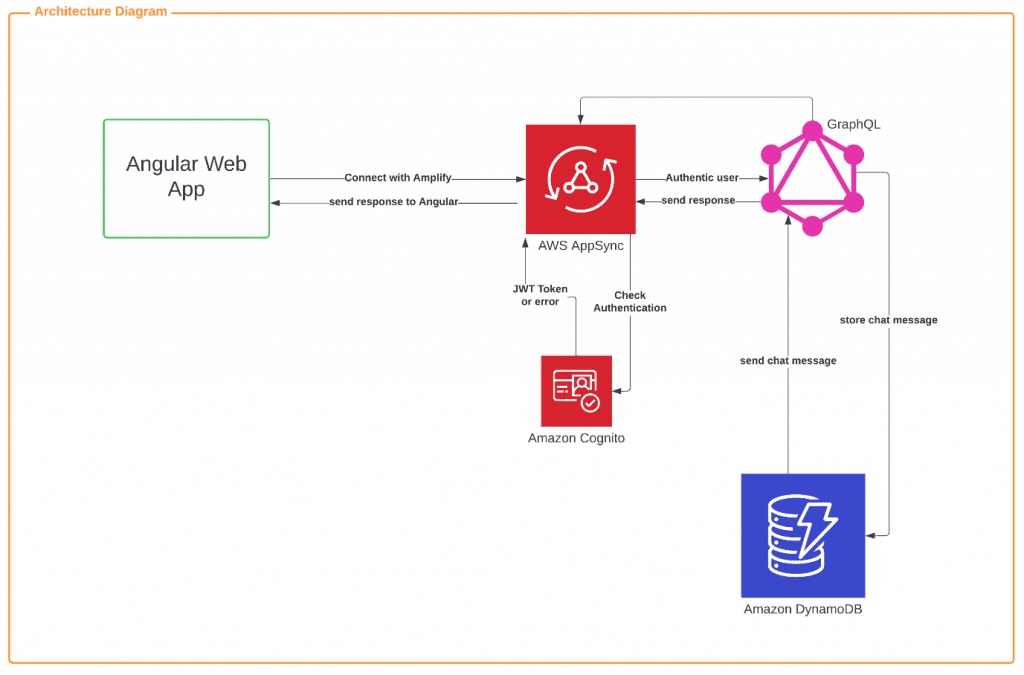
The Architecture We Follow to Implement a Chat Application Without a Backend

image 9
Let me explain to you the above architecture
  • First, you need an angular library. That will provide you ways to connect with AWS Amplify i.e., aws-amplify, aws-amplify-angular. 
  • AWS amplify provides you with ways to connect with AWS App Sync. It provides us GraphQL Schemas and resolvers to connect to a Dynamo DB. 
  • AWS Amplify provides you ways to connect with Amazon Cognito, which will help you to register and authenticate users. You need a amplify authenticator component which has class Auth which will help provide us various methods like signup, signin, signout, forgot password, Check out the complete API here
  • Once the user is authenticated successfully you can initial chat and store and retrieve from Dynamo DB. For that, you need to create a schema, mutations, subscriptions, and queries which will help you to save data and retrieve data from Dynamo DB.
    • Schemas: It is the most basic component of GraphQL which represent a kind of object you fetch from a service. Example: 
type ChatTable = {
  __typename: "ChatTable",
  id?: string | null,
  message?: string | null,
  sender_id?: number | null,
  receiver_id?: number | null,
  assets_id?: string | null,
  created_date?: string | null,
  updated_date?: string | null,
}

Mutations: Mutations are special because they define the entry point of every GraphQL query. For example, whenever a writes operation occurs it should send explicitly via a mutation.


type CreateChatTableMutation = {
  createChatTable?:  {
    __typename: "ChatTable",
    id?: string | null,
    message?: string | null,
    sender_id?: number | null,
    receiver_id?: number | null,
    assets_id?: string | null,
    created_date?: string | null,
    updated_date?: string | null,
  } | null,
}

Subscriptions: Subscriptions are the most special operation it will keep on listening to the mutation whenever any mutation happens it runs an operation based on it. Send the response to UI. For example, when someone enters a new chat, it listens and sends the response to UI that the new chat initializes.


type OnCreateChatTableSubscription = {
  onCreateChatTable?:  {
    __typename: "ChatTable",
    id?: string | null,
    message?: string | null,
    sender_id?: number | null,
    receiver_id?: number | null,
    assets_id?: string | null,
    created_date?: string | null,
    updated_date?: string | null,
  } | null,
}

Queries: Queries will help you with crud operation please find the example below for getting requests.


  query ListChatTables(
    $filter: TableChatTableFilterInput
  ) {
    listChatTables(
      filter: $filter
    ) {
      items {
        id
        message
        sender_id
        receiver_id
        assets_id
        created_date
        updated_date
      }
    }
  }
`

Advantages and Disadvantages over Rest Framework

  • Advantages

    • Nowadays performance of an application in terms of speed is a major concern and what this architecture solves is it reduces execution time. You can fetch data with a single GraphQL API call. Also, as it runs in the application layer, so the middleware complexity reduces.
    • Easier and faster to build applications.
    • Only pay for the services you use.
    • Modern UI-driven approach to building applications.
    • It provides web-based analytics.
  • Disadvantages

    • Lack of resources for the complex calculation.
    • Missing design pattern for a complex application.
    • It does not based on the HTTP caching methods that enable storing request content.
    • Overkill Cost for small applications.
    • When using AWS Amplify, you cannot distribute load balancers.

A place for big ideas.

Reimagine organizational performance while delivering a delightful experience through optimized operations.

Conclusion

To sum up, I have covered all the components which will help you to build the real-time chat application without the backend. Therefore you can build fast and reliable applications with a modern UI template. In today’s era execution time plays an important role. And to achieve this we can capitalize the power of AWS App Sync. It’s little expensive but it provides fully secured and scalable chat application. That too without overhead of managing the backend. This makes it cost effective chat development option.


Top Stories

Odoo direct printing workflow visuals
How to Set Up Direct Printing in Odoo: Step-by-Step
This guide walks you through setting up one-click direct printing in Odoo using the Zehntech Odoo Direct Print app — from creating your PrintNode account to your first print without a download dialog. Most setups take 10–15 minutes. How It Works — The Architecture The Zehntech Direct Print app uses
Odoo direct printing workflow showing one click printing without PDF download or printer selection (1)
The Hidden Cost of Printing from Odoo — And How to Fix It
Every invoice, picking slip and delivery order printed from Odoo goes through the same cycle: click print, wait for the PDF to download, open the file, go to File → Print, select the correct printer, click print again. Six steps. Every document. Every day. For a single team member printing
Appointment Booking
How to Set Up Appointment Booking in Odoo — Complete Setup Guide
Setting up online appointment booking in Odoo does not require a developer or a third-party scheduling tool. The Zehntech Odoo Appointment Booking app gives you a live 24/7 booking page, real-time calendar sync, and automated confirmations — all inside your existing Odoo instance.This guide is for business owners, Odoo administrators,
Advanced Gantt Scheduling in Odoo
How to Set Up Advanced Gantt Scheduling in Odoo — Complete Guide
Advanced project scheduling inside Odoo does not require exporting to MS Project or maintaining a separate timeline tool. The Zehntech Odoo Advanced Gantt App for Project adds dependency types, automatic cascade, critical path visualization, resource workload management and baseline tracking to your existing Odoo projects — in under 10 minutes.
ai automation for small business
How Small Businesses Can Use AI Automation to Save 10+ Hours a Week without Coding
AI automation for small businesses is simpler than most owners expect. The tools exist, they are affordable, and none of them require coding. What most businesses lack is not access — it is a clear starting point. This guide provides that. It covers which tasks to automate first, which no-code
Odoo Tansforming business oprations
How Odoo is Transforming Business Operations in 2026 And Why Companies Are Switching Fast
In 2026, businesses are under constant pressure to do more with less—reduce costs, improve efficiency, and scale faster than ever before. Yet, many companies are still stuck with disconnected systems, manual processes, and outdated ERP solutions. This is exactly why Odoo ERP for business operations is gaining massive traction. Companies

          Success!!

          Keep an eye on your inbox for the PDF, it's on its way!

          If you don't see it in your inbox, don't forget to give your junk folder a quick peek. Just in case.


              You have successfully subscribed to the newsletter

              There was an error while trying to send your request. Please try again.

              Zehntech will use the information you provide on this form to be in touch with you and to provide updates and marketing.