



It is Monday morning. You open Odoo to check the week’s schedule. One task slipped on Friday — a client delayed approval by two days. Now you need to push back every downstream deadline.
You open Task B. Change the date. Save. Open Task C. Change the date. Save. Open Task D — same thing. Fifteen minutes later, you have updated eight tasks by hand, and you still need to email the team about the changes.
If you are managing projects in Odoo right now, you already know the problem. Task lists do not show you what conflicts with what. When one task slips, every downstream deadline has to be updated by hand. That costs project managers 2–3 hours every week — just on rescheduling. Odoo Gantt App Base fixes this.
Why Odoo’s Default Views Leave Project Managers Blind
Odoo gives you two default ways to manage project tasks: the list view and the Kanban board. Both are useful for tracking individual task status — but neither shows you time, sequence, or dependency.
The list view buries your deadlines in rows. You can sort by date, but you cannot see which tasks conflict with which. There is no sense of how tasks relate to each other in time.
The Kanban board shows you status — to do, in progress, done. But it does not show you when. You cannot see what happens to your Tuesday deadline when a Monday task slips. You cannot see resource conflicts before they occur.
The result: project managers spend 2–3 hours per week opening tasks, editing dates, and manually working out what the schedule should now look like.
The Manual Workarounds People Use — And Why They Break
Most teams build a workaround. The most common ones:
Spreadsheet Gantt charts — a second document alongside Odoo that attempts to show the timeline visually. The problem: it is out of date the moment anything in Odoo changes. Keeping the spreadsheet in sync is a maintenance job no one has time for.
Colour-coded Kanban columns — teams label columns with week numbers or date ranges to simulate a timeline. This shows rough timing but hides dependencies entirely. It does not tell you what conflicts with what.
External tools like Asana or Monday — some teams add a third tool just to get a Gantt view. Now data lives in two places. Every Odoo task update has to be manually mirrored in the external tool. Every schedule change requires double entry.
All three workarounds create the same underlying problem: extra work, extra tools, and missed updates when the team is moving fast.
How Odoo Gantt App Base Solves It
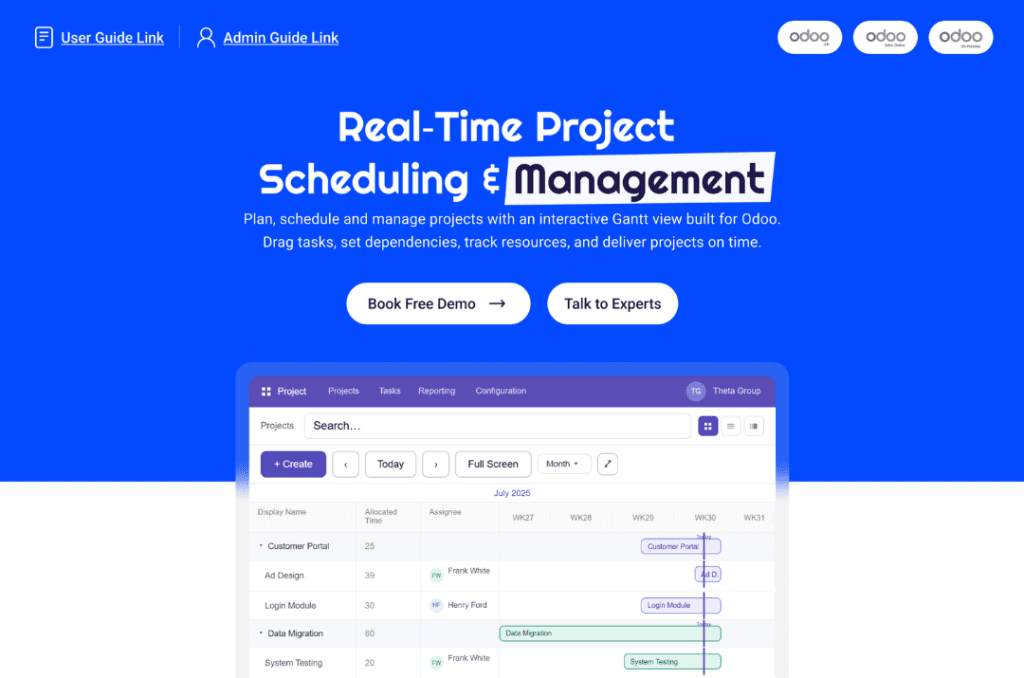
The Odoo Gantt App Base adds a full visual Gantt timeline directly inside Odoo — no new login, no data migration, no extra tools.
Reschedule any task in 3 seconds. Drag the task bar to its new date on the timeline. Every dependent task shifts automatically. No form opens. No downstream tasks to manually update. Done in 3 seconds.
Set dependencies once, enforced forever. Set “Task B starts after Task A” once. The Gantt enforces it automatically from that point on. When Task A moves, Task B follows — without you touching it.
Spot resource conflicts before they hit. The team workload view shows all team members’ capacity in one colour-coded view. You see who is overloaded before you assign new work — not after the deadline is missed.
Cut weekly maintenance from 2+ hours to under 15 minutes. The hours currently spent on manual schedule updates, spreadsheet maintenance, and team emails about date changes — eliminated.
Who This Module Is For
The Odoo Gantt App Base is built for project managers and operations teams already using Odoo who need a visual timeline without adding another tool to the stack.
It works across Odoo v16, v17, v18, and v19 — Community, Enterprise, and Odoo.sh. Installation takes under 5 minutes. Nothing in your existing Odoo setup changes.
Before You Buy — One Common Question
Will this work with my Odoo version and edition?
Yes. Fully compatible with Odoo 16.0, 17.0, 18.0, and 19.0. Works on Community, Enterprise, and Odoo.sh. Requires only the base Project module — no third-party dependencies, no conflicts with other modules.
If you want to see it running in your own Odoo environment before purchasing, book a free 20-minute demo. If it does not meet your requirements after purchase, full refund within 30 days. No forms, no disputes.
The Bottom Line
Custom Gantt development for Odoo costs $3,000–$8,000. The Odoo Gantt App Base: $91.57 one-time.
If your team is wasting 2+ hours every week on manual schedule updates, this app pays for itself in the first week.
Install the Odoo Gantt App Base — $91.57 one-time → https://apps.odoo.com/apps/modules/19.0/zt_gantt_app_base
