




AI automation for small businesses is simpler than most owners expect. The tools exist, they are affordable, and none of them require coding. What most businesses lack is not access — it is a clear starting point.
This guide provides that. It covers which tasks to automate first, which no-code tools handle them best, how to set up your first automation, and the mistakes that cause most small business automation attempts to fail.
How Much Time Can a Small Business Actually Save?
The short answer: Most small business owners recover 10 to 16 hours per week once they automate their core repetitive workflows — email management, social media, customer inquiry responses, invoicing, meeting notes, and internal task routing. The tools that make this possible cost between zero and fifty dollars a month. None of them require technical skills or a developer. A single afternoon of setup typically pays for itself within the first week.
The key shift is treating automation not as a technology project but as a time accounting decision. Every hour you spend manually copying data between apps, writing the same email for the fifth time this week, or posting social content one platform at a time is an hour not spent on client work, sales, or growth. Automation reclaims that time permanently — not as a one-off improvement but as a compounding structural change to how your week is spent.
Why Small Businesses Benefit More from AI Automation Than Large Ones
There is a widespread assumption that AI automation is a large-company investment — something that requires a CTO, an IT department, and a meaningful procurement process. The reality is the opposite.
Large enterprises have teams to absorb repetitive tasks. Small businesses do not. When a five-person team spends 20% of its collective time on admin, that is a critical resource drain. The same percentage at a five-hundred-person company is background noise.
Three structural advantages make small businesses the biggest winners of no-code AI automation:
No procurement delay. A small business owner can sign up for Zapier today and have a working automation live before lunch. A large enterprise needs months of security reviews, vendor approvals, and IT integration work.
Immediate, measurable ROI. When you bill by the hour or every hour recovered is a hour billable to a client, the dollar value of each automated hour is direct and visible. There is no abstraction layer between time saved and revenue recovered.
Proportionally larger overhead. Admin tasks that consume two hours a day represent 25% of an eight-hour working day. Eliminating them is a material change in capacity — not a marginal efficiency gain.
Zehntech’s automation services practice works with businesses across this size range. The pattern is consistent: smaller teams see faster ROI and more visible impact from initial automation investments than larger organisations do.
The 6 Tasks Eating Your Week — and the AI Tools That Handle Them
These are the six categories where small businesses consistently lose the most time. For each, the automation approach is mature, the tools are accessible, and the setup is achievable in a single working session.
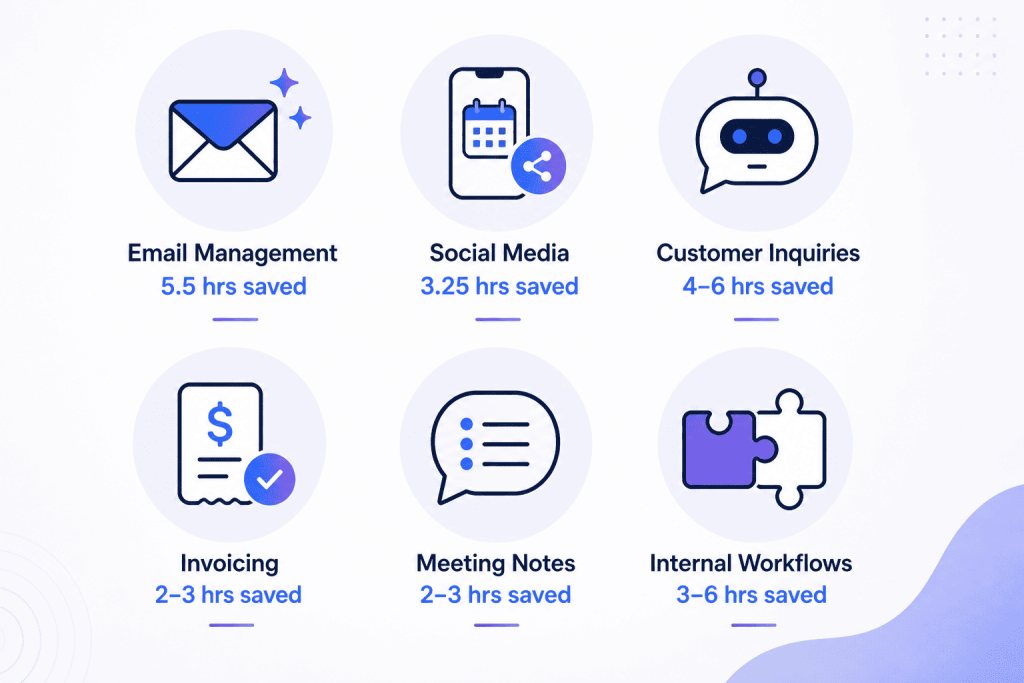
1. Email Management and Drafting
Weekly time lost without automation: 5–8 hours Weekly time with automation: 1–2 hours Setup difficulty: Beginner — no code required
Email is the dominant time sink for most small business owners — reading, sorting, replying to repeated questions, following up on proposals that have gone quiet, and drafting responses that are largely the same each time.
AI handles this at three levels. First, intelligent triage: labelling and routing incoming email by category so your inbox shows you what matters first. Second, draft generation: composing a contextual reply from the thread, ready to review and send. Third, automated sequences: following up on leads or proposals on a schedule, without manual tracking.
Tools that work:
- Gmail AI features — Smart Reply, Priority Inbox, and Nudges are built into every Gmail account at no additional cost. They surface the emails that need a response and suggest replies for common messages.
- Zapier + Gmail — Detects emails matching specific keywords and triggers downstream actions: logging the email to a spreadsheet, creating a CRM contact, or notifying your team on Slack.
- Claude or ChatGPT — Paste an email thread and receive a professional, context-aware reply in seconds. Not automated, but dramatically faster than drafting from scratch.
- Superhuman — An AI-first email client with triage automation, keyboard shortcuts, and follow-up tracking. More advanced, higher cost, highest productivity gain.
Starting point: Create a Zapier automation that detects new emails containing the words “invoice,” “quote,” or “proposal” and logs them to a Google Sheet with the sender, subject, and timestamp. Setup time: 20 minutes. Time saved: 30 minutes per week, permanently.
Social Media Scheduling and Content
Weekly time lost without automation: 3–5 hours Weekly time with automation: 30–45 minutes Setup difficulty: Beginner — no code required
Creating, writing, and manually posting social content across LinkedIn, Instagram, Facebook, and X is a full-time job. For small businesses managing it alongside everything else, it is one of the first things that gets dropped — with direct consequences for visibility and lead generation.
AI automation changes the equation in two ways. First, it eliminates manual scheduling: you build a content calendar and the tool posts automatically at the optimal time on each platform. Second, it accelerates content creation: one input (a topic, a blog post, a product update) becomes multiple platform-specific posts in minutes.
Tools that work:
- Buffer — Schedule posts across platforms from a single queue. The AI assistant generates captions from a prompt or an existing piece of content. Free tier: 3 channels.
- Later — Visual calendar-based scheduler with AI caption suggestions and best-time recommendations.
- Canva Magic Write — AI caption and copy generation inside the design tool most small businesses already use for social graphics.
- Hootsuite with OwlyWriter AI — Generates post variations from a URL, topic, or caption idea. More enterprise-oriented pricing, but the most capable content generation of this group.
Starting point: Write one 400-word piece of content — a blog post excerpt, a client result summary, or a product update. Paste it into Buffer’s AI assistant and generate seven platform-specific posts from it. Schedule them across the week in one session. Setup time: 45 minutes for the first batch; 20 minutes for subsequent weeks.
3. Customer Inquiry Responses
Weekly time lost without automation: 4–6 hours Weekly time with automation: 20–30 minutes Setup difficulty: Intermediate — one-hour setup, no code required
The fifteen questions your business answers repeatedly — pricing, delivery timeframes, return policy, availability, how to get started — are the clearest automation opportunity in any customer-facing business. An AI chatbot handles them instantly, 24 hours a day, without your involvement.
Beyond basic FAQ handling, modern AI chatbots qualify leads by asking structured questions before routing to a human, collect booking details and schedule appointments directly, and handle order or project status enquiries against your existing data.
Tools that work:
- Tidio — AI chatbot for websites with Shopify, WooCommerce, and email integrations. Free tier: 50 conversations per month. Setup is template-based with no coding.
- Intercom Fin — More advanced AI support agent capable of resolving complex queries without escalation. Better suited to businesses with higher inquiry volume.
- Crisp — Affordable chatbot with live chat fallback. The AI handles common questions; a human steps in when it cannot.
- ManyChat — Automates Instagram DM and Facebook Messenger responses. High-volume social media enquiries handled without manual monitoring.
Starting point: Sign up for Tidio and install the website widget (a single line of embed code, or a WordPress plugin if you run WordPress). Train the bot on your ten most common customer questions and their answers. Enable live chat fallback so complex enquiries reach you. Total setup: under 60 minutes.
4. Invoice Processing and Bookkeeping Data Entry
Weekly time lost without automation: 2–4 hours Weekly time with automation: 15–20 minutes Setup difficulty: Beginner — no code required
Manual data entry into accounting software or spreadsheets is the most error-prone repetitive task in most small businesses. Receipts get lost, figures get mis-keyed, and month-end reconciliation becomes an exercise in archaeology. AI-powered bookkeeping tools eliminate the data entry layer entirely.
Tools that work:
- Dext (formerly Receipt Bank) — Photograph a receipt on your phone. The AI extracts the vendor, date, amount, and category and syncs to QuickBooks or Xero automatically. No manual entry required.
- QuickBooks with AI features — Connects to your business bank accounts, categorises transactions automatically, matches invoices to payments, and flags anomalies for review.
- Xero — Bank feed auto-matching, AI reconciliation suggestions, and automated invoice reminders for outstanding payments.
- FreshBooks — Automated invoice generation, payment reminders, and late-fee calculations for service businesses.
Starting point: Connect your business bank account to QuickBooks or Xero. Enable automatic bank feed import and let the AI categorise the first month of transactions. Review the categories once, correct any that are wrong, and the AI learns from those corrections. From the second month onward, review takes 15 minutes rather than two hours.
5. Meeting Notes and Follow-Up Emails
Weekly time lost without automation: 2–3 hours Weekly time with automation: 10–15 minutes Setup difficulty: Beginner — install and use immediately
Writing up meeting notes, extracting action items, and drafting follow-up emails after client calls and internal meetings is invisible overhead that accumulates quickly. A one-hour meeting followed by 30 minutes of note-writing and 20 minutes drafting the follow-up is not unusual. AI transcription tools eliminate all of that.
Tools that work:
- Fathom — Completely free AI meeting recorder for Zoom. Joins automatically, transcribes in real time, generates a structured summary with action items, and drafts the follow-up email. Zero cost.
- Otter.ai — Live transcription with AI meeting summary and action item extraction. Free tier: 300 minutes per month. Integrates with Zoom, Google Meet, and Teams.
- Fireflies.ai — Joins calls automatically, creates searchable transcripts, and pushes action items and summaries directly to HubSpot, Salesforce, or Notion.
- Notion AI — If your team already uses Notion, paste any transcript and ask the AI to extract decisions made, action items, and next steps. No additional subscription required.
Starting point: Sign up for Fathom and connect it to your Zoom account. Your next client call is automatically recorded, transcribed, and summarised. The follow-up email draft is waiting for you when the call ends. Total setup: 5 minutes.
6. Repetitive Internal Workflows
Weekly time lost without automation: 3–6 hours Weekly time with automation: Under 30 minutes Setup difficulty: Intermediate — drag-and-drop setup, no code required
Every time you manually move data from one application to another — a form submission into a spreadsheet, a new lead into your CRM, an order confirmation into Slack — that is a workflow that can run automatically. No-code automation platforms connect your existing tools and trigger actions across them based on rules you define.
The scope is wide: new contact form submissions that create CRM records and send welcome emails and notify the sales team — all in sequence, without touching anything. New Stripe payments that update a tracking spreadsheet and send a receipt email and create a project in your management tool. Recurring weekly reports that pull data, format it, and email it to stakeholders without anyone compiling it manually.
Tools that work:
- Zapier — The most beginner-friendly platform. Over 7,000 app integrations. Free tier: 100 tasks per month. Trigger-action structure is intuitive with no technical background required.
- Make (formerly Integromat) — More powerful than Zapier for complex multi-step workflows with conditional logic. Free tier: 1,000 operations per month. Visual drag-and-drop builder.
- n8n — Open-source and self-hostable. Unlimited automations at no software cost. Steeper initial learning curve; best for teams comfortable with self-hosting.
- Microsoft Power Automate — The natural choice for businesses already running Microsoft 365. Deep integration with Outlook, Teams, SharePoint, and Excel.
Starting point: Build one three-step Zap in Zapier: (1) when a contact form is submitted, (2) add the contact to your CRM, (3) send them a personalised welcome email. The form tool, CRM, and email provider all need to be connected to your Zapier account — each connection takes two minutes. Total setup time: 25 minutes. Time saved: 45 to 90 minutes per week, permanently.
A Real Week in the Life — Before and After Automation
The following is a representative profile of a small business owner — a five-person marketing agency — before and after implementing the automations described above.
| Task | Before Automation | After Automation | Hours Recovered |
|---|---|---|---|
| Email triage, replies, and follow-ups | 7 hrs/week | 1.5 hrs/week | 5.5 hrs |
| Social content writing and scheduling | 4 hrs/week | 45 min/week | 3.25 hrs |
| Meeting notes and follow-up emails | 3 hrs/week | 20 min/week | 2.67 hrs |
| Invoice logging and expense entry | 2.5 hrs/week | 20 min/week | 2.17 hrs |
| CRM updates after new enquiries | 1.5 hrs/week | 0 — fully automated | 1.5 hrs |
| Internal status updates to team | 1 hr/week | 0 — fully automated | 1 hr |
| Total | 19 hrs/week | 3 hrs/week | 16 hrs recovered |
Those sixteen hours are not absorbed into other admin. They are redirected into client work, business development, and the activities that generate revenue. For a business owner billing at a professional rate, sixteen recovered hours per week has a significant dollar value — consistently larger than the monthly cost of all the tools combined.
How to Get Started — Three Steps, No Technical Background Required
The most common failure mode in small business automation is trying to automate everything at once. The correct approach is the opposite: start with one workflow, verify it works, then expand.
Step 1 — Identify Your Most Expensive Repetitive Task
Spend one week logging every task that meets three criteria: you do it regularly, it follows the same steps each time, and it involves moving information from one place to another or sending a standard communication. Write them all down.
Pick the one that consumes the most time and frustrates you the most. That is where you start. Do not optimise for what sounds most impressive — optimise for what costs you the most hours.
Step 2 — Match the Task to the Right Tool
| Task | Tool to Start With |
|---|---|
| Connect two apps with a trigger and action | Zapier or Make |
| Respond to customer enquiries automatically | Tidio or Crisp |
| Transcribe and summarise meetings | Fathom (free) or Otter.ai |
| Draft emails and content faster | Claude or ChatGPT |
| Automate invoices and expenses | Dext + QuickBooks or Xero |
| Schedule social media in bulk | Buffer or Later |
All of these have free tiers. Start free. Pay only when you have outgrown the limits.
Step 3 — Build and Test Your First Automation
Using Zapier as the example — because it is the most beginner-friendly and has the widest range of integrations:
- Go to zapier.com and create a free account
- Click Create Zap
- Set your trigger: choose your contact form tool (Typeform, WPForms, Google Forms) and select “New Submission” as the trigger event
- Add Action 1: select your CRM (HubSpot, Zoho, Pipedrive) and choose “Create or Update Contact” — map the form fields to CRM fields
- Add Action 2: select Gmail and choose “Send Email” — write your welcome email template using the contact’s first name from the form
- Add Action 3: select Slack and choose “Send Channel Message” — configure a notification to your sales or leads channel with the contact’s details
- Test each step with a sample submission, then activate
Total setup time: 25 to 35 minutes. Time saved every week: 45 to 90 minutes, permanently, without any further involvement.
“If you would prefer to have an automation specialist implement this for your business, Zehntech’s team can scope and build your initial automation stack. Most initial implementations complete within a week.”
Mistakes That Cause Small Business Automation to Fail
Understanding what goes wrong is as useful as understanding what to do.
Automating a broken process. If the manual workflow has inconsistencies, gaps, or human judgement calls embedded in it, automation will execute those problems faster and at higher volume. Document the process on paper first. Resolve any inconsistencies. Then automate the clean version.
Choosing tools that do not integrate with your existing stack. Before selecting any automation tool, confirm it connects to the applications your business already uses. An AI chatbot that does not sync to your CRM, or a scheduling tool that does not connect to your calendar, creates parallel workflows rather than eliminating them.
Sending AI output without reviewing it. AI drafts emails, summaries, and responses at high speed. It also makes mistakes — wrong names, incorrect figures, misread context. For any customer-facing automation, build a review step into the workflow until you have confidence in the output quality. For internal automations, a brief weekly audit catches drift before it causes problems.
Removing the human touch from customer interactions entirely. AI chatbots and automated responses handle routine enquiries well. They handle complex, emotional, or unusual situations poorly. Every automated customer workflow needs a clear escalation path to a human — and that path needs to be easy to find. A chatbot that traps a frustrated customer in a loop damages the relationship more than no chatbot would have.
Setting it up and not monitoring it. Automations break when APIs update, when field names change, or when the underlying business process evolves. A monthly 30-minute review of active automations — checking that each one still runs correctly and still solves the problem it was built for — prevents slow drift from useful to broken.
Common Questions
Is AI automation expensive for small businesses?
No. The tools used by most small businesses for AI automation cost between zero and fifty dollars per month. Zapier and Make both have free tiers that handle hundreds of automations monthly. AI writing assistants and customer chatbots frequently start free or under twenty dollars per month. The return on investment is typically positive within the first month — a twenty-dollar monthly subscription that recovers ten hours of a professional’s time per week is not a close calculation.
Do I need technical skills to use these tools?
No. Zapier, Make, Buffer, Tidio, Otter.ai, and the other tools described in this guide are built for non-technical users. They use drag-and-drop interfaces, pre-built templates, and plain-language setup wizards. Most small business owners can build their first working automation in under thirty minutes with no prior experience. Coding is not required at any stage.
Which AI tool is best for a small business with no budget?
The highest-value free tools are Fathom (unlimited free AI meeting notes for Zoom), Zapier free tier (100 tasks per month for connecting apps), Make free tier (1,000 operations per month for more complex workflows), ChatGPT free tier (email drafting and content generation), and Tidio free tier (50 customer chat conversations per month). Starting with Fathom for meeting automation and Zapier for one core workflow is the most common zero-budget entry point.
Can AI automation replace employees?
No — and that is not the goal. AI automation eliminates repetitive, low-value tasks: copying data between apps, writing the same email repeatedly, logging the same information in multiple places, manually posting content that follows a pattern. It does not replace the work that requires judgement, relationship management, creative problem-solving, or nuanced client communication. The practical outcome for small businesses is that existing team members spend more of their time on the work that grows the business and less on overhead that could be handled automatically.
How long does it take to set up AI automation for a small business?
A single automation — a contact form submission that creates a CRM record and sends a welcome email — takes 25 to 35 minutes to build in Zapier. A full automation stack covering email, social media, customer enquiries, meeting notes, and invoicing typically takes one to two weeks to implement and test properly. Zehntech’s automation team can design and implement a complete setup for your business — contact us to discuss your requirements and timeline.
What tasks can AI automation handle for a small business?
The six highest-value categories are: email sorting, drafting, and follow-up sequences; social media scheduling and AI-generated content; customer inquiry responses via AI chatbot; invoice data entry and expense categorisation; meeting transcription and follow-up email drafting; and repetitive internal workflow tasks such as CRM updates, task creation, and status notifications. These six categories typically account for ten to sixteen hours of recovered time per week for a small business owner.
AI automation for small businesses is not a future investment. The tools are available now. They are affordable, accessible, and require no technical background. What separates businesses that use them effectively from those that do not is not budget or expertise — it is the decision to start with one workflow, prove the return, and build from there.
The compounding effect matters here. Ten recovered hours in the first month becomes ten hours per month every month thereafter. A team that reclaims sixteen hours per week across four people has effectively added a part-time hire without adding payroll. The gap between businesses that automate their overhead and those that continue to handle it manually will widen significantly over the next three to five years.
Explore Zehntech Automation Services — from simple no-code workflows to enterprise-grade automation View Zehntech AI Solutions — AI-powered systems built for your business Contact Zehntech — book a free automation consultation
-
How Much Time Can a Small Business Actually Save?
- Why Small Businesses Benefit More from AI Automation Than Large Ones
- The 6 Tasks Eating Your Week — and the AI Tools That Handle Them
- A Real Week in the Life — Before and After Automation
- How to Get Started — Three Steps, No Technical Background Required
- Mistakes That Cause Small Business Automation to Fail
- Common Questions
