












Join us at GITEX 2025! Discover our solutions at Hall 4, Booth H-30 Schedule a Meeting Today.
Automate Marketing Initiatives with Salesforce Marketing Cloud Learn More
Join us at GITEX 2024! Discover our solutions at Hall 4, Booth H-30 Book your live demo today.

Why Laravel is the Best Platform for Creating Efficient APIs?

PHP has become the most popular web language in recent years due to its ease of use. Also due to its ability to quickly construct feature-rich web applications. Meanwhile, to design and consume APIs, dynamic, interactive, secure, and efficient websites require a robust tool suite. So, to create content that enhances discoverability and helps achieve business goals, we use Laravel for API development. In this article, we’ll look at how to use Laravel to create and test a robust API.

Requirements

Consider the following technologies as we develop our Laravel APIs:
PHP
Composer
Laravel
When it comes to developing our API, we’ll use PHP. There are other ways to install PHP on our machine.


A package manager for PHP is Composer. You can declare your application’s requirements, and it will download them for you. Let’s get Composer up and running.


To download, go to this link:


https://getcomposer.org/download/


To download, go to this link:


https://getcomposer.org/doc/00-intro.md


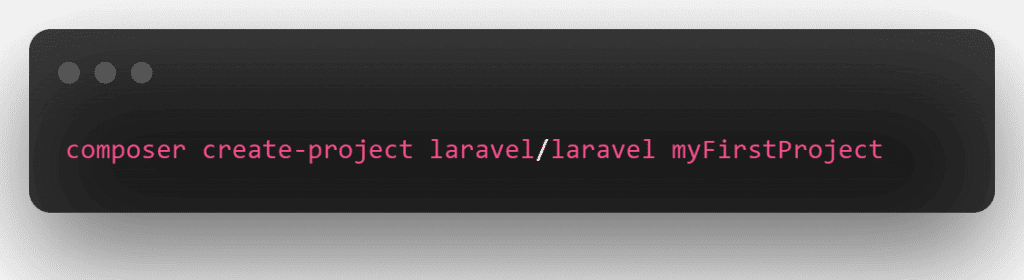
Now we can install Laravel by running the Composer command:

raycast untitled 2 1 1

The composer will download and install Laravel. And along with it any required dependencies when you execute this command. Here we are talking about the ones establishing a project for us to work on. You can quickly read the entire installation.

https://laravel.com/docs/9.x/installation


After everything has been downloaded, use the following command to test the installation:

raycast untitled 17

Planning the API

Build an API with Laravel 8 crud with a passport authentication. Example; This tutorial will show you how to create API using Laravel & passport auth. Passport auth is typically used to convey information that can be trusted and confirmed using a digital signature.


Use HTTP verbs/methods as actions in RESTful APIs, and endpoints as resources acted upon. The HTTP verbs will be used for their semantic meaning:

First, let’s define API method:


GET: retrieve resources
POST: create resources
PUT: update resources
DELETE: delete resources


Let’s now start building a robust RESTful API in the Laravel 8 app using Passport Authentication. We will also show you a fully functional CRUD for user products that use the API.

This Laravel 8 rest API crude tutorial with a passport; Using Passport Authentication would create an API like this


Login API
Register it
Get User Info API
Product List it
Create Product API
Edit Product API
Update Product API
Delete Product API

Rest CRUD APIs in Laravel 8 With These 8 Steps


Download Laravel 8 App
Database Configuration
Install Passport Auth
Passport Configuration
Create Product Table and Model
Run Migration
Create Auth and CRUD APIs Route
Create Passport Auth and CRUD Controller
Test Laravel 8 REST CRUD API with Passport Auth in Postman

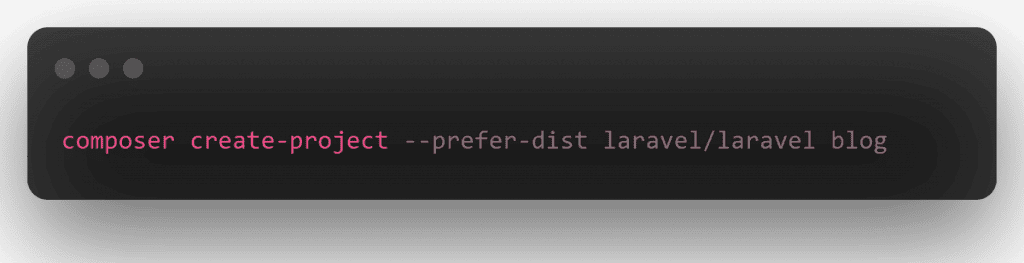
Download Laravel 8 App


First of all, Open command prompt and run the following command to install laravel 8 app:

raycast untitled

Database Configuration


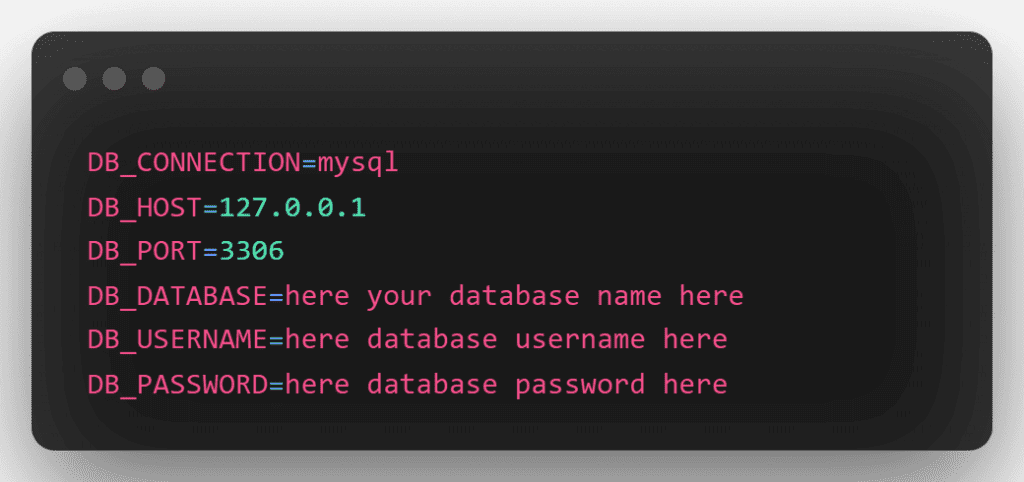
Now, navigate to the root directory of your Laravel restful authentication API with passport tutorial project that you just installed. Then open the .env file. Then, as follows, add the database information:

raycast untitled 1

Install Passport Auth


Run the following command to install the passport package:

raycast untitled 2 1 2


To produce passport encryption keys, you’ll need to install Laravel. This command will generate the encryption keys required for safe access token generation:

raycast untitled 3

Passport Configuration


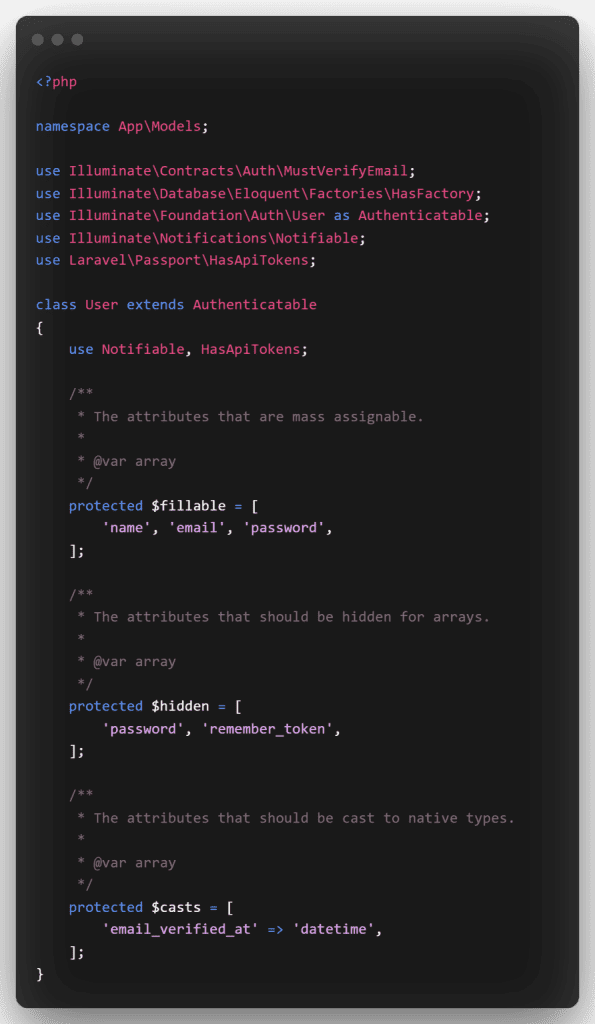
Navigate to the App/Models directory and open the User.php file. Then, in User.php, add the following code:

raycast untitled 4 892x1536 1

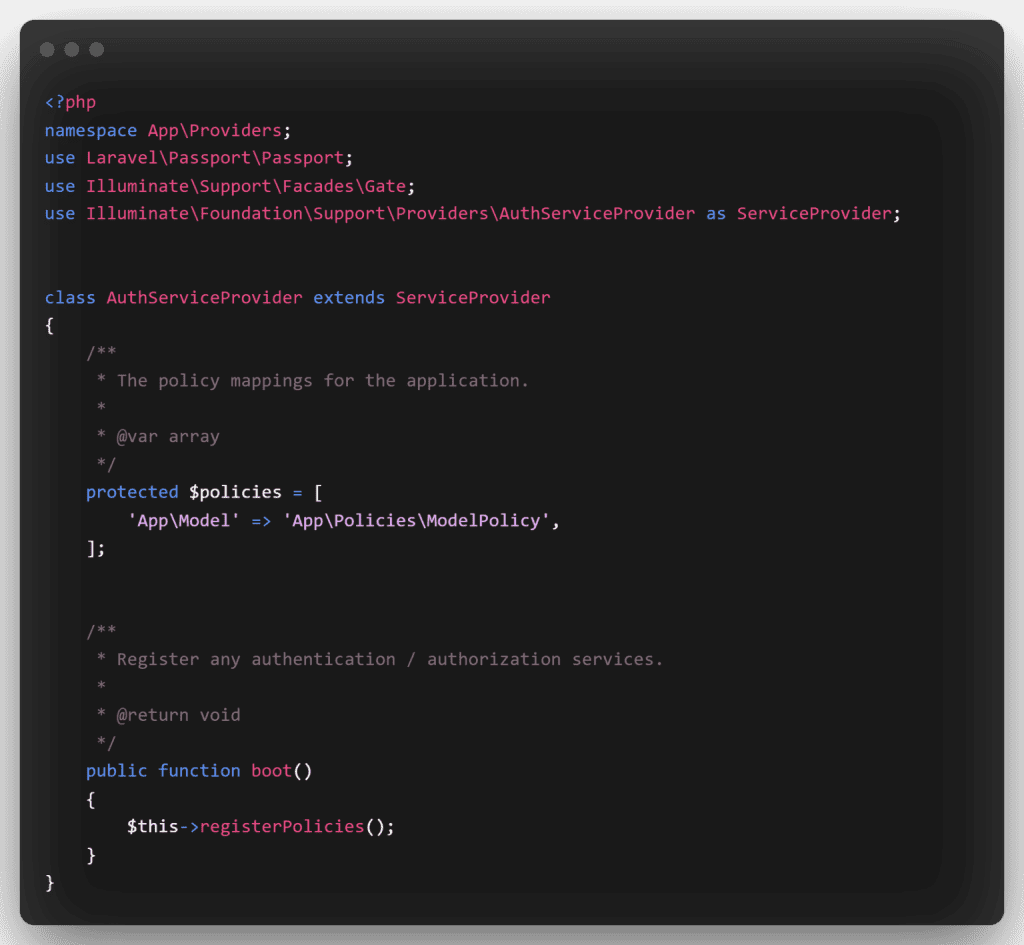
Next In App/Providers/AuthServiceProvider.php, create passport routes. Update this line in App/Providers/AuthServiceProvider.php => Inside the boot method, register Passport::routes():

raycast untitled 5 1536x1417 1

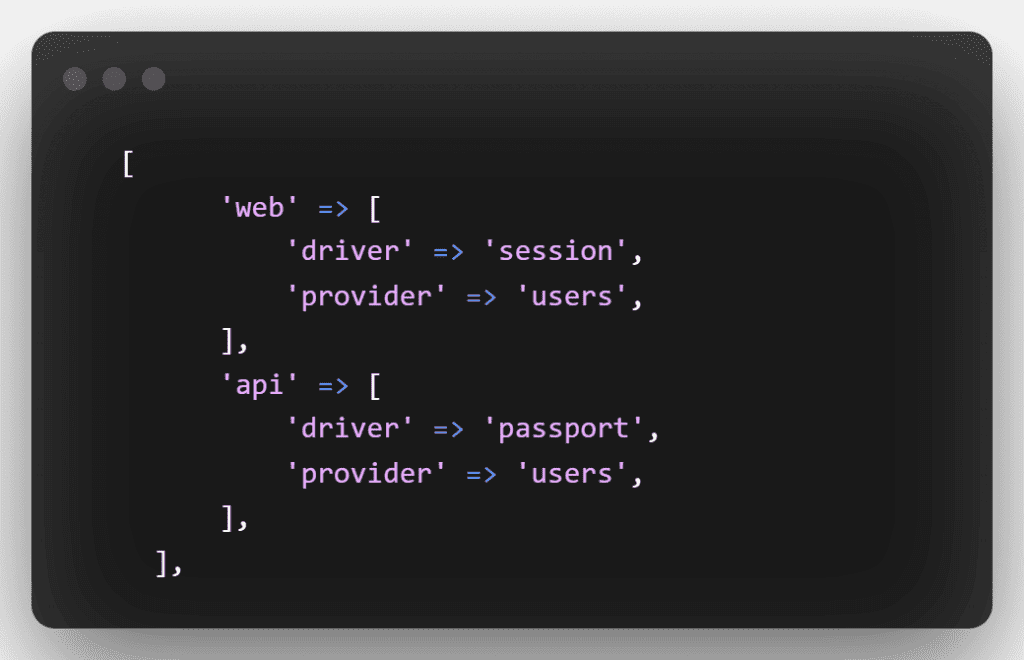
Next, open the auth.php file in the config/auth.php directory. Then change the API driver to passport for the session. Put the following code in API: ‘driver’ => ‘passport’

raycast untitled 6

Create Product Table and Model


To build a product model and migration file, open a terminal and type the following command:

raycast untitled 7

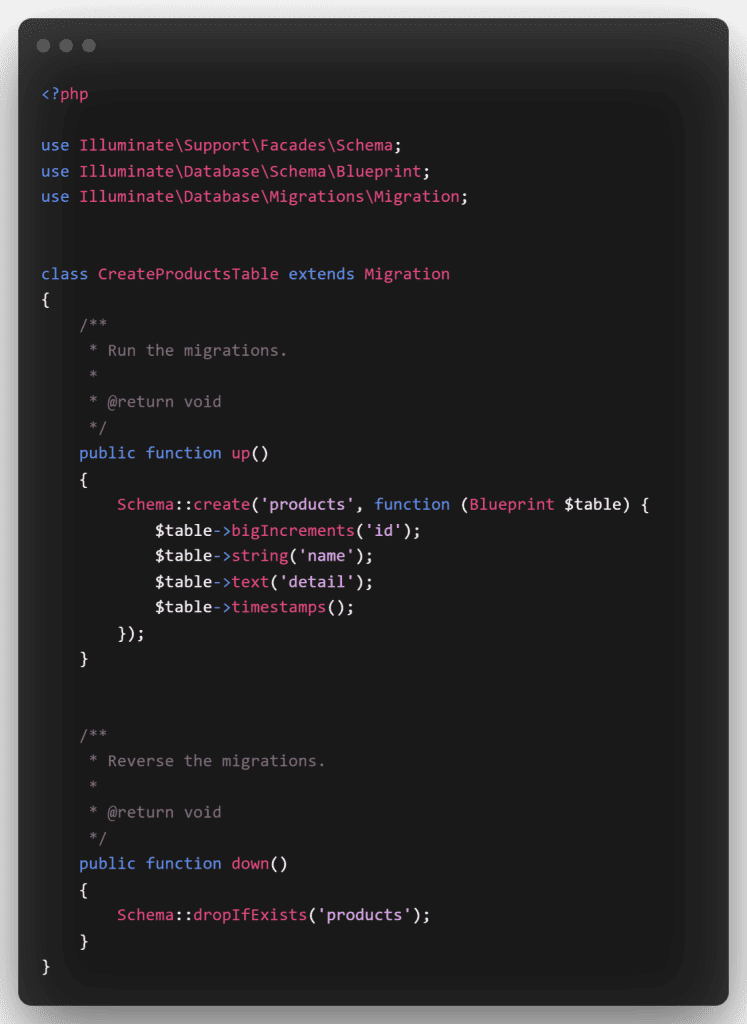
After that, open the create products table.php file in the database/migrations directory. After that, add the following code to it:

raycast untitled 8 1120x1536 1

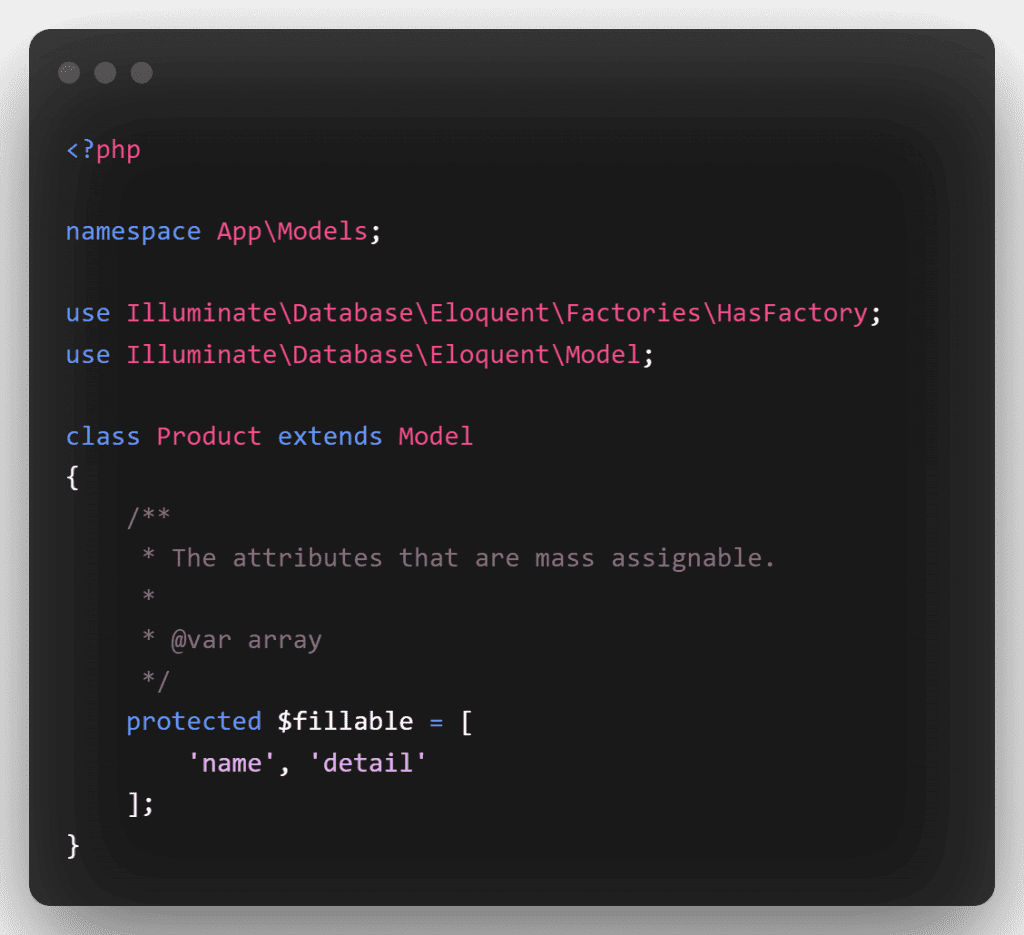
Then, in the product.php file, add the fillable property: navigate to the app/models directory, open product.php, and add the following code:

raycast untitled 9

Run Migration


In this phase, you’ll use the bellow command to migrate your data. This command generates the following database tables:

raycast untitled 10

Create Auth and CRUD APIs Route


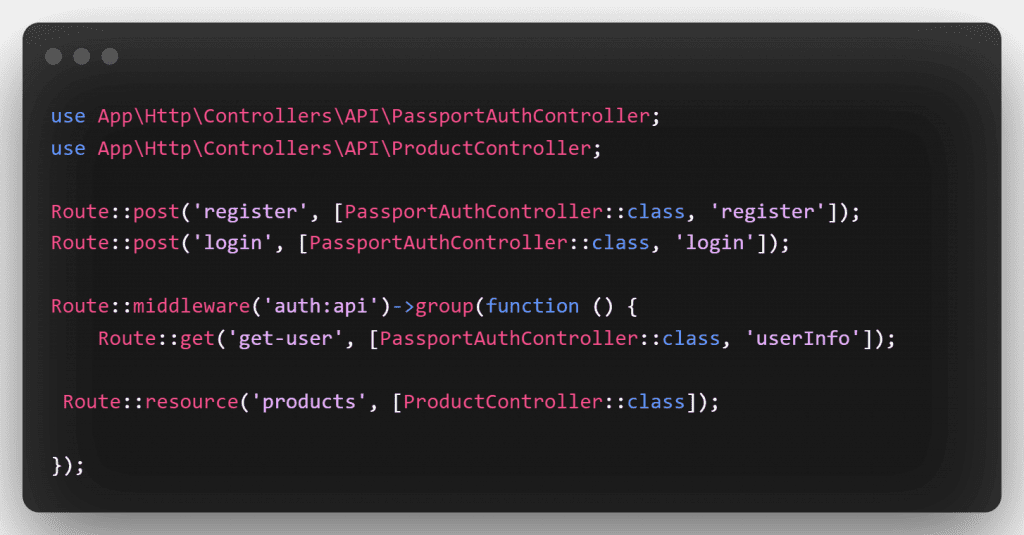
Create the rest API auth and crud operation routes in this phase.


To begin, open api.php in the routes directory. Then, in the api.php file, edit the following routes.

raycast untitled 11

Create Passport Auth and CRUD Controller


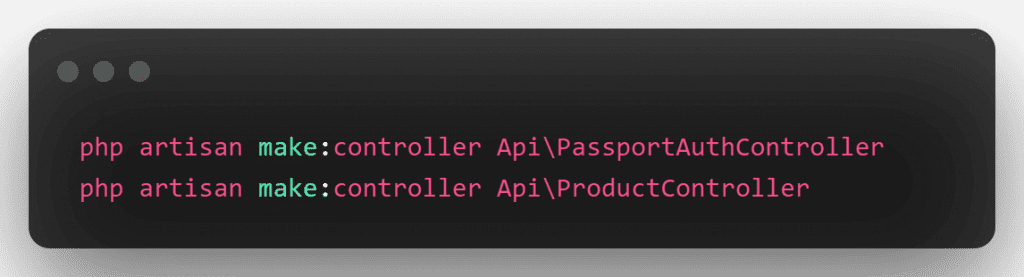
In this step, Create a controllers name PassportAuthController and ProductController. Use the below command and create a controller :

raycast untitled 12 1


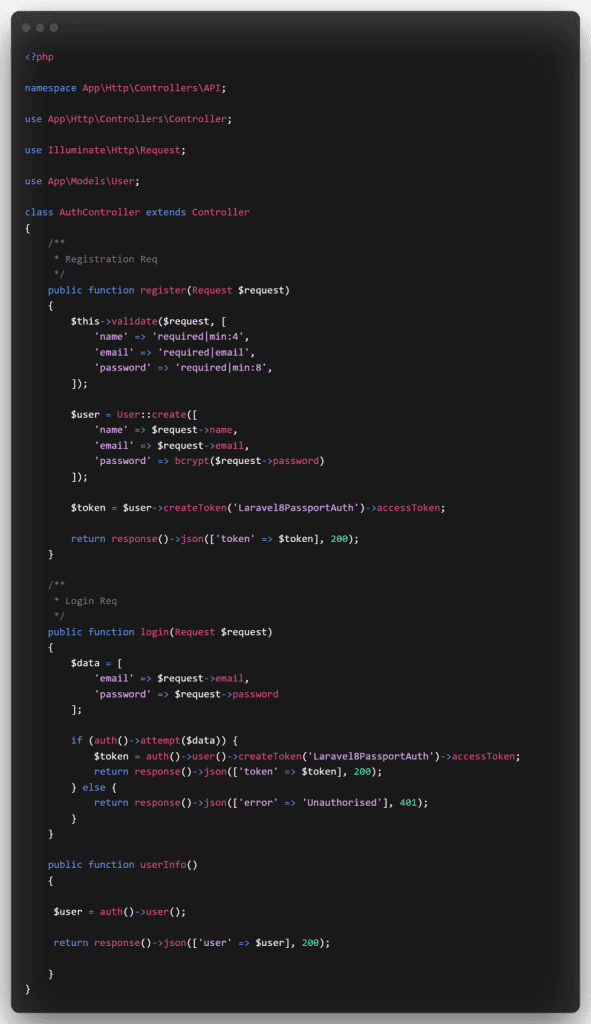
After that, in PassportAuthController.php, create several authentication methods. So, open the PassportAuthController.php file in the app/http/controllers/API directory. Also, in your PassportAuthController.php file, add the following methods:

raycast untitled 13 886x1536 1


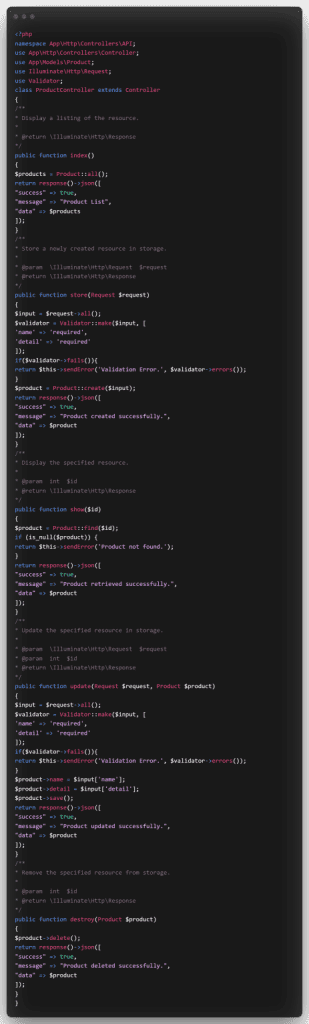
Next, in ProductController.php, create rest api crud methods. So, open the ProductController.php file in the app/http/controllers/API directory. Also, in your ProductController.php file, add the following methods:

raycast untitled 14 463x1536 1


Then, to start the development server, open a command line and type the following command:

raycast untitled 15

Test Laravel 8 REST CRUD API with Passport Auth in Postman

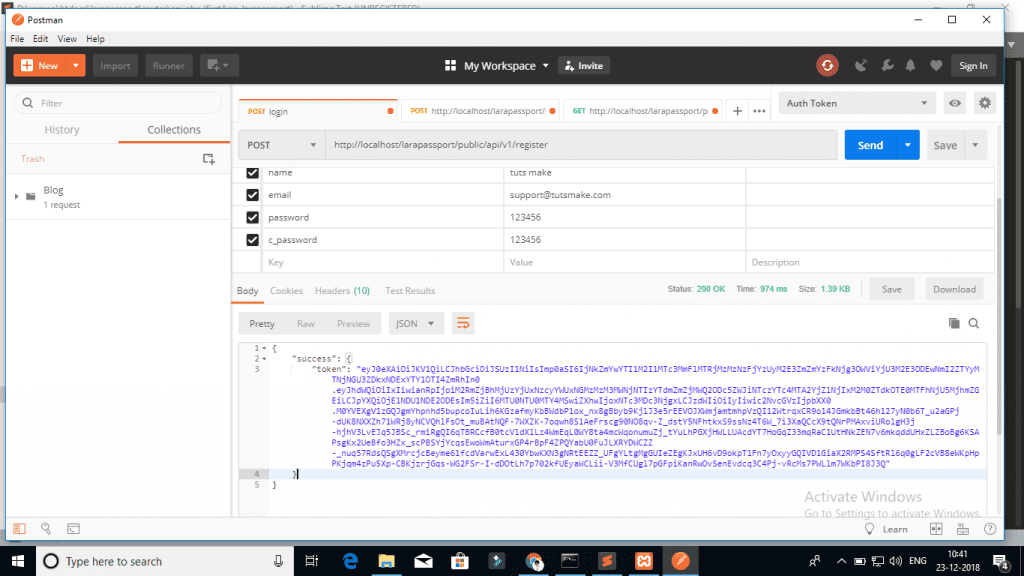
Now, in the Postman app, we’ll call the above-mentioned generate crud and auth apis:

1 – Laravel Register Rest API :

Screenshot 44 1024x576 1 1

2 – Login API :


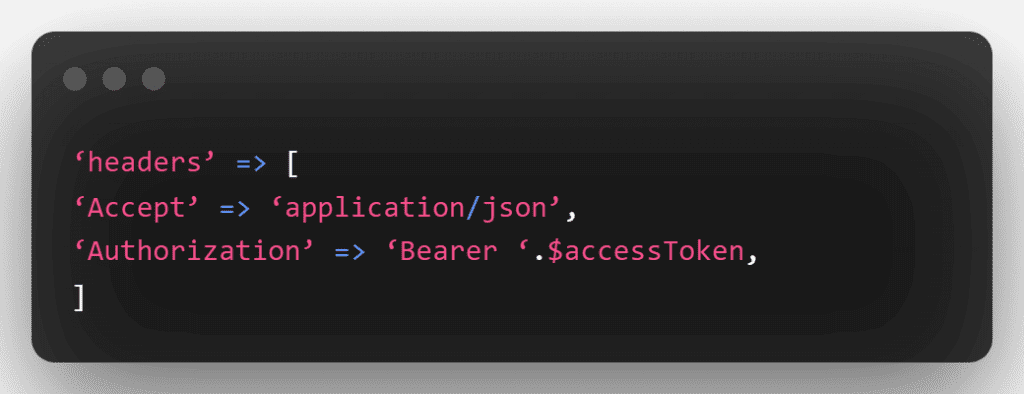
You’ll then use the getUser, create product, list product, edit product, and remove product APIs in the next step. The access token must be given as headers in this api:

raycast untitled 16

3 – Product List API
Method:- POST
URL:- http://127.0.0.1:8000/api/products

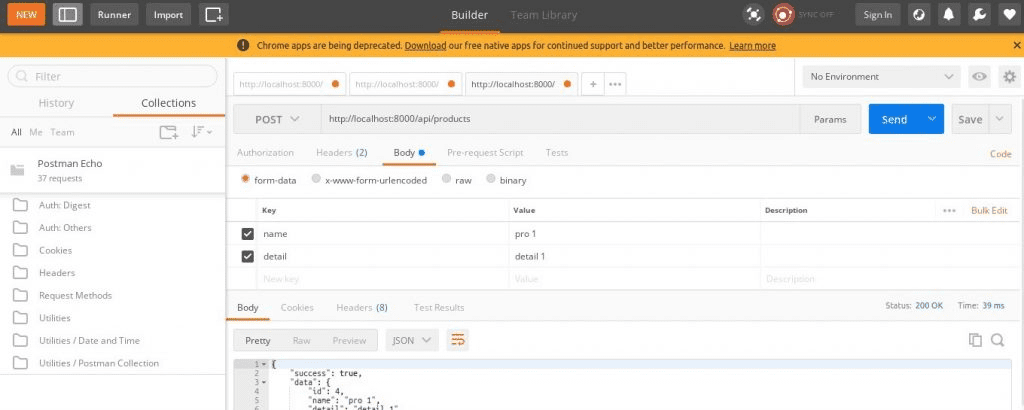
4 – Product Create API
Method:- POST
URL:- http://127.0.0.1:8000/api/products

image 27

5 – Product Fetch API
Method:- GET
URL :- http://127.0.0.1:8000/api/products/{id}

image 28

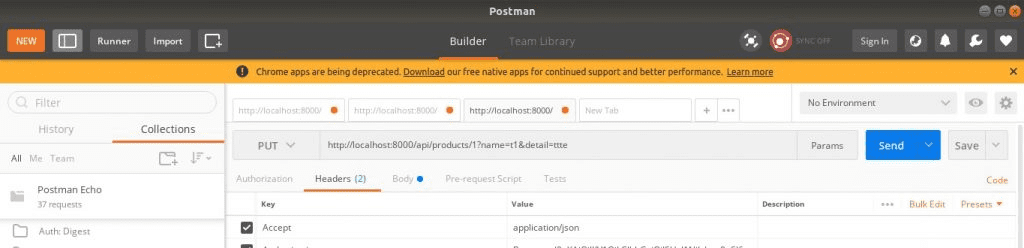
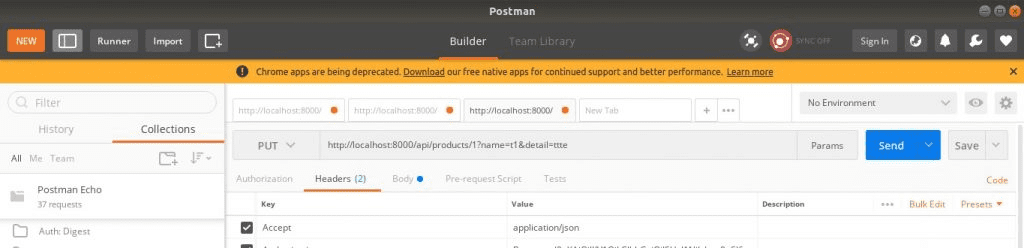
– Product Update API
Method:- PUT
URL :- http://127.0.0.1:8000/api/products/{id}

image 29

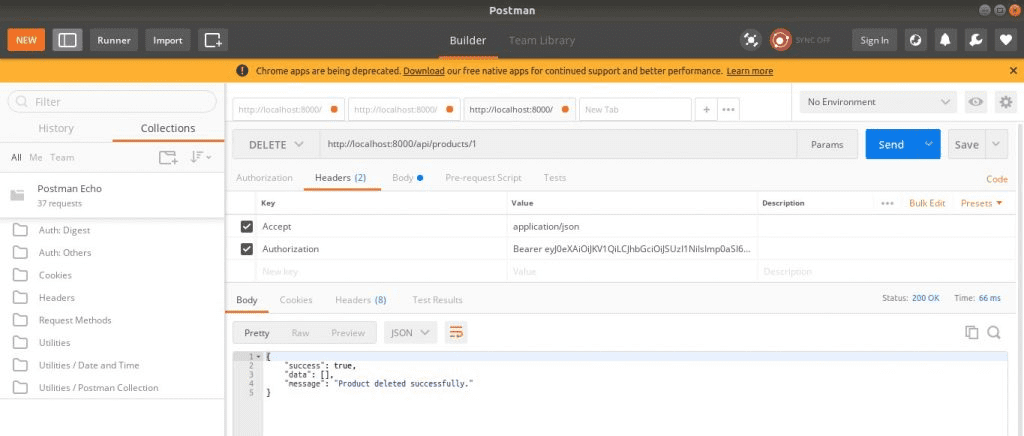
7 – Product Delete API
Method:- DELETE
URL :- http://127.0.0.1:8000/api/products/{id}

image 30

A place for big ideas.

Reimagine organizational performance while delivering a delightful experience through optimized operations.


To sum up, PHP is the language that most web developers use. And the software that has recently been the most successful in deploying web applications. You can create efficient APIs in Laravel 8 with passport auth. Also you can use the Postman app to call these APIs, hence making it a very useful language.

Top Stories

10 Proven Tips For Successful Odoo Module Customization (3)
10 Proven Tips for Successful Odoo Module Customization
Odoo is famous for its customizable nature. Businesses from around the world choose Odoo because of its scalability and modality. Regardless of the business size, Odoo can cater to the unique and diverse needs of any company. Odoo has proven its capacity and robust quality in terms of helping businesses
How Odoo is Transforming Traditional Education with E Learning
How Odoo is Transforming Traditional Education with E-Learning?
Does your school need to centralize data to easily access and share information between applications? Odoo provides an ERP system that can do so. Using multiple software applications for every department can be dragging. With Odoo, you can systematize your operations for efficiency, user-friendly navigation, uniform cross-functional practice, and increased
How Can Odoo Module Customization Revolutionize Your Purchase Management Workflow
How Can Odoo Module Customization Revolutionize Your Purchase Management Workflow?
Odoo ERP’s modules are engineered with a robust structure to drive efficiency across your entire organization. Each module is specifically designed to address distinct business functions, from finance and inventory to sales, marketing, and purchase management. This tailored approach ensures that every part of your company has the tools it needs to excel. The true power of
Strategies for Keeping Your Customizations Up to Date with Odoo Upgrades!
According to expert business owners, running a successful business means staying up to date with the latest changes. If you are also a business owner and use Odoo, the best business management software, it is essential to update it regularly. It becomes necessary, especially if you have made noteworthy changes
Featured Image Size
Transform Your Scheduling Process with Odoo’s Appointment Booking Module: Learn How
In fast-moving industries where customer satisfaction and operational efficiency determine business growth, scheduling is more than just setting dates and times — it’s a crucial part of delivering a smooth experience. Unfortunately, many organizations still rely on outdated scheduling methods: scattered Google calendars, endless back-and-forth emails, shared spreadsheets, or manual
Mastering Financial Success with efficient Odoo online store management Managing Payments and Invoicing with 98% Accuracy
Mastering Financial Success with Efficient Odoo Online Store Management: Managing Payments and Invoicing with 98% Accuracy
In the fast-paced world of e-commerce, achieving financial success hinges on the precision and efficiency of your payment and invoicing systems. This is where a versatile Odoo online store managementplatform comes into play. The title of our discussion, "Mastering Financial Success: Managing Payments and Invoicing in Your Odoo Online Store

          Success!!

          Keep an eye on your inbox for the PDF, it's on its way!

          If you don't see it in your inbox, don't forget to give your junk folder a quick peek. Just in case.


              You have successfully subscribed to the newsletter

              There was an error while trying to send your request. Please try again.

              Zehntech will use the information you provide on this form to be in touch with you and to provide updates and marketing.