Enhance your Odoo notes with automatic color-coded prioritization based on deadlines and custom time intervals.
Color Code Notes is a free Odoo module by Zehntech Technologies that enhances native note management with automatic color-coded categorization. The module adjusts note colors dynamically based on deadlines and configurable time intervals — giving teams instant visual clarity on urgency without manual tagging or status updates.
Teams using Color Code Notes spend less time scanning lists and more time acting on what matters. The visual layer eliminates the cognitive load of reading dates and calculating urgency manually.
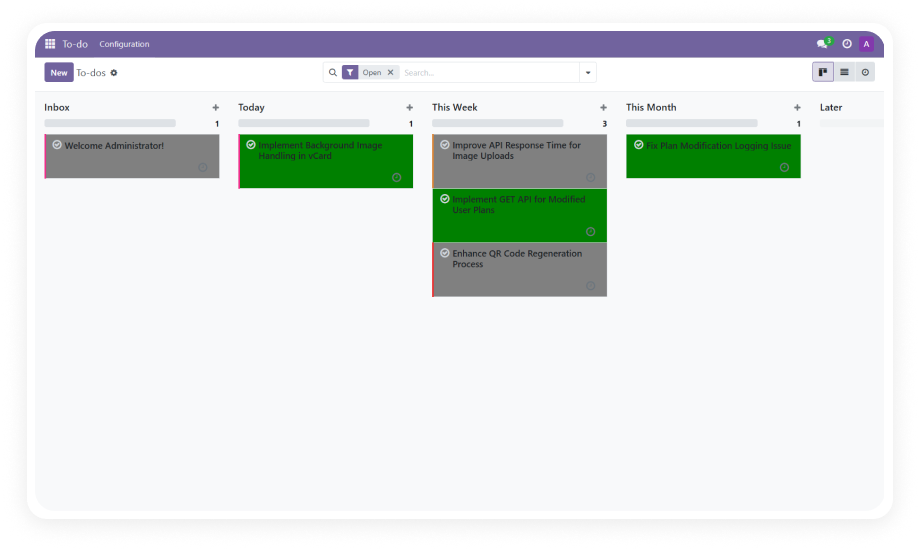
Notes are automatically assigned colors based on their deadline status.
Why it matters: teams instantly distinguish between upcoming, approaching, and overdue items without reading dates or opening individual records.
The module calculates time remaining until each deadline and assigns colors based on configurable intervals.
Why it matters: urgency is communicated visually and updates automatically as time passes — no manual re-tagging required.
Administrators define custom time intervals and assign specific colors to each range from a centralized settings panel.
Why it matters: every organization operates on different timelines, and this module adapts to your urgency thresholds rather than imposing a fixed system.
Notes with deadlines are visually differentiated from those without, and color intensity reflects proximity to due dates.
Why it matters: critical items surface naturally in any view, reducing the risk of missed deadlines across projects and teams.
Choose your Odoo version and explore interactive documentation
No development environment. No custom code. No consultant required for standard setup.
Get the Color Code Notes module from the Odoo App Store. Upload to your Odoo instance via the Apps menu or place in your custom addons directory.
Navigate to Apps, update the app list, search for "Color Code Notes," and click Install. Dependencies (Project, To-Do, Discuss) will be resolved automatically.
Open the module settings. Define your time intervals (e.g., 0-2 days, 3-5 days, 6+ days) and assign a color to each range. Save your configuration.
Create or open notes with deadlines. Colors will apply automatically based on your interval settings. No further action required — the system updates dynamically.
"One-Time Purchase. No Subscription. No Recurring Fees."
Install Color Code Notes today and give your team instant visual clarity on every deadline. No more scanning dates, no more missed follow-ups — just color-coded urgency that works automatically.
You have successfully subscribed to the newsletter
There was an error while trying to send your request. Please try again.