Join us at GITEX 2025! Discover our solutions at Hall 4, Booth H-30 Schedule a Meeting Today.
Automate Marketing Initiatives with Salesforce Marketing Cloud Learn More
Join us at GITEX 2024! Discover our solutions at Hall 4, Booth H-30 Book your live demo today.
Zehntech Odoo App

Microsoft Azure SSO Integration

Replace password-based Odoo logins with secure Microsoft Azure Active Directory authentication. Your team logs in once with their Microsoft account and lands directly in Odoo — powered by OAuth 2.0, configured in minutes, and maintained with zero ongoing effort.

Compatible with Odoo 16, 17, 18 & 19
Community & Enterprise Supported
OAuth 2.0 Protocol with Azure Active Directory
One-Time Configuration
Trusted by 500+ Businesses Across 12+ Countries
$34.84
V19, 18, 17, 16
Microsoft Azure SSO Integration — One-click Microsoft login for Odoo

What is Microsoft Azure SSO Integration?

Microsoft Azure SSO Integration is an Odoo authentication module that connects your Odoo instance to Microsoft Azure Active Directory for Single Sign-On. Instead of managing separate Odoo credentials, your users authenticate through their existing Microsoft accounts using the industry-standard OAuth 2.0 protocol. The module handles redirect URL generation automatically, maps Microsoft user profiles to Odoo sessions, and centralizes all authentication management within the Odoo backend — eliminating password fatigue, reducing IT help desk tickets, and strengthening your security posture in one installation.

Azure AD authentication
OAuth 2.0 protocol
Automatic redirect URL handling
Centralized user management
Multi-company support

How Microsoft Azure SSO Integration Solves Odoo Authentication Challenges

Problem
Zehntech Microsoft Azure SSO Solution
Users must remember and manage separate Odoo login credentials
Users authenticate with their existing Microsoft account — one set of credentials for everything
Password reset requests create ongoing IT support burden
Microsoft handles all password management and recovery; IT help desk tickets drop immediately
No native connection between Odoo and corporate identity providers
OAuth 2.0 integration connects Odoo directly to Azure Active Directory as the identity source
Manually configuring redirect URLs creates errors across environments
The module dynamically generates redirect URLs from Odoo's web base URL system parameter
Onboarding new users requires creating and distributing Odoo passwords
New users with a Microsoft account can access Odoo immediately — no separate credential provisioning
Multi-company environments require duplicate authentication setups
A single OAuth provider configuration serves all companies and users within the Odoo instance
Weak or reused passwords create security vulnerabilities
Microsoft's enterprise authentication — including MFA policies — protects every Odoo login
Implementing SSO typically requires custom development and ongoing maintenance
One-time configuration through Odoo's built-in OAuth Providers menu; no code, no maintenance

Complete Microsoft SSO Authentication for Your Odoo Instance

1

Microsoft Azure Active Directory Single Sign-On

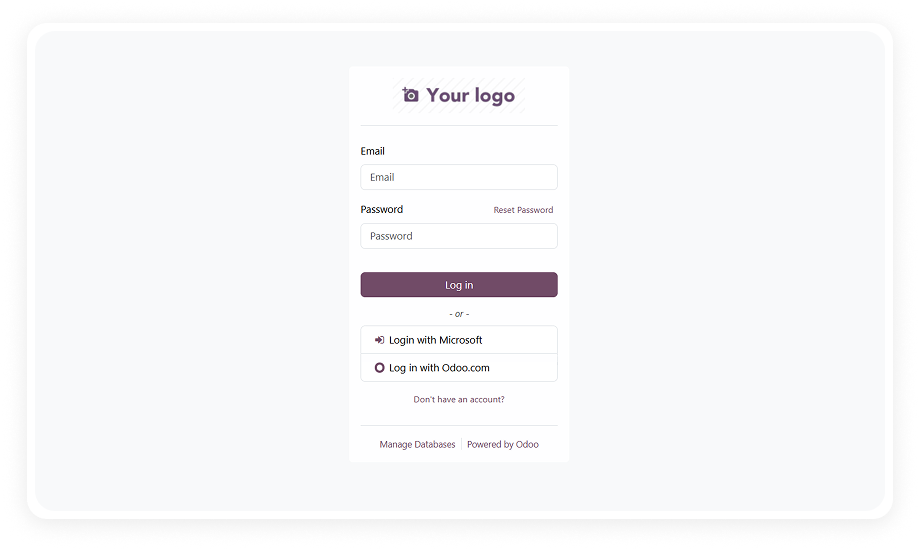
Users log into Odoo using their existing Microsoft account credentials through Azure AD. A "Login with Microsoft" button appears on the Odoo login page, initiating the OAuth flow and creating an authenticated Odoo session upon successful Microsoft verification.

Why it matters: users access Odoo with the same credentials they use for Outlook, Teams, and SharePoint — eliminating password fatigue and reducing login friction to a single click.

2

OAuth 2.0 Authorization Protocol

Authentication is handled through the OAuth 2.0 standard, the same protocol used by enterprise applications worldwide for secure delegated access. The module communicates with Microsoft's authorization endpoint and validates tokens before granting Odoo access.

Why it matters: OAuth 2.0 is the industry standard for secure authentication — your Odoo environment benefits from the same protocol protecting Fortune 500 systems without any custom security engineering.

3

Automated Redirect URL Generation

The module dynamically generates and manages the OAuth callback redirect URL using Odoo's web base URL system parameter. This means the correct redirect URL is always in sync with your server configuration — no manual URL entry or environment-specific adjustments required.

Why it matters: misconfigured redirect URLs are the most common cause of OAuth integration failures. Automatic generation eliminates this entire category of configuration errors.

4

Centralized User Management

All user authentication is managed from the standard Odoo backend interface. Administrators can view, enable, or disable Microsoft SSO access for any user without leaving the Odoo admin panel.

Why it matters: a single management console means your IT team doesn't need to juggle between Azure Portal and Odoo to control who can log in — reducing administrative overhead and eliminating permission gaps.

5

One-Time Configuration Setup

The entire integration is configured once through Odoo's Settings > OAuth Providers menu. You enter your Azure application Client ID, authentication endpoint, scope, and UserInfo URL — and the integration runs permanently without further adjustment.

Why it matters: unlike integrations that require ongoing token refreshes or periodic reconfiguration, this is truly set-and-forget — saving IT teams from recurring maintenance cycles.

6

Multi-Company and Multi-User Support

The module is designed to work across multi-company Odoo environments where users may belong to different organizational units. A single OAuth provider configuration supports all companies and user groups within the instance.

Why it matters: organizations with multiple subsidiaries, departments, or brands running on a shared Odoo instance can deploy SSO once and have it serve everyone — no per-company configuration required.

7

Reduced IT Help Desk Dependency

By shifting authentication to Microsoft's infrastructure, password reset requests, account lockouts, and credential management tasks are handled entirely through Microsoft's self-service tools.

Why it matters: IT teams reclaim hours previously spent on password resets and access troubleshooting — a direct operational cost reduction that scales with your organization's size.

8

Microsoft Graph API Integration

The module connects to the Microsoft Graph API endpoint (https://graph.microsoft.com/v1.0/me) to retrieve authenticated user profile information for session creation in Odoo.

Why it matters: Graph API is Microsoft's unified API surface — using it ensures compatibility with current and future Azure AD environments, including organizations that have migrated to Microsoft Entra ID.

Who Gets The Most Out Of This Module

Role
Primary Use Case
Key Outcome
IT Administrator
Deploy SSO across the organization and eliminate separate Odoo credential management
Single authentication source for all users; dramatically reduced password reset tickets
CTO / CIO
Enforce corporate security policies including MFA on all Odoo access
Enterprise-grade authentication without custom development investment
HR Manager
Onboard new employees to Odoo without provisioning separate login credentials
New hires with Microsoft accounts gain Odoo access instantly on day one
Operations Manager
Ensure teams use corporate Microsoft accounts for Odoo access instead of personal credentials
Consistent identity governance across all business systems
Security Officer
Apply Azure AD conditional access and MFA policies to Odoo login
Odoo authentication inherits the full Microsoft security stack
Business Owner (SMB)
Simplify login experience for a team already using Microsoft 365
One fewer password for employees to manage; fewer support interruptions

Versions & Documentation

Choose your Odoo version and explore interactive documentation

Native Odoo vs Zehntech Microsoft Azure SSO Integration

Capability
Zehntech Microsoft Azure SSO
Native Odoo
Microsoft Azure AD Single Sign-On
Available
Not available
OAuth 2.0 authentication protocol
Full implementation
Basic OAuth provider framework only
Automated redirect URL generation
Dynamic from web base URL
Manual configuration required
One-click Microsoft account login
Available
Not available
Microsoft Graph API user profile retrieval
Available
Not available
Pre-configured scope and endpoint settings
Available
Requires manual research and entry
Multi-company SSO from single configuration
Available
Not available
MFA inheritance from Azure AD policies
Available
Not available
Reduced IT help desk dependency
Available
Not applicable
Zero-maintenance after initial setup
Available
Not applicable
Dynamic redirect URL handling
Available
Not available
Works with Microsoft Entra ID (Azure AD successor)
Available
Not available

Get Started In Minutes

No development environment. No custom code. No consultant required for standard setup.

01

Install from the Odoo App Store

Search for zt_microsoft_sso_integration in your Odoo Apps menu and click Install. Works on Odoo 16–19, Community, Enterprise, and Odoo.sh. The only dependency is the Discuss (mail) module.

02

Register an Application in Azure Portal

Log into your Microsoft Azure Portal and navigate to App Registrations. Create a new application, note the Application (Client) ID, and configure the redirect URI to match your Odoo web base URL.

03

Configure the OAuth Provider in Odoo

Navigate to Settings > OAuth Providers. Create a new provider entry with the name "Microsoft," enter the Client ID from Azure, set the authentication endpoint URL, scope, and UserInfo endpoint.

04

Test and Verify the SSO Flow

Log out of Odoo and confirm the Microsoft login button appears. Click it to complete the full authentication roundtrip and verify the user session is created correctly.

Technical Details & Compatibility

Requirement
Odoo Versions
Editions
Hosting
Dependencies
Third-Party Dependencies
Custom Dev Required
Install Time
Server Restart
Data Migration
Module Conflicts
License
Last Tested
Lines of Code
OAuth Protocol
Microsoft API Endpoint
Scope Required
Multi-Company Support
Support
Details
16.0 · 17.0 · 18.0 · 19.0
Community · Enterprise · Odoo.sh
Odoo Online · On-Premise · Odoo.sh
Discuss (mail)
Microsoft Azure Active Directory tenant
No
Under 10 minutes
Not required
Not required
None known
OPL-1
Odoo 19.0 — May 2026
195
OAuth 2.0
https://graph.microsoft.com/v1.0/me
User.Read User.ReadBasic.All openid email profile
Yes
Microsoft Azure SSO Integration — FAQ illustration

Frequently Asked Questions

The module uses the OAuth 2.0 protocol to delegate authentication to Microsoft Azure Active Directory. When a user clicks the Microsoft login button on the Odoo login page, they are redirected to Microsoft's authentication endpoint. After successful Microsoft verification, the user is redirected back to Odoo with an active session created automatically — no separate Odoo password entry required.
The module supports Odoo 16, 17, 18, and 19. It is compatible with both Community and Enterprise editions. All three deployment models are supported: Odoo Online, Odoo.sh, and On-Premise.
No — the module dynamically generates the redirect URL using Odoo's web base URL system parameter. This eliminates manual URL configuration errors that are the most common cause of OAuth integration failures. The redirect URL stays in sync automatically if your server URL changes.
Yes — the module is designed for multi-company and multi-user environments. A single OAuth provider configuration serves all companies within the same Odoo instance. User authentication is managed centrally through the Odoo backend regardless of company assignment.
The required scope is: User.Read, User.ReadBasic.All, openid, email, and profile. The UserInfo endpoint used is https://graph.microsoft.com/v1.0/me for retrieving authenticated user profile data. These are read-only permissions — the module does not write any data back to Microsoft Azure.

One-Time Purchase.
No Subscription.
No Recurring Fees.

Your organization already runs on Microsoft 365 — Microsoft Azure SSO Integration bridges that identity layer directly into Odoo. In under 10 minutes, every user logs in with their Microsoft account, your security policies apply automatically, and IT never handles another Odoo password reset. Includes lifetime updates and 90 days of dedicated technical support.

Zehntech Odoo experts ready to help


          You have successfully subscribed to the newsletter

          There was an error while trying to send your request. Please try again.

          Zehntech will use the information you provide on this form to be in touch with you and to provide updates and marketing.