Join us at GITEX 2025! Discover our solutions at Hall 4, Booth H-30 Schedule a Meeting Today.
Automate Marketing Initiatives with Salesforce Marketing Cloud Learn More
Join us at GITEX 2024! Discover our solutions at Hall 4, Booth H-30 Book your live demo today.
Zehntech Odoo App

Odoo Microsoft Teams Integration — Activity Alerts, Direct Messaging & Calendar Sync

Connect your Odoo workflows directly to Microsoft Teams. Push activity notifications to Teams feeds, message colleagues from any Odoo chatter, and keep calendars synchronized bi-directionally — all through the Microsoft Graph API with enterprise-grade Azure AD security.

Compatible with Odoo 16, 17, 18 & 19
Community & Enterprise Supported
Bi-Directional Calendar Sync
Azure AD OAuth Authentication
No Custom Code Required
$84.62
V19, 18
Odoo Microsoft Teams Integration — Activity Alerts and Calendar Sync

What is Odoo Microsoft Teams Integration?

Odoo Microsoft Teams Integration is a connector module that bridges your Odoo instance with Microsoft Teams through the Microsoft Graph API. It eliminates constant context-switching between your ERP and communication platform by routing activity notifications, direct messages, and calendar events across both systems automatically. When someone is assigned a task in Odoo, they see it in Teams. When a meeting is scheduled in Outlook, it appears in Odoo.

Activity feed notifications
Direct messaging from chatter
Bi-directional calendar sync
Daily activity reminders
Teams meeting links

How Odoo Microsoft Teams Integration Solves Collaboration Gaps

Problem
Zehntech Teams Solution
Team members miss Odoo activity deadlines because they live in Teams
Activity notifications pushed directly to the user's Teams activity feed
No way to message a Teams colleague from inside an Odoo record
Direct messaging from any chatter without switching platforms
Calendar events in Odoo don't appear in Outlook/Teams
Bi-directional sync ensures events appear in both systems automatically
Meetings scheduled in Outlook/Teams invisible to Odoo
Webhook-based sync brings external events into Odoo in real time
Users forget upcoming activities because notifications get buried
Daily cron job sends activity reminders to Teams
Duplicate calendar entries when syncing between platforms
Intelligent deduplication using Graph Event IDs
No Teams meeting links on Odoo calendar events
Teams meeting links generated automatically for online events
Connecting Odoo to Microsoft requires custom API development
Pre-built Graph API integration handles auth, messaging, and sync

Full-Spectrum Odoo-to-Teams Connectivity

1

Real-Time Activity Notifications in Teams

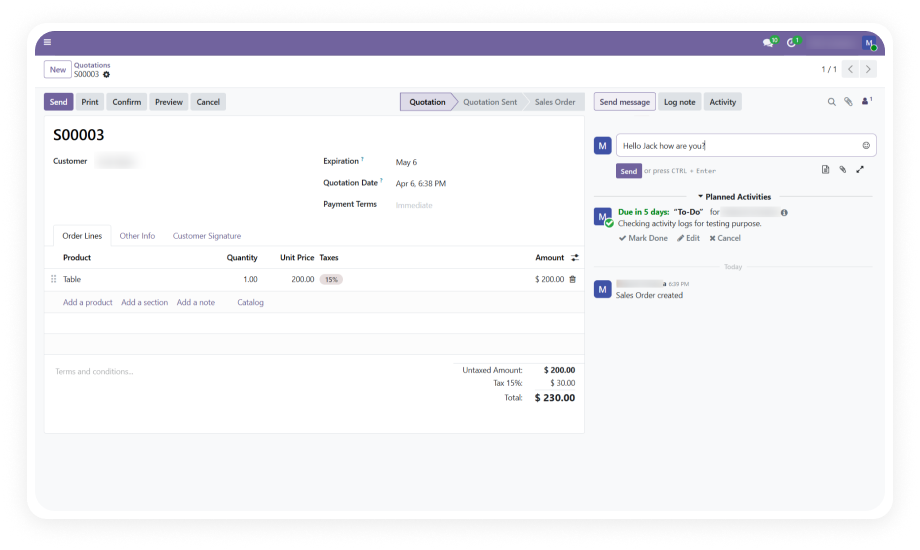
When an activity with a due date is created in Odoo and assigned to a user, the system automatically pushes a notification to that user's Microsoft Teams activity feed with relevant context.

Why it matters: Team members who spend their day in Microsoft Teams never miss an Odoo assignment.

2

Direct Messaging from Odoo Chatter to Teams

From any Odoo record with a chatter section — sales orders, project tasks, contacts, invoices — users can compose a message and select a Microsoft Teams user from a dropdown.

Why it matters: Conversations about specific records stay contextual without forcing anyone to switch applications.

3

Bi-Directional Calendar Synchronization

Calendar events created in Odoo automatically sync to Microsoft Teams and Outlook. Events created in Teams or Outlook sync back to Odoo through webhooks and daily cron job fallbacks.

Why it matters: Teams maintain a single unified calendar regardless of which platform they use to schedule.

4

Automated Daily Activity Reminders

A scheduled cron job runs daily and sends reminder notifications to Teams for all upcoming Odoo activities that are due. This acts as a safety net beyond the initial assignment notification.

Why it matters: Even if a user misses the first notification, the daily reminder ensures nothing falls through the cracks.

5

When a calendar event is marked as an online meeting in Odoo, the module automatically generates a Microsoft Teams meeting link and attaches it to the event for all attendees.

Why it matters: Online meeting setup becomes a one-step process inside Odoo instead of requiring manual Teams meeting creation.

6

Webhook-Based Instant Calendar Updates

Changes to calendar events in Microsoft Teams or Outlook are pushed to Odoo in real time via webhook subscriptions. Rescheduled meetings, cancelled events, and new invitations appear within seconds.

Why it matters: The Odoo calendar always reflects current reality without waiting for a scheduled sync job.

7

Manual Calendar Sync Wizard

For scenarios requiring a specific historical sync or a targeted refresh, the module provides a manual sync wizard that lets administrators select a custom date range and trigger synchronization on demand.

Why it matters: Administrators retain full control for initial setup, troubleshooting, or syncing historical events.

8

Intelligent Duplicate Prevention

The module tracks Microsoft Graph Event IDs alongside Odoo calendar event records, ensuring that a synced event is never recreated. Both directions reference these IDs before creating new entries.

Why it matters: Users never see phantom duplicate events cluttering their calendars, maintaining trust in the sync system.

9

Enterprise-Grade Azure AD OAuth Security

All communication between Odoo and Microsoft Teams flows through Azure AD OAuth authentication using Application Client ID, Tenant ID, and Client Secret credentials verified against Microsoft's enterprise directory.

Why it matters: Data transfer meets the same security standards your organization applies to all Microsoft 365 integrations.

10

User-Specific Event Synchronization

Calendar sync respects user-level boundaries — each user's events sync independently based on their authenticated Microsoft identity. Private events remain private, and users control what appears in their connected calendars.

Why it matters: Privacy is preserved across the integration, and individual users maintain control over synchronized content.

Who Gets The Most Out Of This Module

Role
Primary Use Case
Key Outcome
Project Manager
Push task assignments and deadlines from Odoo to Teams feed
Zero missed deadlines — activities surface where the team collaborates
Sales Representative
Message colleagues about specific CRM opportunities without leaving Odoo
Faster deal velocity through contextual communication
Operations Director
Maintain unified calendar across Odoo and Microsoft 365
Single source of truth for team availability — no double-bookings
IT Administrator
Configure enterprise-grade Microsoft Graph API integration
Secure, auditable connectivity meeting corporate security policies
HR Manager
Schedule interviews with automatic Teams meeting link generation
Streamlined meeting setup without switching tools
Remote Team Lead
Ensure distributed team receives daily activity reminders in Teams
Higher task completion rates for teams relying on Teams as their hub
Not the right fit for: Organizations not using Microsoft 365, or teams that prefer Slack or other non-Microsoft communication platforms.

Versions & Documentation

Choose your Odoo version and explore interactive documentation

Documentation not available for Odoo 16. Please refer to the setup guide included with purchase.

Documentation not available for Odoo 17. Please refer to the setup guide included with purchase.

Native Odoo vs Zehntech Microsoft Teams Integration

Capability
Zehntech Teams Integration
Native Odoo
Push activity notifications to Microsoft Teams feeds
Yes
Not available
Direct messaging from Odoo chatter to Teams users
Yes
Not available
Bi-directional calendar sync with Teams/Outlook
Yes
Not available
Webhook-based real-time calendar updates
Yes
Not available
Teams meeting link auto-generation
Yes
Not available
Automated daily activity reminders in Teams
Yes
Not available
Manual sync wizard with custom date ranges
Yes
Not available
Intelligent duplicate prevention (Graph Event IDs)
Yes
Not available
Azure AD OAuth enterprise authentication
Yes
Not available
User-specific event sync with privacy boundaries
Yes
Not available
Microsoft Graph API integration (pre-built)
Yes
Not available
Works on Community and Enterprise editions
Yes
Basic (no Teams connectivity)

Get Connected In Under 30 Minutes

No custom development. Structured setup through Azure Portal and Odoo admin.

01

Register Azure AD App

Create a new app in Azure Portal with required API permissions and generate Client Secret.

02

Configure OAuth Provider

Create a Microsoft Azure AD provider entry in Odoo with your Client ID, Tenant ID, and Secret.

03

Install Module

Install zehntech_teams_connector and configure the Teams Application Identifier in settings.

04

Deploy Teams App

Upload teams_app.zip as a custom app in Microsoft Teams Admin Center.

Technical Details & Compatibility

Requirement
Odoo Versions
Editions
Hosting
Odoo Dependencies
Third-Party Dependency
External Requirements
Setup Time
Server Restart
API Permissions
Lines of Code
License
Last Tested
Custom Dev Required
Support
Details
16.0 · 17.0 · 18.0 · 19.0
Community · Enterprise · Odoo.sh
Odoo Online · On-Premise · Odoo.sh
Calendar · Discuss
Microsoft Azure SSO Integration
Microsoft 365 + Azure AD App
~30 minutes
Not required
6 Graph API permissions
2,719
OPL-1
Odoo 19.0 — May 2026
No
Odoo Microsoft Teams Integration — FAQ illustration

Frequently Asked Questions

Yes — the module connects to Teams through the Microsoft Graph API, which requires an active Microsoft 365 subscription with both Teams and Outlook access for full functionality.
Calendar sync is fully bi-directional — events created in Odoo push to Teams/Outlook, and events from Teams/Outlook pull into Odoo via webhooks. A daily cron job acts as a fallback, and intelligent duplicate prevention ensures no event is created twice.
The module supports Odoo 16, 17, 18, and 19 — covering the four most recent major versions. Both Community and Enterprise editions are fully compatible across all deployment types.
Yes — from any Odoo record with a chatter section (Sales Orders, Project Tasks, Contacts, Invoices, etc.), you can compose a message and select a Teams user from a dropdown. The message is delivered directly to that user's Teams chat.
The system automatically pushes a notification to the assigned user's Microsoft Teams activity feed with context about the task and its due date. A daily cron job also sends reminders for upcoming activities.

One-Time Purchase.
No Subscription.
No Recurring Fees.

Your team already lives in Microsoft Teams — now bring Odoo directly into that workflow. Activity notifications, chatter-to-Teams messaging, and bi-directional calendar sync mean your ERP and communication hub finally operate as a single connected system. Includes lifetime updates and 90 days of dedicated technical support.

Zehntech Odoo experts ready to help


          You have successfully subscribed to the newsletter

          There was an error while trying to send your request. Please try again.

          Zehntech will use the information you provide on this form to be in touch with you and to provide updates and marketing.