Join us at GITEX 2025! Discover our solutions at Hall 4, Booth H-30 Schedule a Meeting Today.
Automate Marketing Initiatives with Salesforce Marketing Cloud Learn More
Join us at GITEX 2024! Discover our solutions at Hall 4, Booth H-30 Book your live demo today.
Zehntech Odoo App

Power BI Connector for Odoo

Real-Time Odoo Analytics in Microsoft Power BI. Bridge your Odoo ERP data directly to Microsoft Power BI. Create workspaces, push datasets from any Odoo model, embed live dashboards inside Odoo, and schedule automated data syncs — all without middleware, manual exports, or custom development.

Compatible with Odoo 16, 17, 18 & 19
Community & Enterprise Supported
Upload Any Odoo Model to Power BI
No Middleware Required
Trusted by 500+ Businesses Across 12+ Countries
$119.46
V19, 18, 17, 16
Power BI Connector for Odoo — Real-time analytics integration

What is the Power BI Connector for Odoo?

The Power BI Connector is an Odoo integration module that establishes a direct, authenticated connection between your Odoo ERP and Microsoft Power BI. It eliminates the need for CSV exports, middleware platforms, or third-party ETL tools by enabling you to push data from any Odoo model directly into Power BI datasets — and pull Power BI dashboards back into the Odoo interface.

Direct Odoo-to-Power BI connection
Any Odoo model supported
One-click workspace creation
Embedded dashboards in Odoo
Scheduled auto-sync

How Power BI Connector Solves Odoo Reporting Limitations

Problem
Zehntech Power BI Connector Solution
Native reporting lacks advanced visualization
Enterprise-grade Power BI dashboards fed directly from Odoo
Manual CSV exports are error-prone and stale
Push live Odoo data directly to Power BI tables
ETL middleware adds cost and complexity
Direct OAuth2 authentication with zero intermediaries
Analysts switch between Odoo and Power BI constantly
Embed Power BI dashboards directly inside Odoo
Only specific models can be reported on
Universal data upload from any Odoo model
Large datasets overwhelm reporting tools
Domain filtering controls exactly which records are pushed
Manual refreshes mean outdated dashboards
Automated scheduled publishing keeps data current
Single-instance connectors cannot unify data
Multi-instance support connects multiple Odoo databases

Complete Odoo-to-Power BI Integration

1

Multi-Instance Integration

Connect multiple Odoo instances to Power BI simultaneously for consolidated cross-instance analytics.

Why it matters: Organizations running multiple Odoo databases get unified analytics without manual export merging.

2

One-Click Workspace Creation

Create and configure Power BI workspaces directly from within the Odoo interface with a single click.

Why it matters: Eliminates context-switching so administrators establish analytics environments without leaving Odoo.

3

Universal Data Upload

Push data from any Odoo model — standard or custom — to Power BI tables without restrictions.

Why it matters: Analysts get unrestricted access to every data point including custom fields and models.

4

Domain Filtering Before Upload

Apply Odoo domain filters to control exactly which records are sent to Power BI before transfer begins.

Why it matters: Prevents Power BI from being overwhelmed and ensures dashboards reflect precise scope.

5

Embedded Dashboards in Odoo

Import Power BI dashboards and reports directly into the Odoo interface for unified access.

Why it matters: Teams see data-driven insights where they work, increasing adoption and reducing time to action.

6

Automated Scheduled Publishing

Configure automated dataset publishing with customizable scheduling intervals — hourly, daily, or custom.

Why it matters: Dashboards always reflect current Odoo data without manual trigger requirements.

7

OAuth2 via Microsoft MSAL

Secure OAuth2 authentication through Azure AD with enterprise-grade security protocols.

Why it matters: Connection is protected by the same authentication framework used across Microsoft ecosystem.

8

User-Friendly Configuration

The entire setup is managed through a clean, guided interface inside Odoo — no API expertise required.

Why it matters: Administrators do not need developer support to configure and maintain the integration.

Who Gets The Most Out Of This Connector

Role
Primary Use Case
Key Outcome
CFO / Finance Director
Automated financial KPI dashboards pulling live Odoo accounting data
Executive-ready financial analytics updated in real time
Sales Manager
Cross-team sales pipeline and revenue visualizations
Data-driven sales decisions based on current pipeline
Operations Manager
Inventory turnover and supply chain analytics
Bottlenecks identified faster through visual drill-down
Data Analyst
Direct access to any Odoo model for custom reports
Full analytical freedom without waiting for IT exports
IT Administrator
Centralized connection management with scheduled syncs
Elimination of fragile CSV-based reporting pipelines
CEO / Business Owner
Consolidated dashboards spanning multiple Odoo instances
Single-view business intelligence across all operations

Versions & Documentation

Choose your Odoo version and explore interactive documentation

User Documentation

Admin Guide

Native Odoo vs Zehntech Power BI Connector

Capability
Zehntech Power BI Connector
Native Odoo
Direct Power BI integration
Yes
Not available
Push any Odoo model to Power BI
Yes
Not available
One-click workspace creation
Yes
Not available
Domain filtering before upload
Yes
Not available
Embed dashboards inside Odoo
Yes
Not available
Automated scheduled publishing
Yes
Not available
Multi-instance connection
Yes
Not available
OAuth2 / Azure AD authentication
Yes
Not available
Cross-module analytics
Yes (via Power BI)
Basic pivot/graph only

Get Started In Minutes

No middleware. No ETL platform. No consultant required for standard setup.

01

Install and Configure Azure AD

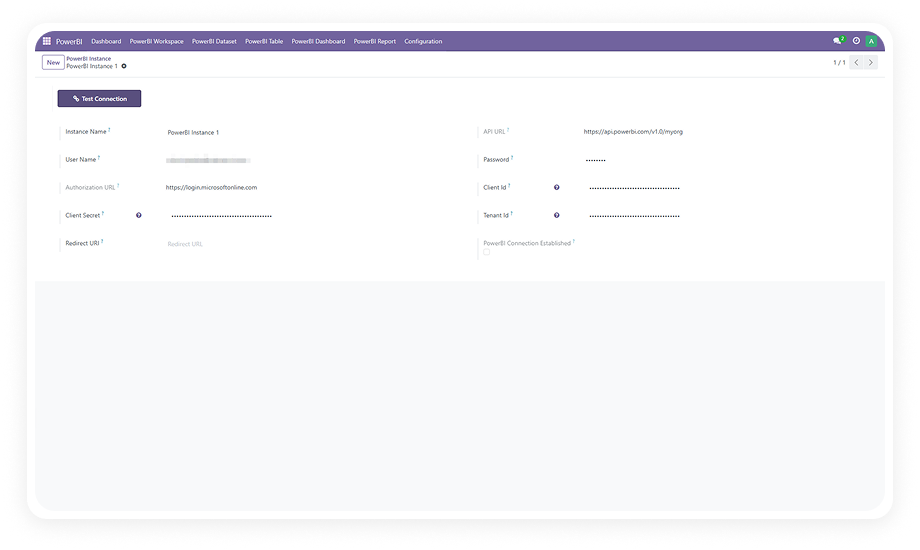
Install the module from Odoo App Store. Enter your Microsoft Azure AD credentials (Client ID, Client Secret, Tenant ID) for OAuth2 authentication.

02

Create Power BI Workspaces

Use one-click workspace creation to establish your Power BI workspaces directly from Odoo. Configure names and organize by department.

03

Select Models and Push Data

Choose Odoo models to analyze, apply domain filters, and push data to Power BI tables. Datasets are created automatically.

04

Schedule Syncs and Embed

Configure your sync schedule and import Power BI dashboards back into Odoo for in-app analytics access.

Technical Details & Compatibility

Requirement
Odoo Versions
Editions
Hosting
Dependencies
Python Dependencies
Custom Dev Required
Install Time
Server Restart
License
Last Tested
Support
Details
16.0 · 17.0 · 18.0 · 19.0
Community · Enterprise · Odoo.sh
Odoo Online · On-Premise · Odoo.sh
Discuss (mail)
msal (1.16.0), pandas, pytz, others
No
Under 15 minutes
Not required
OPL-1
Odoo 19.0 — May 2026
Power BI Connector FAQ illustration

Frequently Asked Questions

Yes — the connector supports multi-instance integration out of the box. Connect multiple Odoo databases to a single Power BI workspace for consolidated analytics. Each instance is authenticated independently.
Yes — the connector supports universal data upload from any Odoo model without restrictions. Standard modules (Sales, CRM, Inventory) and custom models are all supported.
The connector supports Odoo 16, 17, 18, and 19. Both Community and Enterprise editions are fully compatible on all hosting environments.
Yes — the connector imports Power BI dashboards and reports directly into Odoo. Users view live analytics within their Odoo workspace without switching applications.
Yes — automated scheduled publishing is a core feature. Configure sync frequency (hourly, daily, or custom) directly in Odoo settings. Datasets refresh automatically.

One-Time Purchase.
No Subscription.
No Recurring Fees.

Includes lifetime updates and 90 days of dedicated technical support.

Zehntech Odoo experts ready to help


          You have successfully subscribed to the newsletter

          There was an error while trying to send your request. Please try again.

          Zehntech will use the information you provide on this form to be in touch with you and to provide updates and marketing.