Join us at GITEX 2025! Discover our solutions at Hall 4, Booth H-30 Schedule a Meeting Today.
Automate Marketing Initiatives with Salesforce Marketing Cloud Learn More
Join us at GITEX 2024! Discover our solutions at Hall 4, Booth H-30 Book your live demo today.
Zehntech Odoo App

All In One Task Management

Centralize Every Task, Deadline, Reminder, and Time Log Inside Odoo. No more stitching together separate tools — manage project dashboards, task templates, smart reminders, auto-assignment, and time tracking in one native interface.

Compatible with Odoo 16, 17, 18 & 19
Community & Enterprise Supported
Task templates, reminders, timers & auto-assignment included
No Custom Development Required
Trusted by 500+ Businesses Across 12+ Countries
$48.78
V19, 18, 17, 16
All In One Task Management — Complete task control in Odoo

What is All In One Task Management?

All In One Task Management is a comprehensive Odoo module that consolidates project dashboards, task templates, smart reminders, time tracking, sub-task controls, and workflow automation into a single native interface. It eliminates the operational friction that comes from managing tasks across disconnected views — giving teams a structured, automated, and auditable task environment entirely within Odoo. No third-party tools, no workarounds, no manual status updates.

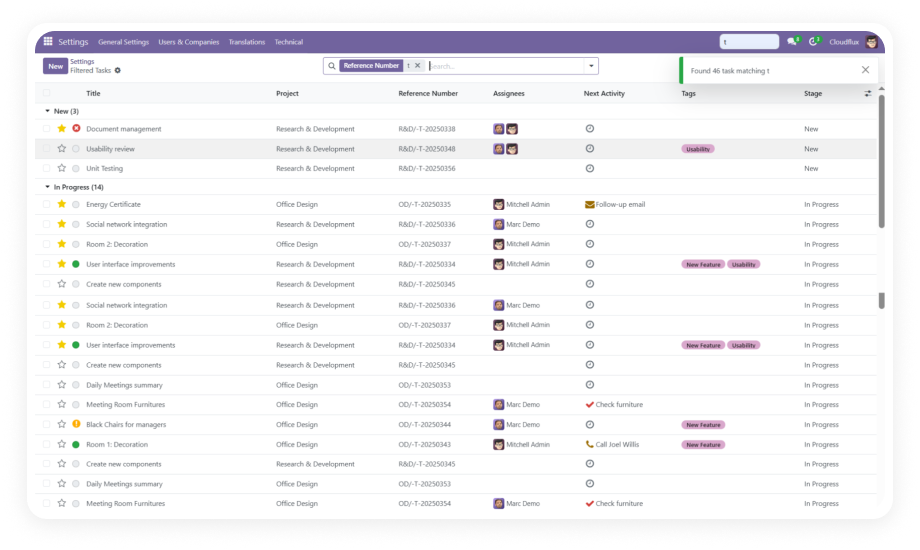
Project & task dashboards
Task templates & checklists
Auto-assignment rules
Timer logging & timesheets
Smart deadline reminders

How All In One Task Management Solves Project Execution Chaos

Problem
Zehntech Task Management Solution
No unified view of task status across projects
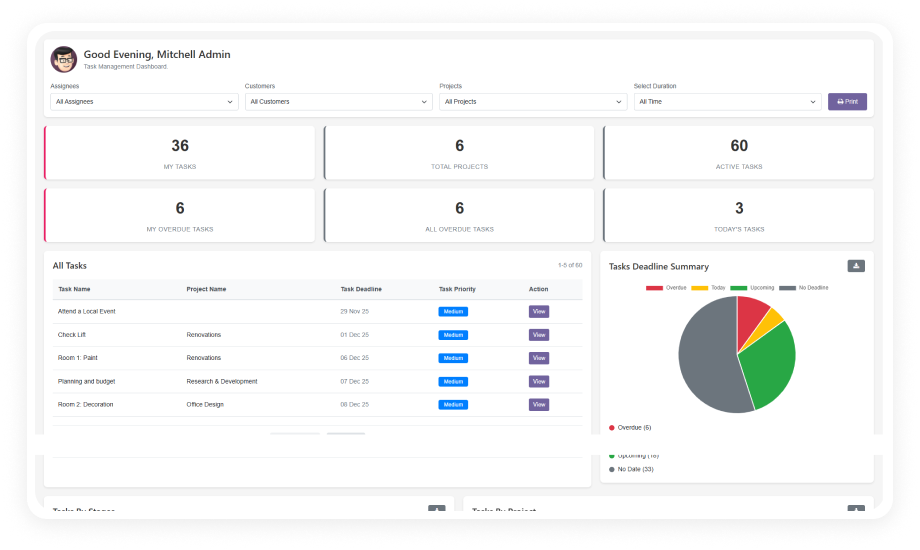
Advanced project & task dashboard gives centralized visibility into stages, workloads, and deadlines
Recreating recurring task structures wastes hours every sprint
Task templates let teams configure checklists, sub-tasks, and timelines once and reuse them
Tasks get lost without consistent numbering
Auto-generated unique IDs for every task and project make search and audit effortless
Deadlines slip because team members aren't alerted
Smart reminders automatically notify assignees of overdue tasks and approaching deadlines
Updating assignees across dozens of tasks is manual
Mass task update operations allow bulk changes in a single action
Newly staged tasks sit unassigned
Stage-triggered auto-assignment rules route tasks to the right person automatically
Time spent on tasks is estimated, not tracked
Built-in task timer logs accurate time at the task level, feeding directly into timesheets

Complete Task Control Built Into Your Odoo

1

Advanced Project Dashboard

Centralized command view that surfaces project progress, task stage distribution, team workloads, and operational bottlenecks.

Why it matters: One screen replaces multiple report requests.

2

Task Templates

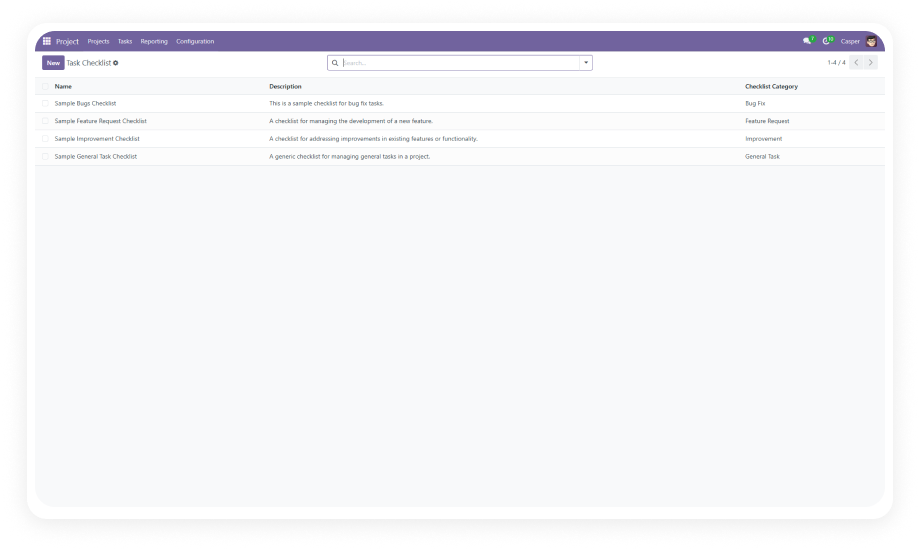
Pre-configured task structures — including checklists, sub-tasks, timelines, and progress trackers — that can be saved and reused.

Why it matters: Sprint starts become instant instead of manual setup.

3

Auto-Numbering

Auto-generated unique IDs assigned to every task and project at creation for fast search and reliable referencing.

Why it matters: No more lost tasks or duplicate references.

4

Smart Task Reminders

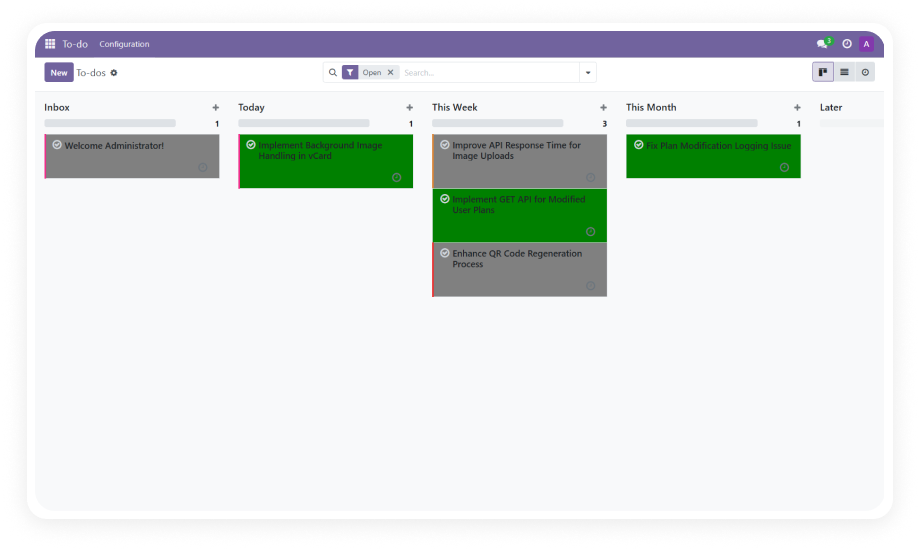
Automated alert system that notifies assignees when tasks become overdue or deadlines are approaching.

Why it matters: Deadlines are enforced without manager follow-up.

5

Mass Task Update

Bulk editing capability that lets managers apply changes to assignees, deadlines, and tags across multiple tasks.

Why it matters: Batch updates in seconds instead of hours.

6

Auto User Assignment

Stage-triggered automation rules that assign tasks to designated users when a task transitions into a configured stage.

Why it matters: No ownership gaps during task handoffs.

7

Task Timer Logs

Built-in timer functionality attached directly to each task, logging time at the activity level with precision.

Why it matters: Actual time replaces estimates for billing and planning.

8

Timesheet Integration

Seamless conversion of task timer log data into Odoo timesheet entries, eliminating double-entry effort.

Why it matters: Time tracking and billing become one workflow.

9

Sub-Task Management

Sub-task enforcement logic that prevents a parent task from being marked complete while child sub-tasks remain open.

Why it matters: Nothing slips through incomplete.

10

Task Creation from CRM

Tasks can be generated directly from CRM leads, calendar meetings, or inbound email with context preserved.

Why it matters: Seamless lead-to-execution handoff.

11

Task Priority Management

Priority level configuration on individual tasks to surface critical work and guide team focus.

Why it matters: Teams work on what matters most first.

12

Workflow Automation

Configurable automation rules that drive task lifecycle transitions, moving tasks through stages automatically.

Why it matters: Process consistency without manual intervention.

Who Gets The Most Out Of This Module

Role
Primary Use Case
Key Outcome
Project Manager
Manage multi-project task pipelines from a unified dashboard with deadline and workload visibility
Full project control without report requests
Operations Manager
Automate task assignment and stage transitions to enforce team workflows consistently
Consistent execution without manual oversight
Team Lead
Use task templates to spin up recurring project structures in seconds with pre-built checklists
Faster sprint starts and standardized delivery
CRM / Sales Manager
Convert CRM leads directly into tasks without leaving the pipeline or duplicating data entry
Seamless lead-to-execution handoff
Finance / Billing Team
Leverage task timer logs and timesheet integration to produce accurate project cost records
Accurate billing and project cost reporting
Executive / CTO
Monitor project health and team productivity through live dashboards and advanced task reports
Executive-level visibility into delivery
Not the right fit for: Teams that only need a simple task list with no automation, templates, or time tracking requirements.

Versions & Documentation

Choose your Odoo version and explore interactive documentation

Native Odoo vs Zehntech All In One Task Management

Capability
Zehntech Task Mgmt
Native Odoo
Centralized project & task dashboard
Yes — unified view with workload, stage, and deadline data
Basic — limited project overview
Task templates with checklists & sub-tasks
Yes
Not available
Auto-generated unique task & project numbering
Yes
Not available
Smart reminders for overdue tasks
Yes
Basic — manual follow-up only
Mass task update across multiple records
Yes
Not available
Stage-triggered auto user assignment
Yes
Not available
Built-in task timer with time log
Yes
Not available
One-click timesheet conversion
Yes
Not available
Sub-task completion enforcement
Yes
Not available
Task creation from CRM leads
Yes
Basic — manual task creation only

Get Started In Minutes

No development environment. No custom code. No consultant required for standard setup.

01

Purchase & Install

Buy from Odoo App Store and install directly on Odoo 16–19, Community or Enterprise.

02

Configure Automation Rules

Define stage-triggered auto-assignment rules and smart reminder thresholds in Project settings.

03

Build Templates

Create reusable task templates with pre-built checklists, sub-tasks, and timeline defaults.

04

Launch & Monitor

Assign tasks using templates, activate automation, and open the dashboard to monitor progress.

Technical Details & Compatibility

Requirement
Odoo Versions
Editions
Hosting
Dependencies
Third-Party Dependencies
Custom Dev Required
Install Time
Server Restart
Lines of Code
License
Last Tested
Support
Details
16.0 · 17.0 · 18.0 · 19.0
Community · Enterprise · Odoo.sh
Odoo Online · On-Premise · Odoo.sh
project, hr_timesheet, crm, calendar
None
No
Under 5 minutes
Not required
6,443
OPL-1
Odoo 19.0 — May 2026
All In One Task Management — FAQ illustration

Frequently Asked Questions

Yes. The module installs directly from the Odoo App Store and configures through Odoo's standard interface. All features — including automation rules, custom fields, and task templates — are activated through configuration, not code. No developer involvement is required.
Yes. The module is fully compatible with both Odoo Community and Enterprise editions. It also supports Odoo Online, On-Premise, and Odoo.sh hosting environments. All core features function across all supported editions without limitation.
Auto assignment is driven by stage-triggered rules configured in the Project settings panel. When a task moves into a defined stage, the system automatically assigns the designated user based on the configured rule — with no manual intervention needed. This eliminates ownership gaps during task handoffs.
The module supports Odoo 16, 17, 18, and 19. All four versions are fully supported across Community and Enterprise editions. Interactive documentation is available for each version via the user guide links included with purchase.
Yes. All In One Task Management allows tasks to be generated directly from CRM leads, calendar meetings, and inbound email within Odoo. This connects your sales pipeline and calendar to the project task board without manual re-entry. Context from the source record carries over automatically.

One-Time Purchase.
No Subscription.
No Recurring Fees.

Includes lifetime updates and 90 days of dedicated technical support.

Zehntech Odoo experts ready to help


          You have successfully subscribed to the newsletter

          There was an error while trying to send your request. Please try again.

          Zehntech will use the information you provide on this form to be in touch with you and to provide updates and marketing.