Join us at GITEX 2025! Discover our solutions at Hall 4, Booth H-30 Schedule a Meeting Today.
Automate Marketing Initiatives with Salesforce Marketing Cloud Learn More
Join us at GITEX 2024! Discover our solutions at Hall 4, Booth H-30 Book your live demo today.
Zehntech Odoo App

Color Code Notes for Odoo — Visual Deadline Management

Enhance your Odoo notes with automatic color-coded prioritization based on deadlines and custom time intervals.

Color-coded deadline identification
No recurring fees
Dynamic date interval configuration
90 days technical support
Works across Community & Enterprise
FREE
V19, 18, 17, 16
Color Code Notes — Odoo visual note management module

What is Color Code Notes?

Color Code Notes is a free Odoo module by Zehntech Technologies that enhances native note management with automatic color-coded categorization. The module adjusts note colors dynamically based on deadlines and configurable time intervals — giving teams instant visual clarity on urgency without manual tagging or status updates.

Automatic color changes based on deadline proximity
Configurable time intervals with custom color assignments
Rich text editor integration
Works with Project, To-Do, and Discuss modules
Zero configuration overhead

Teams using Color Code Notes spend less time scanning lists and more time acting on what matters. The visual layer eliminates the cognitive load of reading dates and calculating urgency manually.

How Color Code Notes Solves Note Prioritization Chaos

Problem
Zehntech Color Code Notes Solution
Notes lack visual urgency indicators
Automatic color coding based on deadline proximity
Manually tagging priority wastes time
Dynamic color updates without user intervention
Overdue items get buried in long lists
Distinct color differentiation for overdue notes
No way to scan deadlines at a glance
Color-based identification replaces date scanning
Default notes all look identical
Each note carries a visual urgency signal
Teams miss approaching deadlines
Color shifts alert users before deadlines hit
Configuration options are limited in native Odoo
Flexible interval and color settings per organization
Status tracking requires clicking into each note
Color provides instant status from list view

Features

1

Color Coded Prioritization

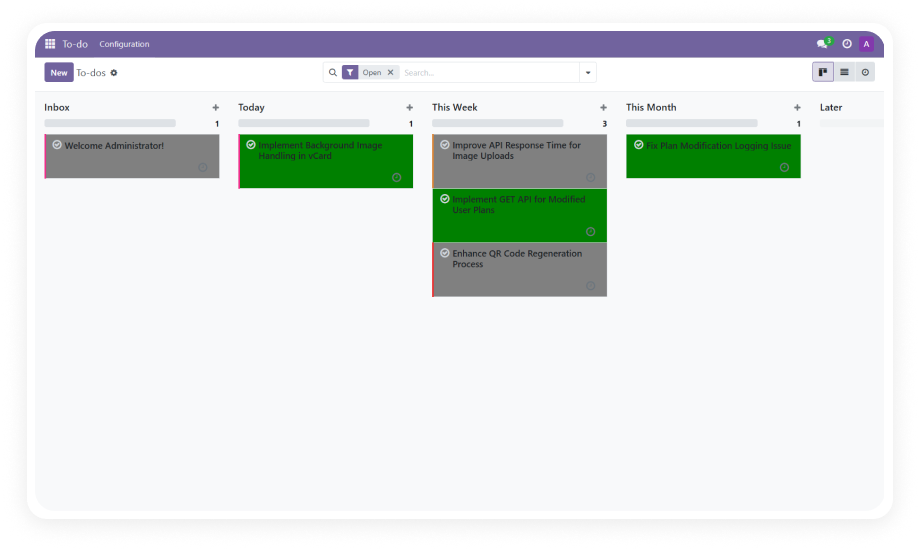
Notes are automatically assigned colors based on their deadline status.

Why it matters: teams instantly distinguish between upcoming, approaching, and overdue items without reading dates or opening individual records.

2

Dynamic Date Intervals

The module calculates time remaining until each deadline and assigns colors based on configurable intervals.

Why it matters: urgency is communicated visually and updates automatically as time passes — no manual re-tagging required.

3

Flexible Settings Configuration

Administrators define custom time intervals and assign specific colors to each range from a centralized settings panel.

Why it matters: every organization operates on different timelines, and this module adapts to your urgency thresholds rather than imposing a fixed system.

4

Deadline-Based Identification

Notes with deadlines are visually differentiated from those without, and color intensity reflects proximity to due dates.

Why it matters: critical items surface naturally in any view, reducing the risk of missed deadlines across projects and teams.

Who Gets The Most Out Of This Module

Role
Primary Use Case
Key Outcome
Project Manager
Monitoring task deadlines across multiple projects
Instant visibility into which items need immediate attention
Team Lead
Daily standup preparation and workload scanning
Faster identification of blocked or overdue work
Operations Manager
Tracking operational notes and compliance deadlines
Reduced risk of missed regulatory or process deadlines
Executive Assistant
Managing meeting notes and follow-up actions
Color-coded urgency ensures no follow-up falls through
Support Manager
Monitoring support ticket notes and SLA deadlines
Visual SLA tracking without separate dashboards
Freelancer / Consultant
Managing personal task notes across clients
Quick prioritization across multiple client engagements

Versions & Documentation

Choose your Odoo version and explore interactive documentation

Native Odoo vs Zehntech Color Code Notes

Capability
Zehntech Color Code Notes
Native Odoo
Color-coded note prioritization
Yes — automatic
No
Deadline-based color changes
Yes — dynamic
No
Configurable time intervals
Yes — fully customizable
No
Visual urgency indicators
Yes — color-coded
No
Automatic color updates as deadlines approach
Yes
No
Custom color assignments per interval
Yes
No
Overdue item differentiation
Yes — distinct color
No
Dedicated overdue color setting
Yes — independently configurable
No
Rich text editor integration
Yes
Basic text only
Works with Project module
Yes
Yes
Works with To-Do module
Yes
Yes
Centralized settings panel for color rules
Yes
No

Get Started In Minutes

No development environment. No custom code. No consultant required for standard setup.

01

Download

Get the Color Code Notes module from the Odoo App Store. Upload to your Odoo instance via the Apps menu or place in your custom addons directory.

02

Install

Navigate to Apps, update the app list, search for "Color Code Notes," and click Install. Dependencies (Project, To-Do, Discuss) will be resolved automatically.

03

Configure Intervals

Open the module settings. Define your time intervals (e.g., 0-2 days, 3-5 days, 6+ days) and assign a color to each range. Save your configuration.

04

Use

Create or open notes with deadlines. Colors will apply automatically based on your interval settings. No further action required — the system updates dynamically.

Technical Compatibility

Parameter
Module Technical Name
Odoo Versions
Editions
Hosting
Dependencies
License
Lines of Code
Author
Support
Pricing
Details
zehntech_color_code_notes
16.0 · 17.0 · 18.0 · 19.0
Community · Enterprise
Odoo Online · Odoo.sh · On Premise
Project (project), To-Do (project_todo), Discuss (mail)
OPL-1 (Odoo Proprietary License v1.0)
433
Zehntech Technologies Inc.
Free — lifetime updates included
Color Code Notes — FAQ illustration

Frequently Asked Questions

  • Adds automatic color-coded categorization to Odoo notes based on deadlines
  • Colors change dynamically as deadline proximity shifts
  • Configurable time intervals let you define your own urgency thresholds
  • Works seamlessly with the Project, To-Do, and Discuss modules
  • Yes, completely free to download and install from the Odoo App Store
  • No subscription or recurring fees of any kind
  • Includes lifetime updates for all supported Odoo versions
  • 90 days of dedicated technical support included
  • Odoo 16, 17, 18, and 19
  • Works with both Community and Enterprise editions
  • Compatible with Odoo Online, Odoo.sh, and On Premise hosting
  • Yes, the module includes a flexible settings configuration panel
  • Define custom time intervals (e.g., 0-2 days, 3-7 days, 7+ days)
  • Assign specific colors to each interval range independently
  • Changes apply immediately to all existing and new notes
  • Project (project) — standard Odoo module
  • To-Do (project_todo) — standard Odoo module
  • Discuss (mail) — standard Odoo module
  • All dependencies are part of standard Odoo installations and resolve automatically

Ready to See Deadlines Before They See You?

"One-Time Purchase. No Subscription. No Recurring Fees."

Install Color Code Notes today and give your team instant visual clarity on every deadline. No more scanning dates, no more missed follow-ups — just color-coded urgency that works automatically.

Zehntech Odoo experts ready to help


          You have successfully subscribed to the newsletter

          There was an error while trying to send your request. Please try again.

          Zehntech will use the information you provide on this form to be in touch with you and to provide updates and marketing.