Join us at GITEX 2025! Discover our solutions at Hall 4, Booth H-30 Schedule a Meeting Today.
Automate Marketing Initiatives with Salesforce Marketing Cloud Learn More
Join us at GITEX 2024! Discover our solutions at Hall 4, Booth H-30 Book your live demo today.
Zehntech Odoo App

Odoo WooCommerce Connector

Unify Your WooCommerce Stores With Odoo ERP. Connect multiple WooCommerce storefronts to a single Odoo instance. Synchronize products, orders, customers, inventory, and categories in real time — with webhook automation, comprehensive logging, and a unified operations dashboard built for teams that sell at scale.

Compatible with Odoo 16, 17, 18 & 19
Community & Enterprise Supported
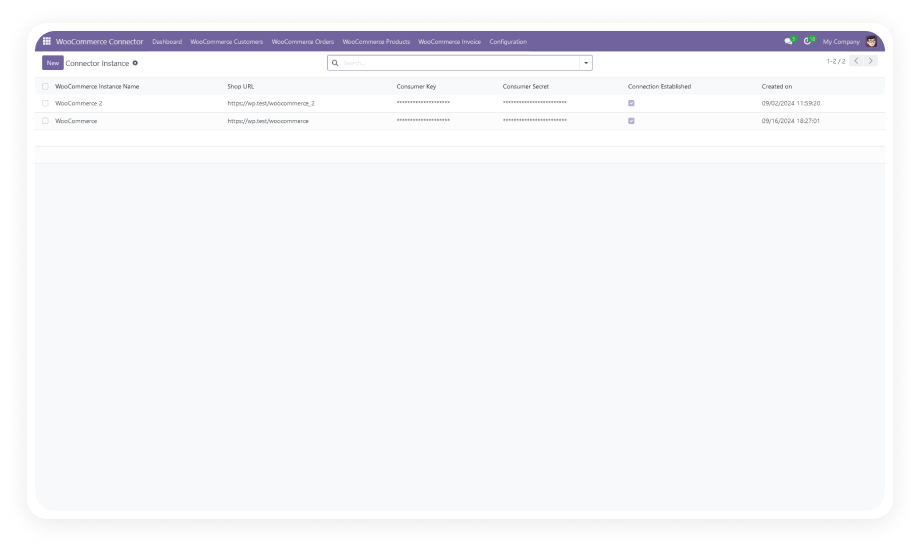
Multi-Store WooCommerce Connection
Real-Time Webhook Automation
Trusted by 500+ Businesses Across 12+ Countries
$247.89
V19, 18, 17
Odoo WooCommerce Connector — multi-store sync and real-time webhook automation

What is the Odoo WooCommerce Connector?

The Odoo WooCommerce Connector is an integration module that bridges WooCommerce and Odoo ERP into a single, synchronized commerce ecosystem. It eliminates manual data entry between your online store and back-office operations by automating the flow of products, orders, customers, inventory levels, categories, and tags — across multiple WooCommerce stores simultaneously. Whether you operate one storefront or ten, every transaction, stock movement, and customer record stays consistent across both platforms without human intervention.

Multi-store sync
Bidirectional data flow
Real-time webhooks
Order lifecycle sync
Comprehensive logging

How Odoo WooCommerce Connector Solves E-Commerce Integration Challenges

Problem
Zehntech WooCommerce Connector Solution
Orders placed on WooCommerce must be manually entered into Odoo
Automatic order sync pulls every WooCommerce order into Odoo Sales in real time
Inventory counts drift between WooCommerce and the warehouse
Bidirectional inventory sync keeps stock levels accurate across both platforms
Product updates in Odoo are not reflected on the storefront
Product sync pushes Odoo catalog changes to WooCommerce automatically
Managing multiple WooCommerce stores requires switching between dashboards
Multi-store support connects all storefronts to one Odoo instance with a unified dashboard
Customer records are duplicated across systems with no single source of truth
Customer sync consolidates buyer data in Odoo and prevents duplicate records
No visibility into what synced, what failed, or what is pending
Comprehensive logging tracks every import, export, and webhook event with full detail
Setting up WooCommerce webhooks requires developer involvement
One-click webhook creation inside Odoo eliminates the need for technical configuration
Batch imports are delayed and cause order fulfillment bottlenecks
Webhook-based real-time automation delivers data the moment events occur in WooCommerce

Complete WooCommerce-to-Odoo Integration Built for Multi-Store Operations

1

Multi-Store WooCommerce Connection

Connect an unlimited number of WooCommerce stores to a single Odoo instance. Each store is configured independently with its own credentials, sync rules, and data mappings.

Why it matters: businesses operating multiple brands, regions, or product lines manage all storefronts from one centralized ERP without switching contexts.

2

Bidirectional Product Synchronization

Sync product data — including names, descriptions, prices, images, variants, SKUs, and attributes — between WooCommerce and Odoo in both directions. Changes made in either system propagate to the other automatically.

Why it matters: your product catalog stays consistent across platforms without manual updates, reducing listing errors and saving hours of data entry per week.

3

Order Lifecycle Sync

Every WooCommerce order is automatically created in Odoo Sales with full line-item detail, customer information, shipping data, and payment status. Order status updates in Odoo flow back to WooCommerce.

Why it matters: fulfillment teams work from Odoo without monitoring WooCommerce separately, and customers see accurate order status on the storefront.

4

Customer Data Synchronization

Customer records created during WooCommerce checkout are automatically synced to Odoo Contacts with addresses, email, phone, and order history. Duplicate detection prevents redundant records.

Why it matters: sales and support teams have a complete, unified customer view in Odoo without manual imports or data reconciliation.

5

Real-Time Inventory Level Sync

Stock quantities in Odoo Inventory are synchronized with WooCommerce in real time. When a sale occurs, a receipt is processed, or a manual adjustment is made in Odoo, the corresponding WooCommerce stock level updates immediately.

Why it matters: prevents overselling, reduces stockout notifications to customers, and eliminates end-of-day batch reconciliation workflows.

6

Product Category & Tag Sync

WooCommerce product categories and tags are mapped to Odoo equivalents and synchronized automatically. New categories or tags created in either system are replicated to the other.

Why it matters: product organization stays consistent across your catalog and storefront without manual category management in two places.

7

Webhook-Based Real-Time Automation

The connector uses WooCommerce webhooks to trigger instant data updates in Odoo the moment events occur — new orders, product changes, customer registrations, and inventory adjustments.

Why it matters: unlike scheduled cron-based sync that introduces delays, webhook automation delivers data in seconds, keeping both systems current for time-sensitive operations like order fulfillment.

8

One-Click Webhook Creation

Create and manage WooCommerce webhooks directly from the Odoo interface without accessing WooCommerce admin or writing API calls. A single click registers all necessary webhook endpoints.

Why it matters: non-technical administrators can configure real-time sync without developer involvement, reducing setup time from hours to minutes.

9

Comprehensive Activity Logging

Every sync operation — imports, exports, and webhook events — is recorded with timestamps, data payloads, status indicators, and error details. Logs are filterable and searchable from within Odoo.

Why it matters: when a sync issue arises, support teams can pinpoint exactly what happened, when, and why — without guessing or recreating the problem.

10

Unified E-Commerce Dashboard

A dedicated dashboard inside Odoo displays key metrics about your WooCommerce operations: sync status, recent activity, pending items, error counts, and store-level performance indicators.

Why it matters: operations managers get a single-screen view of their entire e-commerce ecosystem health without opening multiple tools or generating manual reports.

Who Gets The Most Out Of This Connector

Role
Primary Use Case
Key Outcome
E-Commerce Manager
Manage multiple WooCommerce stores from one Odoo backend
Centralized control over products, pricing, and inventory across all storefronts
Operations Director
Eliminate manual order entry and inventory reconciliation
Reduced fulfillment errors and same-day order processing from Odoo
Warehouse Manager
Keep WooCommerce stock levels accurate in real time
Zero overselling incidents and automated stock adjustment propagation
Odoo Administrator
Configure multi-store connections and webhook automation
Full integration setup without developer dependency or API coding
Finance Controller
Ensure all WooCommerce revenue flows into Odoo accounting
Complete, auditable order-to-invoice pipeline with no data gaps
Business Owner (DTC Brand)
Scale from one to multiple WooCommerce storefronts without adding headcount
Unified operations as the business grows — no per-store admin overhead
⚠  Not the right fit for: Businesses using Shopify, Magento, or other e-commerce platforms — those require their respective dedicated connectors.

Versions & Documentation

Choose your Odoo version and explore interactive documentation

Documentation coming soon for Odoo 16.

WooCommerce Integration Setup Guide

Customer Sync Configuration Guide

Product Sync Configuration Guide

WooCommerce Integration Setup Guide

Customer Sync Configuration Guide

Product Sync Configuration Guide

WooCommerce Integration Setup Guide

Customer Sync Configuration Guide

Product Sync Configuration Guide

Native Odoo vs Zehntech Odoo WooCommerce Connector

Capability
Zehntech WooCommerce Connector
Native Odoo
WooCommerce store connection
✔ Available
Not available
Multi-store support (unlimited stores)
✔ Unlimited stores
Not available
Bidirectional product sync
✔ Full bidirectional
Not available
Automatic order import from WooCommerce
✔ Real-time
Not available
Customer data synchronization
✔ With duplicate detection
Not available
Real-time inventory level sync
✔ Instant updates
Not available
Product category and tag sync
✔ Bidirectional
Not available
Webhook-based real-time automation
✔ Full webhook support
Not available
One-click webhook creation from Odoo
✔ No dev required
Not available
Comprehensive import/export logging
✔ Full audit trail
Not available
Unified e-commerce dashboard
✔ Built-in dashboard
Not available
No-code admin configuration
✔ No dev required
Not available
Odoo Community & Enterprise support
✔ Full support
Basic (no WooCommerce)

Get Started In Minutes

No development environment. No custom code. Standard setup completes in under 15 minutes.

01

Install the Module and Python Dependency

Run pip install woocommerce on your Odoo server environment. Then search for zehntech_odoo_woocommerce_connector in your Odoo Apps menu and click Install. Compatible with Odoo 16, 17, 18, and 19.

02

Connect Your WooCommerce Store

Navigate to the WooCommerce Connector settings in Odoo. Enter your WooCommerce store URL along with the Consumer Key and Consumer Secret generated from WooCommerce Settings. Click Connect to establish the API link. Repeat for each additional store.

03

Create Webhooks and Configure Sync Rules

Use the one-click webhook creation button to register all necessary event triggers in WooCommerce directly from Odoo. Configure your sync preferences — direction, frequency, and data mapping — for products, orders, customers, inventory, and categories.

04

Run Initial Import and Monitor Dashboard

Trigger the initial data sync to pull existing WooCommerce products, orders, and customers into Odoo. Monitor the unified dashboard for sync status and review activity logs to confirm data accuracy. All new events sync automatically via webhooks from this point forward.

Technical Details & Compatibility

Requirement
Odoo Versions
Editions
Hosting
Dependencies
Third-Party Dependencies
Custom Dev Required
Install Time
Server Restart
Data Migration
Module Conflicts
License
Last Tested
Lines of Code
Support
Details
16.0 · 17.0 · 18.0 · 19.0
Community · Enterprise · Odoo.sh
Odoo Online · On-Premise · Odoo.sh
Contacts, Inventory (stock), Invoicing (account), Sales (sale_management), Discuss (mail)
Python: woocommerce (pip install woocommerce)
No
Under 15 minutes
Not required
Not required
None known
OPL-1
Odoo 19.0 — May 2026
7,657
FAQ

Frequently Asked Questions

Yes. The connector supports unlimited WooCommerce store connections to a single Odoo instance. Each store is configured independently with its own API credentials and sync settings. All stores share the unified dashboard and logging system inside Odoo for centralized monitoring.
Yes. The connector uses webhook-based automation for real-time data sync between WooCommerce and Odoo. Events in WooCommerce — new orders, product changes, customer registrations — trigger instant updates in Odoo. One-click webhook creation inside Odoo eliminates the need for manual API configuration on the WooCommerce side.
Products (including variants, attributes, images, prices, and SKUs), product categories, and product tags. Orders with full line-item detail, customer information, shipping data, and payment status. Customer records with addresses, contact details, and order history, plus real-time inventory levels.
The connector supports Odoo 16, 17, 18, and 19. Both Community and Enterprise editions are fully compatible. All hosting environments — Odoo Online, Odoo.sh, and On-Premise — are supported.
No. The connector is a one-time purchase at $247.89 with no recurring fees or subscription charges. Lifetime updates are included, ensuring compatibility with future Odoo releases. 90 days of dedicated technical support from the Zehntech team is included with every purchase.

Ready to Unify Your WooCommerce Operations Inside Odoo?

One-Time Purchase. No Subscription. No Recurring Fees. Your WooCommerce stores generate orders, update inventory, and create customers around the clock. The Odoo WooCommerce Connector ensures every one of those events reaches your Odoo ERP in real time — no manual imports, no batch delays, no data gaps. Includes lifetime updates and 90 days of dedicated technical support.

Zehntech Odoo experts


          You have successfully subscribed to the newsletter

          There was an error while trying to send your request. Please try again.

          Zehntech will use the information you provide on this form to be in touch with you and to provide updates and marketing.