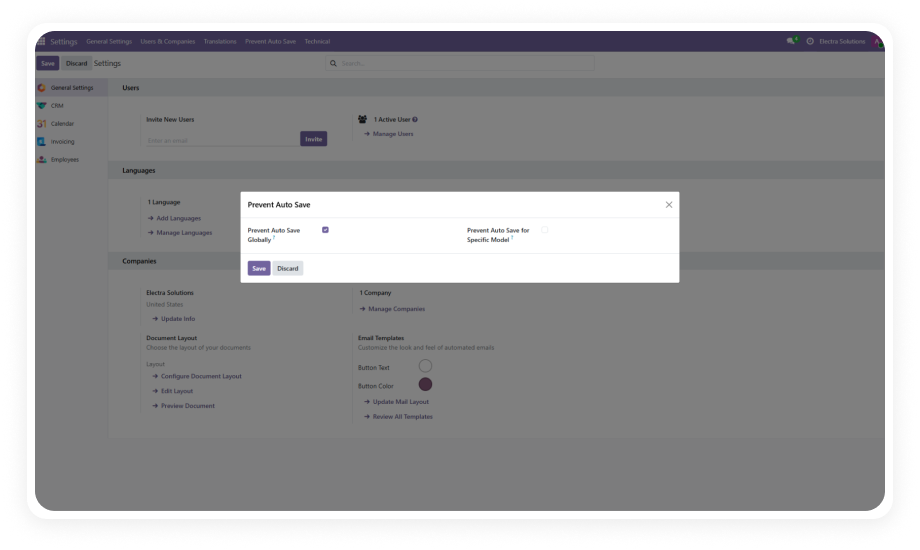
Disable automatic form saving across your entire Odoo instance with a single toggle. Once enabled, no form data is committed to the database without explicit user confirmation.
Why it matters: Organizations handling sensitive financial, HR, or customer data cannot afford accidental overwrites — global prevention ensures every save is intentional regardless of which module a user is working in.
Selectively choose which Odoo models require manual save confirmation. Configure auto-save prevention only on critical models like Invoicing or HR records while leaving less sensitive forms with default behavior.
Why it matters: Different business processes have different risk profiles — a sales note may not need the same protection as a payroll record, and model-specific control lets you match security to sensitivity.
When a user attempts to leave a form with unsaved changes, a clear popup notification appears. Users can then choose to save their work, discard changes, or return to the form to continue editing.
Why it matters: Without visual warnings, users assume their work is saved — popup alerts eliminate the confusion between "saved" and "unsaved" states, preventing both data loss and unintended commits.
Enable or disable auto-save restriction through simple checkbox controls in the Settings menu. Administrators can instantly switch between restricted and default Odoo behavior without code changes or module reinstallation.
Why it matters: Business needs change — during data migration you may want auto-save active, while during normal operations you need it restricted. Instant toggling provides operational flexibility without technical overhead.
Seamlessly integrates with core Odoo modules including CRM, Contacts, Discuss, Employees, Calendar, and Invoicing. The restriction applies consistently across all dependent modules without requiring individual configuration per app.
Why it matters: Data integrity must be consistent across your entire workflow — a restriction that only works in one module while auto-saving in another creates false confidence and leaves gaps in your protection strategy.
All configuration is centralized within Odoo's native Settings interface under the "Prevent Auto Save" menu. No separate admin panels, no external configuration files — everything is managed where administrators already work.
Why it matters: Centralized configuration reduces the learning curve for new administrators and ensures that auto-save policies are visible, auditable, and easily adjustable alongside other system settings.