Join us at GITEX 2025! Discover our solutions at Hall 4, Booth H-30 Schedule a Meeting Today.
Automate Marketing Initiatives with Salesforce Marketing Cloud Learn More
Join us at GITEX 2024! Discover our solutions at Hall 4, Booth H-30 Book your live demo today.
Zehntech Odoo App

Global Search for Odoo

Find Any Record Across All Odoo Modules Instantly. Stop navigating between Sales, Inventory, Invoicing, and Purchases to locate a single record. Global Search delivers unified, cross-module search results from one interface — with exact phrase matching, category filters, and a complete search history that keeps your team moving.

Compatible with Odoo 16, 17, 18 & 19
Community & Enterprise Supported
Searches Customers, Products, Sales, Purchases, Inventory & Invoices
Respects Native Odoo Access Controls
Trusted by 500+ Businesses Across 12+ Countries
$19.91
V19, 18, 17, 16
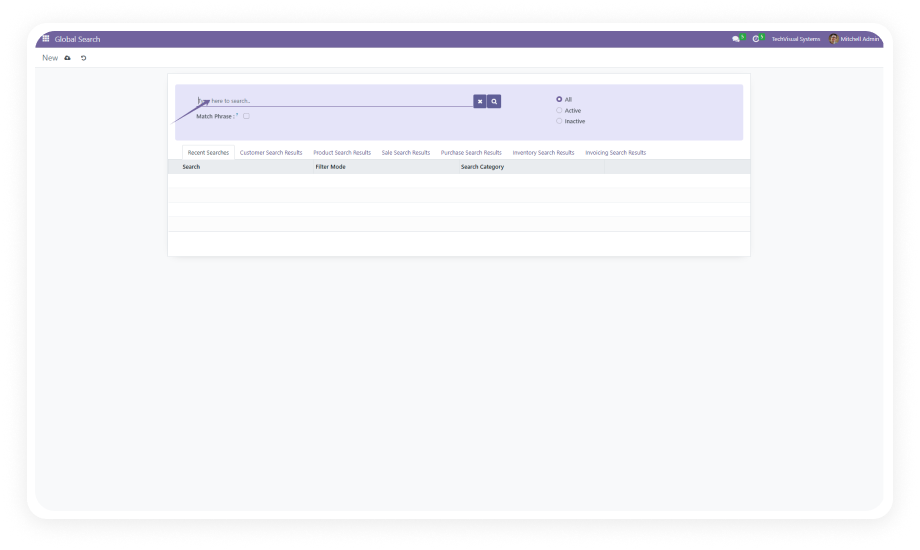
Global Search for Odoo — Unified cross-module search interface

Global Search is an Odoo productivity module that lets users search across multiple business modules simultaneously from a single interface. Instead of opening each application individually to locate a customer, product, order, or invoice, users type their query once and receive categorized results spanning Customers, Products, Sales Orders, Purchases, Inventory, and Invoices — all filtered by their existing Odoo permissions.

Cross-module search
Exact phrase matching
Category filters
Status filters
Search history
Role-based results

How Global Search Eliminates the Odoo Navigation Problem

Problem
Zehntech Global Search Solution
Finding a single record requires opening and searching within each module individually
One unified search interface returns results from all six core modules simultaneously
Broad keyword searches return too many irrelevant results
Match Phrase option enables exact string matching to surface precisely what you need
No way to limit search scope without navigating to a specific module first
Module category filter lets users narrow results to Sales, Inventory, Purchases, or any combination
Archived or inactive records clutter search results during daily operations
Active/Inactive status filter separates current records from historical data on demand
Users waste time re-running the same searches throughout the day
Search history saves recent queries with one-click access to repeat any prior search
Search results across modules have no unified structure or context
Categorized results are organized by module type with record counts for immediate context
Shared search tools may expose records users shouldn't see
Role-based access control ensures search results respect each user's native Odoo permissions
Adding cross-module search typically requires custom development
Global Search installs from the Odoo App Store with zero custom code required

Complete Cross-Module Search for Your Odoo Environment

1

Search simultaneously across Customers, Products, Sales Orders, Purchases, Inventory, and Invoices from a single search interface. Results from all six modules are returned together in one categorized view.

Why it matters: eliminates the repetitive workflow of opening each module individually to locate records, saving measurable time on every lookup your team performs.

2

Enable the Match Phrase option to search for your exact input as a complete phrase rather than as individual separated keywords. When activated, only records containing the exact sequence of words you entered are returned.

Why it matters: when you know the precise name, reference number, or description you need, exact matching cuts through noise instantly.

3

Module Category Filtering

Filter search results by specific module categories — focus on just Sales, just Inventory, just Invoices, or any combination you need in the moment.

Why it matters: gives users control over search scope without forcing them to navigate into each module separately.

4

Active and Inactive Status Filter

Toggle between Active, Inactive, or All record states to control whether archived or historical records appear alongside current data.

Why it matters: daily operational searches stay clean and focused on live data, while audit or investigation workflows can surface archived records on demand.

5

Categorized Results with Record Counts

Search results are organized by module type with a count of matching records per category displayed alongside the results.

Why it matters: users instantly understand the distribution of matching records across their business — seeing at a glance whether a search term has more hits in Sales versus Inventory.

6

Role-Based Access Control

Search results are filtered through native Odoo security protocols. Each user only sees records from modules and record types their role has permission to access.

Why it matters: a shared search tool that exposes data across module boundaries must enforce the same access controls as direct module navigation.

7

Search History with One-Click Access

Every search query is saved to a personal history log. Users can revisit and re-execute any recent search with a single click rather than retyping the query.

Why it matters: operational teams run the same lookups repeatedly throughout the day — search history transforms repetitive typing into a one-click action.

Who Gets The Most Out Of This Module

Role
Primary Use Case
Key Outcome
Operations Manager
Locate a customer's full trail — orders, invoices, inventory movements — from one search
Complete cross-module visibility without switching between applications
Sales Team Lead
Quickly find products, customer records, and open sales orders during client calls
Faster response times and fewer on-hold moments during live conversations
Warehouse Manager
Search for product records and associated purchase or inventory documents simultaneously
Immediate context on stock movements, receipts, and procurement status
Accounts / Finance Team
Find invoices, related purchase orders, and customer records in a single query
Faster reconciliation and audit workflows with categorized multi-module results
Odoo Administrator
Provide power-user search capabilities to the organization without custom development
Improved team productivity with a module that installs in minutes and respects existing security
Executive / Business Owner
Search across the entire business from one interface to answer operational questions quickly
Instant answers without needing to know which module holds the relevant record

Versions & Documentation

Choose your Odoo version and explore interactive documentation

Capability
Zehntech Global Search
Native Odoo
Search across multiple modules simultaneously
Yes
Not available
Unified results from Customers, Products, Sales, Purchases, Inventory, Invoices
Yes
Not available
Exact phrase matching (Match Phrase)
Yes
Not available
Filter results by module category
Yes
Not available
Filter results by Active/Inactive status
Yes
Not available
Categorized results with record counts per module
Yes
Not available
Search history with one-click re-execution
Yes
Not available
Role-based access control on search results
Yes
Per-module only
Single interface for cross-module lookups
Yes
Not available
No custom development required
Yes
N/A — feature does not exist
Odoo Community edition support
Yes
Basic (single-module search only)
Odoo Enterprise edition support
Yes
Basic (single-module search only)

Get Started In Minutes

No development environment. No custom code. No consultant required for standard setup.

01

Install from the Odoo App Store

Search for zehntech_global_search in your Odoo Apps menu and click Install. Compatible with Odoo 16, 17, 18, and 19 on both Community and Enterprise editions.

02

Open the Global Search Interface

Once installed, the Global Search interface is accessible from your Odoo navigation. No additional configuration is needed to begin searching.

03

Search and Filter

Enter any keyword or phrase into the search bar. Enable Match Phrase for exact matching. Use the module category dropdown to narrow results.

04

Leverage Search History

As you use Global Search, your queries are automatically saved. Access your search history to re-execute recent queries with a single click.

Technical Details & Compatibility

Requirement
Odoo Versions
Editions
Hosting
Dependencies
Third-Party Dependencies
Custom Dev Required
Install Time
Server Restart
Data Migration
Module Conflicts
License
Lines of Code
Last Tested
Support
Details
16.0 · 17.0 · 18.0 · 19.0
Community · Enterprise · Odoo.sh
Odoo Online · On-Premise · Odoo.sh
Sales · Purchase · Inventory · Invoicing · Discuss
None
No
Under 5 minutes
Not required
Not required
None known
OPL-1
733
Odoo 19.0 — May 2026
Global Search for Odoo — FAQ illustration

Frequently Asked Questions

Global Search queries six core business modules: Customers, Products, Sales Orders, Purchases, Inventory, and Invoices. All results are returned in a single categorized view with record counts per module. Users do not need to navigate between individual applications to find records across the business.
Yes — the module enforces native Odoo role-based access control on every search. Users only see results from modules and records they already have permission to access. No additional security configuration is required beyond standard Odoo user roles.
Yes — enable the Match Phrase option to search for your input as a complete, exact string. When activated, only records containing the exact sequence of words you entered are returned. This eliminates irrelevant partial-match results when you know precisely what you need.
Global Search supports Odoo 16, 17, 18, and 19. Both Community and Enterprise editions are fully compatible. The module works across all deployment models: Odoo Online, Odoo.sh, and On-Premise.
No third-party dependencies are required for installation or operation. The module depends on standard Odoo applications (Sales, Purchase, Inventory, Invoicing, and Discuss) which are already present in most Odoo installations. No custom development, server configuration, or external integrations are needed.

One-Time Purchase.
No Subscription.
No Recurring Fees.

Your team already works across Sales, Inventory, Invoicing, and Purchases every day. Global Search eliminates the constant module-switching by putting every record within reach of a single query. Install in under 5 minutes and start finding records in seconds instead of minutes. Includes lifetime updates and 90 days of dedicated technical support.

Zehntech Odoo experts ready to help


          You have successfully subscribed to the newsletter

          There was an error while trying to send your request. Please try again.

          Zehntech will use the information you provide on this form to be in touch with you and to provide updates and marketing.