Join us at GITEX 2025! Discover our solutions at Hall 4, Booth H-30 Schedule a Meeting Today.
Automate Marketing Initiatives with Salesforce Marketing Cloud Learn More
Join us at GITEX 2024! Discover our solutions at Hall 4, Booth H-30 Book your live demo today.
Zehntech Odoo App

Task Auto Numbering and Search for Odoo

Automatically assign unique, configurable reference numbers to every project task — and find any task instantly with global search. Stop scrolling through unnamed tasks. Give every task a structured ID and locate any record in seconds.

Compatible with Odoo 16, 17, 18 & 19
Community & Enterprise Supported
Custom Prefix, Suffix & Step Configuration
One-Time Purchase — No Recurring Fees
Odoo Online | Odoo.sh | On Premise
$19.91
V19, 18, 17, 16
Task Auto Numbering and Search for Odoo — unique reference numbers and global search

What Does Task Auto Numbering and Search Do?

Task Auto Numbering and Search is an Odoo module that automatically generates unique, customizable reference numbers for every project task and enables instant task lookup through a dedicated global search box. You configure the prefix, suffix, starting number, and increment step — the module handles the rest. When you need to find a task, simply type its reference number into the search box and jump straight to it.

Structured task identification (TASK-001, DEV-0050)
Instant global task search by reference number
Bulk regeneration for existing task libraries
Professional task references for client communication
Audit trail and compliance traceability

How Task Auto Numbering Solves Unstructured Task Management

Problem
Zehntech Solution
No quick way to reference tasks in emails or reports
Every task gets a unique structured ID (e.g., TASK-001)
Duplicate or ambiguous task names cause confusion
Sequential, zero-duplicate reference numbers on every task
Manual numbering breaks down as teams scale
Fully automated sequential numbering — no manual effort
Time wasted scrolling to find a specific task
Global search box — find any task by reference in one step
No audit trail for task tracking across departments
Structured IDs enable reliable tracking and reporting
Existing tasks have no consistent identification
Bulk regeneration applies new pattern to all existing records
No flexibility for exceptions or legacy records
Manual override button for individual task corrections
New team members struggle to locate tasks
Reference numbers provide immediate orientation for all users

Key Features

1

Automatic Reference Number Generation

Every new project task is automatically assigned a unique, sequential reference number the moment it is created. No manual input, no duplicates, no gaps.

Why it matters: Teams can immediately reference tasks in conversations, emails, and documentation without creating naming conventions manually.

2

Custom Sequence Configuration

Define your own numbering format by setting custom prefixes (e.g., "TASK-", "DEV-"), suffixes, starting numbers, and step increments to match your organization's conventions.

Why it matters: Different departments or projects can use distinct numbering patterns, making cross-team identification intuitive and consistent.

3

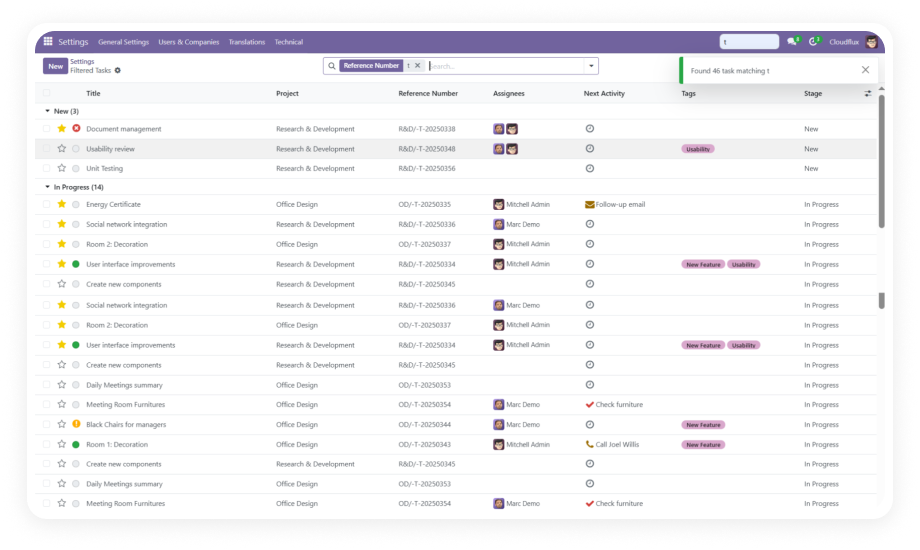
A dedicated search box lets users locate any task instantly by entering its reference number. The search works globally across all projects within your Odoo instance.

Why it matters: Eliminates time spent scrolling through task lists or applying complex filters — go directly from reference number to task record in one step.

4

Manual Reference Editing

A dedicated button allows authorized users to manually update or regenerate a task's reference number when exceptions or corrections are needed.

Why it matters: Provides flexibility for edge cases — merged tasks, re-assigned work, or legacy records that need alignment with the new numbering system.

5

Bulk Reference Regeneration

A single-click option regenerates reference numbers for all existing tasks at once, with a success notification confirming how many records were updated.

Why it matters: When migrating to this module or changing numbering conventions, you can apply the new pattern to your entire task history without touching individual records.

6

Success Notifications

After bulk operations, the system displays clear notifications showing the count of updated records, confirming that the regeneration completed successfully.

Why it matters: Gives administrators confidence that batch operations executed correctly, reducing uncertainty and the need for manual verification.

Role
Primary Use Case
Key Outcome
Project Manager
Tracking and referencing tasks in status reports and meetings
Instant task identification without ambiguity
Development Team Lead
Assigning structured ticket numbers to development tasks
Consistent numbering across sprints and backlogs
Operations Manager
Locating specific operational tasks across multiple projects
Seconds to find any task via global search
QA Analyst
Referencing bug tickets and test tasks in QA documentation
Clear traceability between test reports and task records
Client Account Manager
Sharing task references with external clients for transparency
Professional, structured communication with clients
System Administrator
Bulk-updating reference numbers after data migration
One-click regeneration across all existing tasks
Finance Controller
Cross-referencing project tasks with billing records
Reliable task IDs that align with invoicing systems
HR Coordinator
Tracking onboarding tasks per new employee
Organized, searchable onboarding checklists

Supported Versions & Documentation

Choose your Odoo version and explore interactive documentation

Documentation for Odoo 16 — coming soon. Contact us for setup assistance.

Documentation for Odoo 17 — coming soon. Contact us for setup assistance.

Documentation for Odoo 18 — coming soon. Contact us for setup assistance.

Documentation for Odoo 19 — coming soon. Contact us for setup assistance.

Before vs. After: Task Management With and Without Auto Numbering

Aspect
With Task Auto Numbering
Without This Module
Task Identification
✔ Unique, structured reference numbers on every task
Generic task names, often duplicated
Finding a Specific Task
✔ Type reference number in global search — instant result
Scroll through lists or apply multiple filters
Numbering Consistency
✔ Fully automated, sequential, zero duplicates
Manual effort, prone to errors and gaps
Customization
✔ Custom prefix, suffix, start number, and step
No built-in sequence configuration
Legacy Task Updates
✔ Single-click bulk regeneration for all existing tasks
One-by-one manual editing
Cross-Team Communication
✔ "Check TASK-0247 for the latest update"
"That task... the one about the login page..."
Onboarding New Members
✔ Reference numbers provide immediate orientation
New staff struggle to locate tasks
Audit & Compliance
✔ Structured IDs enable reliable tracking
Difficult to trace task history

How to Install and Configure

Up and running in under 15 minutes. No development environment required.

01

Install the Module

Purchase from the Odoo App Store and activate from the Apps menu. Works on Odoo 16–19, Community, Enterprise, and Odoo.sh. Dependencies (Project and Discuss) confirmed automatically.

02

Configure Your Numbering Sequence

Navigate to the module's configuration settings. Define your preferred prefix (e.g., "TASK-", "PRJ-"), suffix, starting number, and step increment. Save to apply to all future tasks.

03

Regenerate References for Existing Tasks

Use the bulk regeneration feature to assign reference numbers to all existing tasks in a single click. A success notification confirms the count of updated records.

04

Type any reference number into the global search box to jump straight to the task. Share reference numbers in emails, reports, and meetings for instant task identification.

Technical Details & Compatibility

Parameter
Technical Name
License
Odoo Versions
Deployment
Editions
Dependencies
Lines of Code
Custom Dev Required
Install Time
Developer
Support
Details
zehntech_task_auto_numbering
OPL-1 (Odoo Proprietary License)
16.0 · 17.0 · 18.0 · 19.0
Odoo Online · Odoo.sh · On Premise
Community · Enterprise
Project (project), Discuss (mail)
335
No
Under 15 minutes
Zehntech Technologies Inc.
Task Auto Numbering and Search — Frequently Asked Questions

Frequently Asked Questions

Yes. Task Auto Numbering and Search is compatible with both Odoo Community and Enterprise editions across all supported versions (16, 17, 18, 19). The only requirements are that the Project and Discuss modules are installed.
The module provides configurable prefixes, suffixes, starting numbers, and step increments. You define the numbering pattern that best fits your organization's naming conventions, ensuring consistent identification across all your project tasks.
Existing tasks will not automatically receive reference numbers upon installation. Use the bulk regeneration feature to assign reference numbers to all existing tasks in a single click. A success notification confirms how many records were updated after regeneration.
Yes. The module includes a dedicated button for manually updating or regenerating individual task reference numbers. This is useful for edge cases such as merged tasks, re-assigned records, or alignment corrections.
Task Auto Numbering and Search is a one-time purchase at $19.91. There are no recurring fees, no subscriptions, and no hidden costs. You receive lifetime access to the module for your purchased Odoo version.

One-Time Purchase.
No Subscription.
No Recurring Fees.

Give every project task a unique identity. Find any task in seconds. Bring structure and speed to your Odoo project management — at $19.91, it pays for itself in hours saved on day one.

Get started with Task Auto Numbering and Search for Odoo


          You have successfully subscribed to the newsletter

          There was an error while trying to send your request. Please try again.

          Zehntech will use the information you provide on this form to be in touch with you and to provide updates and marketing.