Join us at GITEX 2025! Discover our solutions at Hall 4, Booth H-30 Schedule a Meeting Today.
Automate Marketing Initiatives with Salesforce Marketing Cloud Learn More
Join us at GITEX 2024! Discover our solutions at Hall 4, Booth H-30 Book your live demo today.
Zehntech Odoo App

Timesheet Approval Workflow for Odoo

Structured Timesheet Oversight with Multi-Stage Approval, Manager Review, and Full Audit Compliance. Eliminate payroll inaccuracies, prevent unauthorized billing, and enforce accountability through manager-level review gates, automated email notifications, and a comprehensive audit trail.

Compatible with Odoo 16, 17, 18 & 19
Four-Stage Approval Workflow
Real-Time Management Dashboard
Comprehensive Audit Trail
Automated Email Notifications
$48.78
V19, 18
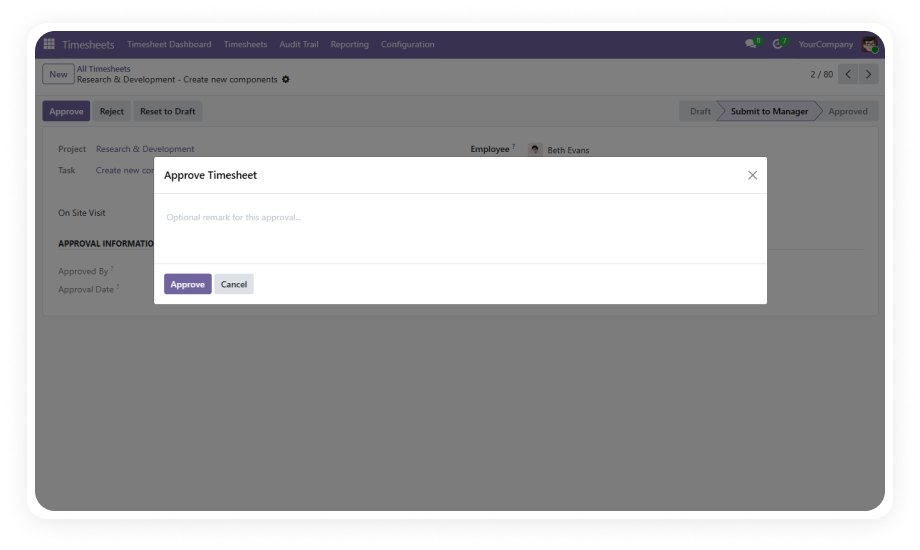
Timesheet Approval Workflow — Multi-stage approval dashboard

What Is Timesheet Approval Workflow?

Timesheet Approval Workflow is a Zehntech Odoo module that introduces a structured four-stage approval process (Draft, Submitted, Approved, Rejected) for employee timesheets. It eliminates payroll inaccuracies, prevents unauthorized billing, and enforces accountability through manager-level review gates, automated email notifications, and a comprehensive audit trail — all integrated natively within Odoo's HR and Project modules.

HR Manager timesheet review before payroll
Project Manager billable hours validation
Finance Controller compliance auditing
Team Lead submission monitoring

How Timesheet Approval Workflow Solves HR Challenges

Problem
Zehntech Solution
Inaccurate billing from unapproved timesheets
Four-stage approval pipeline with manager review
Payroll errors from unverified hours
Mandatory approval before payroll processing
Zero accountability and audit vulnerabilities
Comprehensive audit trail with timestamps
Manager blindspots on pending reviews
Real-time dashboard with KPI cards
Compliance risk from undocumented tracking
Immutable read-only audit logs
No feedback mechanism for rejections
Mandatory rejection reasons with notifications

Key Features

1

Four-Stage Approval Workflow

Timesheets progress through Draft, Submitted, Approved, and Rejected states with clear transitions and validation rules at each stage.

Why it matters: Prevents unverified hours from reaching payroll or client billing.

2

Real-Time Management Dashboard

Interactive KPI cards display pending approvals, overdue submissions, and recent rejections with visual charts for instant insight.

Why it matters: Single-screen overview eliminates digging through individual records.

3

Comprehensive Audit Trail

Every action is automatically logged with timestamps, user details, and remarks in a read-only format that cannot be tampered with.

Why it matters: Full compliance with labor regulations and audit requirements.

4

Automated Email Notifications

HTML-formatted email alerts trigger automatically for submissions, approvals, and rejections with action buttons for direct response.

Why it matters: Accelerates approval cycle by bringing decisions to manager's inbox.

5

Role-Based Access Control

Employees view only their personal timesheets while managers have full team visibility. Locked fields post-submission prevent unauthorized edits.

Why it matters: Protects data integrity while giving managers needed oversight.

6

Mandatory Rejection Reasons

When a manager rejects a timesheet, the system requires a written explanation visible to the employee and logged in the audit trail.

Why it matters: Clear feedback reduces back-and-forth and documents rationale.

Who Benefits from Timesheet Approval Workflow?

Role
Primary Use Case
Key Outcome
HR Manager
Review and approve employee timesheets before payroll
Eliminates payroll errors from unverified hours
Project Manager
Validate billable hours logged against client projects
Ensures accurate client invoicing and profitability
Finance Controller
Audit timesheet approvals for compliance reporting
Maintains documented approval chain for audits
Team Lead
Monitor team submission patterns and flag overdue entries
Improves team discipline and on-time submissions
Employee
Submit timesheets and receive clear rejection feedback
Understands exactly what needs correction

Versions & Documentation

Choose your Odoo version and explore interactive documentation

Timesheet Approval Workflow vs Standard Odoo

Capability
Zehntech Module
Standard Odoo
Multi-stage approval pipeline
Yes — Draft, Submitted, Approved, Rejected
No
Manager review gate before payroll
Yes — mandatory approval step
No
Mandatory rejection reasons
Yes — required written explanation
No
Real-time management dashboard
Yes — KPI cards and interactive charts
No
Automated email notifications
Yes — HTML emails with action buttons
No
Immutable audit trail
Yes — timestamped, read-only logs
No
Role-based field locking
Yes — locked fields post-submission
No

Get Started in Minutes

Install, configure, and start managing timesheet approvals immediately.

01

Install and Configure

Install from Odoo App Store. Depends on Discuss, Employees, and Project — ensure these are active. Configure email templates.

02

Define Roles and Permissions

Assign manager-level access to team leads. Set up employee groups for visibility control.

03

Activate the Workflow

Employees log timesheets and submit for review. Managers approve or reject from dashboard or email.

04

Monitor and Optimize

Track pending approvals, monitor turnaround times, and review audit trail for compliance.

Technical Details & Compatibility

Requirement
Technical Name
Odoo Versions
Dependencies
Hosting
License
Codebase Size
Support
Details
zehntech_timesheet_approval_workflow
16.0 · 17.0 · 18.0 · 19.0
Discuss (mail), Employees (hr), Project (project)
Odoo Online · Odoo.sh · On-Premise
OPL-1
~2,355 lines of code
Timesheet Approval — FAQ illustration

Frequently Asked Questions

Yes. The module extends Odoo's native timesheet features by adding an approval layer on top. Existing timesheet entries and project integrations remain fully functional. No data migration is needed.
The module provides a proven four-stage workflow that covers most requirements. Custom development by Zehntech can extend the pipeline for organizations needing additional approval tiers.
The manager must provide a mandatory written reason. The employee receives an automated email notification with the rejection reason and can reset the entry to draft, make corrections, and resubmit.
Yes. The module respects Odoo's standard multi-company access rules. Each company's timesheet workflow operates independently with separate manager assignments.
Every action is logged with exact timestamp, user details, and remarks. Audit logs are stored in read-only format and cannot be modified or deleted by any user.

One-Time Purchase.
No Subscription.
No Recurring Fees.

Includes lifetime updates and 90 days of dedicated technical support.

Zehntech Odoo experts ready to help


          You have successfully subscribed to the newsletter

          There was an error while trying to send your request. Please try again.

          Zehntech will use the information you provide on this form to be in touch with you and to provide updates and marketing.