







Join us at GITEX 2025! Discover our solutions at Hall 4, Booth H-30 Schedule a Meeting Today.
Automate Marketing Initiatives with Salesforce Marketing Cloud Learn More
Join us at GITEX 2024! Discover our solutions at Hall 4, Booth H-30 Book your live demo today.

How to Create an Impressive Website with Wix?

Wix is a cloud-based website builder that has web hosting and style services. Its user-friendly drag-and-drop tools and over 500+ ready-made templates facilitate your building your website without either having specialist skills or hiring an online developer. It is obviously an extremely powerful tool so many people use it to build their websites because it’s very powerful. Wix accelerates the online development process and provides you with the creative freedom to make the website you desire. As a result, it is an ideal website builder for small and medium e-commerce businesses.

A place for big ideas.

Reimagine organizational performance while delivering a delightful experience through optimized operations.

We’re Going to Create a Wix Website in 4 Steps

Step 1- Create an account on Wix

Click this- https://www.wix.com and create your account.
Then Wix asks some questions you can skip that.

Step 2- Choose a design for your website

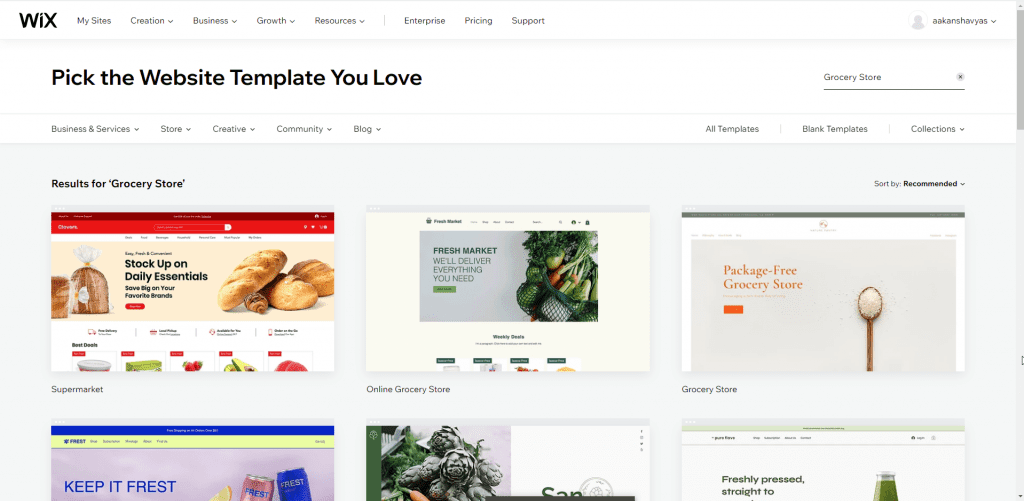
Wix contains a lot of pre-made designs which you’ll select from. Which you’ll use on your website.

Templates are fully built sites that contain everything you would like to urge started, like sample content, galleries, inner pages, and built-in business features. Everyone is fully customizable and might be used as an excellent start line for your website creation journey.

You can find over 800 designer-made templates from Wix. They cover all sorts of internet sites, from a recipe blog to a marriage event site, from a car mechanic business to a consultancy—and such a lot more. Everyone is formed using thorough research and trends to form sure every component, from the design to the pages, most closely fits the subject.
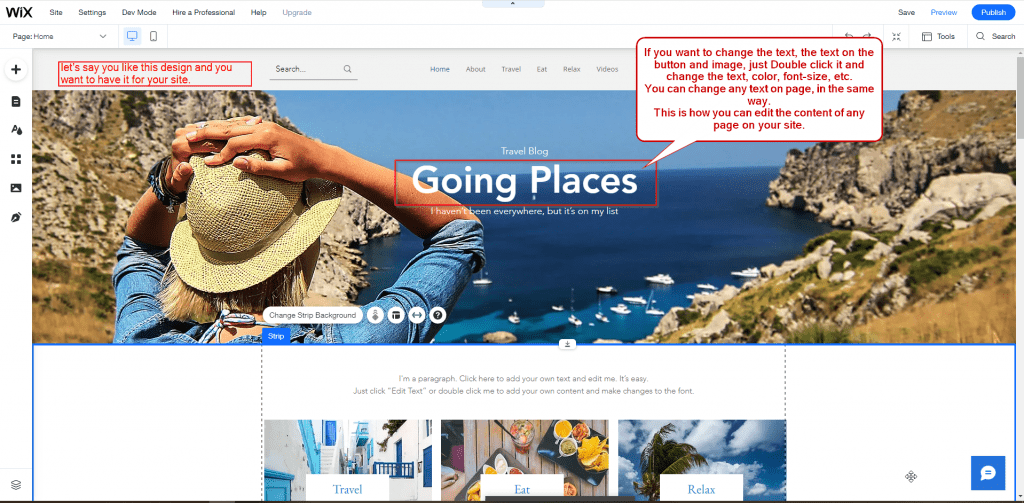
then click on the “Edit this site” button.

template

Step 3- Add your content to your chosen template

textadd

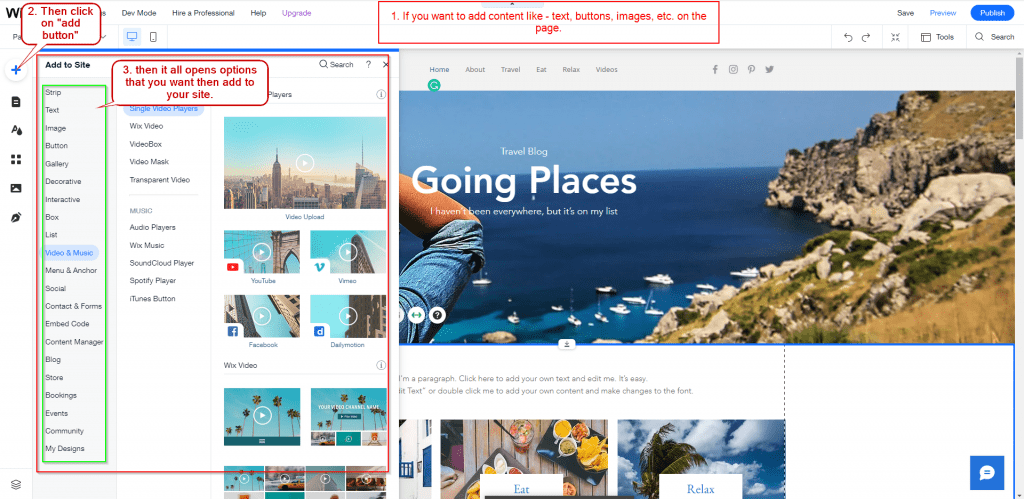
You can add another element to your website page like – text, buttons, images, etc. on the page.

extracontent

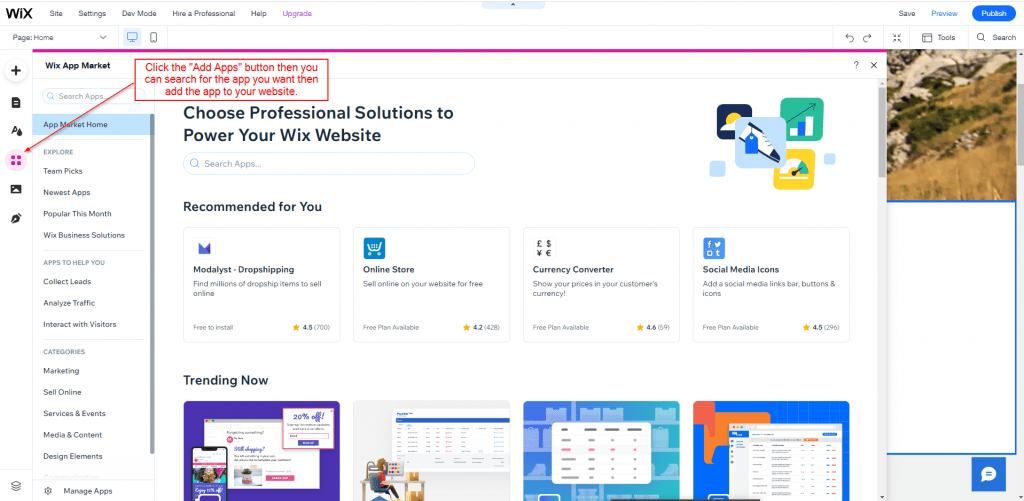
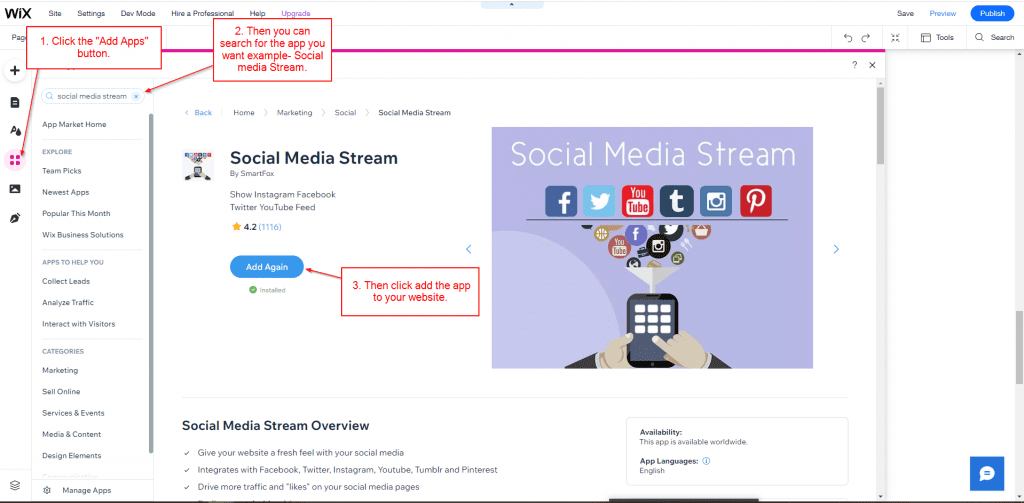
You can also add “Apps or third-party ” to your website –

app 1

Wix apps like –

Wix Stores, 123 Form Builder & Payments, Visitor Analytics, Social Media Stream, Comments, Logo makers, Wix Bookings, Photo & Video gallery, Site booster, etc.

For example – Social Media Stream.

smsapp 1

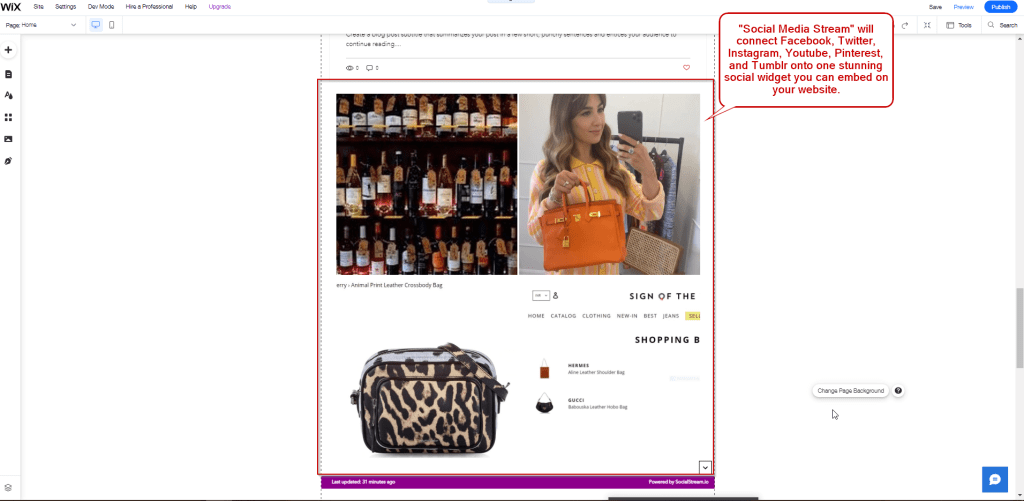
“Social Media Stream” will connect Facebook, Twitter, Instagram, YouTube, Pinterest, and Tumblr onto one stunning social widget you’ll embed on your website.

  • Integrates with Facebook, Twitter, Instagram, YouTube, Tumblr, and Pinterest
  • Drive more traffic and “likes” on your social media pages
  • Works on a PC, phone, or tablet
  • Customizable widget
smspost 1024x501 1

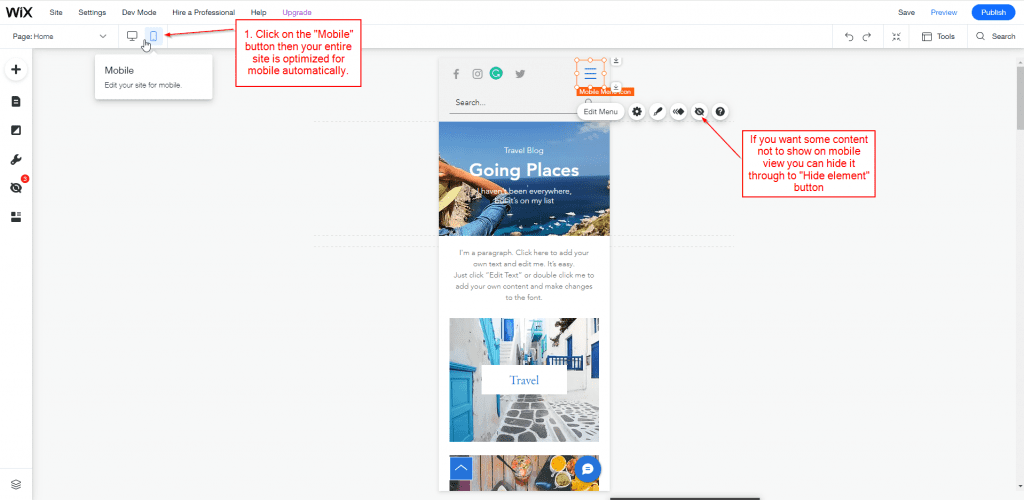
Content can be changed only for mobile and you can make it responsive also –

 In the mobile view, you can create your website responsively and you can add some content in mobile view or hide content also. You can customize the mobile view and create an attractive website.

mobile

Step 4- Publish the website on internet

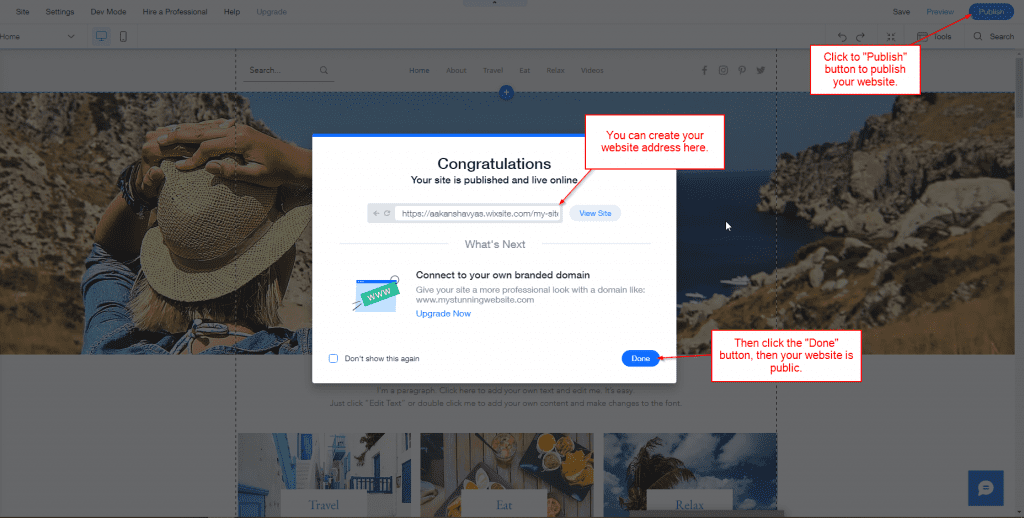
You create a website and publish your site, then click the “Publish” button and you can create your website address then click the “Done” button and your site is public.

public

Wix is a user–friendly drag-and-drop tool and you can easily create your website in it. There are third-party apps in Wix, which make your website attractive and increases your sales. Also, you can change the theme or layout. Hence you wish to have a website that is customizable and easy to use you must definitely go for Wix.

Top Stories

10 Proven Tips For Successful Odoo Module Customization (3)
10 Proven Tips for Successful Odoo Module Customization
Odoo is famous for its customizable nature. Businesses from around the world choose Odoo because of its scalability and modality. Regardless of the business size, Odoo can cater to the unique and diverse needs of any company. Odoo has proven its capacity and robust quality in terms of helping businesses
How Odoo is Transforming Traditional Education with E Learning
How Odoo is Transforming Traditional Education with E-Learning?
Does your school need to centralize data to easily access and share information between applications? Odoo provides an ERP system that can do so. Using multiple software applications for every department can be dragging. With Odoo, you can systematize your operations for efficiency, user-friendly navigation, uniform cross-functional practice, and increased
How Can Odoo Module Customization Revolutionize Your Purchase Management Workflow
How Can Odoo Module Customization Revolutionize Your Purchase Management Workflow?
Odoo ERP’s modules are engineered with a robust structure to drive efficiency across your entire organization. Each module is specifically designed to address distinct business functions, from finance and inventory to sales, marketing, and purchase management. This tailored approach ensures that every part of your company has the tools it needs to excel. The true power of
Featured Image Size
Transform Your Scheduling Process with Odoo’s Appointment Booking Module: Learn How
In fast-moving industries where customer satisfaction and operational efficiency determine business growth, scheduling is more than just setting dates and times — it’s a crucial part of delivering a smooth experience. Unfortunately, many organizations still rely on outdated scheduling methods: scattered Google calendars, endless back-and-forth emails, shared spreadsheets, or manual
Enhancing GraphQL with Roles and Permissions
GraphQL has gained popularity due to its flexibility and efficiency in fetching data from the server. However, with great power comes great responsibility, especially when it comes to managing access to sensitive data. In this article, we'll explore how to implement roles and permissions in GraphQL APIs to ensure that
Exploring GraphQL with FastAPI A Practical Guide to begin with
Exploring GraphQL with FastAPI: A Practical Guide to begin with
GraphQL serves as a language for asking questions to APIs and as a tool for getting answers from existing data. It's like a translator that helps your application talk to databases and other systems. When you use GraphQL, you're like a detective asking for specific clues – you only get

          Success!!

          Keep an eye on your inbox for the PDF, it's on its way!

          If you don't see it in your inbox, don't forget to give your junk folder a quick peek. Just in case.


              You have successfully subscribed to the newsletter

              There was an error while trying to send your request. Please try again.

              Zehntech will use the information you provide on this form to be in touch with you and to provide updates and marketing.