Join us at GITEX 2025! Discover our solutions at Hall 4, Booth H-30 Schedule a Meeting Today.
Automate Marketing Initiatives with Salesforce Marketing Cloud Learn More
Join us at GITEX 2024! Discover our solutions at Hall 4, Booth H-30 Book your live demo today.

How To Fix SSH Exception Error In AWS IoT Secure Tunneling?

SSH is used to establish a secure connection between two computers, one local and one remote. While SSH is most often used for secure terminal access and file transfers, it may also be used to build a secure tunnel between machines in order to relay non-encrypted network connections. SSH tunnels can also be used to grant external access to internal network resources.

For example, while working on an IOT project for a client, I encountered a strange error. The error was related to an SSHException that occurred while publishing data to an AWS IOT topic.

I utilised Boto3 IoT data plane service to fix this error, and within this service, I used the publishing function to publish data to an AWS IOT topic.

Then I configured AWS ACCESS KEY, SECRET, and regions in AWS_ACCESS_KEY_ID, AWS_SECRET_ACCESS_KEY, and AWS_DEFAULT_REGION environment variables respectively

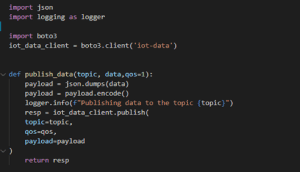
Code 300x172 1
This code snippet is used to publish the data

The default security in the older version of the Boto3, i.e., Boto, was false. To eliminate this ambiguity, the above-mentioned code may function well with boto. However, if you have upgraded your Boto, security is enabled by default, and the code will give you this error:

“botocore.exceptions.SSLError: SSL validation failed for https://data.iot.us-east-2.amazonaws.com/topics/{your_topic}”

Then you will find the solution online and you will get a solution to this problem can be to set verify kwargs of the AWS IoT Client to false as shown below:

iot_data_client = boto3.client(‘iot-data’,verify = False)

But as soon as you execute it, you will start getting warnings like:

“Unverified HTTPS request is being made to host ‘data.iot.us-east-2.amazonaws.com’. Adding certificate verification is strongly advised.”

This creates a security warning and allows you to quickly modify your message in transit since it disables certificate verification and so does not transfer data via Shs. So, in order to address the problem, you must go through the debugging procedure.

What exactly do you mean by the debugging process, and why is it important to go through software testing?


Debugging is the process of detecting and removing existing and potential errors in a software code that may cause it to behave unexpectedly or to crash.

When I started debugging the above SSH Error and tried to figure out the difference, I came to know about a condition for accessing AWS IOT Data Plain Service and the condition were to access the data plane service of AWS IoT.

For example, in my case, I was trying to publish a message to an AWS topic and I need to provide a root CA certificate from an AWS authorized CA. The detailed description is given at the below-mentioned URL:

https://docs.aws.amazon.com/iot/latest/developerguide/server-authentication.html

As explained in the endpoint type section of the above URL, I downloaded the Verisign certificate. I was sending data to data.iot.us-east2 instead of using my own endpoint URL which I got from the AWS IoT Service Settings section. And for this reason, our endpoint fell into the iot: data type, and therefore, I selected the Verisign option.

Otherwise, I could have gone with the Amazon Trust Services Certificate, because it would fall into the iot:data-atts type endpoint.

Why I Preferred Amazon Trust Services Certificate?

  • Eliminates the manual processes associated with using and managing SSL/TLS certificates.
  • Certified private keys are protected and stored using strong encryption
  • Handles automatic certificate renewal, and
  • Avoids downtime due to incorrectly configured, revoked, or expired certificates.


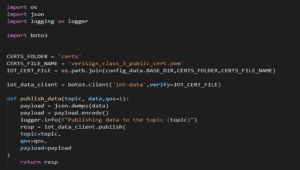
Therefore, I downloaded the certificate from Verisign certificate URL which is mentioned in the link above, and also kept this certificate in a file named verisign_class_3_public_cert.pem. After this, I set the absolute path of this file in verify Kwargs of Boto3 client.

Code 1 300x170 1
refer our code snippet to set an absolute path

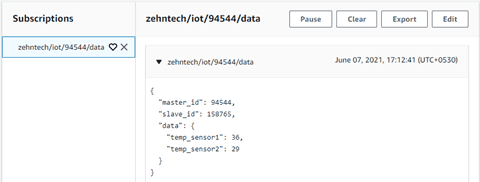
Finally, after executing the whole process step by step, I managed to publish a message on SSH on the topic AWS IoT as you can see in the image below: –

Code 2 1

A place for big ideas.

Reimagine organizational performance while delivering a delightful experience through optimized operations.

Conclusion

The AWS Secure Tunneling component enables you to use AWS IoT Secure Tunneling to establish secure bidirectional communication with Greengrass Core devices that are behind restricted firewalls. Secure Tunneling uses MQTT over WebSockets to make these connections and it has a various data plan and services that helps to publish data to an AWS IOT topic. So that you can open SSH connections to the device using the tunnel managed by AWS IoT.

You can also access AWS IoT through the AWS IoT Console, which provides a graphical user interface (GUI) through which you can configure objects, certificates, rules, jobs, policies, and other elements of your IoT solutions. can manage.

Top Stories

Odoo ERP Implementation (1)
How Indian MSMEs Can Use Budget 2026 Subsidies to Fund Their Odoo ERP Implementation
India’s Union Budget 2026–27 has sent a strong signal to small and medium enterprises: technology adoption is no longer optional — it is strategic. With a ₹10,000 crore MSME-focused fund, a ₹2,000 crore top-up for the Self-Reliant India Fund, and renewed emphasis on digital modernization, the government is actively encouraging
Sap’s critical 9.9 vulnerability
SAP’s Critical 9.9 Vulnerability: Why Mid-Market Companies Are Rethinking Their ERP Security
Resource Planning (ERP) systems sit at the center of business operations. When a vulnerability with a CVSS score of 9.9 is disclosed in SAP environments, it immediately draws attention — not because of hype, but because of operational risk. During the February 2026 SAP Security Patch Day, multiple high-severity security notes were released, including one
Odoo
Odoo v14 End of Life: What the October 2026 Kill Date Means for Your Business
If you’re still running your business on Odoo v14, you now have a hard stop on the calendar 31 October 2026. That’s when Odoo v14 will reach the end of life on Odoo.sh, and any database still on that version will be blocked from normal use. It’s not just a technical detail it’s a real business continuity risk if you ignore
10 Proven Tips for Successful Odoo Module Customization
Odoo is famous for its customizable nature. Businesses from around the world choose Odoo because of its scalability and modality. Regardless of the business size, Odoo can cater to the unique and diverse needs of any company. Odoo has proven its capacity and robust quality in terms of helping businesses
How Odoo is Transforming Traditional Education with E Learning
How Odoo is Transforming Traditional Education with E-Learning?
Does your school need to centralize data to easily access and share information between applications? Odoo provides an ERP system that can do so. Using multiple software applications for every department can be dragging. With Odoo, you can systematize your operations for efficiency, user-friendly navigation, uniform cross-functional practice, and increased
How Can Odoo Module Customization Revolutionize Your Purchase Management Workflow
How Can Odoo Module Customization Revolutionize Your Purchase Management Workflow?
Odoo ERP’s modules are engineered with a robust structure to drive efficiency across your entire organization. Each module is specifically designed to address distinct business functions, from finance and inventory to sales, marketing, and purchase management. This tailored approach ensures that every part of your company has the tools it needs to excel. The true power of

          Success!!

          Keep an eye on your inbox for the PDF, it's on its way!

          If you don't see it in your inbox, don't forget to give your junk folder a quick peek. Just in case.


              You have successfully subscribed to the newsletter

              There was an error while trying to send your request. Please try again.

              Zehntech will use the information you provide on this form to be in touch with you and to provide updates and marketing.