Join us at GITEX 2025! Discover our solutions at Hall 4, Booth H-30 Schedule a Meeting Today.
Automate Marketing Initiatives with Salesforce Marketing Cloud Learn More
Join us at GITEX 2024! Discover our solutions at Hall 4, Booth H-30 Book your live demo today.
Zehntech Odoo App

Advanced Stock Move Report — Full Inventory Movement Visibility for Odoo

Track every product movement across your warehouse — incoming, outgoing, internal, and manufacturing — with smart filters and professional PDF and Excel exports. Built for operations teams that need answers fast, not workarounds.

Compatible with Odoo 16, 17, 18 & 19
Filter by product, location, move type & status
Trusted by 500+ Businesses Across 12+ Countries
Community & Enterprise Supported
No Custom Development Required
$10.95
V19, 18, 17, 16
Advanced Stock Move Report for Odoo

What is Advanced Stock Move Report?

Advanced Stock Move Report is an Odoo inventory reporting module that transforms raw stock movement data into structured, filterable, exportable reports. It replaces the manual effort of chasing movement records across multiple Odoo views by surfacing incoming, outgoing, internal, and manufacturing moves in a single, purpose-built interface. Teams can apply layered filters, preview results instantly, and export print-ready or analysis-ready files without any technical configuration.

Full movement history per product
Multi-type move filtering
PDF & Excel export
Date range presets
Multi-language support

How Advanced Stock Move Report Solves Inventory Reporting Gaps

Problem
Zehntech Advanced Stock Move Report Solution
Native Odoo stock views show raw data with no consolidated movement report
Generates a dedicated stock move report aggregating all movement types in one view
No easy way to filter movements by type — incoming, outgoing, internal, manufacturing all mixed
Dedicated move type filters separate each category instantly
Status-based filtering (Draft, Ready, Done, Cancelled) is not available in standard views
Built-in status filter lets teams isolate active, completed, or cancelled moves
Exporting inventory data requires manual extraction or third-party tools
One-click PDF and Excel (XLSX) export built directly into the report interface
PDF reports lack branding — plain exports with no company identity
PDF output includes company logo and professionally styled, print-ready tables
Date-based filtering requires manual date entry with no smart presets
Predefined selections — This Week, Last Month, This Year — reduce input friction
Reports are only usable by technical users familiar with Odoo's filter syntax
Intuitive layout designed for non-technical warehouse and operations staff
Multi-language teams cannot use reports in their preferred language
Full support for German, French, Spanish, and Japanese out of the box

Every Inventory Movement. One Report. Full Control.

1

Comprehensive Stock Movement Reporting

Generates detailed reports covering all movement types — incoming receipts, outgoing deliveries, internal transfers, and manufacturing moves — in a single unified view.

Why it matters: operations teams no longer need to cross-reference multiple Odoo records to build a complete picture of stock activity.

2

Smart Multi-Criteria Filtering

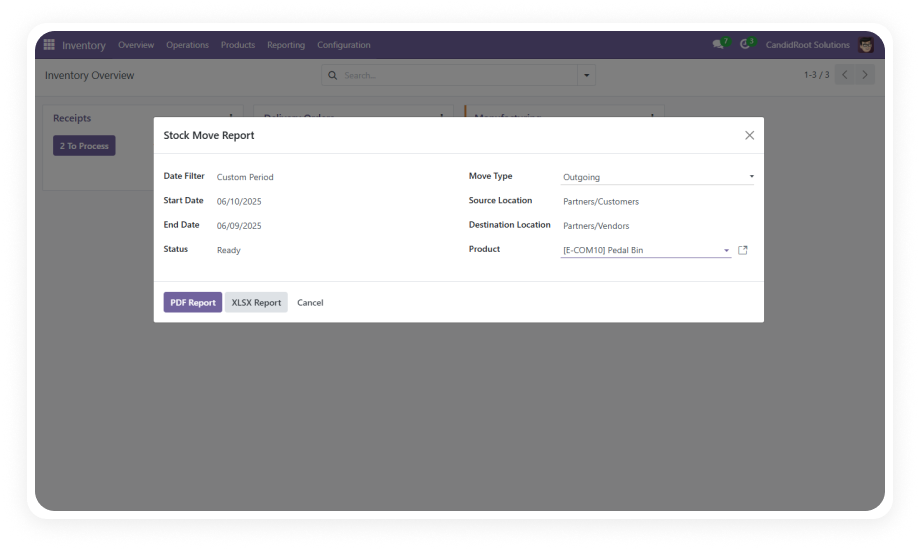
Filter stock moves by product, date range, source location, destination location, move type, and status simultaneously.

Why it matters: layered filters let analysts pinpoint exactly the movements they need without scrolling through irrelevant data.

3

Predefined Date Range Selections

Choose from built-in date presets including This Week, Last Month, and This Year alongside custom date range entry.

Why it matters: preset date options eliminate manual date input for the most common reporting periods, reducing errors and saving time on recurring reports.

4

Move Type Filtering

Dedicated filters for Incoming, Outgoing, Internal, and Manufacturing move types allow users to isolate specific operational flows.

Why it matters: logistics and procurement teams can generate type-specific reports without any extra configuration.

5

Status-Based Filtering

Filter movements by state — Draft, Ready, Done, or Cancelled — to focus reports on completed transactions or investigate pending moves.

Why it matters: accurate period-end reporting requires excluding draft records, and this filter makes that a single click.

6

Professional PDF Export

Exports reports as polished, print-ready PDF documents with company logo and styled table layouts.

Why it matters: branded PDF reports are ready for management reviews, audits, or supplier meetings without any post-export formatting.

7

Excel (XLSX) Export

Downloads structured XLSX files with clearly defined columns optimized for analysis, filtering, and record-keeping in spreadsheet tools.

Why it matters: finance and operations teams can import movement data directly into their existing Excel-based workflows without reformatting.

8

Multi-Language Support

The module interface and report output support German, French, Spanish, and Japanese in addition to English.

Why it matters: international teams and multi-country deployments can use the module in their native language, reducing input errors and improving adoption.

9

Non-Technical User Accessibility

The report interface is designed for minimal effort — filters apply visually, results preview instantly, and exports require no technical knowledge.

Why it matters: warehouse staff and operations managers can run their own reports independently, reducing dependency on Odoo administrators or IT support.

Who Gets The Most Out Of This Module

Role
Primary Use Case
Key Outcome
Warehouse Manager
Track all inbound and outbound moves by location and date
Full daily visibility into warehouse activity without manual log checks
Inventory Analyst
Filter and export movement data by product and period for trend analysis
Clean XLSX data ready for analysis without reformatting
Operations Manager
Generate period-end movement summaries filtered by Done status
Accurate closing reports for management review in minutes
Procurement Officer
Isolate incoming moves by supplier product to verify receipt volumes
Faster supplier reconciliation with verifiable movement records
Production Planner
Filter manufacturing moves to track material consumption against production orders
Clearer picture of material flow tied to manufacturing operations
Finance & Audit Team
Export PDF movement reports with company branding for audit documentation
Print-ready, branded movement records that meet audit standards
Odoo Administrator
Deploy multi-language reports for international warehouse teams
Single module installation supporting German, French, Spanish, and Japanese
⚠ Not the right fit for: Teams that need real-time warehouse operation tools, barcode scanning, or lot/serial traceability — this module generates movement reports, not live WMS screens.

Versions & Documentation

Choose your Odoo version and explore interactive documentation

Documentation coming soon for Odoo 16.
Documentation coming soon for Odoo 17.
Documentation coming soon for Odoo 18.
Documentation coming soon for Odoo 19.

Native Odoo vs Zehntech Advanced Stock Move Report

Capability
Zehntech Advanced Stock Move Report
Native Odoo
Unified stock movement report (all move types)
✓ Available
Not available
Filter by move type (Incoming, Outgoing, Internal, Manufacturing)
✓ Dedicated filters
Basic
Filter by movement status (Draft, Ready, Done, Cancelled)
✓ Available
Not available
Predefined date range presets (This Week, Last Month, This Year)
✓ Available
Not available
Custom date range filtering
✓ Available
Basic
Filter by source and destination location simultaneously
✓ Available
Basic
One-click PDF export with company logo and styled tables
✓ Available
Not available
One-click Excel (XLSX) export with structured columns
✓ Available
Not available
Multi-language report output (German, French, Spanish, Japanese)
✓ Available
Not available
Non-technical user interface — no filter syntax required
✓ Available
Basic
Instant result preview after filter application
✓ Available
Basic
Print-ready branded report output
✓ Available
Not available

Get Started In Minutes

No development environment. No custom code. No consultant required for standard setup.

01

Purchase & Install

Purchase Advanced Stock Move Report from the Odoo App Store. Navigate to your Odoo Apps menu, search for the module by name, and click Install — under two minutes, no server restart required.

02

Open the Inventory module. The Advanced Stock Move Report appears in the reporting section, with all filter controls visible and ready — no configuration wizard required.

03

Apply Filters & Preview Results

Select your product, date range, source and destination locations, move type, and status. Filters apply immediately — combine multiple filters for precise queries or leave open for full history.

04

Export in PDF or Excel

Click the export button to download a branded PDF for presentations or audits, or an Excel XLSX file for further analysis. Both formats are generated instantly.

Technical Details & Compatibility

Requirement
Odoo Versions
Editions
Hosting
Dependencies
Third-Party Dependencies
Custom Dev Required
Install Time
Server Restart
Data Migration
Module Conflicts
License
Last Tested
Lines of Code
Support
Details
16.0 · 17.0 · 18.0 · 19.0
Community · Enterprise · Odoo.sh
Odoo Online · On-Premise · Odoo.sh
Inventory (stock) · Discuss (mail)
None
No
Under 5 minutes
Not required
Not required
None known
OPL-1
Odoo 19.0 — May 2026
415
Advanced Stock Move Report — FAQ illustration

Frequently Asked Questions

Yes. The module installs directly from the Odoo App Store with no custom code, no developer environment, and no technical consultant required for standard setup.
  • It works immediately after installation on Odoo Community, Enterprise, and Odoo.sh across versions 16 through 19.
  • The only dependencies are the standard Inventory (stock) and Discuss (mail) modules already present in every Odoo installation.
Yes. The module is fully compatible with Odoo Community edition as well as Enterprise and Odoo.sh.
  • No Enterprise-only features are required — the module relies only on the core Inventory and Discuss dependencies available in all editions.
The module provides two export formats accessible directly from the report interface:
  • PDF exports include your company logo and professionally styled, print-ready table layouts — suitable for management reviews and audits.
  • Excel exports deliver structured columns optimized for analysis, filtering, and record-keeping in spreadsheet tools without any post-export reformatting.
Advanced Stock Move Report supports Odoo 16.0, 17.0, 18.0, and 19.0.
  • All hosting types are supported: Odoo Online, Odoo.sh, and On-Premise deployments.
  • Each version is maintained and updated independently, so you are covered regardless of which version your organization runs.
Yes. The filter panel supports simultaneous selection of move type (Incoming, Outgoing, Internal, Manufacturing) and status (Draft, Ready, Done, Cancelled).
  • These filters combine with product, date range, and location filters, allowing highly specific queries from a single report interface.
  • All filter combinations apply instantly and update the preview in real time.

Ready to See Every Stock Movement With Clarity?

Your team already runs inventory in Odoo — Advanced Stock Move Report adds the reporting layer that native Odoo doesn't provide. Filter by type, status, product, and date, then export to PDF or Excel in seconds. Includes lifetime updates and 90 days of dedicated technical support.

Advanced Stock Move Report


          You have successfully subscribed to the newsletter

          There was an error while trying to send your request. Please try again.

          Zehntech will use the information you provide on this form to be in touch with you and to provide updates and marketing.