Join us at GITEX 2025! Discover our solutions at Hall 4, Booth H-30 Schedule a Meeting Today.
Automate Marketing Initiatives with Salesforce Marketing Cloud Learn More
Join us at GITEX 2024! Discover our solutions at Hall 4, Booth H-30 Book your live demo today.
Zehntech Odoo App

Product Low Stock Alert

Never Miss a Restock Moment in Odoo. Get instant, automated alerts when product stock drops below your defined thresholds. Multi-level configuration, real-time recalculation, and POS integration ensure your team catches low inventory before customers feel the impact.

Compatible with Odoo 16, 17, 18 & 19
Multi-Level Threshold Priority (Global, Category, Product)
Community & Enterprise Supported
No Custom Development Required
Trusted by 500+ Businesses Across 12+ Countries
FREE
V19, 18, 17, 16
Product Low Stock Alert — Odoo inventory alert module with multi-level thresholds and POS integration

What is Product Low Stock Alert?

Product Low Stock Alert is a free Odoo inventory module that automatically notifies your team when product quantities fall below configured thresholds. Instead of discovering stockouts after a customer order fails, your warehouse, sales, and POS staff see visual warnings the moment inventory dips — giving them time to reorder before it becomes a problem. The module uses a priority-based configuration system: set a global threshold as your baseline, override it for specific product categories, and fine-tune individual products.

Real-time alert recalculation
Three-tier threshold priority
Visual alerts in list & kanban views
POS low stock tags
Multi-user notifications

How Product Low Stock Alert Solves Inventory Blindspots

Problem
Zehntech Product Low Stock Alert Solution
Native Odoo has no automated low stock notification for general users
Sends real-time alerts when product quantities drop below defined thresholds
A single global threshold does not fit products with different demand profiles
Three-tier priority system — global, per-category, and per-product — for granular control
Stock quantity changes are not reflected in alert status until manual checks
Real-time recalculation triggers automatically on every inventory movement
List and kanban views do not visually distinguish low stock products
Visual highlighting makes low stock items instantly identifiable in both views
POS staff have no visibility into low inventory while processing sales
Alert tags appear directly on products in the Point of Sale interface
Alert configuration requires navigating multiple screens per product
Central settings panel manages all alert methods and thresholds from one location
Only inventory managers see stock issues — sales and retail teams are uninformed
Multi-user notifications push alerts to relevant staff across departments
Configuring alerts per product is too granular for large catalogs
Category-level thresholds apply to all products in a group at once, with per-product override when needed

Proactive Stock Monitoring. Multi-Level Control. Zero Configuration Complexity.

1

Multi-Level Alert Configuration

Configure stock alert thresholds at three levels — global (all products), per-category (product groups), and per-product (highest priority override). The system uses priority-based logic to determine which threshold applies.

Why it matters: businesses with diverse product catalogs can set appropriate reorder points for each segment without managing hundreds of individual settings.

2

Real-Time Alert Recalculation

Alert status updates automatically whenever inventory quantities change — through sales, transfers, manufacturing, adjustments, or POS transactions. No manual trigger or scheduled job required.

Why it matters: teams always see current stock status, eliminating the gap between an inventory change and alert notification that causes missed reorder windows.

3

List View Visual Highlighting

Products with quantities below their alert threshold are visually highlighted in the product tree (list) view. Staff can instantly distinguish low stock items from healthy inventory without opening individual records.

Why it matters: warehouse managers scanning product lists can identify restocking needs at a glance during daily operations.

4

Kanban View Visual Highlighting

The same visual alert indicator extends to kanban product views, providing low stock visibility in card-based layouts that many inventory teams prefer for daily management.

Why it matters: teams using kanban workflows for inventory management get immediate visual cues without switching to list view.

5

POS Low Stock Alert Tags

Low stock products display an alert tag directly in the Odoo Point of Sale interface. Retail staff see the warning while browsing products during sales transactions.

Why it matters: counter staff can inform customers about limited availability before completing a sale, reducing order cancellations and customer disappointment.

6

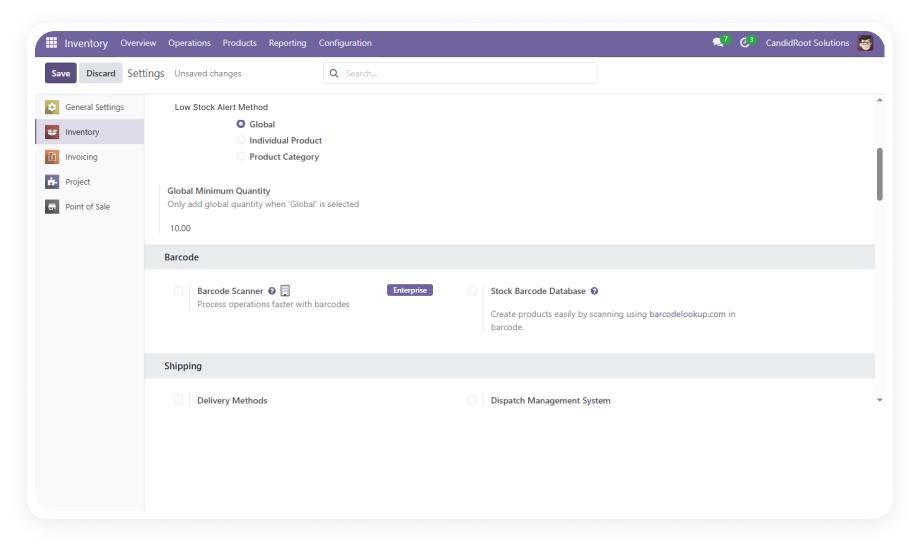
Central Settings Panel

A dedicated administration panel provides a single location to configure alert methods, set global thresholds, and manage notification preferences across the entire system.

Why it matters: administrators do not need to navigate multiple menus or product records to set up or modify the alert system — reducing configuration time and setup errors.

7

Per-Category Threshold Configuration

Assign alert thresholds at the product category level. All products within that category inherit the threshold unless a per-product override exists.

Why it matters: categories with similar demand patterns can be managed with a single setting rather than configuring each product individually.

8

Per-Product Threshold Override

Set specific alert quantities on individual products that take precedence over both category and global settings. Ideal for high-value, fast-moving, or critical items.

Why it matters: critical products can have tighter thresholds that trigger earlier replenishment independent of their category defaults.

9

Multi-User Alert Notifications

Configure multiple users to receive low stock notifications across different departments — inventory, purchasing, sales, and management — from a single configuration panel.

Why it matters: cross-functional visibility ensures the right people act on low stock situations without relying on a single inventory manager to forward alerts.

10

No-Code Setup

The entire module configures through Odoo's standard interface with no custom code, no developer intervention, and no technical expertise required. Works out of the box.

Why it matters: non-technical warehouse and operations staff can set up and manage stock alerts independently, without creating IT support tickets.

Who Gets The Most Out Of This Module

Role
Primary Use Case
Key Outcome
Warehouse Manager
Monitor all products against thresholds and identify items needing restock
Proactive replenishment before stockouts disrupt operations
Procurement Officer
Receive alerts to trigger purchase orders when stock hits reorder points
Faster supplier engagement with fewer emergency orders
Retail / POS Staff
See low stock tags on products during Point of Sale transactions
Inform customers of limited availability and suggest alternatives in real time
Operations Manager
Set category-level thresholds for different product segments
Simplified management of stock policies across large catalogs
Sales Manager
Get notified when popular products approach low stock
Adjust sales strategies and customer expectations before inventory runs out
Inventory Analyst
Use visual highlighting to audit stock levels across list and kanban views
Quick identification of at-risk SKUs during daily inventory reviews
E-commerce Manager
Prevent online order acceptance for products nearing zero stock
Reduce backorder situations and customer complaints from delayed fulfillment
CFO / Finance Lead
Ensure high-value inventory maintains minimum thresholds
Protect revenue by preventing stockouts on premium product lines

Versions & Documentation

Choose your Odoo version and explore interactive documentation

Documentation coming soon for Odoo 19. Contact us for early access or a live walkthrough.

Native Odoo vs Zehntech Product Low Stock Alert

Capability
Zehntech Product Low Stock Alert
Native Odoo
Automated Low Stock Alert Notifications
✔ Real-time automated alerts
Not available
Multi-Level Threshold Configuration
✔ Global, category, and product-level
Not available
Priority-Based Threshold Logic
✔ Three-tier hierarchy, no conflicts
Not available
Real-Time Recalculation on Inventory Change
✔ Instant, no manual trigger
Not available
Visual Low Stock Highlighting in List View
✔ Available
Not available
Visual Low Stock Highlighting in Kanban View
✔ Available
Not available
POS Interface Low Stock Alert Tags
✔ Displays in Point of Sale
Not available
Per-Category Threshold Management
✔ Available
Not available
Per-Product Threshold Override
✔ Full override control
Basic (reordering rules only)
Multi-User Alert Notifications
✔ Cross-department alerts
Not available
Central Settings Panel
✔ One-screen configuration
Not available
No-Code Setup and Management
✔ Yes — no developer required
N/A

Get Started In Minutes

No development environment. No custom code. No consultant required for standard setup.

01

Install the Module

Download for free from the Odoo App Store. Navigate to Apps, search for "Product Low Stock Alert," and click Install. Compatible with Odoo 16–19, Community, Enterprise, and Odoo.sh. No server restart needed.

02

Configure Global Threshold

Navigate to the central settings panel and set your global alert quantity — the default threshold for all products unless overridden. Any product below this number triggers an alert.

03

Set Category & Product Overrides

Assign per-category thresholds for product groups with unique demand patterns. For individual high-priority products, set per-product thresholds that take the highest priority in the alert hierarchy.

04

Monitor Alerts Across Views & POS

Alerts activate immediately. Low stock products display in list views, kanban views, and the POS interface. All alerts recalculate in real time — no manual refresh, no scheduled jobs.

Technical Details & Compatibility

Requirement
Odoo Versions
Editions
Hosting
Dependencies
Third-Party Dependencies
Custom Dev Required
Install Time
Server Restart
Data Migration
Module Conflicts
License
Last Tested
Lines of Code
Languages Supported
Support
Details
16.0 · 17.0 · 18.0 · 19.0
Community · Enterprise · Odoo.sh
Odoo Online · On-Premise · Odoo.sh
Inventory (stock) · Point of Sale (point_of_sale) · Sales (sale_management) · Discuss (mail) · Invoicing (account)
None
No
Under 5 minutes
Not required
Not required
None known
OPL-1
Odoo 19.0 — May 2026
439
English · French · Spanish · Japanese · German
Product Low Stock Alert — Frequently Asked Questions

Frequently Asked Questions

Yes. The module is completely free to download and use from the Odoo App Store with no purchase price, no subscription, and no hidden costs. It includes lifetime updates and full functionality across all supported Odoo versions (16, 17, 18, and 19). All features — including POS integration, multi-level thresholds, and real-time recalculation — are included at no charge.
The system uses a three-tier priority hierarchy: per-product settings take highest priority, followed by per-category settings, with the global setting as the default fallback. If a product has its own threshold, that value is used regardless of category or global settings. If no product-level threshold exists, the system checks the product's category, then falls back to the global default.
Yes. The module places alert tags directly on low-stock products within the POS interface. Retail staff can see at a glance which products are running low while processing sales transactions. This integration requires no additional POS configuration — it activates automatically once thresholds are set.
Yes. The module recalculates alert status automatically whenever inventory quantities change through sales, transfers, adjustments, or POS transactions. There is no scheduled job or manual trigger required — alerts reflect current stock levels immediately. Visual highlighting in list views, kanban views, and POS updates without page refresh delays.
Product Low Stock Alert supports Odoo Community, Enterprise, and Odoo.sh editions across versions 16.0, 17.0, 18.0, and 19.0. All hosting types are supported: Odoo Online, Odoo.sh, and On-Premise deployments. The module's dependencies (Inventory, Point of Sale, Sales, Discuss, Invoicing) are standard modules available in all Odoo editions.

Ready to Stop Discovering Stockouts After the Damage Is Done?

Your team already manages inventory in Odoo — Product Low Stock Alert adds the proactive monitoring layer that native Odoo does not provide. Set thresholds at global, category, or product level, and let real-time alerts protect your supply chain. Includes lifetime updates. Free forever.

Get started with Product Low Stock Alert — Zehntech Odoo experts ready to help


          You have successfully subscribed to the newsletter

          There was an error while trying to send your request. Please try again.

          Zehntech will use the information you provide on this form to be in touch with you and to provide updates and marketing.