Join us at GITEX 2025! Discover our solutions at Hall 4, Booth H-30 Schedule a Meeting Today.
Automate Marketing Initiatives with Salesforce Marketing Cloud Learn More
Join us at GITEX 2024! Discover our solutions at Hall 4, Booth H-30 Book your live demo today.
Zehntech Odoo App

Stock Picking Section Management for Odoo

Organize Delivery Orders with Structured Sections and Notes for Clear Warehouse Communication. Bring order to complex shipments by inserting custom section headers and informational notes directly within your Odoo picking operations — keeping warehouse teams, logistics staff, and customers aligned.

Compatible with Odoo 16, 17, 18 & 19
Works on Odoo Online, Odoo.sh & On-Premise
Auto-Transfer Sections from Sales Orders
Sections & Notes Printed on PDF Delivery Slips
One-Time Purchase — No Recurring Fees
$29.87
V19, 18, 17, 16
Stock Picking Section Management — Organized delivery orders with sections and notes in Odoo

What Is Stock Picking Section Management?

Stock Picking Section Management is an Odoo module that lets you insert organizational sections and descriptive notes between product lines in delivery orders. It bridges communication gaps between sales, warehouse, and logistics teams by embedding handling instructions, grouping labels, and contextual notes directly inside fulfillment documents — ensuring nothing gets lost between order confirmation and final delivery.

Grouping products by department or handling requirement
Embedding warehouse instructions in picking operations
Structured PDF delivery slips with section labels
Auto-transfer notes from sales orders to delivery
Multi-warehouse and multi-company compatible

How Stock Picking Section Management Solves Fulfillment Communication Gaps

Problem
Zehntech Solution
No way to group products within a single delivery order
Organized sections with custom headers between product lines
Handling instructions from sales never reach warehouse staff
Notes embedded directly within picking operations
PDF delivery slips lack context for drivers and recipients
Structured documents with sections and notes printed on slips
Complex multi-product shipments cause picking errors
Clear visual hierarchy guides warehouse staff through each order
Teams resort to sticky notes, emails, or verbal instructions
Single source of truth from order entry to delivery
Manual re-entry of sales notes into delivery operations
Automatic section/note transfer from sales order to picking
Fixed, inflexible order line format
Editable sections and notes until order validation

Key Features

1

Section Headers in Delivery Orders

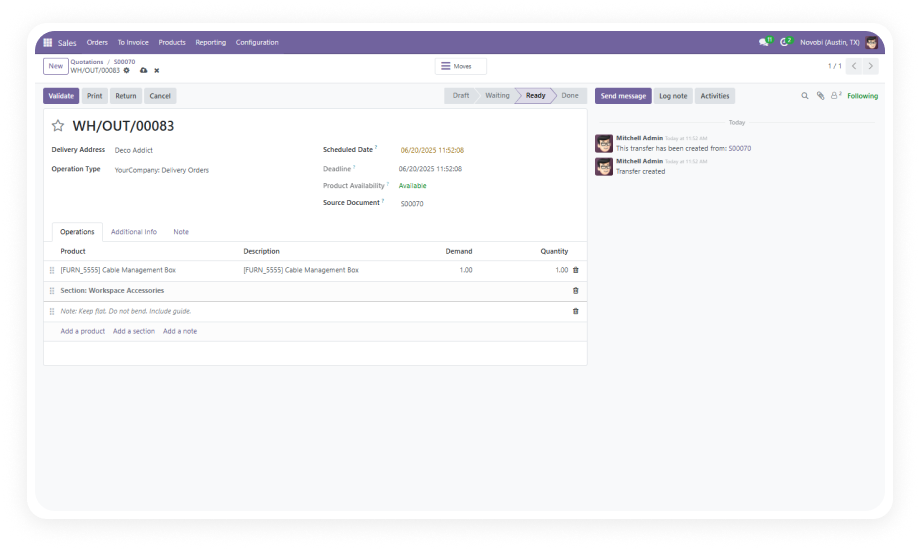
Insert custom section labels between product lines to create logical groupings within a single picking operation. Organize items by department, handling requirement, destination zone, or any category your workflow demands.

Why it matters: Warehouse staff can instantly identify which items belong together, reducing picking errors and improving pack accuracy for complex multi-product shipments.

2

Informational Notes Within Pickings

Add free-text notes anywhere between order lines to communicate handling instructions, special packaging requirements, or delivery-specific comments directly in the picking document.

Why it matters: Critical fulfillment instructions live inside the order itself rather than in separate emails or verbal handoffs, eliminating communication gaps that cause shipping mistakes.

3

Sales Order to Delivery Auto-Transfer

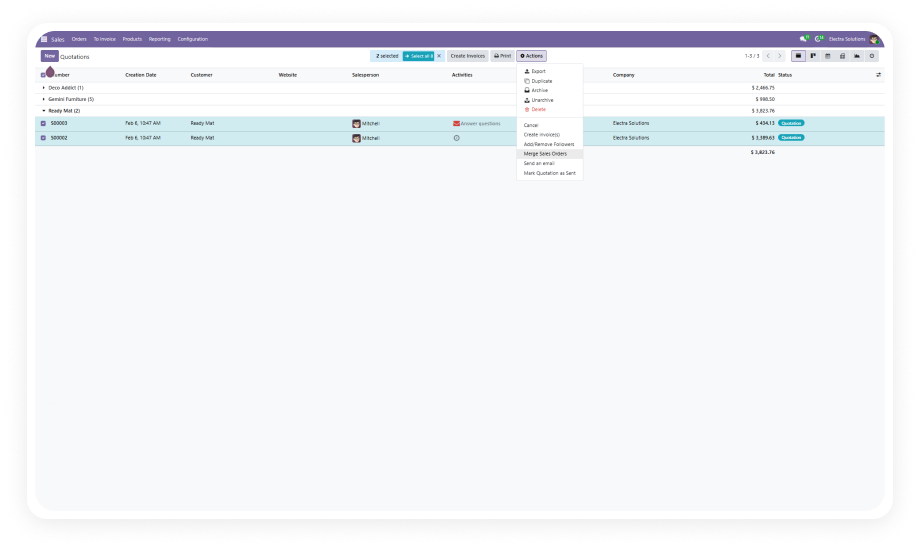
Sections and notes created in sales orders automatically propagate to the corresponding delivery orders, maintaining continuity from order entry through fulfillment without manual re-entry.

Why it matters: Sales teams can document customer-specific requirements once at order time, confident that warehouse staff will see those exact instructions when picking the shipment.

4

PDF Delivery Slip Integration

All section headers and notes appear on printed PDF delivery slips, providing structured documentation for drivers, recipients, and internal records.

Why it matters: Customers and delivery personnel receive organized, professional documentation that clearly communicates product groupings and special instructions — reducing delivery disputes and return requests.

5

Flexible Content Management

Modify or remove sections and notes at any time before order validation. Adjust instructions as shipment details evolve without affecting product line data.

Why it matters: Warehouse managers retain full control over documentation accuracy, updating instructions to reflect real-time changes in stock availability, shipping methods, or customer requests.

6

Multiple Sections Per Delivery

Support for unlimited sections and notes within a single delivery order, enabling complex shipment documentation for large or multi-category orders.

Why it matters: Enterprise-scale operations with 50+ line items per delivery can maintain the same organizational clarity as simple orders, scaling documentation to match operational complexity.

Who Benefits from Stock Picking Section Management?

Role
Primary Use Case
Key Outcome
Warehouse Manager
Organizing multi-category shipments into logical picking zones
Reduced picking time and fewer errors on complex orders
Sales Representative
Documenting customer-specific handling instructions at order entry
Seamless instruction transfer from sales desk to warehouse floor
Logistics Coordinator
Adding shipping notes and carrier instructions to delivery slips
Clear communication with drivers and third-party carriers
Quality Control Lead
Inserting inspection checkpoints between product groups
Structured QC workflow embedded directly in fulfillment documents
Operations Director
Standardizing delivery documentation across multiple warehouses
Consistent operational processes and professional customer-facing documents
Customer Service Agent
Adding return-handling or special delivery notes to replacement orders
Accurate fulfillment of sensitive orders with complete context

Versions & Documentation

Choose your Odoo version and explore interactive documentation

Documentation coming soon for Odoo 16

Documentation coming soon for Odoo 17

Documentation coming soon for Odoo 18

Documentation coming soon for Odoo 19

Before vs. After: Stock Picking Section Management

Scenario
With This Module
Without This Module
Product grouping in deliveries
✔ Organized sections with custom headers
Flat, undifferentiated product list
Handling instructions
✔ Embedded notes within picking operations
Separate emails, sticky notes, or verbal
Sales-to-warehouse communication
✔ Automatic section/note transfer from SO
Manual re-entry or lost context
Printed delivery slips
✔ Structured document with sections and notes
Basic product listing only
Complex shipment management
✔ Clear visual hierarchy and instructions
Error-prone, confusing for staff
Documentation flexibility
✔ Editable sections/notes until validation
Fixed order line format only

Get Started In Minutes

Install, configure, and start organizing delivery orders immediately — no developer required.

01

Install the module

Purchase from the Odoo App Store and install on your instance (Odoo 16–19). Required dependencies install automatically — no manual configuration needed.

02

Add sections to sales orders

Use the "Add a section" button in the order lines tab. Create descriptive headers like "Fragile Items," "Cold Storage Required," or department-specific labels.

03

Insert notes for warehouse instructions

Use "Add a note" to insert free-text handling requirements, packing preferences, or delivery-specific comments that warehouse staff need at pick time.

04

Confirm and fulfill

Confirm the sales order. Sections and notes transfer automatically to the delivery order. Warehouse teams see the structured layout, and the PDF delivery slip includes all documentation.

Technical Details & Compatibility

Requirement
Technical Name
Odoo Versions
License
Dependencies
Deployment
Lines of Code
Author
Support
Details
zehntech_stock_picking_section
16.0 · 17.0 · 18.0 · 19.0
OPL-1 (Odoo Proprietary License v1.0)
Inventory (stock) · Sales (sale_management) · Discuss (mail) · Invoicing (account)
Odoo Online · Odoo.sh · On-Premise
401
Zehntech Technologies Inc.
Stock Picking Section Management — Frequently Asked Questions

Frequently Asked Questions

The module works with both new and existing delivery orders. You can add sections and notes to any unvalidated picking operation. Already-confirmed deliveries cannot be modified per standard Odoo behavior.
Yes, all section headers and notes are fully rendered on PDF delivery slips. Customers, drivers, and warehouse staff all see the structured documentation with logical grouping maintained exactly as you defined it.
Yes, the module depends on both Sales (sale_management) and Inventory (stock). Additional dependencies include Discuss (mail) and Invoicing (account). All dependencies install automatically when you add the module — no manual setup required.
Yes, you can add sections and notes directly to standalone delivery orders. The sales-to-delivery auto-transfer is an additional benefit, not a requirement. Manual picking operations support the same section and note functionality.
The module follows standard Odoo architecture and works across multi-warehouse configurations. Sections and notes are specific to each individual picking operation. Multi-company environments can use the module independently per company.

One-Time Purchase.
No Subscription.
No Recurring Fees.

Bring structured clarity to every delivery order. Eliminate lost instructions, reduce picking errors, and deliver professional documentation to your customers and warehouse teams.

Get started with Stock Picking Section Management


          You have successfully subscribed to the newsletter

          There was an error while trying to send your request. Please try again.

          Zehntech will use the information you provide on this form to be in touch with you and to provide updates and marketing.