Join us at GITEX 2025! Discover our solutions at Hall 4, Booth H-30 Schedule a Meeting Today.
Automate Marketing Initiatives with Salesforce Marketing Cloud Learn More
Join us at GITEX 2024! Discover our solutions at Hall 4, Booth H-30 Book your live demo today.
Zehntech Odoo App

Attendance Management with Webcam

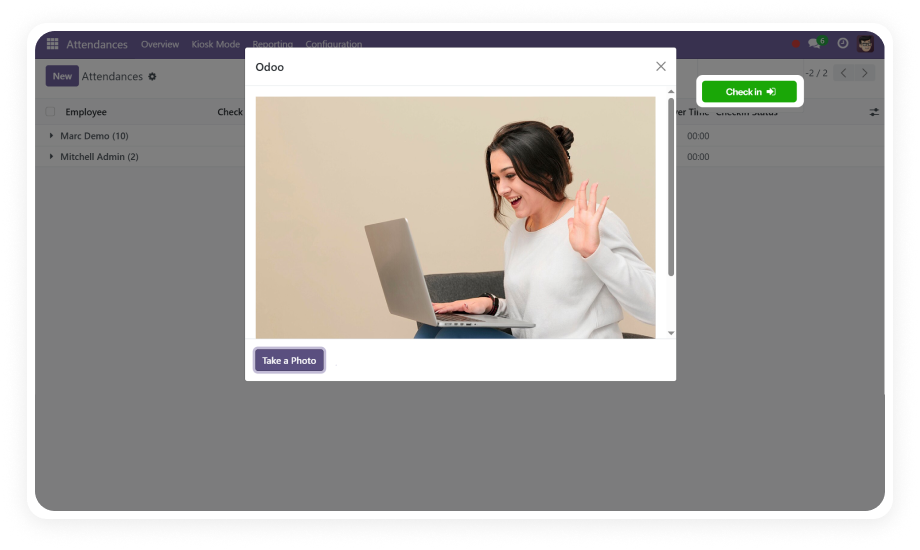
Image-Verified Employee Check-In for Odoo. Eliminate unverified attendance entries and proxy check-ins. This module adds real-time webcam photo capture to Odoo's Attendances module — recording a photo with every check-in and check-out in both standard and Kiosk modes.

Compatible with Odoo 16, 17, 18 & 19
Works in Standard & Kiosk Attendance Modes
Trusted by 500+ Businesses Across 12+ Countries
Community & Enterprise Supported
No Custom Development Required
$48.78
V19, 18, 17, 16
Attendance Management with Webcam — Image-verified employee check-in for Odoo

What is Attendance Management with Webcam?

Attendance Management with Webcam is an Odoo module that replaces unverified clock-ins with image-authenticated attendance records. It activates the device camera at every check-in and check-out event, captures a timestamped photo, and stores it directly within the attendance record — eliminating proxy check-ins and disputed timesheets without any custom development. Works seamlessly with Odoo's native Attendances module on Community, Enterprise, and Odoo.sh.

Webcam photo at check-in & check-out
Kiosk mode attendance support
Configurable photo capture toggle
Image-verified attendance records
HR attendance report generation

One module. Verified attendance with photographic proof. No disputed check-ins.

How Attendance Management with Webcam Solves the Proxy Check-In Problem

Problem
Zehntech Webcam Solution
Employees check in on behalf of absent colleagues — proxy attendance is undetectable
Webcam captures a photo of the actual person at every check-in and check-out
No way to verify who physically performed a check-in or check-out
Each attendance record is linked to a timestamped photo captured at the moment
Kiosk terminals offer no visual verification of the person using them
Kiosk mode is fully supported — webcam activates automatically
HR managers have no audit trail when attendance disputes arise
Photos stored against attendance records give HR a clear visual audit trail
Enabling or disabling attendance photos requires developer involvement
Administrators toggle photo capture on or off from settings — no code needed
Standard Odoo attendance provides no biometric or visual verification layer
Module adds webcam-based photo verification as a native extension
Attendance reporting lacks visual context
HR reports can include photo records alongside attendance entries
Businesses running on both Community and Enterprise need a unified solution
Module supports both editions and all hosting types — Online, On-Premise, Odoo.sh

Every Feature Your HR Team Needs for Photo-Verified Attendance

1

Webcam Photo Capture at Check-In

When an employee initiates a check-in, the module automatically activates the device camera and captures a photograph that is stored directly with the attendance record.

Why it matters: Every check-in becomes a timestamped visual record, making proxy attendance immediately detectable.

2

Webcam Photo Capture at Check-Out

Photo capture is not limited to check-in — the module also captures a photo when the employee checks out, providing a complete visual record for each attendance session.

Why it matters: Check-out fraud is as common as check-in fraud; both events are covered with a single module.

3

Kiosk Mode Webcam Support

The webcam photo capture feature works natively within Odoo's Kiosk attendance mode, activating the camera automatically without any manual intervention.

Why it matters: Shared kiosk terminals in offices, warehouses, and production floors become verified attendance stations without additional hardware.

4

Configurable Photo Capture Toggle

Administrators can enable or disable the webcam photo capture feature from within the Odoo Attendances configuration settings — no developer involvement required.

Why it matters: Teams can turn verification on or off as operational needs change, giving full control without touching code.

5

Image-Based Attendance Verification

Each attendance transaction is linked to a captured photograph, creating an image-verified record that HR managers can review when disputes or queries arise.

Why it matters: Visual verification transforms attendance records from a trust-based system into an evidence-based one.

6

Enhanced Attendance Security

By requiring a physical photo at the point of check-in or check-out, the module deters proxy attendance and unauthorized time entries at the system level.

Why it matters: Security is enforced as part of the workflow rather than relying on supervisory oversight.

7

HR Attendance Report Generation

HR administrators and managers can generate attendance reports that include the photo records captured for each employee during the reporting period.

Why it matters: Reporting goes beyond timestamps — HR has visual context for every record without leaving Odoo.

8

Standard & Normal Mode Compatibility

Beyond Kiosk mode, webcam capture integrates equally with Odoo's standard attendance interface used by employees on their own devices or workstations.

Why it matters: Whether your team uses kiosks, desktops, or laptops, the same verified attendance experience applies consistently.

Who Gets The Most Out Of This Module

Role
Primary Use Case
Key Outcome
HR Manager
Auditing attendance records when employees dispute check-in times or presence
Visual proof for every check-in resolves disputes quickly
Operations Manager
Monitoring workforce presence across shared kiosk stations on a factory or warehouse floor
Kiosk attendance becomes fully verified without extra hardware
Payroll Administrator
Cross-referencing payroll data with verified attendance records before payroll processing
Photo-linked records reduce payroll errors caused by fraudulent check-ins
Odoo Administrator
Configuring and managing attendance photo settings without writing code
Full control via the standard Odoo settings interface
Business Owner / CTO
Eliminating payroll leakage caused by proxy attendance in multi-site operations
Attendance accountability is enforced at the system level
Compliance Officer
Maintaining auditable attendance records for labor compliance and internal audits
Every attendance entry carries a timestamped photo — ready for audit

Versions & Documentation

Choose your Odoo version and explore interactive documentation

Native Odoo vs Zehntech Attendance Management with Webcam

Capability
Zehntech Webcam
Native Odoo
Webcam photo capture at check-in
Available
Not available
Webcam photo capture at check-out
Available
Not available
Kiosk mode webcam integration
Available
Not available
Photo stored with attendance record
Available
Not available
Image-based attendance verification
Available
Not available
Proxy check-in prevention
Available
Not available
Configurable photo capture toggle
Available
Not available
HR attendance report with photos
Available
Basic (no photos)
No custom development required
Available
Not applicable
Works on Community & Enterprise
Available
Basic attendance only
Works on Odoo.sh and On-Premise
Available
Basic attendance only
Visual audit trail for attendance disputes
Available
Not available

Get Started In Minutes

No development environment. No custom code. No consultant required for standard setup.

01

Purchase & Download

Purchase Attendance Management with Webcam from the Odoo App Store for your required version — 16, 17, 18, or 19. The same license covers Community, Enterprise, and Odoo.sh editions.

02

Install the Module

Place the module in your Odoo addons directory and update the module list. Then navigate to Odoo Apps and click Install — no server restart required.

03

Enable Photo Capture in Settings

Go to the Attendances module configuration in Odoo Settings and enable the "Allow Webcam Image" toggle. This activates webcam photo capture for all check-in and check-out events.

04

Verify and Go Live

Ask a test employee to perform a check-in using the standard interface or Kiosk mode. Confirm the webcam activates, the photo is captured, and the image appears in the attendance record.

Technical Details & Compatibility

Requirement
Odoo Versions
Editions
Hosting
Dependencies
Third-Party Dependencies
Custom Dev Required
Install Time
Server Restart
Data Migration
Module Conflicts
License
Last Tested
Lines of Code
Support
Details
16.0 · 17.0 · 18.0 · 19.0
Community · Enterprise · Odoo.sh
Odoo Online · On-Premise · Odoo.sh
Attendances (hr_attendance) · Employees (hr) · Discuss (mail)
None
No
Under 5 minutes
Not required
Not required
None known
OPL-1
Odoo 19.0 — May 2026
1,048
Attendance Management with Webcam — FAQ illustration

Frequently Asked Questions

Yes. The module installs directly from the Odoo App Store and requires zero custom development. Photo capture is enabled through a single toggle in the Attendances configuration settings. Standard Odoo Attendances, Employees, and Discuss modules are the only dependencies.
Yes. The module is fully compatible with Odoo Community and Enterprise editions. It also runs on all three hosting environments: Odoo Online, On-Premise, and Odoo.sh. Supported across Odoo versions 16, 17, 18, and 19.
When an employee checks in or checks out, the module activates the device webcam and captures a photo automatically. The photo is stored directly within the attendance record for HR review and reporting. This works identically in both standard attendance mode and Kiosk mode.
The module supports Odoo 16, 17, 18, and 19 — all actively maintained versions. Each version is available as a separate module package matching your Odoo instance. The latest version (19.0) was last tested in May 2026.
Yes. Kiosk mode is fully supported — the webcam activates automatically during kiosk check-in and check-out. This makes shared kiosk terminals in offices, warehouses, and production floors into verified attendance stations. No additional configuration is needed beyond enabling the photo capture setting in Attendances.

Ready to Eliminate Proxy Check-Ins?

One-Time Purchase. No Subscription. No Recurring Fees.

Your team already runs attendance in Odoo — this module adds the visual verification layer that makes every check-in accountable and every record audit-ready. From standard desktops to shared kiosk terminals, webcam photo capture works across your entire workforce without a single line of custom code.

Includes lifetime updates and 90 days of dedicated technical support.

Zehntech Odoo experts ready to help


          You have successfully subscribed to the newsletter

          There was an error while trying to send your request. Please try again.

          Zehntech will use the information you provide on this form to be in touch with you and to provide updates and marketing.