Join us at GITEX 2025! Discover our solutions at Hall 4, Booth H-30 Schedule a Meeting Today.
Automate Marketing Initiatives with Salesforce Marketing Cloud Learn More
Join us at GITEX 2024! Discover our solutions at Hall 4, Booth H-30 Book your live demo today.
Free Zehntech Odoo App

Email Activity Deadline Reminder

Automated Deadline Alerts Across Every Odoo Module. Stop losing tasks to forgotten deadlines. Email Activity Deadline Reminder sends automated email notifications based on activity due dates — across Projects, Invoicing, CRM, and every module with scheduled activities — so your team acts before deadlines pass.

Compatible with Odoo 19, 18, 17 & 16
Community & Enterprise Supported
Configurable 5-Min, Hourly, or Daily Reminders
No Custom Development Required
Trusted by 500+ Businesses Across 12+ Countries
FREE
V19, 18, 17, 16
Email Activity Deadline Reminder — Automated deadline alerts for Odoo

What is Email Activity Deadline Reminder?

Email Activity Deadline Reminder is a free Odoo module that automates email notifications for scheduled activity deadlines across your entire Odoo instance. Instead of relying on users to manually check their activity lists, the module sends recurring reminders at configurable intervals — every 5 minutes, hourly, or daily — starting from a defined date before the deadline. It works across Projects, Invoicing, CRM, and every Odoo model that supports scheduled activities, giving administrators centralized control over deadline accountability.

Cross-module deadline alerts
Flexible reminder frequency
Custom start dates
Inline activity editing
Zero-code setup

How Email Activity Deadline Reminder Solves Missed Deadline Problems

Problem
Zehntech Solution
Users forget scheduled activities spread across multiple Odoo modules
Automated email reminders surface every upcoming deadline directly in their inbox
No proactive notification before an activity becomes overdue
Configurable reminder start dates trigger alerts well before the deadline passes
One-size-fits-all reminder timing does not match varying task urgency
Three frequency options — 5-minute, hourly, or daily — match reminder intensity to deadline criticality
Editing a scheduled activity forces deletion and recreation of reminder rules
Editable scheduled activities let users modify details, deadlines, and intervals inline
Native Odoo has no built-in email reminder mechanism for activities
This module adds a dedicated reminder layer on top of standard Odoo activities via automated cron jobs
Reminder systems that only cover CRM miss project, invoice, and operational deadlines
Cross-module support ensures reminders work on Projects, Invoicing, and any activity-enabled model
Overdue activities accumulate silently without visibility or accountability
Automated activity deadline status view surfaces all passed-deadline items for admin review
Manual reminder setups do not scale across growing teams and increasing activity volume
System-wide cron-based configuration applies consistent reminder rules automatically to all users

Complete Activity Deadline Management Across All Odoo Modules

1

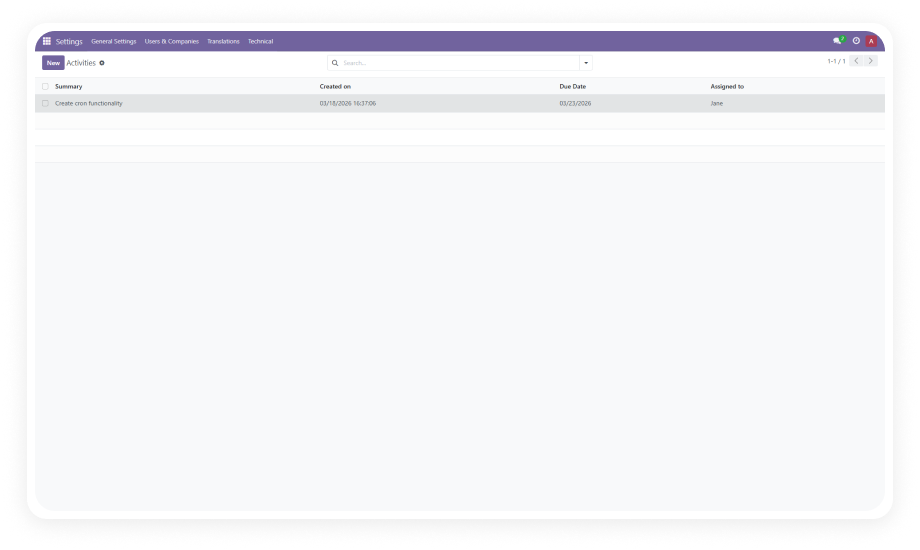
Automated Activity Deadline Status

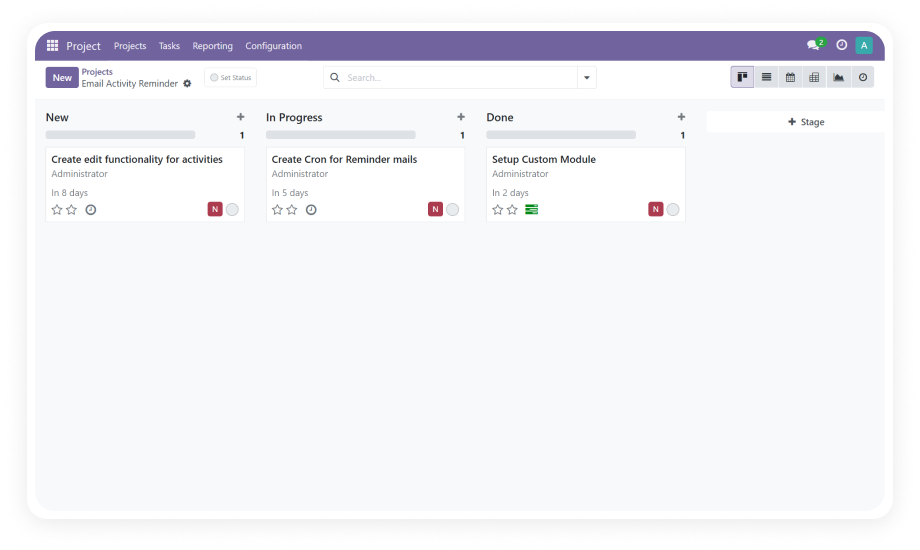
View and manage all activities with full deadline tracking from a centralized admin interface. See which activities are approaching their deadline, currently due, or already overdue — and take corrective action directly.

Why it matters: Administrators gain instant organization-wide visibility into activity health without pulling reports from individual modules.

2

Customizable Reminder Frequency

Choose from three reminder intervals: every 5 minutes for urgent deadlines, hourly for standard tasks, or daily for longer-horizon activities. Match reminder intensity to deadline criticality without custom development.

Why it matters: A critical invoice due today needs more aggressive reminders than a project review due next week.

3

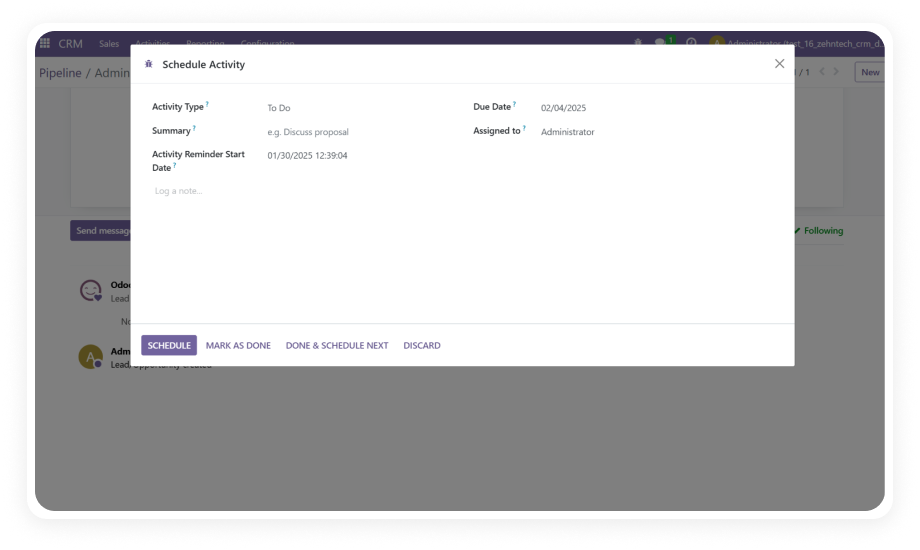
Configurable Reminder Start Dates

Define exactly when reminders begin for each activity. Set a start date days or hours before the deadline to give users advance notice, or configure reminders to begin on the due date itself for time-sensitive tasks.

Why it matters: Starting reminders too early creates noise; starting too late defeats the purpose. Configurable start dates let you find the right balance.

4

Editable Scheduled Activities

Modify task details, deadlines, reminder intervals, and assignees on existing scheduled activities without deleting and recreating the entire configuration. Changes propagate immediately through the reminder system.

Why it matters: Deadlines shift, responsibilities transfer, and priorities change — the reminder system must accommodate updates without administrative friction.

5

Automated Email Notifications via Cron

The system uses Odoo scheduled actions (cron jobs) to send reminder emails at the configured frequency. Notifications are delivered directly to the assigned user's inbox with full activity context included.

Why it matters: Cron-based delivery ensures reliability without manual intervention — reminders continue to fire even when administrators are not logged in.

6

Cross-Module Activity Support

Reminders work across every Odoo module that supports scheduled activities — including Projects, Invoicing, CRM, Sales, Purchase, HR, and custom modules using the activity mixin. One installation covers your entire Odoo instance.

Why it matters: Organizations do not operate in a single module. A unified reminder system prevents deadline fragmentation across different business functions.

7

Admin-Controlled Overdue Management

Activities that pass their deadline are surfaced in the deadline status view, where administrators can edit details, reassign ownership, or remove items that are no longer relevant.

Why it matters: Overdue activities represent organizational risk — surfacing them in a manageable interface prevents small delays from compounding into systemic problems.

8

No-Code Installation and Configuration

The module installs from the Odoo App Store and configures entirely through the standard admin interface. No server-side scripts, no custom development, and no external dependencies beyond standard Odoo modules.

Why it matters: Operations teams can deploy deadline reminders independently — without developer involvement or technical debt.

Who Gets The Most Out Of This Module

Role
Primary Use Case
Key Outcome
Project Manager
Receive automated reminders for task deadlines across all active projects
No task slips through the cracks; project timelines stay on track without daily manual reviews
Accounting Team
Get notified about invoice-related activity deadlines before they become overdue
Timely payment follow-ups and reconciliation actions protect cash flow
Sales Representative
Receive recurring alerts for scheduled follow-ups, calls, and proposal deadlines
Higher close rates through consistent, timely prospect engagement
Operations Director
Monitor overdue activities across all departments from a single deadline status view
Full organizational accountability without department-by-department check-ins
Odoo Administrator
Configure system-wide reminder rules, frequencies, and cron schedules
Consistent deadline behavior across all users and modules without per-user setup
Team Lead
Ensure direct reports receive reminders for their assigned activities before deadlines
Proactive team management with automated accountability — no micromanagement required

Versions & Documentation

Choose your Odoo version and explore interactive documentation

Native Odoo vs Zehntech Email Activity Deadline Reminder

Capability
Zehntech Module
Native Odoo
Automated email reminders for scheduled activities
Yes
Not available
Customizable reminder frequency (5-min / hourly / daily)
Yes
Not available
Configurable reminder start dates per activity
Yes
Not available
Cross-module activity reminder support
Yes
Not available
Centralized activity deadline status view
Yes
Not available
Overdue activity flagging and admin management
Yes
Not available
Inline editing of scheduled activities with reminder sync
Yes
Limited (no reminder integration)
Cron-based automated email delivery
Yes
Not available
Pre-deadline reminder alerts
Yes
Not available
Recurring reminders until deadline or completion
Yes
Not available
No-code configuration via admin interface
Yes
Not available
Works with Projects, Invoicing, CRM, and all activity models
Yes
Basic activity logging only

Get Started In Minutes

No development environment. No custom code. No consultant required for standard setup.

01

Install from the Odoo App Store

Search for zehntech_email_activity_deadline_reminder in your Odoo Apps menu and click Install. Compatible with Odoo 16, 17, 18, and 19 on both Community and Enterprise editions.

02

Configure Outgoing Mail Server

Ensure an SMTP server is configured in Odoo Settings under Technical > Outgoing Mail Servers. The module requires a working outgoing mail server to deliver deadline reminder emails.

03

Schedule Activities with Reminder Settings

Create or edit scheduled activities on any project task, invoice, or record. Set the reminder start date and choose a reminder frequency — every 5 minutes, hourly, or daily.

04

Activate the Reminder Cron Job

Navigate to Settings > Technical > Automation > Scheduled Actions and verify the activity deadline reminder cron job is active. Run it manually once to confirm email delivery.

Technical Details & Compatibility

Requirement
Odoo Versions
Editions
Hosting
Dependencies
Third-Party Dependencies
Custom Dev Required
Install Time
Server Restart
Data Migration
Module Conflicts
License
Last Tested
Lines of Code
Support
Details
16.0 · 17.0 · 18.0 · 19.0
Community · Enterprise · Odoo.sh
Odoo Online · On-Premise · Odoo.sh
Discuss (mail) · Project (project) · Invoicing (account)
None
No
Under 5 minutes
Not required
Not required
None known
OPL-1
Odoo 19.0 — May 2026
198
Email Activity Deadline Reminder — FAQ illustration

Frequently Asked Questions

Yes — the module installs directly from the Odoo App Store with no coding required. All configuration is handled inside the standard Odoo admin interface. Standard setup is completed in under 5 minutes by any Odoo administrator.
Yes — the module is fully compatible with both Odoo Community and Enterprise editions. It supports all three hosting environments: Odoo Online, Odoo.sh, and On-Premise. Odoo 16, 17, 18, and 19 are all supported with full functionality.
Administrators configure reminder frequency (every 5 minutes, hourly, or daily) and a reminder start date per activity. The system uses Odoo cron jobs to automatically send email notifications to the assigned user at the configured intervals. Reminders continue until the activity is completed or the deadline passes.
The module supports Odoo 16, 17, 18, and 19. Both Community and Enterprise editions are fully compatible across all supported versions. The module works on Odoo Online, Odoo.sh, and On-Premise hosting environments.
Email Activity Deadline Reminder works across all Odoo modules that support scheduled activities. This includes Projects, Invoicing, CRM, Sales, Purchase, HR, and any custom module using the activity mixin. One installation covers your entire Odoo instance — no per-module configuration required.
Three options: every 5 minutes (for urgent deadlines), hourly (for standard tasks), and daily (for longer-horizon activities). Frequency is set per activity, so you can match reminder intensity to deadline urgency. Administrators can adjust frequency on existing activities at any time without recreating the reminder.
Yes — the module sends reminder emails through Odoo's outgoing mail system. An SMTP server must be configured in Settings > Technical > Outgoing Mail Servers. Standard Odoo Online instances already have outgoing mail configured by default.

Ready to Eliminate
Missed Deadlines?

Your team already runs on Odoo — this module adds the automated deadline reminder layer that native Odoo simply does not provide. Includes lifetime updates and 90 days of dedicated technical support.

Zehntech Odoo experts ready to help


          You have successfully subscribed to the newsletter

          There was an error while trying to send your request. Please try again.

          Zehntech will use the information you provide on this form to be in touch with you and to provide updates and marketing.