Join us at GITEX 2025! Discover our solutions at Hall 4, Booth H-30 Schedule a Meeting Today.
Automate Marketing Initiatives with Salesforce Marketing Cloud Learn More
Join us at GITEX 2024! Discover our solutions at Hall 4, Booth H-30 Book your live demo today.
Zehntech Odoo App

Employee Roster Scheduling System for Odoo

Automate shift planning, rotation management, and workforce scheduling inside Odoo — with drag-and-drop roster assignment, conflict prevention, bulk operations, and real-time analytics. No spreadsheets. No scheduling collisions. No manual rotation tracking.

Compatible with Odoo 19, 18, 17 & 16
Community & Enterprise Supported
Smart Scheduling Engine with Conflict Detection
No Custom Development Required
Trusted by 500+ Businesses Across 12+ Countries
$188.16
V19
Employee Roster Scheduling System — Shift planning dashboard view

What is the Employee Roster Scheduling System?

Employee Roster Scheduling System is an Odoo module for versions 19, 18, 17, and 16 that replaces manual shift scheduling — spreadsheets, whiteboards, email chains — with an intelligent, automated workforce planning engine built directly inside Odoo HR. It assigns shifts, manages rotations, prevents conflicts, handles employee change requests through an approval workflow, and delivers real-time scheduling analytics across departments and locations.

Smart shift scheduling engine
Drag-and-drop roster planning
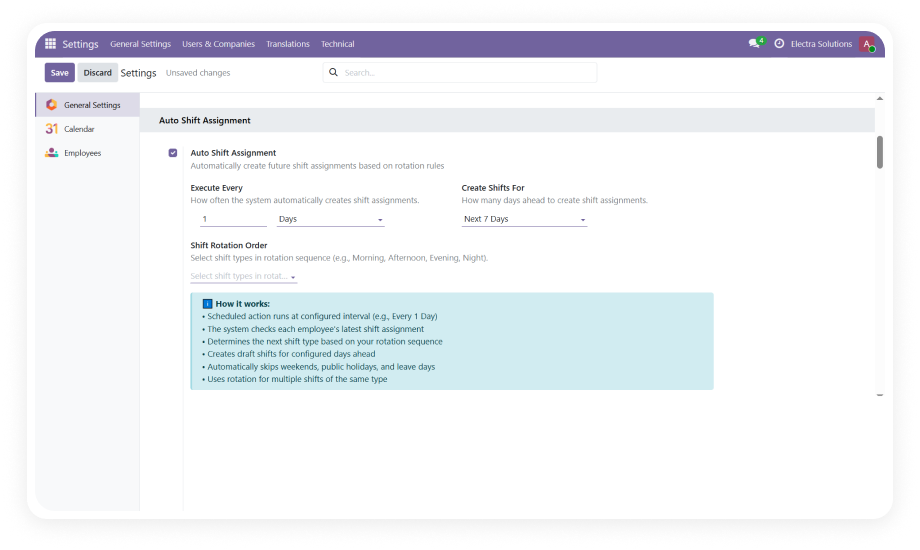
Automated rotation management
Conflict prevention
Bulk shift operations
Real-time workforce dashboard
Excel/PDF reporting

How Employee Roster Scheduling System Solves Workforce Planning

Problem
Zehntech Employee Roster Solution
Manual shift scheduling causes conflicts and double-bookings
Smart scheduling engine prevents overlapping assignments automatically
Spreadsheet-based rosters break down as headcount grows
Drag-and-drop calendar with Gantt views scales across unlimited employees
Shift rotation tracked informally, leading to unfair distribution
Automated rotation wizard with history tracking and fair-distribution logic
Assigning shifts one-by-one consumes hours of manager time
Bulk operations assign shifts to multiple employees simultaneously
No visibility into workforce utilization or scheduling gaps
Real-time dashboard with KPI metrics and workload tracking
Shift change requests happen over chat with no audit trail
Built-in change request workflow with manager approval
Leave approvals create orphaned shifts nobody notices
Leave integration automatically cancels overlapping shifts
Reporting requires manual data extraction and manipulation
One-click Excel and PDF exports with email sharing

Everything You Need to Run Shift Scheduling at Scale

1

Smart Shift Scheduling Engine

Automated shift assignment with built-in conflict prevention. The engine validates every assignment against existing schedules, approved leaves, and configured rules before confirming.

Why it matters: Scheduling conflicts cost real money in overtime, understaffing, and employee dissatisfaction. Catching them before they happen is the only scalable approach.

2

Drag-and-Drop Roster Planning

Visual calendar interface lets managers build rosters by dragging employees into shift slots. Color-coded shift types and Gantt view support provide instant visual clarity.

Why it matters: Managers think visually — a drag-and-drop interface reduces planning time from hours to minutes while making scheduling gaps immediately obvious.

3

Automated Shift Rotation Management

Configure rotation rules and let the system automatically cycle employees through shift patterns. The rotation wizard excludes previously rotated employees for fair distribution.

Why it matters: Manual rotation tracking is where scheduling fairness breaks down. Automation ensures every employee gets equitable shift distribution with provable history.

4

Bulk Operations & Mass Assignment

Assign shifts to multiple employees simultaneously using rule-based logic. Select groups by department, job position, or custom criteria and apply shift patterns in a single operation.

Why it matters: At scale, individual assignment is not operationally viable. Bulk operations turn a multi-hour task into a single action.

5

Employee Shift Change Request Workflow

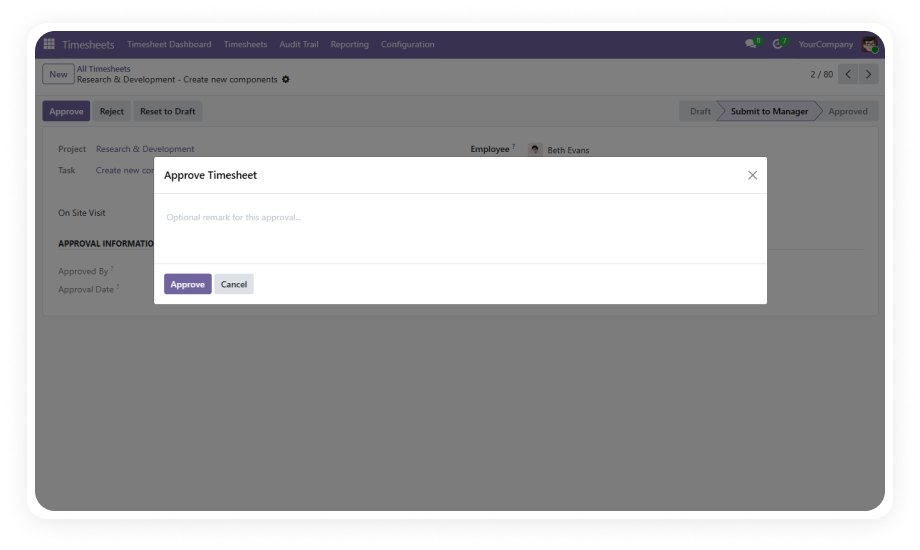
Employees submit shift change requests directly through the system. Requests route through a structured manager approval workflow before any modification takes effect.

Why it matters: Unmanaged shift swaps create invisible coverage gaps. A formal workflow ensures every change is reviewed, approved, and documented.

6

Real-Time Workforce Analytics Dashboard

Live dashboard with KPI metrics, date-range filtering, and per-employee workload tracking shows planned hours versus available hours across the organization.

Why it matters: Scheduling decisions are only as good as the data behind them. Real-time analytics replace guesswork with evidence.

7

Reporting & Export Engine

Generate shift reports in Excel and PDF formats with customizable grouping and filtering options. Share reports via email directly from the module.

Why it matters: Compliance reporting, payroll reconciliation, and management reviews all require formatted scheduling data — the module delivers it without manual extraction.

8

Security, Multi-Company & Multilingual Support

Role-based access control ensures employees see only their own schedules while managers access full department views. Multi-company support handles complex organizational structures natively.

Why it matters: Workforce scheduling touches sensitive employee data and spans organizational boundaries — enterprise-grade access control is non-negotiable.

Who Gets the Most Out of This Module

Role
Primary Use Case
Key Outcome
HR Manager
Automate shift assignments across departments with conflict prevention and rotation fairness
Zero scheduling conflicts and equitable shift distribution without manual tracking
Operations Manager
Plan workforce coverage using drag-and-drop roster views and real-time utilization dashboards
Optimal staffing levels with advance visibility into gaps and overtime risks
Shift Supervisor
Manage day-to-day shift changes through the approval workflow and monitor team schedules
Controlled shift modifications with full audit trail and no coverage surprises
Department Head
Use bulk operations to assign shift patterns for entire teams and review workload analytics
Hours of scheduling time reduced to minutes with data-backed planning decisions
Employee
View personal shift schedules, submit change requests, and track approval status
Complete visibility into upcoming shifts and a formal path for schedule modifications
Compliance Officer
Access rotation audit trails, shift history, and exportable reports for labor regulation compliance
Auditable scheduling records with provable fairness in shift distribution

Versions & Documentation

Choose your Odoo version and explore interactive documentation

Documentation coming soon for Odoo 18. Full setup documentation included with every installation.
Documentation coming soon for Odoo 17. Full setup documentation included with every installation.
Documentation coming soon for Odoo 16. Full setup documentation included with every installation.

Native Odoo vs Zehntech Employee Roster Scheduling

Capability
Zehntech Employee Roster
Native Odoo
Smart shift scheduling with conflict prevention
Available
Not available
Drag-and-drop visual roster planning
Available
Not available
Gantt view for shift timeline visualization
Available
Enterprise only (limited)
Automated shift rotation with fair-distribution logic
Available
Not available
Rotation history audit trail
Available
Not available
Bulk shift assignment operations
Available
Not available
Employee shift change request workflow
Available
Not available
Manager approval for schedule modifications
Available
Not available
Real-time workforce KPI dashboard
Available
Not available
Employee workload tracking (planned vs. available hours)
Available
Not available
Leave integration with automatic shift cancellation
Available
Not available
Excel and PDF shift reporting with email delivery
Available
Not available
Color-coded shift types with calendar views
Available
Partial (basic calendar only)
Multi-company support
Available
Partial
Role-based access control for scheduling
Available
Basic
Multilingual scheduling interface
Available
Partial

Get Started in Under 15 Minutes

No development environment. No custom code. No consultant required for standard setup.

01

Install the Dependency Module

Install the Odoo Gantt App Base (zt_gantt_app_base) from the Odoo App Store first. This is a required paid dependency that provides the Gantt view framework.

02

Install Employee Roster Scheduling System

Download and install zehntech_employee_shift_roster from the Odoo App Store. Compatible with Odoo 19, 18, 17, and 16 — Community, Enterprise, and Odoo.sh.

03

Configure Shift Types

Navigate to the module settings and define your organization's shift types. Assign unique names, time ranges, and color codes to each shift.

04

Assign Shifts and Activate Scheduling

Begin assigning shifts individually or in bulk. Configure rotation rules for automated shift cycling. Activate the real-time dashboard to monitor workforce utilization.

Technical Details & Compatibility

Requirement
Odoo Versions
Editions
Hosting
Dependencies
Paid Dependency
Python Packages
Custom Dev Required
Install Time
Server Restart
Data Migration
Module Conflicts
License
Last Tested
Lines of Code
Support
Details
19.0 · 18.0 · 17.0 · 16.0
Community · Enterprise · Odoo.sh
Odoo Online · On-Premise · Odoo.sh
Employees (hr) · Time Off (hr_holidays) · Discuss (mail) · Calendar
Odoo Gantt App Base (zt_gantt_app_base)
pytz · xlsxwriter
No
Under 15 minutes
Not required
Not required
None known
OPL-1 (Odoo Proprietary)
Odoo 19.0 — May 2026
21,350
Employee Roster Scheduling System — FAQ illustration

Frequently Asked Questions

Yes — the smart scheduling engine validates every assignment against existing schedules and approved leaves before confirming. If an employee already has a shift or approved time off during the proposed period, the system blocks the conflicting assignment. When a leave request is approved after shifts are assigned, the overlapping shifts are automatically cancelled.
Yes — employees submit shift change requests directly from within the module. Requests route through a structured manager approval workflow before any schedule modification takes effect. The system automatically blocks shift change requests for past dates to maintain scheduling integrity.
The rotation wizard automatically cycles employees through configured shift patterns based on rules you define. Previously rotated employees are automatically excluded to ensure fair distribution across the team. A complete rotation audit trail records every change for compliance reviews and dispute resolution.
Yes — the Odoo Gantt App Base (zt_gantt_app_base) module must be installed first. This is a separate paid module available on the Odoo App Store that provides the Gantt view framework used by the scheduling interface. The Python packages pytz and xlsxwriter are also required but are included in standard Odoo deployments.
The module supports Odoo 19, 18, 17, and 16 across Community, Enterprise, and Odoo.sh editions. It is compatible with Odoo Online, On-Premise, and Odoo.sh hosting environments.
One-time purchase at $188.16 — no subscription, no recurring fees. Lifetime updates are included with your purchase, and 90 days of dedicated technical support are provided after installation.

One-Time Purchase.
No Subscription.
No Recurring Fees.

Your team already runs in Odoo — this module adds the intelligent shift scheduling, rotation management, and workforce analytics layer that native Odoo simply does not provide. Includes lifetime updates and 90 days of dedicated technical support.

Zehntech Odoo experts ready to help


          You have successfully subscribed to the newsletter

          There was an error while trying to send your request. Please try again.

          Zehntech will use the information you provide on this form to be in touch with you and to provide updates and marketing.