Join us at GITEX 2025! Discover our solutions at Hall 4, Booth H-30 Schedule a Meeting Today.
Automate Marketing Initiatives with Salesforce Marketing Cloud Learn More
Join us at GITEX 2024! Discover our solutions at Hall 4, Booth H-30 Book your live demo today.
Zehntech Odoo App

Executive KPI Dashboard

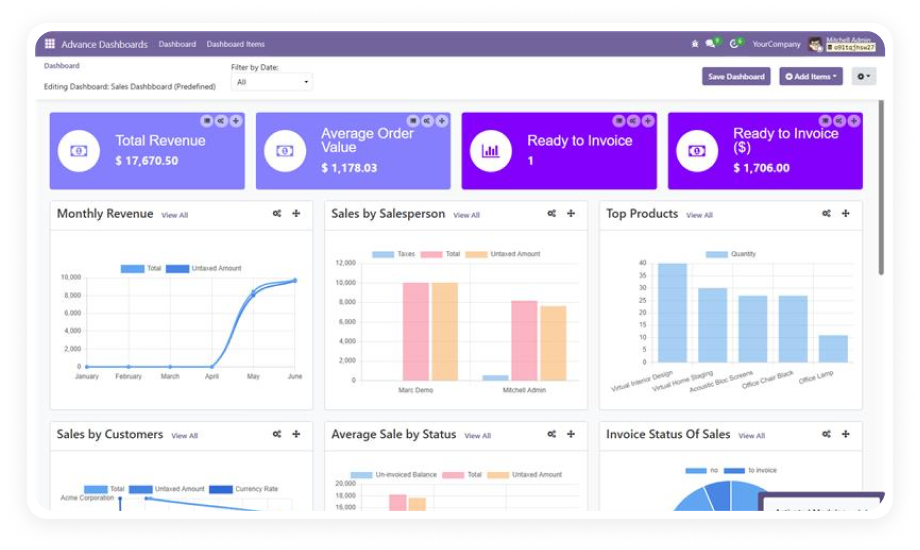
Build custom dashboards that visualize your entire operation — sales, inventory, accounting, CRM, and manufacturing — with drag-and-drop tools and 10 chart types. No coding. No consultants. Just the metrics that matter, updating in real time.

Compatible with Odoo 16, 17, 18 & 19
10 Chart Types with Drag-and-Drop Builder
Community & Enterprise Supported
No Custom Development Required
Trusted by 115+ Businesses Across 12+ Countries
$119.46
V19, 18, 17
Executive KPI Dashboard — Real-time business intelligence for Odoo

What is Executive KPI Dashboard?

Executive KPI Dashboard is an Odoo business intelligence module that transforms complex operational data into intuitive visual dashboards. It replaces the need for external BI tools, custom development, or spreadsheet-based reporting by giving business users a drag-and-drop interface to build real-time dashboards connected directly to their Odoo data. Teams can visualize KPIs across sales, inventory, accounting, manufacturing, and CRM — all from a single, unified dashboard layer inside Odoo.

Drag-and-drop builder
10 visualization types
Real-time data refresh
Role-based access control
Cross-department sharing

How Executive KPI Dashboard Solves Reporting Gaps in Odoo

Problem
Zehntech Executive KPI Dashboard Solution
Native Odoo provides reports per module but no unified executive-level view
Creates cross-module dashboards combining data from Sales, Inventory, CRM, Accounting, and more in one screen
Building visual dashboards requires custom development or external BI tools
Drag-and-drop builder enables any business user to create dashboards without code
Standard Odoo reports show static snapshots, not live data
Dashboards refresh automatically as underlying records change — metrics are always current
No built-in way to restrict dashboard visibility by role
Role-based access control separates Creators and Viewers for secure, controlled sharing
Sharing insights across departments requires manual export and distribution
One-click dashboard sharing lets teams collaborate on the same live data view
Limited chart types in native Odoo — mostly tables and basic bar charts
10 chart types including tiles, list, bar, line, pie, doughnut, radar, and polar area
New dashboard setups require starting from scratch every time
Five pre-built templates provide immediate starting points for common use cases
Moving dashboards between environments requires reconfiguration
Import/export functionality makes dashboard configurations portable across instances

Build. Visualize. Decide. All From One Dashboard.

1

Drag-and-Drop Dashboard Builder

Create and arrange dashboard elements using a visual interface — no code, no technical configuration, no developer involvement.

Why it matters: Business users own their own dashboards, eliminating bottlenecks and dependency on IT for every reporting request.

2

10 Chart Types for Every Data Story

Choose from Tiles, List View, Bar, Horizontal Bar, Line, Horizontal Line, Pie, Doughnut, Radar, and Polar Area charts.

Why it matters: Different data types demand different visualizations — pipeline stages suit a bar chart, revenue distribution suits a doughnut.

3

Real-Time Data Updates

Dashboards pull data directly from Odoo and refresh automatically as records are created, updated, or completed.

Why it matters: Executives and managers see current-state metrics, not yesterday's numbers. No manual refresh, no stale data.

4

Role-Based Access Control

Two distinct permission levels — Dashboard Creators (build and edit) and Dashboard Viewers (view only) — ensure the right people have the right access.

Why it matters: Sensitive financial and operational data stays visible only to authorized personnel.

5

Cross-Department Dashboard Sharing

Share completed dashboards with individuals, teams, or entire departments with a single action.

Why it matters: Sales, operations, and finance can view the same source of truth without duplicate reporting.

6

Multi-Module Data Connectivity

Connect dashboard elements to any Odoo module — Sales, CRM, Inventory, Accounting, Manufacturing, HR, and more.

Why it matters: Executive dashboards rarely live in a single domain. This connectivity enables true cross-functional visibility.

7

Five Pre-Built Dashboard Templates

Start with professionally designed templates covering common business use cases instead of building from an empty canvas.

Why it matters: Teams get value immediately after installation. Templates serve as starting points that can be customized.

8

Import & Export Dashboard Configurations

Export dashboard setups as portable configurations and import them into other Odoo instances.

Why it matters: Multi-company environments, staging-to-production workflows, and template distribution become friction-free.

9

External Data Source Integration

Connect dashboards with external data sources beyond standard Odoo modules for a complete business intelligence view.

Why it matters: Organizations with data in external systems can centralize visibility inside Odoo without duplicating data.

10

Non-Technical User Experience

The entire module — from creation to consumption — is designed for business users with no technical background.

Why it matters: Adoption scales across the organization without training overhead or technical support queues.

Who Gets The Most Out Of This Module

Role
Primary Use Case
Key Outcome
CEO / Executive
Monitor company-wide KPIs across revenue, pipeline, and operations in one view
Strategic decision-making backed by real-time, cross-functional data
Sales Director
Track pipeline health, conversion rates, and revenue targets with live charts
Immediate visibility into team performance without waiting for reports
Finance Controller
Visualize cash flow, receivables aging, and expense trends on a single dashboard
Faster financial oversight with live data instead of month-end snapshots
Operations Manager
Monitor inventory levels, delivery performance, and production throughput
Proactive operations management with early warning indicators
CRM Manager
Surface lead sources, stage distribution, and activity completion rates
Data-driven coaching and resource allocation across the sales team
HR Director
Track headcount, attendance, leave patterns, and recruitment pipeline
Unified people analytics without exporting data to spreadsheets
IT Administrator
Deploy standardized dashboards across departments with role-based access
Controlled rollout of business intelligence without custom development
Not the right fit for: Teams that only need basic Odoo reports or prefer external BI tools like Tableau or Power BI.

Versions & Documentation

Choose your Odoo version and explore interactive documentation

Documentation coming soon for Odoo 16. Full setup documentation included with purchase.

Documentation coming soon for Odoo 17. Full setup documentation included with purchase.

Documentation coming soon for Odoo 18. Full setup documentation included with purchase.

Documentation coming soon for Odoo 19. Full setup documentation included with purchase.

Native Odoo vs Zehntech Executive KPI Dashboard

Capability
Zehntech Executive KPI Dashboard
Native Odoo
Unified cross-module executive dashboard
Yes
Not available
Drag-and-drop dashboard builder (no coding)
Yes
Not available
10 chart types (tiles, bar, line, pie, doughnut, radar, polar)
Yes
Basic (limited chart options)
Real-time data refresh from live Odoo records
Yes
Basic (per-module reports)
Role-based access control (Creator vs Viewer)
Yes
Not available
One-click cross-department dashboard sharing
Yes
Not available
Multi-module data connectivity in a single view
Yes
Not available
Pre-built dashboard templates
5 templates
Not available
Import/export dashboard configurations
Yes
Not available
External data source integration
Yes
Not available
List view chart type for tabular KPI displays
Yes
Basic
Non-technical user interface for dashboard creation
Yes
Not available

Get Started In Minutes

No development environment. No custom code. No consultant required for standard setup.

01

Purchase & Install

Purchase Executive KPI Dashboard from the Odoo App Store. Available for Odoo 16, 17, 18, and 19 across Community, Enterprise, and Odoo.sh. No server restart required.

02

Choose a Template or Start Fresh

Open the Dashboard menu. Select from five pre-built templates or start with a blank canvas. The drag-and-drop builder loads immediately.

03

Connect Data & Configure KPIs

Link each chart to Odoo modules — Sales, CRM, Inventory, Accounting, Manufacturing. Define metrics, filters, and groupings. Data flows in real time.

04

Set Permissions & Share

Assign Creator or Viewer roles. Share dashboards with departments, teams, or individuals. Each user sees only permitted dashboards.

Technical Details & Compatibility

Requirement
Odoo Versions
Editions
Hosting
Dependencies
Third-Party Dependencies
Custom Dev Required
Install Time
Server Restart
Data Migration
Module Conflicts
License
Last Tested
Lines of Code
Support
Details
16.0 · 17.0 · 18.0 · 19.0
Community · Enterprise · Odoo.sh
Odoo Online · On-Premise · Odoo.sh
Discuss (mail)
None
No
Under 5 minutes
Not required
Not required
None known
OPL-1
Odoo 19.0 — May 2026
10,638
Executive KPI Dashboard — FAQ illustration

Frequently Asked Questions

Yes. Executive KPI Dashboard uses a drag-and-drop interface that allows any business user to create, configure, and publish dashboards without writing a single line of code. All 10 chart types, data connections, filters, and access controls are configured entirely through the visual builder.
Yes. The module is fully compatible with Odoo Community, Enterprise, and Odoo.sh editions. It requires only the standard Discuss (mail) module as a dependency, which is included in every Odoo installation regardless of edition.
Dashboards pull data directly from Odoo's database and refresh automatically as underlying records change. When a sales order is confirmed, a delivery is completed, or an invoice is paid, the relevant KPI tiles and charts update to reflect current values without manual intervention.
Executive KPI Dashboard supports Odoo 16.0, 17.0, 18.0, and 19.0. All hosting types are supported: Odoo Online, Odoo.sh, and On-Premise deployments. Each version is maintained and updated independently.
Yes. The module includes role-based access control with two distinct permission levels. Dashboard Creators can build, configure, modify, and delete dashboards. Dashboard Viewers can only view dashboards that have been shared with them.
Yes. The import/export functionality allows you to export dashboard configurations from one Odoo instance and import them into another. This supports staging-to-production workflows, multi-company environments, and dashboard template distribution across teams.
The module ships with five pre-built dashboard templates covering common business use cases. Templates provide immediate value after installation and serve as starting points that can be customized, extended, or used as-is.

One-Time Purchase.
No Subscription.
No Recurring Fees.

Includes lifetime updates and 90 days of dedicated technical support.

Zehntech Odoo experts ready to help


          You have successfully subscribed to the newsletter

          There was an error while trying to send your request. Please try again.

          Zehntech will use the information you provide on this form to be in touch with you and to provide updates and marketing.