Bidirectional CRM Sync Without the Middleware. Unify your HubSpot marketing data and Odoo operations with a direct, bidirectional connector. Sync contacts, companies, deals, tasks, notes, meetings, and emails automatically between platforms — with multi-account support, scheduled automation, and a real-time performance dashboard built in.
HubSpot Odoo Connector is a direct integration module that establishes bidirectional data synchronization between HubSpot CRM and Odoo ERP. It eliminates the need for third-party middleware platforms like Zapier or Make by connecting both systems natively — keeping contacts, companies, deals, tasks, notes, meetings, and emails consistent across your entire tech stack.
Direct native integration removes middleware dependencies
Multiple HubSpot accounts require separate integration setups
Multi-account connectivity from a single Odoo instance
Sync failures go unnoticed until downstream processes break
Comprehensive logging categorizes every sync with traceable details
No visibility into sync health or historical performance
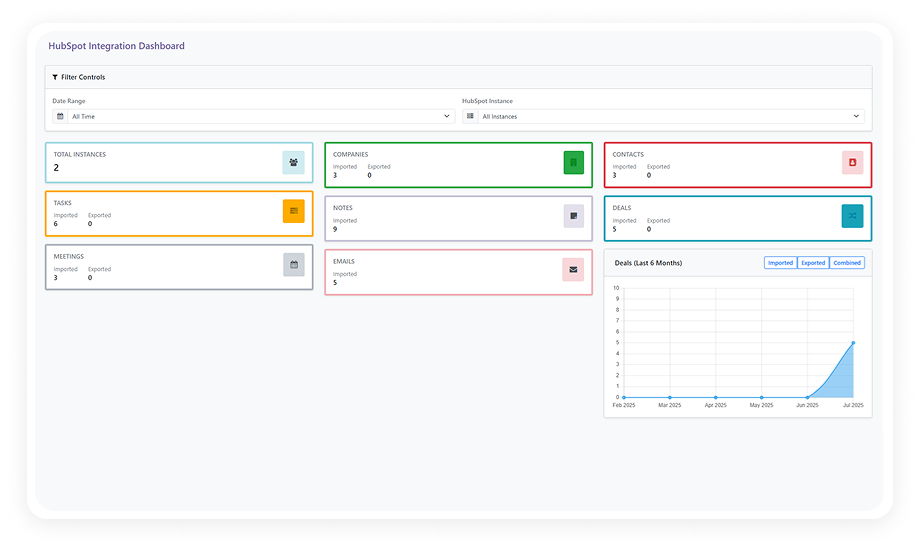
Built-in dashboard visualizes metrics and historical trends
Large datasets overwhelm basic sync processes
Configurable batch sizes and transfer intervals for high volume
Default field mappings rarely match real business data
Flexible field mapping with sensible defaults
Complete Bidirectional HubSpot-Odoo Data Synchronization
1
Bidirectional Sync of All Key Entities
Records flow in both directions between HubSpot and Odoo. Contacts, companies, deals, tasks, notes, meetings, and emails stay consistent across platforms.
Why it matters: Teams on both platforms always work from the same current data — no version conflicts or manual reconciliation.
2
Multi-Account HubSpot Connectivity
Connect multiple HubSpot accounts to a single Odoo instance. Each account maintains its own authentication, sync configuration, and activity logging.
Why it matters: Organizations managing multiple brands can centralize all HubSpot data into one Odoo environment.
3
Flexible Sync Modes — Manual and Automated
Trigger synchronization manually for immediate data transfer, or configure automated scheduling through Odoo's cron job system.
Why it matters: On-demand control when you need data right now, plus hands-off automation for continuous background sync.
4
Comprehensive Sync Logging
Every sync operation is logged with granular status categories — success, partial sync, and error — each with traceable details.
Why it matters: When sync issues arise, detailed logs reduce troubleshooting time from hours to minutes.
5
Built-In Sync Performance Dashboard
A visual dashboard presents sync activity metrics, success rates, and error trends with historical filtering.
Why it matters: Proactive visibility lets administrators catch degradation early before it impacts business processes.
6
Configurable Field Mapping
Default field mappings are provided out of the box, with full flexibility to customize which HubSpot fields map to which Odoo fields.
Why it matters: Businesses with non-standard data structures can adapt without writing custom code.
7
Batch Size and Transfer Interval Control
Define batch sizes and transfer intervals to control how much data moves per sync cycle — preventing timeouts with large datasets.
Why it matters: Organizations with tens of thousands of records can sync reliably without overwhelming either platform.
8
HubSpot API Token Authentication
Secure connection via HubSpot's standard API access token — straightforward authentication with no OAuth complexity.
Why it matters: Setup is fast, secure, and maintainable without additional authentication infrastructure.
Who Gets The Most Out Of This Connector
Role
Primary Use Case
Key Outcome
Marketing Director
Keep HubSpot leads and contacts synchronized with Odoo CRM in real time
Sales and marketing alignment without manual data handoff
Sales Operations Manager
Ensure deals closed in either platform are reflected across both systems
Unified pipeline reporting and accurate revenue forecasting
CTO / IT Director
Replace middleware tools (Zapier, Make) with a direct native integration
No development environment. No custom code. No consultant required for standard setup.
01
Install from the Odoo App Store
Search for 'zehntech_odoo_hubspot_connector' in your Odoo Apps menu and click Install. Works on Odoo 16–19, Community, Enterprise, and Odoo.sh.
02
Configure HubSpot API Authentication
Navigate to the HubSpot Connector settings and enter your HubSpot API access token. For multi-account setups, add each account with its own credentials.
03
Review and Customize Field Mapping
Default mappings work out of the box. Review the configuration for each entity type and customize any fields that need to align with your data structure.
04
Schedule Automated Sync or Run Manual
Configure cron jobs to automate sync intervals or trigger manual sync. Monitor initial operations through the dashboard to confirm data flows correctly.
The connector supports full bidirectional synchronization between HubSpot and Odoo. Records created or updated in HubSpot automatically reflect in Odoo, and vice versa. This applies to all supported entity types: contacts, companies, deals, tasks, notes, meetings, and emails.
Seven entity types are synchronized: contacts, companies, deals, tasks, notes, meetings, and emails. Each entity maintains configurable field mapping between HubSpot and Odoo. Default mappings are provided for immediate operation, with full customization available.
Yes — the connector supports multi-account connectivity out of the box. Each HubSpot account maintains its own API authentication, sync schedule, and activity log. This is ideal for organizations managing multiple brands or business units from one Odoo backend.
The connector supports Odoo 16, 17, 18, and 19. Both Community and Enterprise editions are fully compatible. All hosting environments are supported: Odoo Online, Odoo.sh, and On-Premise.
Every sync operation is logged with a status of success, partial sync, or error — each with traceable details. The built-in dashboard visualizes sync performance metrics and highlights historical trends. Administrators can filter logs to isolate specific failures and resolve issues without parsing raw data.
One-Time Purchase. No Subscription. No Recurring Fees.
Your marketing team runs HubSpot. Your operations team runs Odoo. HubSpot Odoo Connector makes them one system — with bidirectional sync across contacts, companies, deals, tasks, notes, meetings, and emails. Includes lifetime updates and 90 days of dedicated technical support.