Join us at GITEX 2025! Discover our solutions at Hall 4, Booth H-30 Schedule a Meeting Today.
Automate Marketing Initiatives with Salesforce Marketing Cloud Learn More
Join us at GITEX 2024! Discover our solutions at Hall 4, Booth H-30 Book your live demo today.
Zehntech Odoo App

Odoo Mailchimp Connector

Unify Email Marketing and ERP in One Platform. Bridge the gap between your Odoo ERP and Mailchimp email marketing. Synchronize contacts, manage campaigns, import templates, and track delivery metrics — all from within your Odoo backend, with full bidirectional data flow and multi-account support.

Compatible with Odoo 16, 17, 18 & 19
Community & Enterprise Supported
Bidirectional Contact & Campaign Sync
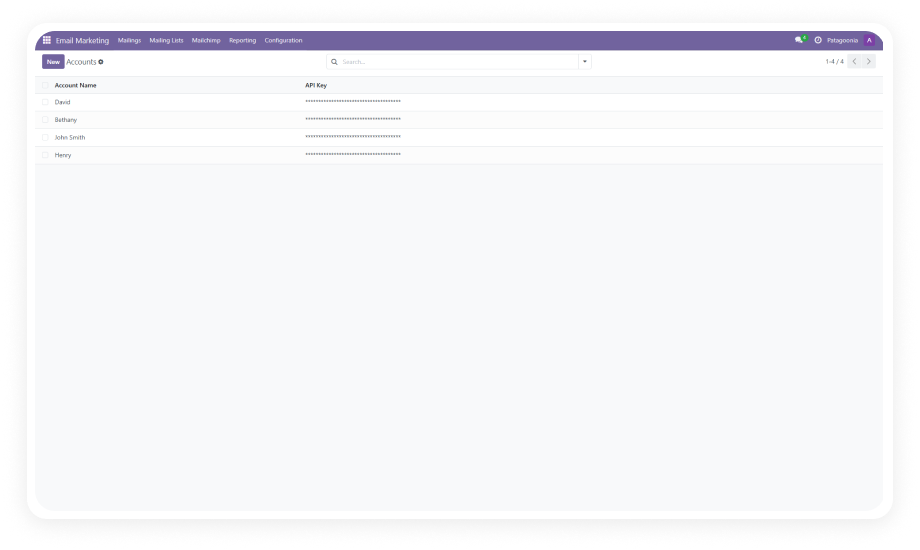
Multiple Mailchimp Accounts Per Instance
Trusted by Businesses Across 12+ Countries
$199.11
V19, 18, 17, 16
Odoo Mailchimp Connector — Bidirectional sync interface

What is the Odoo Mailchimp Connector?

The Odoo Mailchimp Connector is a bidirectional integration module that connects your Odoo ERP directly to Mailchimp's email marketing platform. Instead of managing contacts in two separate systems, switching between tabs to create campaigns, or manually exporting subscriber lists, this connector keeps both platforms aligned through real-time data synchronization. Connect multiple Mailchimp accounts, pull in audiences and templates, push contacts and campaigns from Odoo, and monitor email delivery performance — all without leaving your ERP.

Bidirectional sync
Multi-account support
Campaign management
Template import
Segment sync
Delivery metrics

One module. Complete Mailchimp integration inside Odoo. No middleware required.

How the Odoo Mailchimp Connector Eliminates Email Marketing Fragmentation

Problem
Zehntech Solution
Contact data lives in both Odoo and Mailchimp with no reliable synchronization
Bidirectional sync keeps contacts aligned across both platforms automatically
Marketing teams must switch to Mailchimp to create or send email campaigns
Campaigns can be created, updated, and sent directly from the Odoo interface
New subscribers in Mailchimp are invisible to your Odoo CRM and sales team
Contact imports pull Mailchimp members into Odoo with subscription status segmentation
Managing multiple Mailchimp accounts requires logging into each separately
Connect and manage multiple Mailchimp accounts from a single Odoo instance
Email templates built in Mailchimp cannot be reused or referenced in Odoo
Templates are imported from Mailchimp and accessible within Odoo for campaign use
Campaign performance data (opens, bounces) only lives in Mailchimp
Delivery metrics including open rates and bounce rates are tracked inside Odoo
Audience segments and merge fields must be recreated manually in each system
Segments and merge fields synchronize between platforms to maintain consistency
Standard Odoo Email Marketing module has no native Mailchimp connectivity
This connector adds a dedicated Mailchimp integration layer to Odoo's marketing workflow

Complete Mailchimp Integration Built Into Your Odoo Workflow

1

Multiple Mailchimp Account Connections

Connect more than one Mailchimp account to a single Odoo instance, each authenticated via its own API key. Manage audiences, campaigns, and templates from different business units or brands without switching between Mailchimp dashboards.

Why it matters: Organizations running multiple brands or regional accounts can centralize all email marketing management inside one Odoo backend.

2

Multi-List Audience Synchronization

Organize and synchronize audiences across your connected Mailchimp accounts using the Multi-List Sync capability. Pull in subscriber lists, keep them updated, and manage audience organization from Odoo.

Why it matters: Instead of manually reconciling audience lists across accounts, all subscriber data stays organized and accessible from your ERP.

3

Bidirectional Contact Sync with Status Segmentation

Import Mailchimp member contacts into Odoo with automatic categorization by subscription status — subscribed, unsubscribed, cleaned, or pending. Export and update contacts from Odoo to Mailchimp with the same granular status tracking.

Why it matters: Sales and marketing teams always see accurate subscriber status without manual data reconciliation between platforms.

4

Campaign Creation and Delivery from Odoo

Fetch existing campaigns from Mailchimp, or create and update new email campaigns directly within the Odoo interface. Send campaign emails from Odoo and manage the full campaign lifecycle without opening Mailchimp.

Why it matters: Marketing workflows stay inside the ERP where they connect to customer records, pipeline data, and operational context.

5

Campaign Delivery Metrics Tracking

Monitor campaign performance directly in Odoo with metrics including open rates, bounce rates, recipient counts, and delivery status (draft, sending, sent).

Why it matters: Performance data appears alongside your CRM and sales data, enabling faster decisions without toggling between analytics platforms.

6

Email Template Import

Import email templates from your Mailchimp account into Odoo for reuse across campaigns. Maintain a centralized template library accessible to your marketing team inside the ERP.

Why it matters: Templates built by your design team in Mailchimp become immediately available in Odoo without manual recreation or file transfers.

7

Segment and Merge Field Synchronization

Synchronize Mailchimp audience segments and merge fields into Odoo to maintain consistent targeting criteria and personalization data across both platforms.

Why it matters: Segmentation rules and personalization fields stay aligned without manual upkeep, so campaigns reach the right audiences regardless of which platform initiates the send.

8

Real-Time Data Refresh

Trigger on-demand data synchronization between Odoo and Mailchimp to pull the latest contacts, campaign statuses, and audience updates without waiting for scheduled sync cycles.

Why it matters: When time-sensitive campaigns require current data, teams can refresh instantly rather than working with stale information.

9

Dedicated Notebook Sections for Organized Data

Imported Mailchimp data is organized into dedicated notebook sections within Odoo records, separating contact details, campaign data, and template information for clean navigation.

Why it matters: Users find Mailchimp-related data in a structured layout rather than mixed into unrelated fields, reducing confusion and improving workflow efficiency.

10

Centralized Contact Export and Management

Create, update, and export contacts from Odoo to Mailchimp with full control over which records sync and when. Manage audience membership directly from Odoo contact records.

Why it matters: The contact database in your ERP becomes the authoritative source, pushing updates to Mailchimp rather than requiring duplicate data entry.

Who Benefits Most From the Odoo Mailchimp Connector

Role
Primary Use Case
Key Outcome
Marketing Manager
Manage Mailchimp campaigns and audiences from within Odoo alongside CRM data
Unified marketing operations without switching between platforms
E-commerce Director
Keep customer contact lists synchronized between Odoo store and Mailchimp
Accurate subscriber lists that reflect real-time customer activity
Sales Operations Lead
Access Mailchimp engagement data (opens, bounces) alongside pipeline records
Better lead qualification using email engagement signals
Multi-Brand Business Owner
Manage multiple Mailchimp accounts for different brands from one Odoo instance
Centralized control over all email marketing without separate logins
CRM Administrator
Ensure Odoo contacts and Mailchimp subscribers stay aligned without manual work
Eliminated duplicate entries and subscription status discrepancies
Digital Marketing Agency
Handle client Mailchimp accounts connected to a shared Odoo project management system
Streamlined client campaign execution from a single operational hub

Versions & Documentation

Choose your Odoo version and explore interactive documentation

Native Odoo Email Marketing vs Zehntech Odoo Mailchimp Connector

Capability
Zehntech Mailchimp Connector
Native Odoo Email Marketing
Direct Mailchimp API integration
Yes
Not available
Multiple Mailchimp account connections
Yes
Not available
Bidirectional contact synchronization
Yes
Not available
Import contacts with subscription status segmentation
Yes
Not available
Multi-list audience sync
Yes
Not available
Create and send Mailchimp campaigns from Odoo
Yes
Not available
Campaign delivery metrics in Odoo (open, bounce, recipients)
Yes
Odoo-native metrics only
Import Mailchimp email templates
Yes
Not available
Segment and merge field synchronization
Yes
Not available
Real-time on-demand data refresh
Yes
Not available
Export Odoo contacts to Mailchimp
Yes
Not available
Campaign status tracking (draft, sending, sent)
Yes
Odoo-native campaigns only
Dedicated Mailchimp data sections in Odoo records
Yes
Not available

Get Connected In Minutes

No middleware platform. No custom code. No third-party integration service required.

01

Install from the Odoo App Store

Search for zehntech_odoo_mailchimp_connector in your Odoo Apps menu and click Install. The module requires Contacts, Discuss (mail), and Email Marketing (mass_mailing) modules. Compatible with Odoo 16, 17, 18, and 19.

02

Connect Your Mailchimp Account

Navigate to the connector settings and enter your Mailchimp API key to authenticate the connection. You can connect multiple Mailchimp accounts within the same Odoo instance, each with its own API credentials.

03

Import Audiences and Contacts

Use the Multi-List Sync feature to pull your Mailchimp audiences into Odoo. Contacts import with their subscription status automatically segmented (subscribed, unsubscribed, cleaned, pending).

04

Sync Campaigns, Templates, and Segments

Fetch your existing Mailchimp campaigns and email templates into Odoo. Synchronize audience segments and merge fields. Begin creating and sending campaigns from Odoo immediately.

Technical Details & Compatibility

Requirement
Odoo Versions
Editions
Hosting
Dependencies
Third-Party Dependencies
Custom Dev Required
Install Time
Server Restart
Data Migration
Module Conflicts
License
Last Tested
Lines of Code
Support
Details
16.0 · 17.0 · 18.0 · 19.0
Community · Enterprise · Odoo.sh
Odoo Online · On-Premise · Odoo.sh
Contacts · Discuss (mail) · Email Marketing (mass_mailing)
Mailchimp API key required
No
Under 10 minutes
Not required
Not required
None known
OPL-1
Odoo 19.0 — May 2026
2,010
Odoo Mailchimp Connector — FAQ illustration

Frequently Asked Questions

Yes — the connector supports multiple Mailchimp account connections within one Odoo installation. Each account is authenticated independently via its own API key. Audiences, campaigns, and templates from each account are managed separately within Odoo. There is no practical limit on the number of connected accounts.
Yes — bidirectional synchronization is a core capability of this module. Contacts can be imported from Mailchimp into Odoo with automatic subscription status segmentation. Odoo contacts can be created, updated, and exported to Mailchimp directly from the contact record. Both directions maintain subscription status (subscribed, unsubscribed, cleaned, pending) for accurate segmentation.
Yes — the connector allows you to create, update, and send email campaigns from the Odoo interface. Campaign delivery metrics including open rates, bounce rates, and recipient counts are tracked in Odoo. Campaign status (draft, sending, sent) is visible without switching to the Mailchimp dashboard. Existing Mailchimp campaigns can also be fetched into Odoo for monitoring and management.
Supported Odoo versions: 16, 17, 18, and 19. Compatible with both Community and Enterprise editions. Works on Odoo Online, Odoo.sh, and On-Premise hosting environments. The module requires the Contacts, Discuss, and Email Marketing modules as dependencies.
Your existing Mailchimp data remains completely intact and unmodified. The connector imports copies of your audiences, campaigns, templates, and segments into Odoo. You control synchronization timing through manual sync operations and the real-time refresh function. No data is deleted or overwritten in Mailchimp during import or ongoing sync operations.

Ready to Unify Your Email Marketing and ERP?

One-Time Purchase. No Subscription. No Recurring Fees. Your team already uses Odoo and Mailchimp — the Odoo Mailchimp Connector eliminates the gap between them. In under 10 minutes, contacts sync bidirectionally, campaigns launch from inside your ERP, and delivery metrics appear alongside your CRM data. No middleware, no manual exports, no duplicate data entry. Includes lifetime updates and dedicated technical support.

Zehntech Odoo experts ready to help


          You have successfully subscribed to the newsletter

          There was an error while trying to send your request. Please try again.

          Zehntech will use the information you provide on this form to be in touch with you and to provide updates and marketing.