


Bubble.io is a visual programming language and a No Code Cloud platform. It allows the development of web applications over it without programming. As a result, Bubble give us flexibility to develop applications with full responsiveness. In other words, they will adjust automatically to the width of the device they’re seen on. Hence providing an out of box responsive functionality making us prefer it over any other platform.
Want to know how? Keep reading.
Build More Effective Responsive Pages in Bubble.io
When we create an application on any platform, the main concern is “How to make the application fully responsive?”.
We can build more effective web pages in Bubble.io by using its responsive viewer. Making a responsive application is very necessary. That is to say we have to make applications for all the screens like mobile browsers, tablets, laptops, and desktop screens. Bubble’s already created pages with responsiveness.
In other words, we can say Bubble.io adjusts the page automatically to the width of the device. You have to start creating the pages for the widescreens like desktop screens.
After the design of the widescreen, you can start to update web pages for the narrower designs. In Bubble.io creating a responsive web page is very easy. You have to just manage the height and width of the page containers and group them.
Along with this we can create a full-width page and a responsive page at the same time. In Bubble.io we can check whether the webpage is responsive at the same time in its responsive viewer.
Using Bubble.io Responsive Viewer to Develop Web Application
Most importantly to make Bubble.io applications responsive use responsive viewer. There is two tabs available on top of the new element palette. One for the UI Builder and one for the Responsive Viewer. This helps to switch between UI builder and Responsive Viewer. Firstly with the help of Responsive Viewer Bubble.io developers check their web application pages. For knowing their responsiveness for the mobile, tablet, laptop or desktop view. Responsive Viewer contains a ruler top of the page, which defined the current page width. By the help of this developers can change application width in different size.
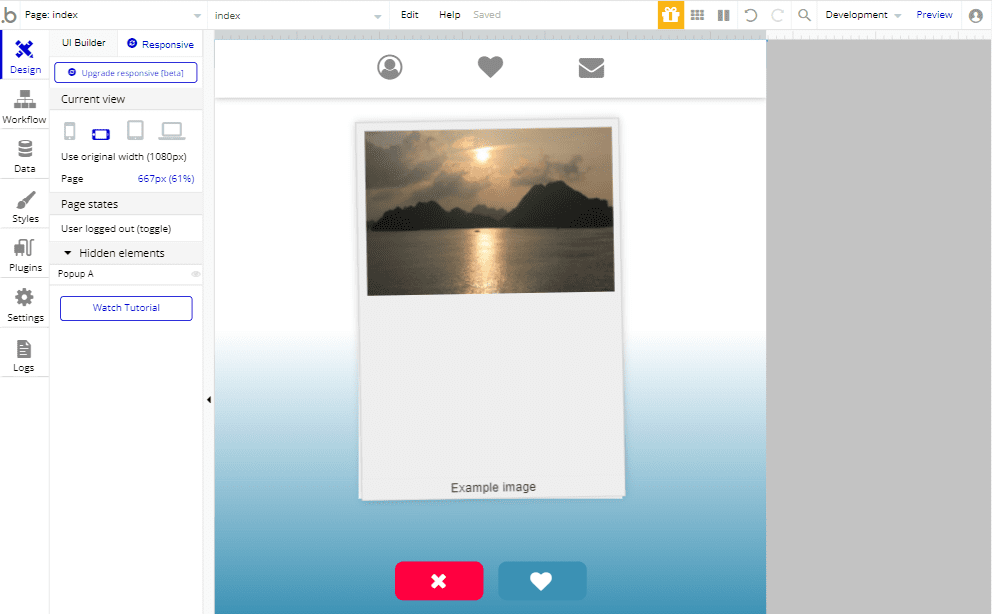
By just clicking and dragging the ruler developer resize their Bubble.io application pages and see how the web pages behave dynamically. On the below of the Responsive viewer there is a current view of the page icon, by which developer can see their web pages in mobile portrait, mobile, tablet and laptop or desktop mode. In Bubble.io we can also click on the element and see their parameters in the responsive palette and modify more settings in it and see the result in real-time. Bubble.io experts use a responsive viewer and make the bubble.io application responsive and more effective for all the devices.
Algorithm to Develop Responsive Bubble.io Application
However to develop the Bubble.io application responsive, you have to understand how Responsive Viewer algorithm work. Algorithm controlling the page accomplishment follows a few middle principles. While you may tweak and notice in real-time the effect of the responsive parameters, it is good to have universal information about the ways the rendering engine works.
Resized and converted pages whether in mobile view or tablet view, the elements get shrunken and expanded when the margins expand. When all the elements in Bubble.io are on a line and at their maximum width, then it expands its margin. When all the elements in Bubble.io, are on a line and at their maximum width, then it expands its margin.
There are shrinkable and expandable elements in Bubble.io by default. Responsive Viewer or Property Editor can control it on an element-by-element basis.
In the Bubble.io applications we use many elements and groups to develop the web pages. If we don’t make the elements responsive, they overlap each other and shrink and expand together. However to make this responsive you can give fixed width or full width to one of the elements. By this when you resize the page the second element breakdown and shifted to the below line and the overlapping elements either break or not be break you can use hide and show condition also.
In the Bubble.io application we also use normal groups and repeating groups as well. These groups are working as mini pages of the application. The elements we use in the group, break inside it when the page shrinks. To check the responsiveness of the page, you can manage the groups how far it will squeeze their content. By limiting their minimum width and by giving the groups maximum width you can limit how wide an element be. If we don’t want to make application page wide as your screen, puts all the elements in the group and assign full width for the group.
Use of Responsive Debugger to develop Bubble.io application
Bubble.io also launch its Responsive Engine (beta version). With the help of this engine Bubble.io developers can make the web pages more interactive and effective. When we upgrade our application page with the Responsive Engine, it will change our existing page settings and shows all the new settings. The Responsive Engine is the all-new technology and upgraded version of the Bubble.io. Currently this Responsive Engine of bubble.io is in the developing stage it is only the beta version. Not a fully upgraded version. So, there may be many issues blocking bugs and unexpected behavior.
Responsive Engine (beta version)
Bubble.io also launch its Responsive Engine (beta version). With the help of this engine Bubble.io developers can make the web pages more interactive and effective. When we upgrade our application page with the Responsive Engine, it will change our existing page settings and shows all the new settings. The Responsive Engine is the all-new technology and upgraded version of the Bubble.io. Currently this Responsive Engine of bubble.io is in the developing stage it is only the beta version. Not a fully upgraded version. So, there may be many issues blocking bugs and unexpected behavior.
A place for big ideas.
Reimagine organizational performance while delivering a delightful experience through optimized operations.

Container Layout Types
Further container layout types are used to define the behavior and positioning of the elements. The container layout type is for all the elements, all the groups, floating group, repeating group, and the page itself. Your page itself is a responsive container to be changed for all screen sizes. But the page shouldn’t be fixed width. By fixing the width of the page, it cannot work as responsive. The container layout types are:
- Fixed type
- Align to parent
- Row
- Column
Fixed type
The fixed layout type has the fixed width and height of the element inside it. The fixed-width container doesn’t change in any screen size or content size it became the same as the desktop or laptop screen.
Align to parent
The parent container is the outside group or page of the Bubble.io application. Inside the parent container we use the children element, and this parent container divides into 9 parts instead of four. The children element can align to the parent container in any direction top, bottom, right, left, top right, top-left, bottom-right, bottom-left.
Row
The children’s elements in the row container are horizontally aligned. All the child elements are squeezed when the screen size is shrinks
Column
The content in the column is aligned vertically. When the screen size changes and goes to the lower side the elements are stretched or pushed other elements down
- Margins and padding
The elements are adjusting my margins and padding. Meanwhile by giving margins and padding we make the web pages responsive and compatible with all size screen
Conclusion
To sum up Bubble.io is a great choice for rapid web and mobile development projects. Above all content specifies that using Bubble to make responsive design is fairly simple. Professionals with cross-domain experience and knowledge for building custom no-code apps can build it in a secure and scalable way.
Reference link






