








Join us at GITEX 2025! Discover our solutions at Hall 4, Booth H-30 Schedule a Meeting Today.
Automate Marketing Initiatives with Salesforce Marketing Cloud Learn More
Join us at GITEX 2024! Discover our solutions at Hall 4, Booth H-30 Book your live demo today.

How to Utilize Python to Make Data Scraping Quicker and Easier

Web Scraping is the process of fetching useful data from the website. This also plays an important role in data analysis and competitive analysis. In Python it is easy to automate the process of data collecting using web scraping.


In machine learning for training the model, there is a need to prepare the dataset. Therefore, collecting the data is quite time-consuming. But using the Python library to scrape the data from multiple websites reduces the development process. So Extracting data is simple and saves lots of time for developers. Also, data can be stored in databases for future use and analysis. Especially for data scientists who work around large and diverse datasets.


Web scraping provides insight and growth in e-commerce platforms. It plays a vital role in business to making better decisions. Further, it provides a market view based on patterns and trends in data. 


In e-commerce, web scraping helps in gathering information about multiple sellers. These are the ones selling their product under the same category but at different prices, names and titles.

Benefits of Using Python for Data Scrapping

Libraries

Python being famous for its various libraries which provide ability to achieve task in various fields. For data extraction from website and API, python has various libraries. These includes BeautifulSoup, Selenium, requests, lxml , Scrapy and also provide libraries for data analysis such as pandas and numpy.

Easy to use

There is no need to use curly braces or semi colon, which makes python code easy to read and understand. Perform web scrapping with minimum line of code and minimum efforts.

Code Debugging –

Python executes code one line at a time. This makes debugging easy and less complicated, as it stops the execution once it found any error in any of the lines.

A place for big ideas.

Reimagine organizational performance while delivering a delightful experience through optimized operations.

Environment Setup

Virtual environment is used to create isolated environment installs the packages required for the project. For creating virtual environment there is command in python. This create separate folder in current working directory in which packages are installed required for project.


Steps to create virtual environment on windows


Step 1: Create virtual environment using command:

python -m venv venv

Step 2: Activate virtual environment:

venv\Scripts\activate

Step 3: Install packages:

pip install package_name

Web Data Scrapping with Python

Package Description

  • Requests – Request library used for making HTTP request from any website using GET method to get the information.
  • BeautifulSoup – Beautifulsoup library pull out data from HTML by inspecting the website. It works with parser to provide way to search data from parser tree.
  • Pandas – Pandas is used for data analysis and data cleaning, it is most commonly python library to be use in the field of data science. It deals with various data structure and method for data manipulation.

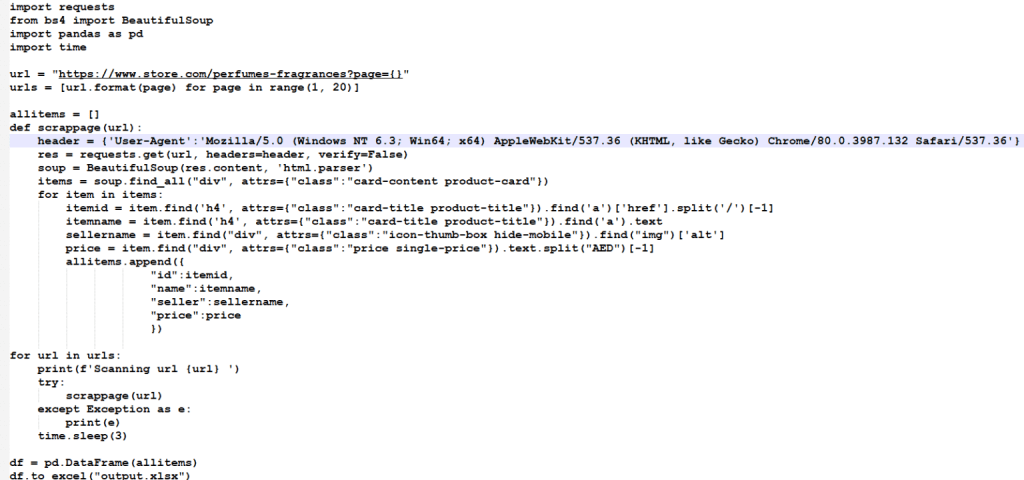
Steps and code to start scrapping in python

  • First of all, need to create and activate the virtual environment using command mentioned above then install the required packages for scrapping.
  • Create python file to write the code for scrapping  website.
scrapper 1536x720 1


To sum up, there are multiple requirements of fetching data and with python you can easily automate the process. With reduced development, Python ensures time saving and simplicity in the process. Keep reading for more such amazing tech related knowledge.

Top Stories

Odoo ERP Implementation (1)
How Indian MSMEs Can Use Budget 2026 Subsidies to Fund Their Odoo ERP Implementation
India’s Union Budget 2026–27 has sent a strong signal to small and medium enterprises: technology adoption is no longer optional — it is strategic. With a ₹10,000 crore MSME-focused fund, a ₹2,000 crore top-up for the Self-Reliant India Fund, and renewed emphasis on digital modernization, the government is actively encouraging
Sap’s critical 9.9 vulnerability
SAP’s Critical 9.9 Vulnerability: Why Mid-Market Companies Are Rethinking Their ERP Security
Resource Planning (ERP) systems sit at the center of business operations. When a vulnerability with a CVSS score of 9.9 is disclosed in SAP environments, it immediately draws attention — not because of hype, but because of operational risk. During the February 2026 SAP Security Patch Day, multiple high-severity security notes were released, including one
Odoo
Odoo v14 End of Life: What the October 2026 Kill Date Means for Your Business
If you’re still running your business on Odoo v14, you now have a hard stop on the calendar 31 October 2026. That’s when Odoo v14 will reach the end of life on Odoo.sh, and any database still on that version will be blocked from normal use. It’s not just a technical detail it’s a real business continuity risk if you ignore
10 Proven Tips for Successful Odoo Module Customization
Odoo is famous for its customizable nature. Businesses from around the world choose Odoo because of its scalability and modality. Regardless of the business size, Odoo can cater to the unique and diverse needs of any company. Odoo has proven its capacity and robust quality in terms of helping businesses
How Odoo is Transforming Traditional Education with E Learning
How Odoo is Transforming Traditional Education with E-Learning?
Does your school need to centralize data to easily access and share information between applications? Odoo provides an ERP system that can do so. Using multiple software applications for every department can be dragging. With Odoo, you can systematize your operations for efficiency, user-friendly navigation, uniform cross-functional practice, and increased
How Can Odoo Module Customization Revolutionize Your Purchase Management Workflow
How Can Odoo Module Customization Revolutionize Your Purchase Management Workflow?
Odoo ERP’s modules are engineered with a robust structure to drive efficiency across your entire organization. Each module is specifically designed to address distinct business functions, from finance and inventory to sales, marketing, and purchase management. This tailored approach ensures that every part of your company has the tools it needs to excel. The true power of

          Success!!

          Keep an eye on your inbox for the PDF, it's on its way!

          If you don't see it in your inbox, don't forget to give your junk folder a quick peek. Just in case.


              You have successfully subscribed to the newsletter

              There was an error while trying to send your request. Please try again.

              Zehntech will use the information you provide on this form to be in touch with you and to provide updates and marketing.