
Join us at GITEX 2025! Discover our solutions at Hall 4, Booth H-30 Schedule a Meeting Today.
Automate Marketing Initiatives with Salesforce Marketing Cloud Learn More
Join us at GITEX 2024! Discover our solutions at Hall 4, Booth H-30 Book your live demo today.

Real Time Object Detection Using Yolov5 and Tensorflow

We know that Machine learning (ML) is a part of artificial intelligence (AI). This helps software applications to enhance accurate prediction. ML and its libraries are very tricky and complex.


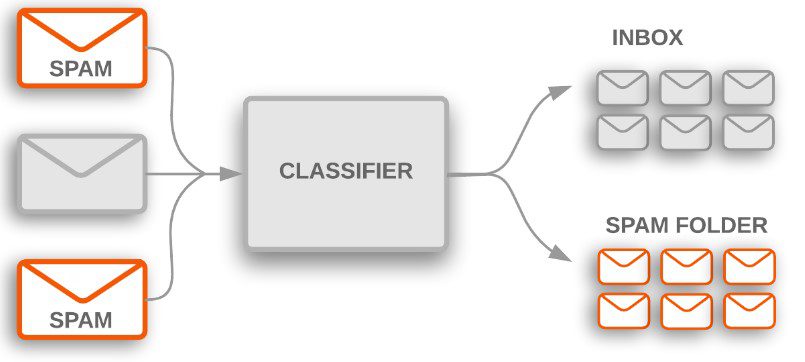
Tensorflow basically used for text and object detection. For example, Google Email software uses ‘text classification’ to decide whether to place the incoming emails in the inbox or spam folder. And Google ‘image search’ worked on machine learning (object detection), ML is match pixel by pixel with indexed images and then gives the applicable result.

Yolov5 is an object detection algorithm that worked on a grid system. So, now in this article, we learn about YOLOv5 and basic TensorFlow.

email image

Object Detection

Object detection is one of the important fields of AI (Artificial Intelligence). It refers to the capability of computer and software systems to locate objects in an image/scene and identify each object.


let’s understand object detection with real-world examples. Recognition of objects in an image is believed to be a normal human brain function.


Identification of objects in videos and images is a computer language called ‘object detection. Many object detection algorithm has emerged in the last few years to detect the problem for example ‘R-CNN, Mask R-CNN, MobileNet, SqueezeDet, YOLO, etc.

Tensorflow

Tensorflow is an open-source platform for ML (machine learning). It was originally developed by Google. TensorFlow applications can run on either conventional CPU, higher-performance GPU (graphics processing units), and also TPU (tensor processing units). It’s a machine learning library that is used across Google for applying deep learning to a lot of different areas. It provides a collection of workflow and best object detection APIs, with this collection we can easily train models.


If you want more about Tensorflow then you can visit this website (https://www.tensorflow.org/).


The Requirement to Train a Custom Object Detection Model

  • Basic knowledge of python language.
  • Data sets (Images) of the object you want to train.
  • Label for the images (You can try this website https://www.makesense.ai).
  • GPU or Height speed CPU (You can also try online netbooks).

How and Where Can We Train a Model?


We have two ways to train the model
  1. Local code editor (ex. vs code)
  2. Online Notebook editor (ex. Colab)

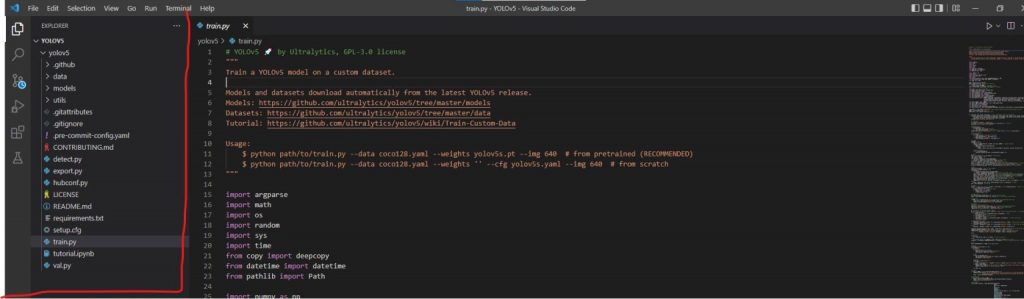
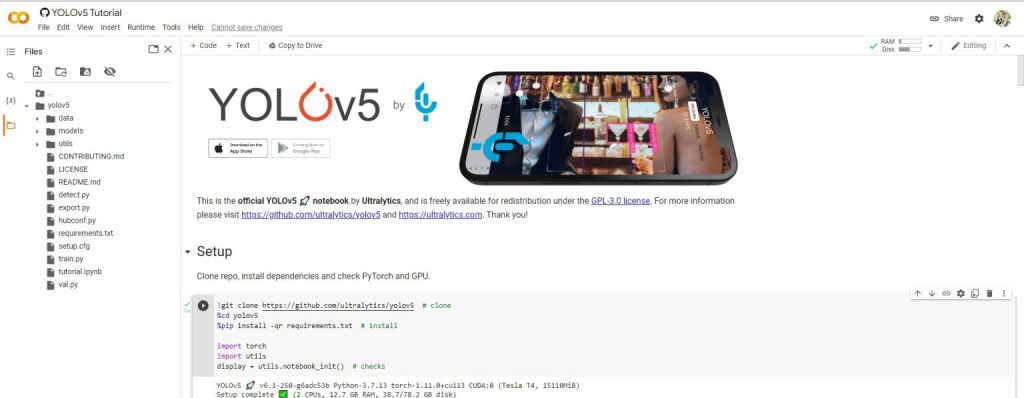
Local Code Editor -You can train the model on your PC, but sometimes it’s a very time taking process ,if your PC doesn’t support heavy programs please use an online GPU editor ,but it’s support so you just need to clone the YOLOv5 official code from Github (https://github.com/ultralytics/yolov5.git) repository and for the setup run the requirements.txt file on the terminal.

Screenshot 2022 06 10 151647 1536x449 1

Online Notebook Editor – We have multiple online notebooks (Google Colab, Kaggle, Jupyter notebook) for training the models. But I would suggest you use “Google Colab” because its UI is simple and processing speed is very fast. Colab provides Free GPUs for Everyone, and Google Colab provides you the best experience of Machine Learning and Deep Learning.


Please make sure you have to download the model file after the model is trained because sometimes The model file is automatically deleted when the PC is turned off.
Screenshot 2022 06 10 151834 1536x597 1

Model training is not a very difficult task. but the size, accuracy, and speed of the model basically depend on a few fundamentals. and these basic effects affect your object detection model.

  1. Numbers of the object image.
  2. Batch size.
  3. Epoch number
  • Images are a very important part of any type of object detection model. Clear and high numbers of images help you train the model with accuracy. Without the images, we can’t train the model.
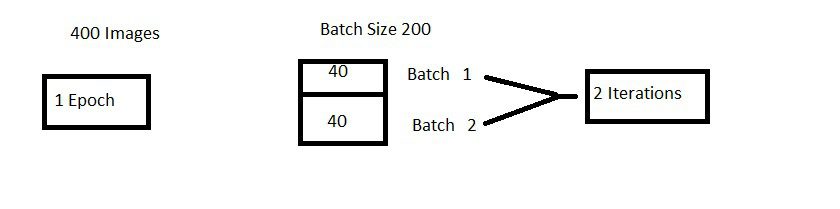
  • An Epoch represents one iteration over the entire dataset. it means One epoch- one forward and backward pass of all training data.
  • We cannot pass the entire dataset into the Neural network at once. So, to solve this problem we divide the dataset into a number of batches. Batch size means the number of training examples(images) in one forward and backward pass.
With the help of an example, we can easily understand
  1. We have 2000 images as data and a batch size of 40, the epoch should run 2000/40 =50 iterations. so we need 50 iterations to complete one epoch.
  2. We have 400 training examples (images), and if your batch size is 200 then it will take 2 iterations to complete 1 epoch.

A place for big ideas.

Reimagine organizational performance while delivering a delightful experience through optimized operations.

Screenshot 2022 06 10 150225
Predefined models

Colab and YoloV5 provide some predefined models for training custom object detection models for example(YOLOv5n, YOLOv5s, YOLOv5m, YOLOv5l, YOLOv5x, YOLOv5n6, YOLOv5s6, YOLOv5m6 , YOLOv5l6, YOLOv5x6TTA).


To start a training mode you need to run this command on a notebook

!python train.py --img 640 --batch 16 --epochs 3 --data coco128.yaml --weights yolov5s.pt --cache
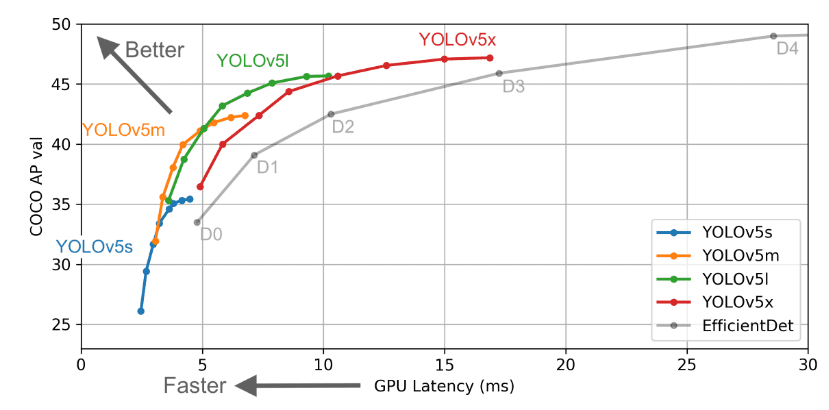
But if you are a beginner then I would suggest you use YOLOv5x. Because it’s a medium size model and enough for you.

TensorFlow is a popular AI technology and it’s uses tensors and allows you to perform graph computations. Some main benefits of TensorFlow “Open-source, Use of Graph Computation ,  Flexible ,Versatile” etc.


I hope after reading this article you must have understood

  • How object detection algorithms work and what TensorFlow, yolov5, and colab.
  • How can we train a model better.
  • Important key points of object detection, epoch, batch size, iteration.

 If you want to explore more about YOLOv5 here are some documentation you can follow


* YOLOv5 Documentation https://docs.ultralytics.com/


* Docker Image https://hub.docker.com/r/ultralytics/yolov5

Top Stories

How to Connect Odoo with Mailchimp Without Custom Code
If your team runs email campaigns in Mailchimp while your customer data lives in Odoo, you already know what that gap costs. Someone exports contacts to a CSV, uploads it to Mailchimp, and by the time the campaign goes out, the list is already weeks behind. Campaign results sit in
How Sales Teams Build Live Odoo Revenue Dashboards in Power BI
Most sales dashboards are wrong by the time anyone looks at them. Not wrong as in broken. Wrong as in stale. The deal your rep closed at 4pm Friday is not in the dashboard your VP opens Monday morning. The pipeline funnel your Sales Manager is presenting to the board
Odoo direct printing workflow visuals
How to Set Up Direct Printing in Odoo: Step-by-Step
This guide walks you through setting up one-click direct printing in Odoo using the Zehntech Odoo Direct Print app — from creating your PrintNode account to your first print without a download dialog. Most setups take 10–15 minutes. How It Works — The Architecture The Zehntech Direct Print app uses
Odoo direct printing workflow showing one click printing without PDF download or printer selection (1)
The Hidden Cost of Printing from Odoo — And How to Fix It
Every invoice, picking slip and delivery order printed from Odoo goes through the same cycle: click print, wait for the PDF to download, open the file, go to File → Print, select the correct printer, click print again. Six steps. Every document. Every day. For a single team member printing
Appointment Booking
How to Set Up Appointment Booking in Odoo — Complete Setup Guide
Setting up online appointment booking in Odoo does not require a developer or a third-party scheduling tool. The Zehntech Odoo Appointment Booking app gives you a live 24/7 booking page, real-time calendar sync, and automated confirmations — all inside your existing Odoo instance.This guide is for business owners, Odoo administrators,
Advanced Gantt Scheduling in Odoo
How to Set Up Advanced Gantt Scheduling in Odoo — Complete Guide
Advanced project scheduling inside Odoo does not require exporting to MS Project or maintaining a separate timeline tool. The Zehntech Odoo Advanced Gantt App for Project adds dependency types, automatic cascade, critical path visualization, resource workload management and baseline tracking to your existing Odoo projects — in under 10 minutes.

          Success!!

          Keep an eye on your inbox for the PDF, it's on its way!

          If you don't see it in your inbox, don't forget to give your junk folder a quick peek. Just in case.


              You have successfully subscribed to the newsletter

              There was an error while trying to send your request. Please try again.

              Zehntech will use the information you provide on this form to be in touch with you and to provide updates and marketing.