








Join us at GITEX 2025! Discover our solutions at Hall 4, Booth H-30 Schedule a Meeting Today.
Automate Marketing Initiatives with Salesforce Marketing Cloud Learn More
Join us at GITEX 2024! Discover our solutions at Hall 4, Booth H-30 Book your live demo today.

Boost Your Platform’s Capabilities with Salesforce Integration

Salesforce integration is the process of combining the information & functionality of Salesforce with other applications to give users a unified user experience. When discussing integration, we mean linking a particular Salesforce instance with another database or system. Salesforce integration connects salesforce.com with another 3rd party external system and applications like Facebook, Gmail, and outlook. So, you can use the features of those applications with Salesforce.


Why Salesforce Integration?


Integration is a mechanism where two or more systems can talk to each other & send the data to each other via the world wide web or open network. This way, the system acts like one system because the user will interact with one system. He will be getting the data from a different approach.


Different Salesforce integration Layers

Salesforce integration can be carried out for different layers within your CRM platform.

  1. User Interface: It allows users to enter multiple apps from a single platform. User interface integration means we can integrate third-party applications like Facebook and LinkedIn with Salesforce. The user interface layer mainly focuses on user interactions with the system. in this layer, we identify the components to integrate third-party web applications into Salesforce.
  2. Business logic: It utilizes Apex web services for inbound and Apex Callouts for outbound to handle business logic across multiple applications. It deals with using apex web services now; they allow us to write logic and expose it as a web service with third-party applications.
  3. Data integration: This layer connects with the user interface and the business process. It helps maintain consistency in application data between multiple integrated systems. So, one way to achieve accurate time synchronization of data between systems is using soap Api.

Salesforce Integration Process


App-based salesforce integration:
As the name implies, App-based Salesforce integration uses specific applications. With only a few clicks, users of these apps may easily combine the data from two different apps to create a single platform.

You would require a reliable and smooth integration platform that enables the smooth flow of data between the two applications to combine your Salesforce CRM with relevant applications. Popular third-party apps like Zapier and drop box, among others, make it easier to integrate with Salesforce.


Code-based Salesforce Integration:
Salesforce integration can be done using a programming language in addition to specialized applications. The most typical instance of code-based Salesforce connection is the use of Apex. It is a proprietary programming language with a Java-like syntax.


  1. Here are some benefits of Salesforce Integration: Improve Productivity
  2. Access Data from Different Sources
  3. Make Better Decisions
  4. Automat workflows
  5. Modernize the Data Infrastructure


Salesforce Integration Platform:
Salesforce integration tools let you share the valuable data you collect in Salesforce with other systems. This means everyone in your organization and non-Salesforce users can access the customer information when needed.


These are some of the popular Salesforce Integration Tools on the market.

  1. Rapidi online
  2. Jitterbit
  3. MuleSoft
  4. Zapier

Rapidi Online: Regarding Salesforce – Microsoft Dynamics data integration, Rapidi is a leader in the market. It integrates Salesforce with all Microsoft Dynamics ERPs (Microsoft Dynamics AX, GP, NAV, 365 Business Central, or 365 for Finance and Operations). Still, it can also be used to integrate Salesforce with various other ERPs. The RapidiOnline integration tool uses pre-configured templates to simplify Salesforce integration to Microsoft Dynamics ERP. RapidiOnline comes with out-of-the-box, ready-to-use reports, and dashboards that you can use as-is or easily modify to suit your needs.


Jitterbit: Jitterbit is a cloud-based advanced point-to-point artificial intelligence software integration platform that enables fast, easy, and secure data transfer between technologies, streamlining processes, and delivering projects in days instead of months.


MuleSoft: MuleSoft is an integration platform that helps businesses connect data, applications, and devices across on-premise, and cloud computing environments. ESB stands for Enterprise Service Bus. Enterprise Service Bus is an integration platform that allows developers to connect applications easily.


It Allows data exchange between applications and handle different applications and communicate with each other. It works based on incoming and outgoing messages flow using different types of connectors dedicated to different types of requests like HTTP, JMS ,etc.


Zapier: Zapier is a way for you to automate your business process and provides a platform to integrate apps with salesforce, connects with over 2000 different Apps. It includes many of the apps you work with in your Facebook lead ads, slack, Gmail, and google sheets. It is easy enough that anyone can build their app workflows with just a few clicks. Zapier’s primary goal is to save users time and effort by quickly automating daily tasks in workflows known as Zaps. Connecting your apps and creating workflows tailored to your needs can improve productivity in all areas of work and life.

Key Concept in Zapier

  • Zap: A Zap is an automatic workflow that links your applications and services together. Each Zap is made up of one trigger and one or several actions.
  • Apps: An app is a web service or apps like Google Docs, Slack, or Salesforce. Zapier provides integrations for over 3,000 apps, enabling you to move data.
  • Trigger: All Zaps begin with a trigger that monitors for new or updated data.
  • Action: Actions are events that Zap executes after being triggered.
  • Filter: Filters can be added to Zap to limit it to performance only when specific requirements are met.

A place for big ideas.

Reimagine organizational performance while delivering a delightful experience through optimized operations.

Salesforce Integration with google sheet via Zapier

Steps To Integrate google sheet With Salesforce Using Zapier


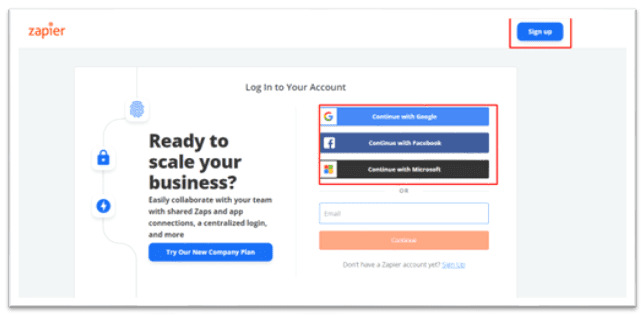
Step 1: You need to create an account on Zapier if you don’t have an existing account.


Zapier1

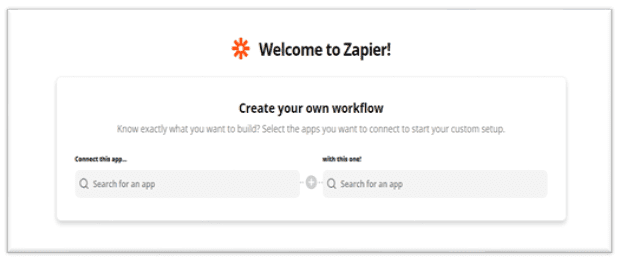
Step 2: Type the App name you want to make a Zap Connect in this app field, as shown in the figure below.


Zapier2

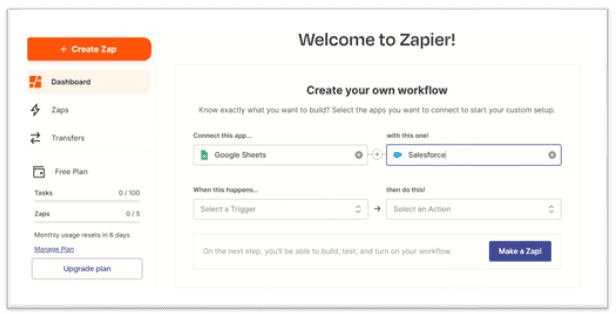
Step 3: Type app’s name you wish to connect with in this one Field.


  • Select Salesforce
Zapier3

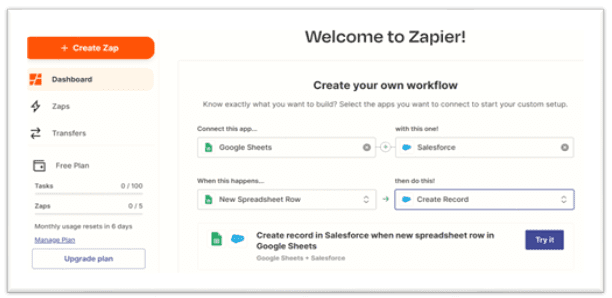
Step 4: Select the Action you want to perform whenever the trigger happens and click Try it, as shown in the figure below.


Zapier4

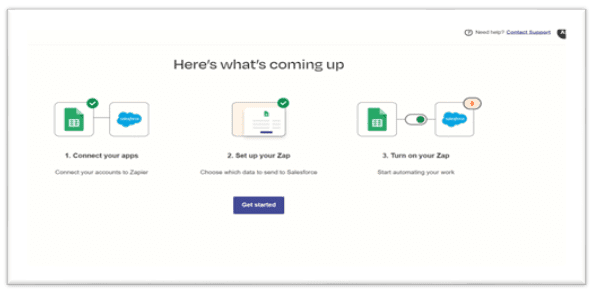
Step 5: Click on Get Started, as shown below.


Zapier5

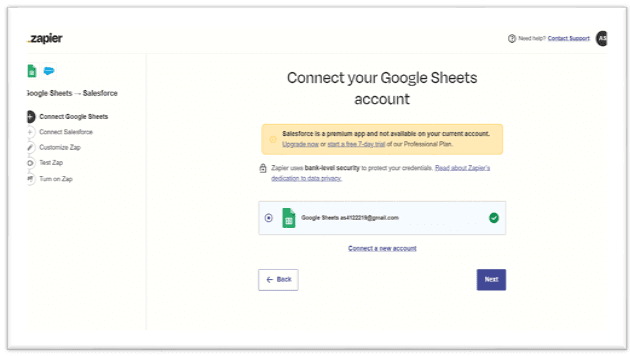
Step 6: Connect your google sheet account. 


Zapier6

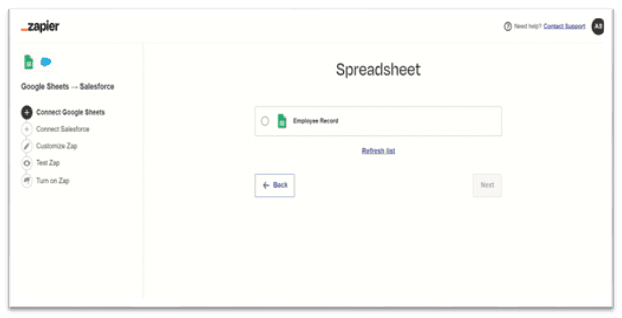
Step 7: Select the required Spreadsheet as shown in the below figure. Click Next.


Zapier7

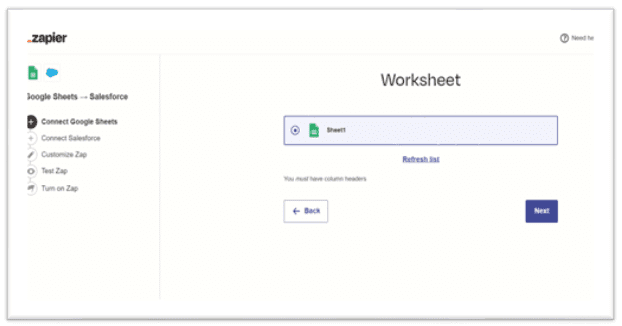
Step 8: Select the required Worksheet as shown in the below figure. Click Next.


Zapier8

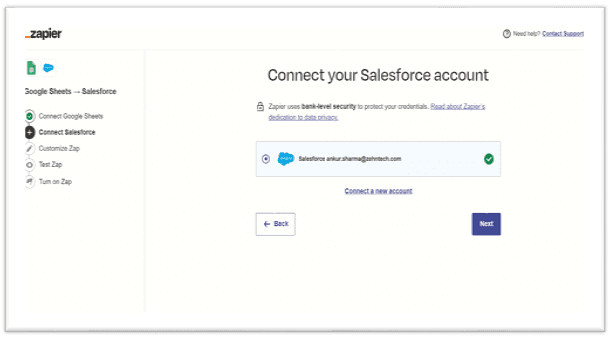
Step 9: Now Connect your Salesforce account as shown below. Click Next.


Zapier9

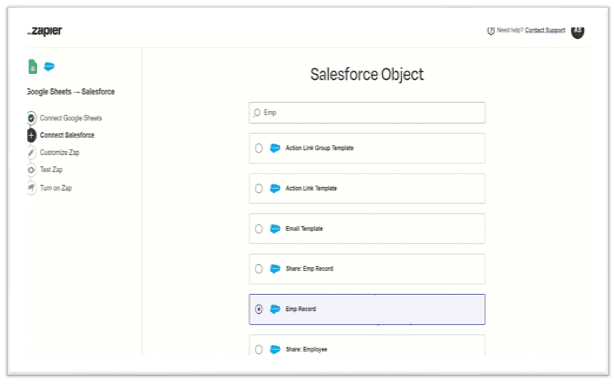
Step 10: Select the Salesforce object in which you need to create a new record; here is the Emp Record object. Click Next.


Zapier10

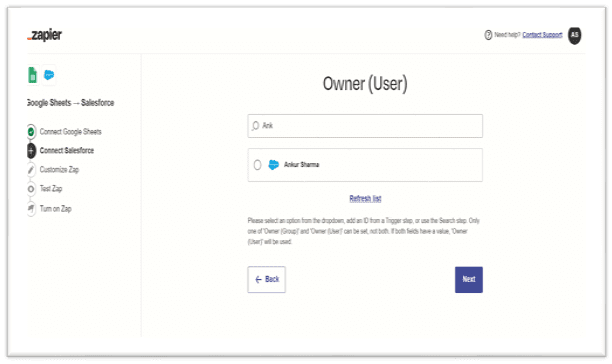
Step 11: select the user then Click Next.


Zapier11

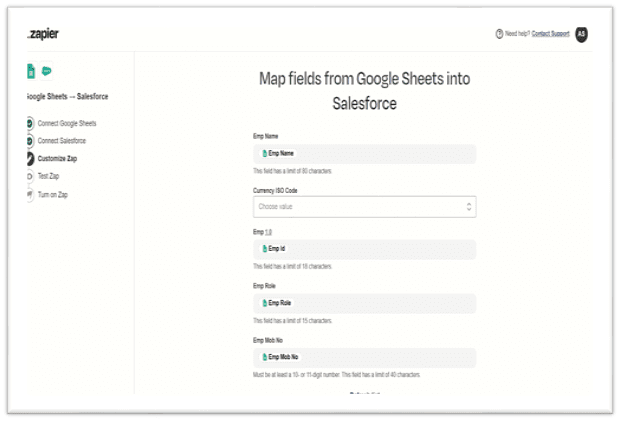
Step 12: Select the Mapping fields from google Sheets into Salesforce, then click Next.


Zapier12

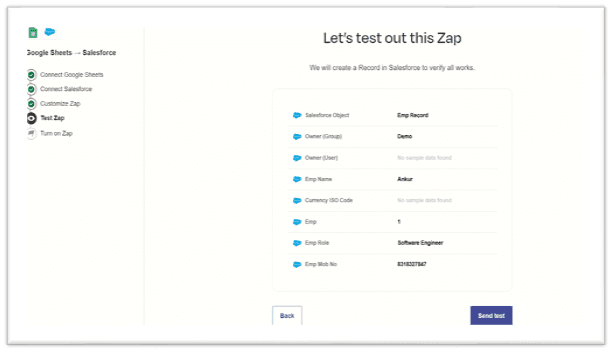
Step 13: Click on the Send test and check if the record is created in Salesforce.


Zapier13

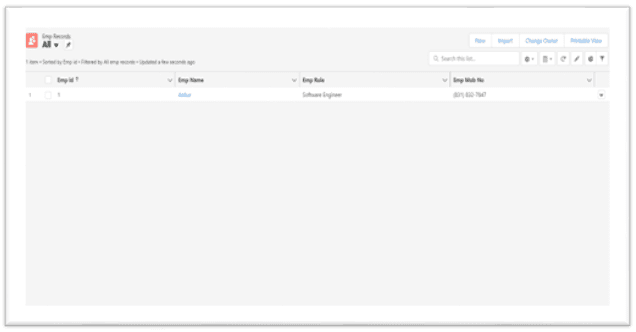
Step 14: Check that the records are created in Salesforce, as shown below.


Zapier14

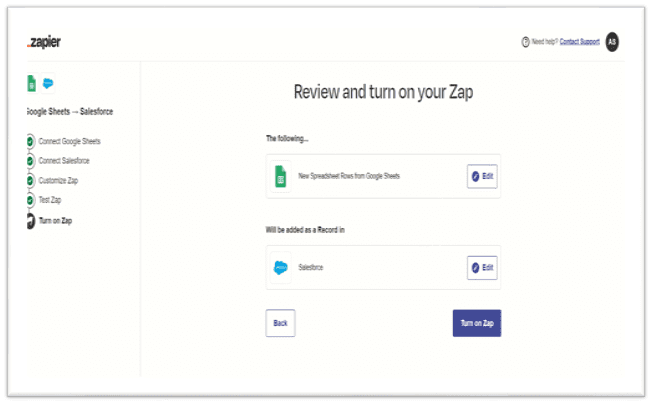
Step 15: Click Turn on Zap to activate, as shown below.


Zapier15

Conclusion

Salesforce integration is about connecting Salesforce with other tools and systems to connect complex systems and automate business processes seamlessly. When integrated with various third-party applications, Salesforce provides benefits such as ease of use, empowering business decisions, building customer networks, and increasing revenue. Zapier acts as a binder between these applications by automatically transferring data – from one application to another. Salesforce Integration serves the purpose of establishing communication between this software and sharing the data for increased performance.

Top Stories

Best Rental Management Apps
Best Rental Management Apps for Odoo in 2026
Most Odoo rental businesses hit the same wall. Not a technology wall — a spreadsheet wall. The system that worked fine at 8 items and one staff member starts failing at 20 items and three people. The double booking happens. The damage charge gets missed. The invoice goes out wrong.
Premium SaaS-style comparison banner by Zehntech showing Odoo vs Custom ERP with modern enterprise dashboards, workflow visuals, and technology comparison elements.
Odoo vs Custom ERP: Which Should Your Business Choose in 2026?
You know your business needs an ERP. The question is whether you build one from scratch or deploy Odoo. Get this decision wrong and you are either paying for features you will never use — or building something that costs three times your budget and takes twice as long to
How to Connect Odoo with Mailchimp Without Custom Code
If your team runs email campaigns in Mailchimp while your customer data lives in Odoo, you already know what that gap costs. Someone exports contacts to a CSV, uploads it to Mailchimp, and by the time the campaign goes out, the list is already weeks behind. Campaign results sit in
How Sales Teams Build Live Odoo Revenue Dashboards in Power BI
Most sales dashboards are wrong by the time anyone looks at them. Not wrong as in broken. Wrong as in stale. The deal your rep closed at 4pm Friday is not in the dashboard your VP opens Monday morning. The pipeline funnel your Sales Manager is presenting to the board
Promotional banner for Zehntech showing a laptop with an Odoo interface and the title “How to Set Up Direct Printing in Odoo.
How to Set Up Direct Printing in Odoo: Step-by-Step
This guide walks you through setting up one-click direct printing in Odoo using the Zehntech Odoo Direct Print app — from creating your PrintNode account to your first print without a download dialog. Most setups take 10–15 minutes. How It Works — The Architecture The Zehntech Direct Print app uses
Odoo direct printing workflow showing one click printing without PDF download or printer selection (1)
The Hidden Cost of Printing from Odoo — And How to Fix It
Every invoice, picking slip and delivery order printed from Odoo goes through the same cycle: click print, wait for the PDF to download, open the file, go to File → Print, select the correct printer, click print again. Six steps. Every document. Every day. For a single team member printing

          Success!!

          Keep an eye on your inbox for the PDF, it's on its way!

          If you don't see it in your inbox, don't forget to give your junk folder a quick peek. Just in case.


              You have successfully subscribed to the newsletter

              There was an error while trying to send your request. Please try again.

              Zehntech will use the information you provide on this form to be in touch with you and to provide updates and marketing.