Join us at GITEX 2025! Discover our solutions at Hall 4, Booth H-30 Schedule a Meeting Today.
Automate Marketing Initiatives with Salesforce Marketing Cloud Learn More
Join us at GITEX 2024! Discover our solutions at Hall 4, Booth H-30 Book your live demo today.
Zehntech Odoo App

All In One Backdate

Full Date Control Across Every Odoo Module. Correct transaction dates across sales, purchasing, manufacturing, invoicing, payments, and inventory — without losing a single audit trail.

Compatible with Odoo 16, 17, 18 & 19
Community & Enterprise Supported
Works Across Sales, Purchase, Manufacturing, Invoicing & Inventory
No Custom Development Required
Trusted by 500+ Businesses Across 12+ Countries
$109.51
V19, 18, 17, 16
All In One Backdate — Full date control across Odoo

What is All In One Backdate?

All In One Backdate is a comprehensive Odoo module that gives authorized users full control over transaction dates across every major business document — from sales and purchase orders to invoices, payments, and inventory operations. It solves the costly problem of locked or incorrect document dates that force teams to cancel and re-create entire transaction chains. Instead of workarounds, this module applies the corrected date cleanly and propagates it downstream — with a complete audit log attached to every change.

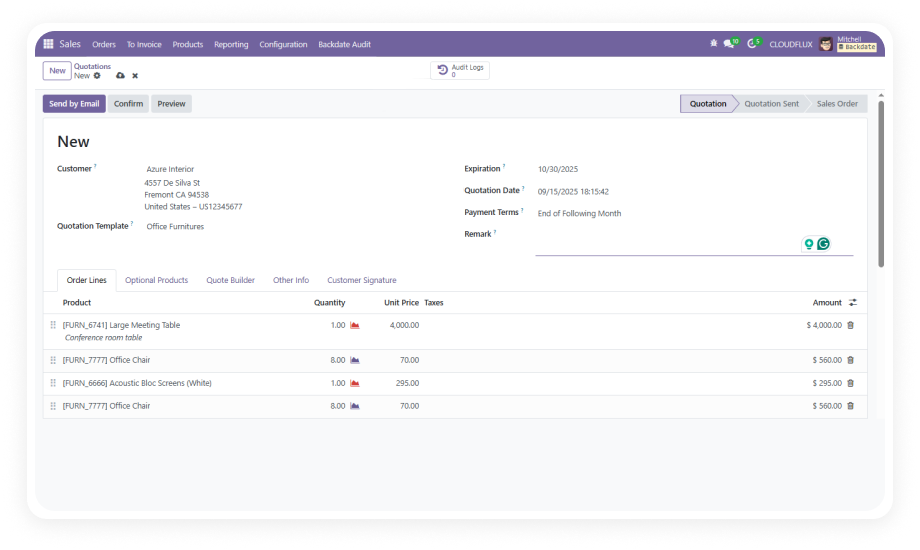
Backdate Sales & Purchase Orders
Correct Invoice & Payment Dates
Adjust Inventory & Manufacturing Dates
Bulk Backdate with Mass Wizard
Full Audit Log Per Record

How All In One Backdate Solves the Date Correction Problem

Problem
Zehntech Backdate Solution
Sales orders locked at creation date — correcting requires cancellation
Apply a backdate directly on the Sales Order; propagates to delivery orders, stock moves, and invoices automatically
Purchase order dates wrong after confirmation
Set a backdate on the Purchase Order and the module updates receipts, vendor bills, and stock moves in a single action
Manufacturing orders completed on the wrong date
Backdate the Manufacturing Order and all associated stock movements and location transfers update accordingly
Invoices posted with the wrong accounting date
Apply a corrected date to customer invoices or vendor bills with a full audit log attached
Payment records show incorrect value dates
Assign a backdate to customer or vendor payments directly, with a complete audit trail
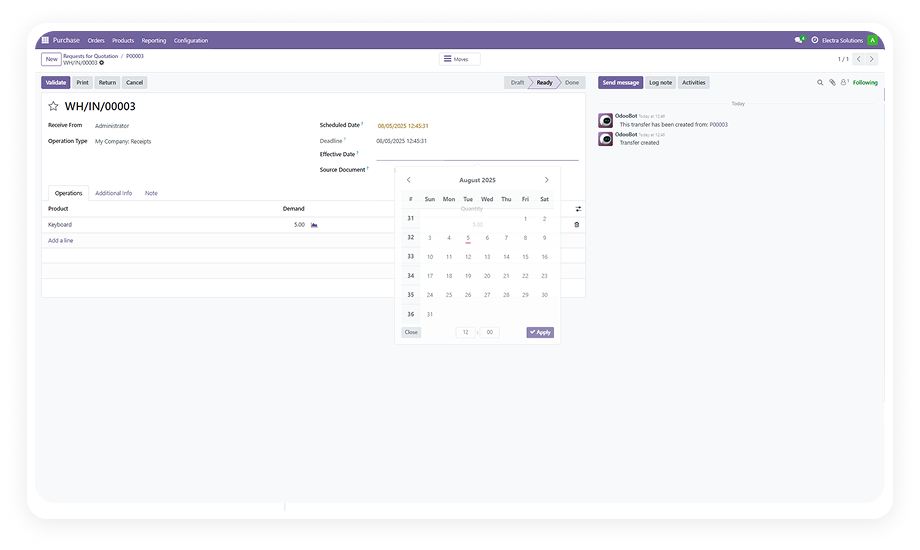
Inventory receipt dates misaligned with actual delivery
Backdate inventory receipts and the module updates all associated stock moves
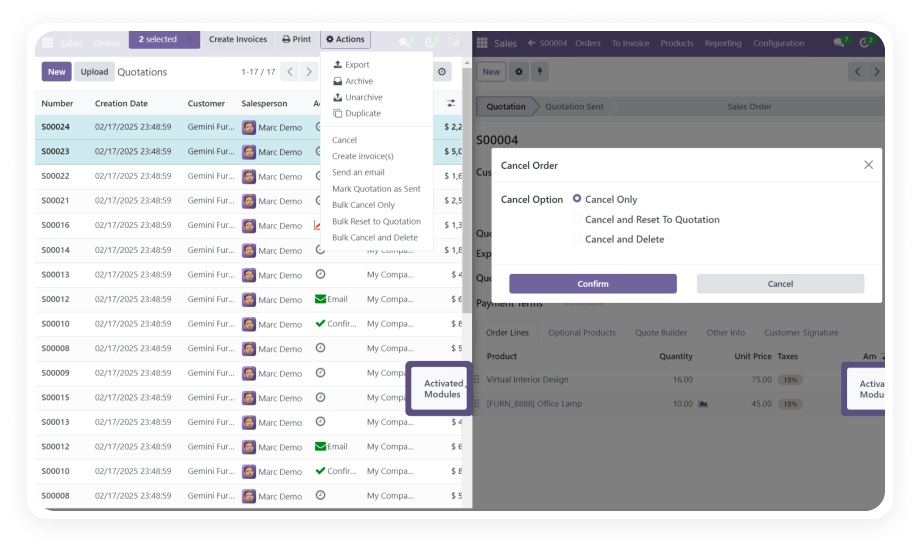
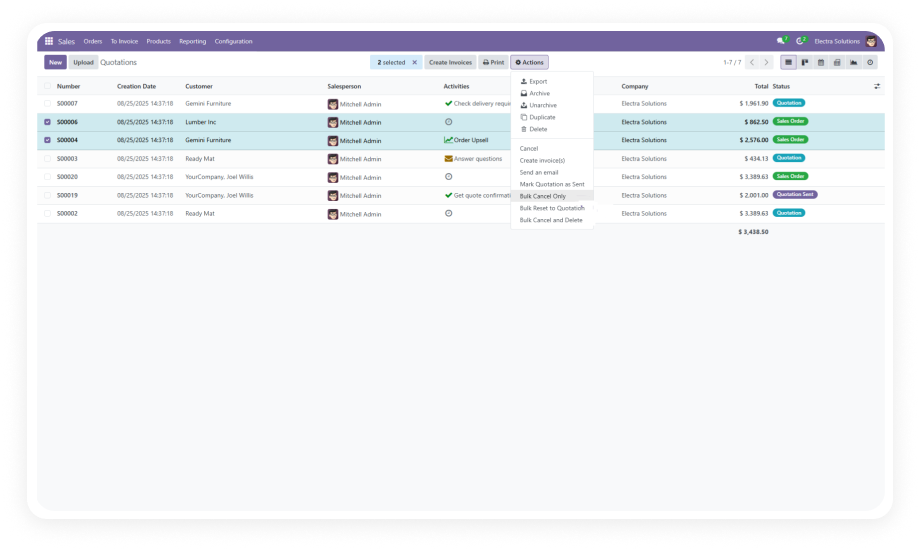
No way to backdate multiple records at once
Use the Mass Backdate Wizard to apply corrected dates across multiple records simultaneously

Complete Backdate Control — Every Module, Every Document

1

Sales Order Backdating

Assign a corrected date to any Sales Order, automatically pushing updates to Delivery Orders, Stock Moves, and linked Customer Invoices.

Why it matters: Fix deal dates without cancelling and recreating entire transaction chains.

2

Purchase Order Backdating

Apply a backdate to any Purchase Order and synchronize the corrected date across vendor receipts, vendor bills, and stock moves.

Why it matters: Vendor bill reconciliation matches delivery timelines accurately.

3

Manufacturing Order Date Correction

Backdate manufacturing orders with automatic reflection in stock movements and location transfers tied to the production run.

Why it matters: Manufacturing cost reports reflect real production dates.

4

Invoice & Vendor Bill Backdating

Set corrected accounting dates on Customer Invoices and Vendor Bills without reversing or cancelling posted documents.

Why it matters: Clean accounting periods with full audit trails.

5

Payment Date Correction

Assign corrected value dates to both Customer and Vendor Payments with a full audit trail capturing every change.

Why it matters: Reconciliation accuracy without manual adjustments.

6

Inventory Receipt Backdating

Apply backdates to inventory receipts with automatic propagation to all associated stock moves for accurate valuation.

Why it matters: Stock valuation reports reflect actual receipt dates.

7

Scrap & Adjustment Backdating

Backdate scrap operations and inventory adjustment entries independently for precise stock consistency.

Why it matters: Period-accurate stock counts and write-offs.

8

Mass Backdate Wizard

Select multiple records and apply a backdate — along with a remark — across all of them in a single bulk operation.

Why it matters: Batch corrections in minutes instead of hours.

9

Configurable Remarks

Each backdate entry can carry an attached remark. Administrators configure remarks as optional or mandatory per model.

Why it matters: Compliance documentation built into the workflow.

10

Dedicated Audit Log

Every backdate action is captured in an audit log, accessible via smart button or dedicated menu for compliance.

Why it matters: Full traceability for audits and internal reviews.

11

Settings-Driven Control

Backdate capabilities are enabled through the standard Odoo Settings interface with granular permission control.

Why it matters: Controlled access without custom development.

12

Automatic Report Reflection

Updated dates and remarks are automatically reflected in all Odoo-generated reports without additional steps.

Why it matters: Reports stay accurate without manual re-runs.

Who Gets The Most Out Of This Module

Role
Primary Use Case
Key Outcome
Finance Manager
Correcting invoice and payment dates before period close without reversing posted entries
Clean accounting periods with full audit trails
Operations Manager
Fixing inventory receipt and adjustment dates after physical counts reveal discrepancies
Accurate stock valuation reports
Procurement Lead
Backdating purchase orders when supplier deliveries are logged after actual arrival
Vendor bill reconciliation that matches delivery timelines
Sales Manager
Correcting sales order dates when orders entered late still need to reflect original deal dates
Accurate revenue period attribution
Manufacturing Supervisor
Adjusting production order completion dates when system timestamps don't match production logs
Manufacturing cost reports that reflect real dates
Odoo Administrator
Managing backdate permissions, configuring mandatory remarks, and reviewing audit logs
Controlled, compliant date correction workflow
Not the right fit for: Organizations that prefer to cancel and re-create documents rather than correct dates in place.

Versions & Documentation

Choose your Odoo version and explore interactive documentation

Native Odoo vs Zehntech All In One Backdate

Capability
Zehntech Backdate
Native Odoo
Backdate Sales Orders after confirmation
Yes — with downstream propagation
Not available
Backdate Purchase Orders after confirmation
Yes — updates receipts, bills, stock moves
Not available
Backdate Manufacturing Orders
Yes — stock movements update accordingly
Not available
Backdate Invoices & Vendor Bills
Yes — with full audit log
Not available
Backdate Payments
Yes — complete audit trail
Not available
Backdate Inventory Receipts
Yes — updates all associated stock moves
Not available
Automatic downstream date propagation
Yes — single action updates entire chain
Not available
Mass Backdate Wizard for bulk operations
Yes — multiple records in one operation
Not available
Mandatory or optional remarks per entry
Yes — configurable per model
Not available
Per-record audit log with smart button
Yes — accessible via smart button or menu
Not available

Get Started In Minutes

No development environment. No custom code. No consultant required for standard setup.

01

Install from Odoo App Store

Purchase and install directly. Compatible with Odoo 16–19, Community & Enterprise.

02

Configure Backdate Settings

Activate backdate controls for each model. Set remarks as optional or mandatory.

03

Apply Backdates on Records

Open any supported document, set the corrected date, and save. Auto-propagation handles the rest.

04

Review the Audit Log

Access the audit log via smart button or dedicated menu for compliance verification.

Technical Details & Compatibility

Requirement
Odoo Versions
Editions
Hosting
Dependencies
Third-Party Dependencies
Custom Dev Required
Install Time
Server Restart
Lines of Code
License
Last Tested
Support
Details
16.0 · 17.0 · 18.0 · 19.0
Community · Enterprise · Odoo.sh
Odoo Online · On-Premise · Odoo.sh
sale, purchase, account, stock, mrp
None
No
Under 5 minutes
Not required
3,816
OPL-1
Odoo 19.0 — May 2026
All In One Backdate — FAQ illustration

Frequently Asked Questions

Yes. All In One Backdate is a standard Odoo module that installs directly from the App Store with no coding, custom development, or technical consultant required. Enable it through the Odoo Settings panel, configure which models allow backdating, and the feature is live immediately. Zehntech includes 90 days of dedicated technical support with every purchase.
Yes. The module is fully compatible with both Odoo Community and Enterprise editions. It also supports Odoo.sh and all three hosting modes — Odoo Online, On-Premise, and Odoo.sh. No edition-specific limitations apply to the core backdate functionality.
When you apply a backdate to a source document such as a Sales Order, the module identifies all related downstream records — Delivery Orders, Stock Moves, and Invoices — and updates their dates automatically. The same propagation logic applies to Purchase Orders and Manufacturing Orders. No manual follow-up is needed.
All In One Backdate supports Odoo 16.0, 17.0, 18.0, and 19.0 — all four versions are actively maintained. Community, Enterprise, and Odoo.sh editions are all supported across every version. Interactive documentation is available for each version.
Yes. The Mass Backdate Wizard lets you select multiple records and apply a corrected date — along with a remark — to all of them in a single bulk operation. Instant success notifications confirm the action, and each record's audit log captures the change individually for traceability.

One-Time Purchase.
No Subscription.
No Recurring Fees.

Includes lifetime updates and 90 days of dedicated technical support.

Zehntech Odoo experts ready to help


          You have successfully subscribed to the newsletter

          There was an error while trying to send your request. Please try again.

          Zehntech will use the information you provide on this form to be in touch with you and to provide updates and marketing.