Join us at GITEX 2025! Discover our solutions at Hall 4, Booth H-30 Schedule a Meeting Today.
Automate Marketing Initiatives with Salesforce Marketing Cloud Learn More
Join us at GITEX 2024! Discover our solutions at Hall 4, Booth H-30 Book your live demo today.
Zehntech Odoo App

Fix Any Transaction Date in Odoo Without Starting Over

Stop cancelling confirmed documents just to correct a date. The Zehntech Change Effective Date module lets authorised users update the effective date on invoices, sales orders, purchase orders, and stock operations — with currency rates and valuations recalculated automatically, and full admin control over who can make the change.

Backdate or future-date confirmed Odoo transactions in seconds
Currency exchange rates recalculate to match the new effective date
Works across invoices, sales, purchases, and stock operations
Role-based access control keeps sensitive changes in the right hands
Compatible with Odoo Online, Odoo.sh, and On-Premise
FREE
V19 · V18 · V17
Change Effective Date for Odoo — Fix Transaction Dates Without Cancellation

What is the Change Effective Date Module for Odoo?

The Change Effective Date module by Zehntech Technologies is a lightweight Odoo add-on that solves one of the most common day-to-day pain points in financial and inventory management: correcting the date on a confirmed transaction without destroying the document and starting over. Native Odoo locks the effective date once a record is confirmed, forcing users to cancel, reset to draft, correct the date, and re-confirm — a multi-step process that breaks document sequences, audit trails, and workflows. This module eliminates that bottleneck entirely.

Modify effective dates directly on confirmed invoices without cancellation
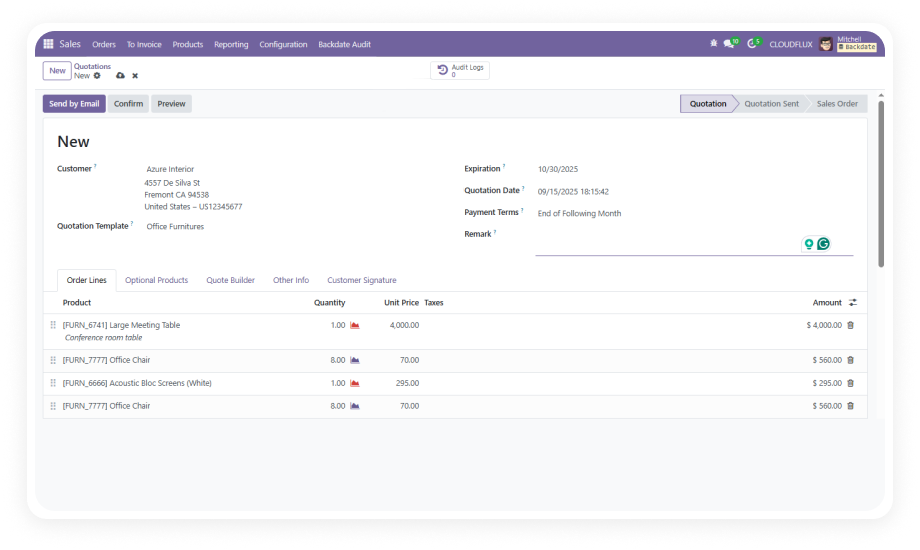
Correct dates on confirmed sales and purchase orders post-approval
Update stock operation dates while preserving inventory valuations
Multi-currency transactions automatically pick up the rate for the new date
Administrators retain full visibility and access control over every date change

How Change Effective Date Solves the Locked-Date Problem in Odoo

Business Problem
How This Module Solves It
Invoice posted with wrong date
Edit the effective date directly on the confirmed invoice
Sales order confirmed on incorrect date
Update the date in place without breaking the order sequence
Purchase order date error discovered after approval
Modify the effective date post-approval with one action
Stock operation recorded on wrong date
Correct the stock operation date while preserving valuation
Multi-currency transaction needs date correction
New effective date auto-applies the correct exchange rate
Period-end date corrections needed urgently
Instant date correction with full report refresh
Unauthorised users changing sensitive dates
Admin-controlled privileges limit access to trusted users
Audit trail concerns after date changes
Role-based access keeps changes accountable and traceable

Full Feature Breakdown

1

Flexible Effective Date Modification

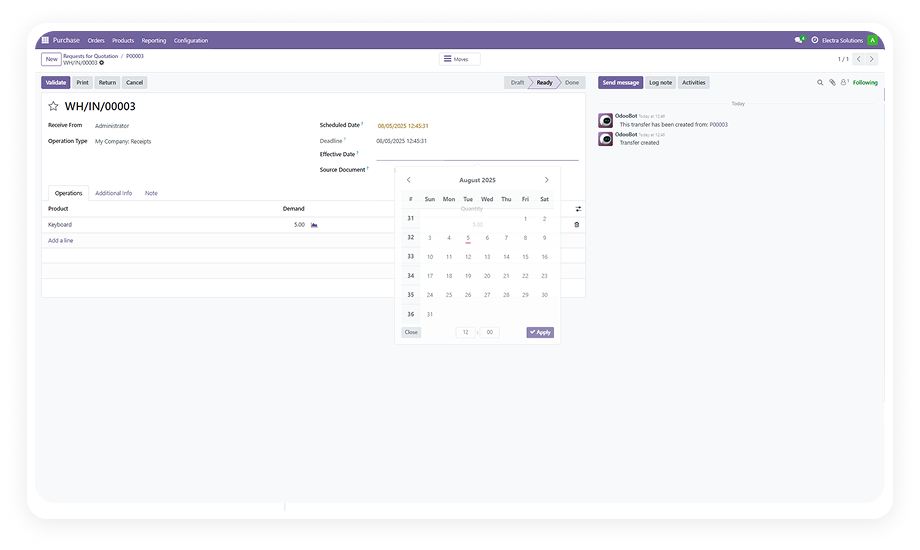
Users with the appropriate access can update the effective date on confirmed transactions — including invoices, sales orders, purchase orders, and stock operations — without cancelling or resetting the document to draft. Both backdating (setting an earlier date) and future-dating (setting a later date) are supported.

Why it matters: eliminates the disruptive cancel-and-repost cycle that breaks document sequences, triggers re-approvals, and wastes time for every team involved.

2

Dynamic Currency Rate Application

When a new effective date is selected on a multi-currency transaction, the module automatically fetches and applies the currency exchange rate corresponding to that date — not the rate from the original posting date.

Why it matters: ensures that corrected transactions remain financially accurate without requiring manual journal adjustments or separate currency entries to reconcile the difference.

3

Post-Confirmation Document Date Updates

The module enables users to correct effective dates on invoices, sales orders, purchase orders, and stock operations after those documents have already been confirmed and are part of the active transaction record. All associated valuations and reports refresh to reflect the updated date.

Why it matters: provides a clean, audit-friendly correction path for documents that have already entered the workflow, without disrupting downstream processes.

4

Admin-Controlled Role-Based Access

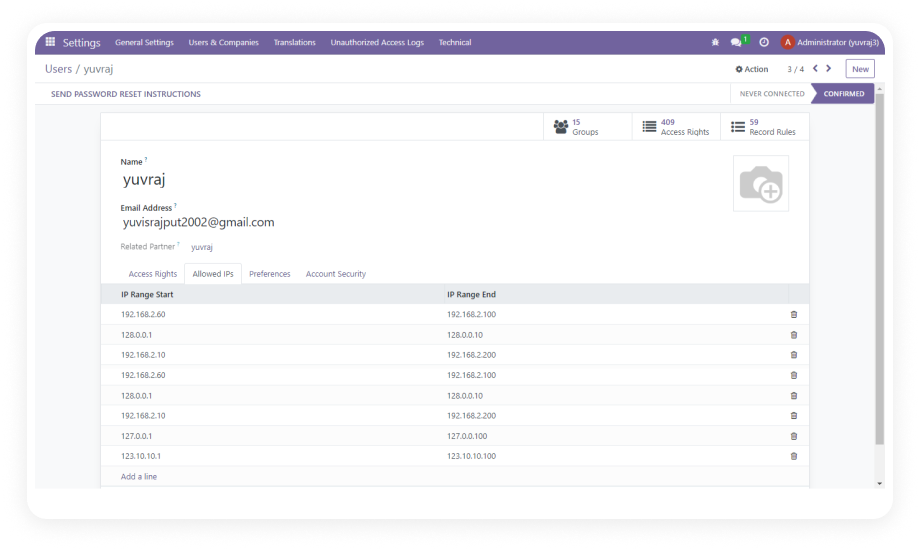
Administrators can assign effective date change privileges on a per-user basis through Odoo's standard access rights framework. Only users explicitly granted permission can modify effective dates on confirmed documents.

Why it matters: protects financial and operational data integrity by ensuring that sensitive date corrections can only be made by authorised personnel, reducing the risk of accidental or unauthorised changes.

Who Gets The Most Out Of This Module

Role
Primary Use Case
Key Outcome
Accounts Payable Specialist
Corrects vendor invoice dates that were posted in the wrong accounting period
Accurate period-end financials without cancelling and reposting paid invoices
Accounts Receivable Manager
Updates customer invoice effective dates to match actual delivery or service dates
Revenue recognised in the correct period; cleaner audit trail
Finance Controller
Adjusts transaction dates during month-end or year-end close without disrupting document sequences
Faster close process; no sequence gaps or re-approval delays
Procurement Officer
Fixes purchase order dates after supplier date changes or late approvals
Purchase records aligned with actual delivery and payment terms
Sales Administrator
Corrects sales order dates when orders are confirmed retroactively or after a system delay
Accurate order books and commission calculations by period
Warehouse / Inventory Manager
Updates stock operation dates to match actual goods movement dates
Correct inventory valuation by period; accurate COGS reporting
Odoo System Administrator
Grants or restricts effective date change access to specific users
Controlled, auditable process with no risk of unauthorised date manipulation

Versions & Documentation

Access step-by-step interactive documentation for your Odoo version below.

Documentation coming soon for this version.

Native Odoo vs Zehntech Change Effective Date

Capability
Zehntech Change Effective Date
Native Odoo
Edit effective date on a confirmed invoice
✓ Yes — directly on the confirmed record
No — must cancel, reset to draft, edit, repost
Edit effective date on a confirmed sales order
✓ Yes — in place, no sequence disruption
No — requires cancellation and re-confirmation
Edit effective date on a confirmed purchase order
✓ Yes — post-approval with one action
No — must reset to draft and re-trigger approvals
Update stock operation dates after confirmation
✓ Yes — date editable with valuation refresh
No — requires reversal and re-entry of stock moves
Auto-apply currency rate for new effective date
✓ Yes — rate fetched automatically for selected date
No — manual journal adjustment required after repost
Valuations refresh after date change
✓ Yes — all downstream figures update automatically
Not applicable — document must be cancelled and reposted
Reports reflect updated effective date
✓ Yes — reporting picks up the new date immediately
Only after full cancel/reset/repost cycle
Role-based access control for date changes
✓ Yes — admin assigns privileges per user
No — date field is simply locked after confirmation
Preserve document sequence numbers
✓ Yes — no cancellation means no sequence gap
No — cancellation creates gaps in document sequences
Avoid re-triggering approval workflows
✓ Yes — no draft reset needed
No — resetting to draft re-triggers all approvals
Multi-currency transaction accuracy
✓ Yes — correct rate for new date applied automatically
Requires manual correction after repost
Audit-friendly correction path
✓ Yes — change made directly with access control
No — cancel/repost leaves a messy document trail

Getting Started: 4 Steps to Correcting Dates Instantly in Odoo

No development environment. No custom code. No consultant required for standard setup.

01

Download and Install

Download the Zehntech Change Effective Date module from the Odoo App Store at no cost. Install it on your Odoo 16, 17, 18, or 19 instance — whether hosted on Odoo Online, Odoo.sh, or On-Premise. The module installs in minutes with no database migration required.

02

Configure User Access Rights

Once installed, a system administrator navigates to the standard Odoo access rights or user settings to assign effective date change privileges to the appropriate team members. This step ensures only authorised users — typically finance managers, senior accountants, or operations leads — can modify confirmed transaction dates.

03

Open the Transaction to Correct

The authorised user navigates to the confirmed invoice, sales order, purchase order, or stock operation that requires a date correction. No cancellation or draft reset is needed. The effective date field is now editable directly on the confirmed document.

04

Select the Correct Date and Save

The user selects the correct effective date from the date picker. Upon saving, the module automatically applies the currency exchange rate for the new date (for multi-currency transactions), refreshes all valuations, and updates downstream reports. The document remains confirmed with its original sequence number intact.

Technical Compatibility

Requirement
Module Name
Latest Version
Supported Odoo Versions
Deployment Types
License
Dependencies
Lines of Code
Author
Support Email
Price
Details
zehntech_change_effective_date
19.0
16 · 17 · 18 · 19
Odoo Online · Odoo.sh · On-Premise
OPL-1 (Odoo Proprietary License v1.0)
Inventory (stock), Invoicing (account), Purchase (purchase), Sales (sale_management), Discuss (mail)
237
Zehntech Technologies Inc.
FREE
Change Effective Date FAQ

Frequently Asked Questions

Yes. That is the core purpose of this module. Once installed and access is configured, authorised users can edit the effective date directly on a confirmed invoice without cancelling it, resetting it to draft, or disrupting the document sequence. The record stays confirmed throughout the correction.
Yes. For multi-currency transactions, the module fetches the currency exchange rate applicable to the newly selected effective date and applies it automatically. There is no need for manual journal entries or separate currency adjustments to reconcile the difference.
The module supports effective date changes on invoices (customer and vendor), sales orders, purchase orders, and stock operations. These cover the primary financial and inventory transaction types in Odoo where date correction is most commonly needed.
Yes. The module is available and maintained for Odoo 16, 17, 18, and 19. It supports all three deployment types: Odoo Online, Odoo.sh, and On-Premise installations.
Yes. Administrators control access through Odoo's standard user access rights framework. The ability to change effective dates on confirmed transactions is a privilege that must be explicitly granted by an admin. Users without the privilege see the effective date field as locked, just as in standard Odoo.
One-Time Purchase. No Subscription. No Recurring Fees.

Ready to Fix Transaction Dates Without the Rework?

Stop cancelling confirmed documents and disrupting your workflows every time a date needs to change. The Zehntech Change Effective Date module gives your team a clean, controlled, auditable way to correct effective dates on invoices, sales orders, purchase orders, and stock operations — with currency rates and valuations handled automatically, and access governed by your admins.

Change Effective Date for Odoo


          You have successfully subscribed to the newsletter

          There was an error while trying to send your request. Please try again.

          Zehntech will use the information you provide on this form to be in touch with you and to provide updates and marketing.