Join us at GITEX 2025! Discover our solutions at Hall 4, Booth H-30 Schedule a Meeting Today.
Automate Marketing Initiatives with Salesforce Marketing Cloud Learn More
Join us at GITEX 2024! Discover our solutions at Hall 4, Booth H-30 Book your live demo today.
Zehntech Odoo App

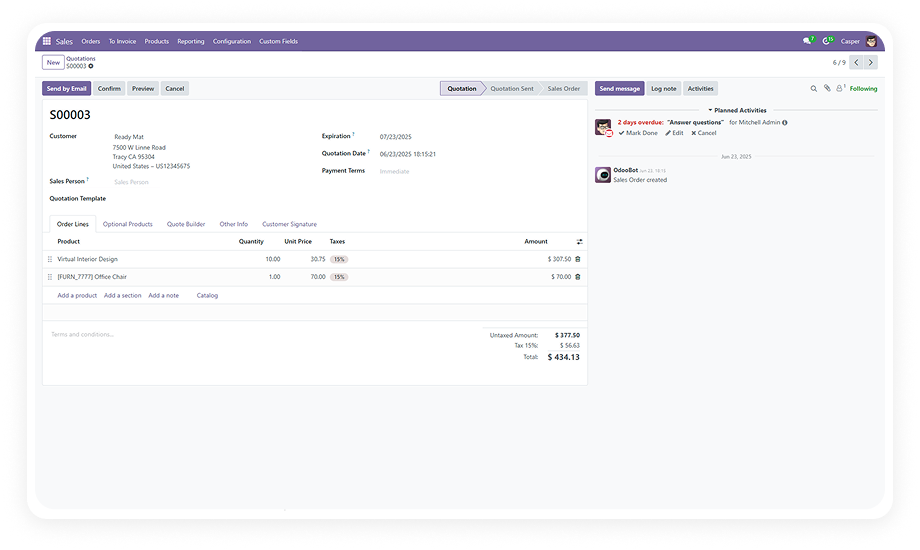
Custom Fields For Sales Order — Add Any Field to Odoo Sales Orders Without Code

Extend your Odoo Sales Order form with the exact fields your business needs. Add text inputs, dropdowns, checkboxes, date pickers, numerical fields, and relational links — position them precisely, enforce required validation, and include them in printed reports. All without writing a single line of code.

Multiple field types supported
No recurring fees
Flexible field positioning
90 days technical support
Report visibility controls
Community & Enterprise
$14.93
V19, 18, 17, 16
Custom Fields For Sales Order — Odoo no-code field customization module

What is Custom Fields For Sales Order?

Custom Fields For Sales Order is a no-code Odoo module that lets you add, edit, and remove custom fields directly on the Sales Order form — without developer involvement. It supports multiple field types including text, numbers, dropdowns, checkboxes, date pickers, and relational fields that link to other Odoo models. You control where each field appears on the form, whether it's mandatory, and whether it shows up in printed Quotation and Sales Order reports.

How Custom Fields For Sales Order Solves Odoo Limitations

Problem
Zehntech Custom Fields For Sales Order Solution
Odoo Sales Order forms have a fixed field set that doesn't match your business data needs
Add unlimited custom fields of any type directly to the Sales Order form — no development required
Adding fields to Sales Orders requires a developer and custom module maintenance
Fully no-code interface lets any admin create, edit, and remove fields without technical knowledge
Custom fields created by developers break during Odoo upgrades
Module-managed fields are upgrade-safe across Odoo 16, 17, 18, and 19
Field data captured in Sales Orders doesn't appear in printed reports
Report visibility controls include custom fields in Quotation and Sales Order PDFs
You need relational data from Contacts, Products, or other models on the Sales Order
Model relationship integration creates linked fields pulling data from any related Odoo model
Required field enforcement is missing for custom data points
Required field manager with real-time validation ensures critical data is captured before order confirmation
Custom fields are positioned awkwardly with no layout control
Flexible positioning lets you place fields exactly where they belong in the form layout
Removing obsolete fields requires developer intervention and carries data risk
Seamless deletion removes outdated fields cleanly through the admin interface

Everything You Need to Customize Sales Order Forms

1

Effortless Field Creation

Add custom fields to your Sales Order form through a simple, guided interface. No coding expertise required — select your field type, set a label, and the field appears on your form immediately.

Why it matters: business users and administrators can respond to new data requirements in minutes, not days.

2

Multiple Field Types

Choose from text inputs, numerical fields, dropdown selections, checkboxes, date pickers, and more. Each type comes with appropriate input validation and display formatting.

Why it matters: you can capture any category of business data — from free-text notes to structured selections — directly on the Sales Order.

3

Model Relationship Integration

Create relational fields that link to other Odoo models such as customers, products, and purchase orders. Pull related data directly into your Sales Order form without duplicating information.

Why it matters: relational fields maintain data integrity and eliminate manual re-entry across connected business objects.

4

Flexible Positioning

Control exactly where each custom field appears within the Sales Order form layout. Place fields in logical groups, near related standard fields, or in dedicated custom sections.

Why it matters: proper positioning ensures a clean, intuitive form experience for users who fill out Sales Orders daily.

5

Required Field Manager

Designate any custom field as mandatory with real-time validation. Users cannot confirm or save the Sales Order until all required custom fields are completed.

Why it matters: critical business data is never missed — the system enforces completeness before the order moves forward.

6

Report Visibility

Include your custom fields in printed Quotation and Sales Order PDF reports. Choose which fields appear in reports during configuration.

Why it matters: custom data flows through to customer-facing documents and internal records without manual formatting.

7

Quick Editing

Modify field labels, types, and options at any time after creation. Changes take effect immediately across all new and existing Sales Order forms.

Why it matters: as business requirements evolve, your custom fields evolve with them — no rebuild required.

8

Seamless Deletion

Remove outdated or unnecessary custom fields cleanly through the admin interface. No developer intervention, no orphaned data, no form errors.

Why it matters: form maintenance stays manageable over time, preventing clutter and confusion for end users.

Who Gets The Most Out Of This Module

Role
Primary Use Case
Key Outcome
Sales Manager
Add custom classification fields (priority level, deal source, campaign tag) to Sales Orders
Better sales pipeline segmentation and reporting without developer dependency
Operations Manager
Capture delivery instructions, warehouse notes, and scheduling preferences on each order
Operational context travels with the order from sales to fulfillment
Finance Controller
Add payment reference fields, cost center codes, and budget approval numbers
Financial tracking data is captured at the point of sale, not retroactively
Project Manager
Link project codes, milestone references, or task IDs directly to the Sales Order
Project-to-revenue traceability without switching between modules
Compliance Officer
Enforce mandatory regulatory fields (license numbers, certification codes) with real-time validation
Compliance data is guaranteed before order confirmation
Business Owner (SMB)
Customize Sales Order forms to match unique business workflows without hiring a developer
Full form control at a fraction of custom development cost

Versions & Documentation

Choose your Odoo version and explore interactive documentation

Documentation coming soon for this version.

Full setup documentation included with purchase.

Native Odoo vs Zehntech Custom Fields For Sales Order

Capability
Zehntech Custom Fields For Sales Order
Native Odoo
Add custom fields to Sales Order form without code
Yes
Not available
Text, number, dropdown, checkbox, date field types
Yes
Not available
Relational fields linked to other Odoo models
Yes
Not available
Flexible field positioning within form layout
Yes
Not available
Required field validation with real-time enforcement
Yes
Not available
Custom fields visible in printed Quotation reports
Yes
Not available
Custom fields visible in printed Sales Order reports
Yes
Not available
Edit field labels, types, and options after creation
Yes
Not available
Delete custom fields without developer involvement
Yes
Not available
No-code admin interface for all field operations
Yes
Not available
Works across Odoo 16, 17, 18, and 19
Yes
Fixed fields only
Community and Enterprise edition support
Yes
Fixed fields only

Get Started In Minutes

No development environment. No custom code. No consultant required for standard setup.

01

Install from the Odoo App Store

Search for zehntech_custom_fields_for_sales_order in your Odoo Apps menu and click Install. Compatible with Odoo 16, 17, 18, and 19 on both Community and Enterprise editions. Dependencies are resolved automatically.

02

Access the Custom Fields Configuration

Navigate to the Sales module and open the Custom Fields configuration menu. This is your control panel for creating, editing, and managing all custom fields that will appear on Sales Order forms.

03

Create and Configure Your Fields

Click Create to add a new field. Select the field type (text, number, dropdown, checkbox, date, or relational), set the label, choose positioning within the form layout, configure required validation if needed, and enable report visibility.

04

Verify in Sales Orders and Reports

Open a Sales Order to confirm your custom fields appear in the correct position and function as expected. Generate a Quotation or Sales Order PDF to verify report visibility. Edit or remove fields at any time.

Technical Details & Compatibility

Requirement
Odoo Versions
Editions
Hosting
Dependencies
Third-Party Dependencies
Custom Dev Required
Install Time
Server Restart
Data Migration
Module Conflicts
License
Last Tested
Lines of Code
Support
Details
16.0 · 17.0 · 18.0 · 19.0
Community · Enterprise
Odoo Online · On-Premise · Odoo.sh
Sales (sale_management) · Discuss (mail) · Invoicing (account)
None
No
Under 10 minutes
Not required
Not required
None known
OPL-1
Odoo 19.0 — May 2026
967
Custom Fields For Sales Order — FAQ illustration

Frequently Asked Questions

  • Yes — the module provides a fully no-code interface for all field operations
  • Any Odoo admin can create, edit, position, and remove custom fields without developer involvement
  • Supports text, numerical, dropdown, checkbox, date, and relational field types
  • Text fields for free-form input, numerical fields for quantities and amounts
  • Dropdown selections for standardized choices, checkboxes for boolean options
  • Date pickers for scheduling and deadline data
  • Relational fields that link to other Odoo models (customers, products, purchase orders)
  • Yes — the module includes report visibility controls for each custom field
  • You choose during configuration which fields should appear in PDF reports
  • Both Quotation and Sales Order report templates are supported
  • Odoo 16, 17, 18, and 19 are all supported
  • Both Community and Enterprise editions are fully compatible
  • Works on Odoo Online, Odoo.sh, and On-Premise hosting environments
  • Yes — the Model Relationship Integration feature creates relational fields linked to other Odoo models
  • Supported relationships include customers, products, and purchase orders
  • Data from related records is accessible directly within the Sales Order form

Ready to Make Your Odoo Sales Orders Work the Way Your Business Does?

One-Time Purchase. No Subscription. No Recurring Fees.

Your Sales Order form should capture exactly the data your business needs — not just what ships with Odoo by default. Custom Fields For Sales Order gives you full control over form structure, field types, validation rules, and report output. Install in under 10 minutes. No developer. No ongoing costs.

Zehntech Odoo experts ready to help


          You have successfully subscribed to the newsletter

          There was an error while trying to send your request. Please try again.

          Zehntech will use the information you provide on this form to be in touch with you and to provide updates and marketing.