Join us at GITEX 2025! Discover our solutions at Hall 4, Booth H-30 Schedule a Meeting Today.
Automate Marketing Initiatives with Salesforce Marketing Cloud Learn More
Join us at GITEX 2024! Discover our solutions at Hall 4, Booth H-30 Book your live demo today.
Zehntech Odoo App

ShipStation Odoo Connector

Automate Shipping, Sync Orders & Print Labels Directly from Odoo. Seamlessly connect your Odoo ERP with ShipStation to automate shipping operations, synchronize orders in real time, manage carriers, generate labels, and track shipments — all without leaving your Odoo workspace.

Compatible with Odoo 16, 17, 18 & 19
Community & Enterprise Supported
Odoo Online, Odoo.sh & On-Premise
Multi-Instance ShipStation Management
Real-Time Tracking Updates
$94.58
V19, 18, 17
ShipStation Odoo Connector — Automated shipping integration

What Is the ShipStation Odoo Connector?

The ShipStation Odoo Connector by Zehntech Technologies is a powerful integration module that bridges your Odoo ERP system with ShipStation's shipping platform. It automates order exports, imports carrier services and package types, synchronizes product data, generates shipping labels, and updates tracking information — eliminating manual data entry between the two systems.

Order Sync
Carrier Import
Label Generation
Tracking Updates

The Problem and Solution

Manual Shipping Workflows
Automated Two-Way Sync
Staff manually re-enter order details into ShipStation
Orders flow automatically from Odoo to ShipStation
Tracking numbers copied back to Odoo one-by-one
Tracking updates push back to Odoo in real time
Carrier rate comparisons require platform switching
All carriers accessible within Odoo workflows
Inventory discrepancies from unsync'd shipment statuses
Warehouse team ships faster with fewer errors
Scaling order volume means scaling manual labor
Operations scale without additional headcount

Key Features

1

Multi-Instance ShipStation Management

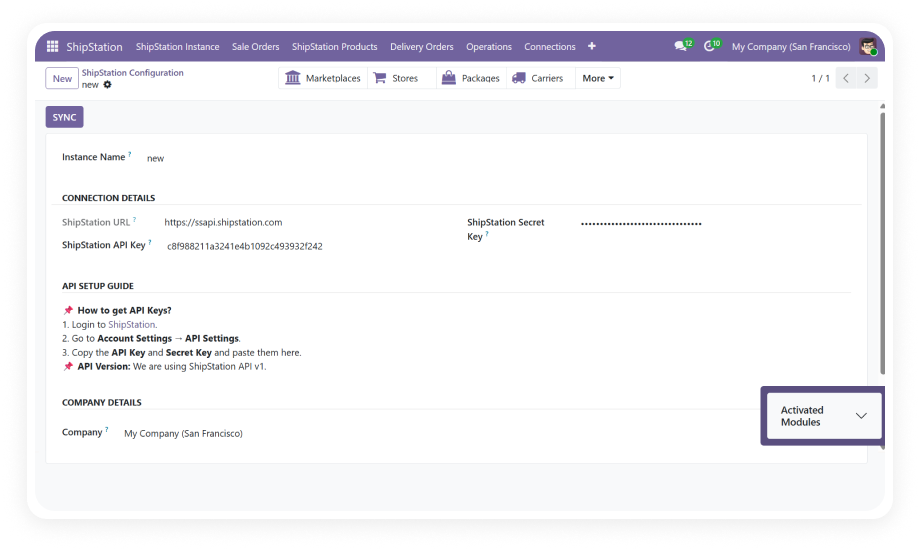
Configure and manage multiple ShipStation accounts from a single Odoo instance. Each instance stores its own API credentials, sync preferences, and operational parameters.

Why it matters: Centralize shipping management for multiple brands or warehouses.

2

Automated Order Export

Delivery orders from Odoo are automatically exported to ShipStation based on configurable triggers. Supports auto-validation of delivery orders before export.

Why it matters: Eliminates delay between order confirmation and shipment processing.

3

Product Synchronization

Sync product data between Odoo and ShipStation through manual triggers or automated cron jobs. Keeps SKUs, weights, dimensions, and descriptions aligned.

Why it matters: Ensures accurate shipping calculations and prevents label mismatches.

4

Carrier & Service Import

Automatically pull all available shipping carriers, service levels, and package types from your ShipStation account into Odoo.

Why it matters: Access real-time carrier options directly within Odoo workflows.

5

Real-Time Tracking Updates

Shipping status and tracking numbers sync back from ShipStation to Odoo automatically, keeping sales orders and customer communications up to date.

Why it matters: Reduces "where's my order" support inquiries significantly.

6

Comprehensive Operation Logs

Every API call, data transfer, and sync event is logged with timestamps, status codes, and error details for full audit trail visibility.

Why it matters: Simplifies troubleshooting and supports compliance requirements.

7

Sales Team Shipping Visibility

Provides shipping status and carrier information directly within Odoo sales workflow, so sales reps can answer customer questions instantly.

Why it matters: Empowers front-office teams with fulfillment data for better service.

8

Cron-Based Automated Scheduling

Configure automated sync schedules for products, orders, and tracking updates using Odoo's built-in scheduled actions (cron jobs).

Why it matters: Ensures continuous data flow without manual intervention.

Who Benefits from the ShipStation Odoo Connector?

Role
Primary Use Case
Key Outcome
E-commerce Manager
Automate order-to-shipment workflow for online stores
Reduce fulfillment processing time by up to 80%
Warehouse Supervisor
Bulk export delivery orders and generate shipping labels
Increase daily shipment throughput without added staff
Operations Director
Centralize multi-carrier shipping across warehouses
Gain single-pane visibility into all shipping operations
Customer Service Rep
Access real-time tracking directly in Odoo sales orders
Resolve shipping inquiries in seconds, not minutes
Finance Controller
Reconcile shipping costs against invoiced amounts
Ensure accurate cost allocation with synced carrier data
IT Administrator
Manage API credentials and monitor integration health
Maintain system reliability with detailed operation logs
Supply Chain Analyst
Analyze carrier performance and delivery timelines
Optimize carrier selection based on actual fulfillment data
Business Owner (SMB)
Scale shipping volume without proportional staffing
Grow revenue without growing operational overhead

Versions & Documentation

Choose your Odoo version and explore interactive documentation

Documentation coming soon for this version.

ShipStation Odoo Connector vs. Manual Workflow

Capability
Manual Process
With This Connector
Order Transfer
Copy-paste order details
Auto export on delivery confirmation
Tracking Updates
Manually copy tracking numbers
Real-time sync to sales/delivery orders
Carrier Setup
Configure each carrier in both systems
One-click import of all carriers
Product Data
Maintain separate product records
Bi-directional sync keeps data aligned
Label Generation
Switch to ShipStation for every label
Generate labels within Odoo workflow
Error Visibility
No centralized logging
Full operation logs with status detail
Multi-Account
Log in/out of separate instances
Manage all accounts from single dashboard
Scalability
Linear headcount increase
Handles volume growth with zero added labor

How to Set Up the ShipStation Odoo Connector

No development environment. No custom code. Setup takes under 30 minutes.

01

Install the Module

Purchase from the Odoo App Store and install on your Odoo instance. Works with Odoo Online, Odoo.sh, and On-Premise deployments.

02

Configure ShipStation Instance

Navigate to connector settings. Enter your ShipStation API Key and Secret. Define sync preferences including auto-export triggers and intervals.

03

Import Carriers & Products

Pull ShipStation carriers, service levels, and package types into Odoo. Synchronize your product catalog to align SKUs and dimensions.

04

Activate Automated Workflows

Enable cron-based scheduling for order exports and tracking imports. Test with a sample order to verify the complete flow.

Technical Details & Compatibility

Requirement
Technical Name
Odoo Versions
Deployment Types
Lines of Code
Dependencies
License
Details
zehntech_shipstation_connector
16.0 · 17.0 · 18.0 · 19.0
Online · Odoo.sh · On-Premise
4,108+
Contacts, Inventory, Manufacturing, Sales, Discuss, Invoicing
OPL-1
ShipStation Odoo Connector — FAQ illustration

Frequently Asked Questions

Yes, the module supports multi-instance management. Configure and operate multiple ShipStation accounts from a single Odoo installation. Each instance maintains its own API credentials, sync rules, and operational settings.
The connector works with all three Odoo hosting options: Odoo Online (SaaS), Odoo.sh (PaaS), and On-Premise. No additional server-side infrastructure is required beyond a valid ShipStation API key. Installation and configuration follow the same process regardless of hosting type.
Both options are available — you can trigger syncs manually on demand or configure automated cron-based scheduling. Automated schedules can be set independently for order exports, product syncs, and tracking imports. Cron intervals are fully configurable (every 15 minutes, hourly, daily, etc.).
All sync operations are logged with detailed status codes, timestamps, and error messages. Failed operations do not corrupt existing data — the system uses safe transaction handling. The operation log makes it easy to identify, diagnose, and resolve issues quickly.
The ShipStation Odoo Connector is a one-time purchase at $94.58 with no recurring fees or subscription charges. You receive lifetime access to the purchased version with free bug-fix updates. Upgrading to a newer Odoo version requires purchasing the module for that version separately.

One-Time Purchase.
No Subscription.
No Recurring Fees.

The ShipStation Odoo Connector eliminates manual shipping workflows, accelerates fulfillment, and gives your team real-time visibility into every shipment — directly within Odoo.

Zehntech Odoo experts ready to help


          You have successfully subscribed to the newsletter

          There was an error while trying to send your request. Please try again.

          Zehntech will use the information you provide on this form to be in touch with you and to provide updates and marketing.