Join us at GITEX 2025! Discover our solutions at Hall 4, Booth H-30 Schedule a Meeting Today.
Automate Marketing Initiatives with Salesforce Marketing Cloud Learn More
Join us at GITEX 2024! Discover our solutions at Hall 4, Booth H-30 Book your live demo today.
Zehntech Odoo App

Simplify Access Management

Take full control of user permissions without writing a single line of code. A centralized security module that lets administrators define granular menu, model, field, button, tab, and chatter restrictions — all from one intuitive interface.

Compatible with Odoo 16, 17 & 18
Community & Enterprise Supported
No Technical Knowledge Required
Lifetime Free Updates Included
$110.50
V18, 17
Simplify Access Management — Centralized permission control dashboard

What Is Simplify Access Management?

Simplify Access Management replaces the scattered, complex security configuration in standard Odoo with a single, unified dashboard for controlling exactly who can see, edit, create, or delete any menu, model, field, button, or tab in your system. It gives non-technical administrators the power to enforce enterprise-grade access policies across the entire Odoo instance without touching code or XML files.

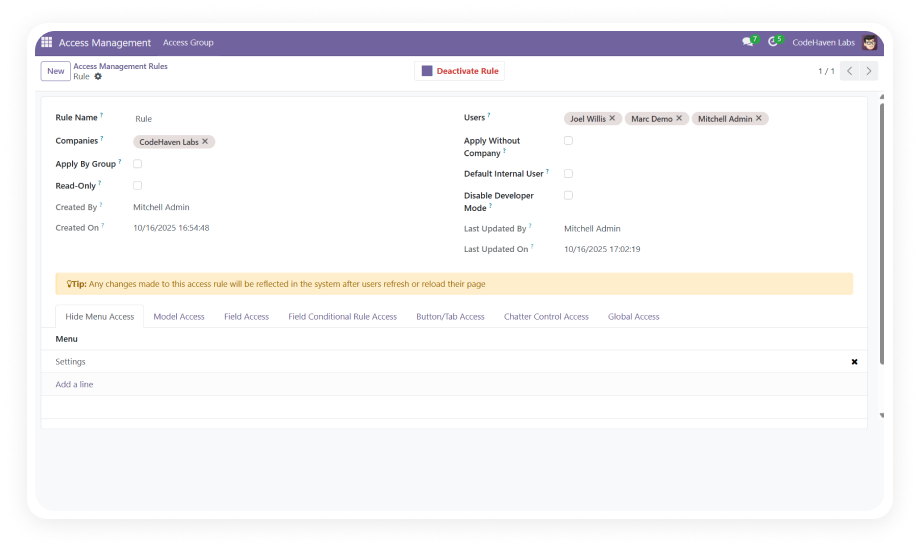
Menu & submenu restriction
Model-level CRUD permissions
Field-level access control
Button & tab restrictions
Global access policies

How Simplify Access Management Solves Permission Challenges

Problem
Zehntech Solution
Complexity overload with scattered settings
One unified dashboard for all restrictions
Requires developer expertise for permissions
No-code visual administration interface
Security gaps from misconfiguration
Clear, auditable access rules
No field-level visibility control
Granular field restrictions per user/group
Buttons and tabs visible to all users
Point-and-click button/tab hiding
No chatter/messaging restrictions
Full chatter control per user/group
Per-module configuration only
Organization-wide cascading policies
Hours/days to configure permissions
Minutes with admin self-service

Core Features

1

Hide or restrict access to any top-level menu or nested submenu based on users or user groups. Entire application sections become invisible to unauthorized personnel.

Why it matters: Prevents information overload and keeps users focused on their responsibilities.

2

Model-Level CRUD Permissions

Define granular Create, Read, Write, and Delete permissions at the model level. Additionally restrict Import, Export, and Reporting capabilities per model.

Why it matters: Toggle CRUD and data operations with checkboxes, reducing misconfiguration risk by 90%.

3

Field-Level Access Control

Control visibility and editability of individual fields with conditional rules based on user roles and context. Make fields invisible, read-only, or required.

Why it matters: Protects sensitive data points without needing separate views or custom development.

4

Button & Tab Restrictions

Hide action buttons and notebook tabs that are irrelevant or dangerous for specific user roles. Remove the "Confirm" button from junior staff or hide sensitive tabs.

Why it matters: Reduces operational errors by removing actions users should not perform.

5

Chatter Management Controls

Restrict messaging, internal note logging, and activity scheduling capabilities within the chatter widget. Control who can communicate on specific records.

Why it matters: Maintains communication discipline and prevents unauthorized activity triggering.

6

Global Access Configuration

Set organization-wide access policies that cascade across all modules simultaneously. Define baseline restrictions that apply to every user, then layer role-specific permissions.

Why it matters: Ensures consistent security posture across your entire Odoo deployment.

Who Benefits from Simplify Access Management?

Role
Primary Use Case
Key Outcome
IT Administrator
Centralized access governance across all Odoo modules
80% reduction in permission configuration time
HR Manager
Restricting employee data fields to authorized personnel only
Full compliance with data privacy regulations
Finance Controller
Hiding cost/margin fields and financial reports from non-finance staff
Confidential financial data stays protected
Operations Manager
Limiting warehouse staff to inventory menus only
Fewer errors from accidental access
Compliance Officer
Auditing and enforcing consistent access policies company-wide
Clear, documentable security controls for audits
Business Owner / CEO
Onboarding new employees with correct permissions instantly
Zero dependency on developer time for access setup
Sales Manager
Restricting discount buttons and pricing fields to senior reps
Margin protection without slowing sales workflow

Versions & Documentation

Choose your Odoo version and explore interactive documentation

Simplify Access Management vs Native Odoo

Capability
Simplify Access Management
Native Odoo
Menu-level restrictions
Visual dropdown selection
Requires XML/code editing
Model CRUD permissions
Checkbox-based configuration
CSV security files + technical menu
Field-level visibility control
No-code field rules per user/group
Custom view inheritance (developer)
Button & tab hiding
Point-and-click restrictions
XML view modifications
Chatter/messaging restrictions
Full control per user/group
Not available natively
Global access policies
Organization-wide cascading rules
Not available — per-module only
Import/Export restrictions
Toggle on/off per model
Limited, requires code
Configuration time
Minutes (admin self-service)
Hours to days (developer dependent)
Technical expertise required
None — fully visual interface
High (XML, Python, domains)
Centralized audit view
Yes — single dashboard
No — scattered across settings

Get Started In Minutes

No developer required. No custom code. Visual configuration for every permission.

01

Install the Module

Purchase from the Odoo App Store and install. Navigate to Apps, update the app list, and click Install on "Simplify Access Management."

02

Configure Global Policies

Open the dashboard from Settings. Define organization-wide baseline restrictions that apply across all modules and users.

03

Set Role-Specific Permissions

Create layered access rules for each user group. Configure menu visibility, CRUD rights, field controls, and button/tab restrictions.

04

Test and Activate

Log in as test users to verify restrictions work correctly. All changes take effect immediately — no server restart needed.

Technical Details & Compatibility

Specification
Technical Name
Odoo Versions
Editions
Deployment
Dependencies
License
Lines of Code
Support
Details
zehntech_simplify_access_management
16.0 · 17.0 · 18.0
Community · Enterprise
Odoo Online · Odoo.sh · On-Premise
stock, account, purchase, sale_management, mail
OPL-1
3,359
Simplify Access Management — FAQ illustration

Frequently Asked Questions

No. Simplify Access Management is designed for non-technical administrators. All configurations are done through a visual interface with dropdowns, checkboxes, and selection fields. No XML editing, Python coding, or domain expressions are required.
The module works as an additional layer on top of existing Odoo security configurations. Your current access rights, groups, and record rules remain intact. Restrictions defined in this module are applied in addition to native permissions, never overriding them.
You can configure restrictions for both individual users and entire user groups. This flexibility allows you to handle exceptions (e.g., a specific manager needing extra access) without creating new security groups.
Yes, Simplify Access Management is fully compatible with both Odoo Community and Enterprise editions. It supports Odoo Online, Odoo.sh, and On-Premise deployments across versions 16, 17, and 18.
Zehntech provides lifetime free updates with your one-time purchase. When you upgrade your Odoo instance, an updated version of the module will be available at no extra cost. Your access configurations are preserved during standard upgrade procedures.

One-Time Purchase.
No Subscription.
No Recurring Fees.

Includes lifetime updates and dedicated technical support. Take control of your Odoo permissions today.

Zehntech Odoo experts ready to help


          You have successfully subscribed to the newsletter

          There was an error while trying to send your request. Please try again.

          Zehntech will use the information you provide on this form to be in touch with you and to provide updates and marketing.