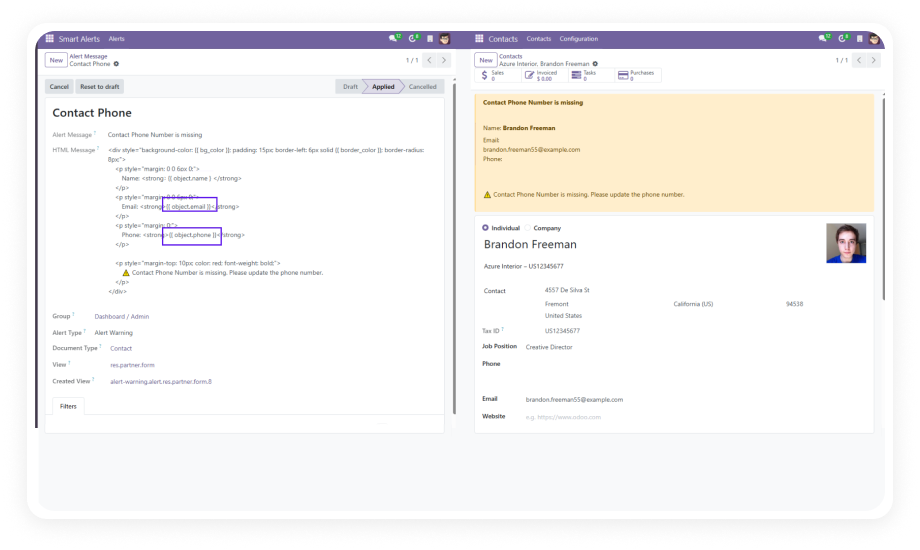
Create fully customizable alert rules that adapt to your specific business requirements. Define conditions based on field values, record states, or complex business logic — all from a user-friendly configuration interface.
Why it matters: Eliminates the need for custom development every time you want to communicate a business rule to users on a form view.
Manage all configured alerts from a single centralized dashboard. View, edit, activate, deactivate, and organize alerts across every Odoo model without navigating between different modules or settings pages.
Why it matters: Provides complete visibility and control over your organization's alert ecosystem, making maintenance and auditing straightforward.
Control exactly which user groups see specific alerts through granular visibility settings. Show critical compliance warnings to managers, display operational notes to warehouse staff, or present financial alerts only to accounting.
Why it matters: Prevents alert fatigue by ensuring users only see messages relevant to their role, keeping forms clean and focused.
Choose from six distinct visual alert types — Danger, Warning, Info, Success, Primary, and Secondary — each with its own color coding and visual weight to convey the appropriate level of urgency.
Why it matters: Visual differentiation helps users instantly gauge severity and priority, enabling faster decision-making without reading every alert in detail.
Define smart conditions that determine when alerts trigger. Alerts appear only when specific field values, record states, or business criteria are met — not on every form load.
Why it matters: Context-sensitive alerts deliver relevant information precisely when it is needed, rather than cluttering forms with static messages users learn to ignore.
Separate administrative and viewing permissions with the dedicated "Smart Alert Admin" role. Only authorized administrators can create, modify, or delete alert configurations, while all other users simply see applicable alerts.
Why it matters: Maintains system integrity by preventing unauthorized changes to alert rules while ensuring every user benefits from guidance alerts.
Compose alert messages using HTML formatting to include bold text, links, lists, and other rich content elements that make alerts more informative and actionable.
Why it matters: Rich formatting allows you to create clear, well-structured alert messages that include actionable links, formatted instructions, or highlighted keywords for quick scanning.
Configure alerts for any Odoo model — Sales Orders, Purchase Orders, CRM Leads, Inventory Transfers, Invoices, and beyond. One module covers your entire Odoo ecosystem.
Why it matters: A single installation addresses alert needs across all departments, eliminating the need for module-specific notification solutions.