Join us at GITEX 2025! Discover our solutions at Hall 4, Booth H-30 Schedule a Meeting Today.
Automate Marketing Initiatives with Salesforce Marketing Cloud Learn More
Join us at GITEX 2024! Discover our solutions at Hall 4, Booth H-30 Book your live demo today.
Zehntech Odoo App

Web Notification

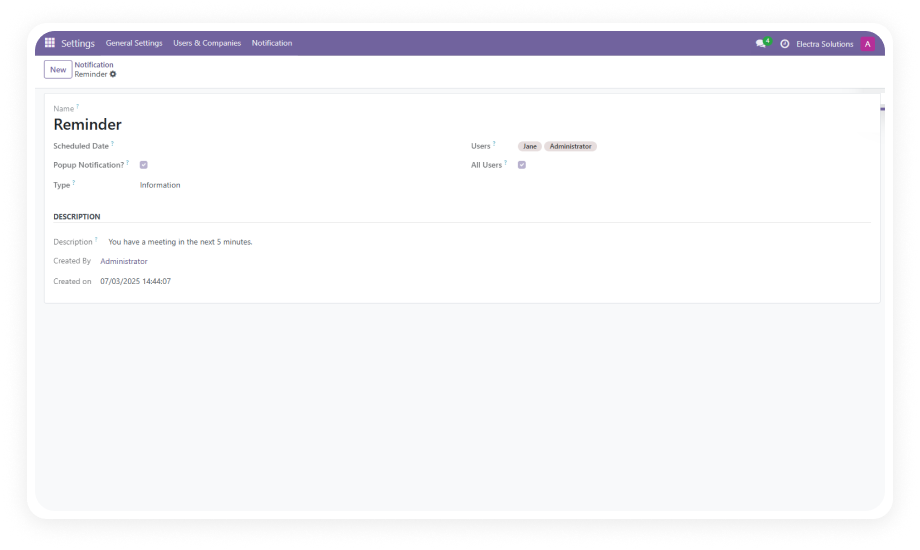
Send Real-Time Pop-Up Notifications to Your Odoo Users — Instantly, Scheduled, or Timed. Deliver critical updates, reminders, and announcements directly inside Odoo with customizable pop-up, text, and animated notifications — no external messaging tools needed.

Compatible with Odoo 16, 17, 18 & 19
Community & Enterprise Supported
Pop-Up, Text & Animated Notification Types
Schedule, Expire & Track Every Notification
No External Messaging Tools Required
$14.93
V19, 18, 17, 16
Web Notification — Real-time in-app pop-up notifications for Odoo

What Is the Web Notification Module for Odoo?

The Web Notification module by Zehntech enables administrators and authorized users to send real-time, scheduled, or expiring pop-up notifications directly within the Odoo interface. Whether you need to broadcast urgent announcements, deliver reminders before deadlines, or push non-intrusive status updates, this module ensures every team member receives the right message at the right time — without ever leaving Odoo. Unlike email or external chat tools, Web Notification operates entirely within the Odoo backend, keeping your communications centralized, trackable, and instantly visible.

Mandatory acknowledgment pop-ups for compliance messages
Scheduled deadline reminders and meeting alerts
System maintenance and downtime notices
Company-wide announcements with engagement tracking
RTL & LTR multilingual notification support

How Web Notification Solves Internal Communication Gaps

Problem
Zehntech Web Notification Solution
Announcements buried in email inboxes
In-app pop-ups visible the moment users open Odoo
No confirmation users saw critical messages
Modal dialogs requiring acknowledgment before dismissal
Reminders sent too late or forgotten
Schedule notifications for exact future delivery dates and times
Outdated notices still showing after deadline
Auto-expiring messages disappear when no longer relevant
No analytics on notification reach
Dashboard tracking views, engagement rates, and timestamps
External chat tools fragment workflow
All communications stay inside the Odoo interface
Multilingual teams miss formatted messages
Animated notifications with full LTR & RTL language support
All users receive irrelevant notifications
Target specific users or groups for role-based delivery

Key Features of Web Notification for Odoo

1

Pop-Up Modal Notifications

Create attention-grabbing modal dialog notifications that overlay the user's screen and require acknowledgment before they can continue working. Ideal for mandatory announcements, policy changes, or system maintenance alerts.

Why it matters: Ensures 100% visibility for mission-critical messages — users cannot dismiss or ignore them accidentally, eliminating the risk of missed communications.

2

Simple Text Notifications

Display non-intrusive text messages in designated interface areas without blocking user interaction. Perfect for routine updates, status changes, or informational alerts that don't require immediate action.

Why it matters: Keeps users informed of ongoing activities without disrupting their workflow, maintaining productivity while still delivering timely information.

3

Animated Notifications (LTR & RTL Support)

Send visually engaging animated notifications with full support for left-to-right and right-to-left language directions. Animations draw attention naturally while respecting your team's linguistic requirements.

Why it matters: Captures user attention effectively in multilingual environments, ensuring global teams using Arabic, Hebrew, or other RTL languages receive the same quality notification experience.

4

Schedule Notifications for Future Delivery

Configure notifications to be delivered automatically at specific future dates and times. Set up reminders for upcoming deadlines, meeting alerts, or scheduled maintenance windows days or weeks in advance.

Why it matters: Eliminates the need to manually send time-sensitive reminders, allowing administrators to plan communications proactively and ensure nothing falls through the cracks.

5

Set Expiry Dates on Notifications

Define how long each notification remains visible to users. Once the expiry period passes, the notification automatically disappears, keeping the interface clean and ensuring only current information is displayed.

Why it matters: Prevents information overload and confusion from outdated messages, ensuring users only see relevant, timely content without manual cleanup by administrators.

6

Notification Analytics Dashboard

Track comprehensive metrics including total views, user engagement rates, acknowledgment timestamps, and response patterns through a dedicated analytics dashboard.

Why it matters: Provides measurable proof that communications reached their audience, enabling data-driven decisions about notification strategies and identifying users who may need follow-up.

Who Benefits from Web Notification?

Role
Primary Use Case
Key Outcome
IT Administrator
Broadcasting system maintenance alerts and downtime notices
Zero confusion during planned outages with confirmed user acknowledgment
HR Manager
Announcing policy changes, benefits enrollment deadlines, and company events
Guaranteed visibility for compliance-critical communications across all employees
Operations Manager
Sending shift change reminders and urgent operational updates
Real-time alignment of floor teams without requiring email checks
Project Manager
Delivering milestone reminders and deadline notifications to project teams
Reduced missed deadlines through timely, impossible-to-ignore in-app alerts
Finance Controller
Alerting teams about month-end closing procedures and submission deadlines
On-time financial submissions with scheduled recurring reminders
Executive Leadership
Pushing company-wide announcements and strategic updates
Immediate reach to all Odoo users with engagement analytics for confirmation
âš   Not the right fit for: Teams that need external customer-facing notifications or SMS/email-based outreach — this module handles internal in-app notifications within the Odoo interface only.

Versions & Documentation

Choose your Odoo version and explore interactive documentation

Web Notification vs. Alternative Communication Methods

Feature
Web Notification (Zehntech)
Email / External Chat / Native Odoo
In-App Pop-Up Notifications
✔ Yes
Not available
Modal Dialogs Requiring Acknowledgment
✔ Yes
Not available
Scheduled Future Delivery
✔ Yes
Limited (email only)
Auto-Expiring Messages
✔ Yes
Not available
Animated Notifications (LTR/RTL)
✔ Yes
Not available
Engagement Analytics Dashboard
✔ Yes
Limited or not available
No External Tool Dependency
✔ Yes
External tools required for chat
Works Within Odoo Interface
✔ Yes — fully embedded
Email operates outside Odoo
Target Specific Users or Groups
✔ Yes
Varies by method
One-Time Purchase (No Subscription)
✔ Yes — $14.93 once
External tools often subscription-based

Get Started In Minutes

No development environment. No external tools. No consultant required for standard setup.

01

Purchase and download

Purchase the Web Notification module from the Odoo App Store for your Odoo version (16, 17, 18, or 19). Download the module package and place it in your Odoo addons directory.

02

Install the module

Navigate to Apps in your Odoo backend, update the app list, then search for "Web Notification." Click Install to activate the module. The required dependency (Discuss/mail) is verified automatically.

03

Configure notification settings

Access the Web Notification settings to configure default notification types (pop-up, text, or animated), set default expiry durations, and assign user permissions for who can create and send notifications.

04

Create and send your first notification

Compose your message, select the notification type, choose target users or groups, optionally set a schedule date and expiry, then publish. Monitor engagement through the analytics dashboard.

Technical Details & Compatibility

Requirement
Technical Name
Odoo Versions
Editions
Hosting
Dependencies
Third-Party Dependencies
Lines of Code
Custom Dev Required
Install Time
Lifetime Updates
License
Support
Details
zehntech_web_notification
16.0 · 17.0 · 18.0 · 19.0
Community · Enterprise · Odoo.sh
Odoo Online · On-Premise · Odoo.sh
Discuss (mail) — standard addon
None
816
No
Under 10 minutes
Included with one-time purchase
OPL-1
Web Notification — Frequently Asked Questions

Frequently Asked Questions

Web Notification is fully compatible with Odoo Online, Odoo.sh, and on-premise deployments. No server-level configuration is required for Odoo Online installations. Simply install from the Apps menu after purchase and you are ready to go.
Yes, you can select individual users or entire user groups as notification recipients. This allows you to send department-specific announcements or role-based reminders. Targeted delivery ensures users only receive messages relevant to them, reducing notification fatigue.
Expired notifications are automatically removed and will not be displayed to users who log in after the expiry date. The analytics dashboard still records the notification's history for audit purposes. This prevents outdated information from confusing users who were offline during the notification period.
No. Web Notification is a one-time purchase at $14.93 with no recurring fees. Lifetime updates for your purchased version are included at no extra cost. You only pay again if you choose to upgrade to a newer major Odoo version in the future.
No external services are required. The module operates entirely within your Odoo instance. The only dependency is the native Odoo Discuss (mail) module, which is included in standard Odoo installations. No API keys, external servers, or third-party accounts are needed.

One-Time Purchase.
No Subscription.
No Recurring Fees.

Includes lifetime updates and dedicated technical support. Keep your team aligned with real-time in-app notifications — starting at $14.93.

Zehntech Odoo experts ready to help


          You have successfully subscribed to the newsletter

          There was an error while trying to send your request. Please try again.

          Zehntech will use the information you provide on this form to be in touch with you and to provide updates and marketing.