Join us at GITEX 2025! Discover our solutions at Hall 4, Booth H-30 Schedule a Meeting Today.
Automate Marketing Initiatives with Salesforce Marketing Cloud Learn More
Join us at GITEX 2024! Discover our solutions at Hall 4, Booth H-30 Book your live demo today.
Zehntech Odoo App

Smart Alerts for Odoo

Real-Time, Condition-Based Notifications for Odoo Forms. Display dynamic, rule-based alert messages directly on Odoo form views to guide users, prevent errors, and enforce business logic across every department — no custom development required.

Compatible with Odoo 16, 17, 18 & 19
Community & Enterprise Supported
Works Across All Odoo Models
No Custom Development Required
One-Time Purchase — Lifetime Updates Included
$24.89
V19, 18, 17
Smart Alerts for Odoo — Real-time condition-based notifications on form views

What Is Smart Alerts for Odoo?

Smart Alerts is an Odoo module that enables administrators to configure dynamic, condition-based alert messages that appear directly on form views across any Odoo model. Instead of relying on users to remember business rules or manually checking data, Smart Alerts automatically displays contextual notifications — warnings, errors, success messages, or informational notes — the moment a record meets specific criteria. No Python. No XML. No developer intervention.

Credit limit warnings on customer records
Handling instructions on product forms
Compliance reminders on approval workflows
Billing discrepancy flags on vendor bills
Any condition-based alert on any Odoo model

How Smart Alerts Solves Silent Business Logic Failures

Problem
Smart Alerts Solution
Data entry mistakes go uncaught until downstream processes break
Condition-based alerts flag issues the moment a record meets defined criteria
Business policies forgotten with no in-context reminder
Configurable rule messages surface the right policy exactly when needed
Approval bottlenecks from manual compliance verification
Automated alerts enforce compliance checks before records reach review
Training overhead as new employees lack real-time guidance
Contextual alerts provide instant guidance directly on the form
Custom development required for every contextual form warning
No-code alert configuration — administrators define rules through the dashboard
No control over which users see which messages
Group-based visibility ensures each user sees only relevant alerts
Static messages users learn to ignore
Conditional display logic shows alerts only when specific criteria are met
Different notification tools needed per department or module
One installation covers all Odoo models across all departments

Key Features of Smart Alerts

1

Dynamic Alert Configuration

Create fully customizable alert rules that adapt to your specific business requirements. Define conditions based on field values, record states, or complex business logic — all from a user-friendly configuration interface.

Why it matters: Eliminates the need for custom development every time you want to communicate a business rule to users on a form view.

2

Unified Alert Dashboard

Manage all configured alerts from a single centralized dashboard. View, edit, activate, deactivate, and organize alerts across every Odoo model without navigating between different modules or settings pages.

Why it matters: Provides complete visibility and control over your organization's alert ecosystem, making maintenance and auditing straightforward.

3

Group-Based Alert Visibility

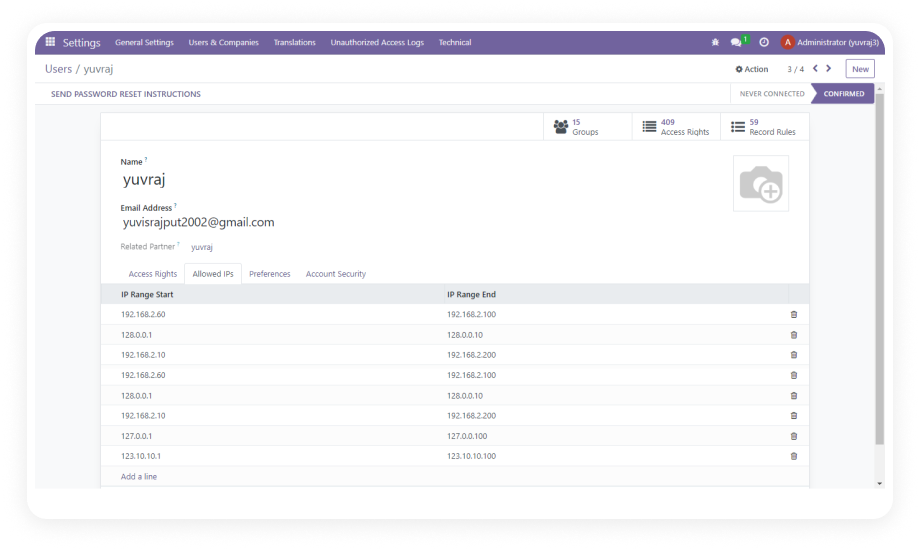
Control exactly which user groups see specific alerts through granular visibility settings. Show critical compliance warnings to managers, display operational notes to warehouse staff, or present financial alerts only to accounting.

Why it matters: Prevents alert fatigue by ensuring users only see messages relevant to their role, keeping forms clean and focused.

4

Multiple Alert Styles

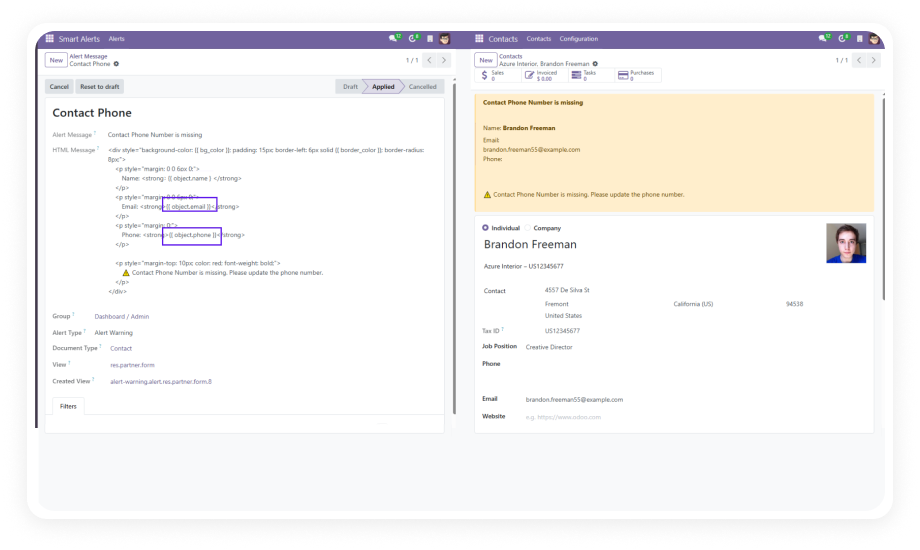
Choose from six distinct visual alert types — Danger, Warning, Info, Success, Primary, and Secondary — each with its own color coding and visual weight to convey the appropriate level of urgency.

Why it matters: Visual differentiation helps users instantly gauge severity and priority, enabling faster decision-making without reading every alert in detail.

5

Conditional Display Logic

Define smart conditions that determine when alerts trigger. Alerts appear only when specific field values, record states, or business criteria are met — not on every form load.

Why it matters: Context-sensitive alerts deliver relevant information precisely when it is needed, rather than cluttering forms with static messages users learn to ignore.

6

Role-Based Access Control

Separate administrative and viewing permissions with the dedicated "Smart Alert Admin" role. Only authorized administrators can create, modify, or delete alert configurations, while all other users simply see applicable alerts.

Why it matters: Maintains system integrity by preventing unauthorized changes to alert rules while ensuring every user benefits from guidance alerts.

7

HTML Message Support

Compose alert messages using HTML formatting to include bold text, links, lists, and other rich content elements that make alerts more informative and actionable.

Why it matters: Rich formatting allows you to create clear, well-structured alert messages that include actionable links, formatted instructions, or highlighted keywords for quick scanning.

8

Cross-Module Compatibility

Configure alerts for any Odoo model — Sales Orders, Purchase Orders, CRM Leads, Inventory Transfers, Invoices, and beyond. One module covers your entire Odoo ecosystem.

Why it matters: A single installation addresses alert needs across all departments, eliminating the need for module-specific notification solutions.

Who Benefits from Smart Alerts?

Role
Primary Use Case
Key Outcome
Sales Manager
Display credit limit warnings on customer records that exceed approved thresholds
Prevents unapproved credit exposure and reduces bad debt risk
Warehouse Supervisor
Show handling instructions or hazard warnings on specific product forms
Reduces product damage and improves worker safety compliance
Accounts Payable Clerk
Alert when vendor bills exceed PO amounts or payment terms are non-standard
Catches billing discrepancies before payment processing
HR Administrator
Notify when employee records are missing mandatory compliance documents
Ensures regulatory compliance and complete personnel files
Project Manager
Flag project tasks that have exceeded estimated hours or missed deadlines
Enables proactive intervention before projects go over budget
Procurement Officer
Warn when purchase orders are created for blocked or unqualified vendors
Enforces vendor management policies without manual checking
Customer Service Agent
Display VIP customer notes or special service instructions on contact forms
Delivers personalized service without memorizing customer details
Compliance Officer
Show regulatory reminders on records entering approval workflows
Maintains audit readiness and reduces compliance violations

Versions & Documentation

Choose your Odoo version and explore interactive documentation

Smart Alerts vs. Alternative Approaches

Capability
Smart Alerts
Custom Development
No-code alert configuration
✔ Yes — graphical interface
No — requires developer
Condition-based display logic
✔ Yes
Yes — coded per case
Multiple visual alert styles
✔ 6 built-in styles
Custom per implementation
Group-based visibility
✔ Yes
Possible with development
Centralized alert management
✔ Unified dashboard
Scattered across codebase
Cross-module coverage
✔ All Odoo models
Per-model development
HTML rich-text messages
✔ Yes
Possible
Implementation time
✔ Minutes
Days to weeks
Maintenance by non-developers
✔ Yes
No
One-time cost
✔ $24.89
Developer hourly rates

How to Set Up Smart Alerts in Odoo

No development environment. No custom code. No consultant required — set up your first alert in under 10 minutes.

01

Install the Module

Purchase Smart Alerts from the Odoo App Store and install it via the Apps menu. Activate developer mode if needed and click "Update Apps List" before searching for zehntech_smart_alerts.

02

Assign Admin Permissions

Navigate to Settings and assign the "Smart Alert Admin" role to users who will configure alerts. Regular users automatically see applicable alerts without any special permissions.

03

Create Alert Rules

Open the Smart Alerts dashboard, click Create, and configure your alert — select the target model, define conditions, choose alert style, compose the message with optional HTML, and assign user group visibility.

04

Test and Activate

Open a record matching your configured conditions to verify the alert displays correctly. Test across user groups, then activate for production use.

Technical Details & Compatibility

Requirement
Technical Name
Odoo Versions
Editions
Hosting
Dependencies
Third-Party Dependencies
Lines of Code
License
Custom Dev Required
Updates
Author
Support
Details
zehntech_smart_alerts
16.0 · 17.0 · 18.0 · 19.0
Community · Enterprise · Odoo.sh
Odoo Online · On-Premise · Odoo.sh
Base (core Odoo module)
None
744
OPL-1 (Odoo Proprietary License)
No
Lifetime updates included
Zehntech Technologies Inc.
Smart Alerts for Odoo — FAQ illustration

Frequently Asked Questions

Yes. Smart Alerts is designed for non-technical administrators. All alert configuration — model selection, condition logic, message formatting, and user group visibility — is handled through a graphical interface with no Python, XML, or JavaScript required.
Smart Alerts works with any Odoo model. You can configure alerts for Sales Orders, CRM Leads, Purchase Orders, Inventory Transfers, Invoices, Contacts, Projects, and any other model in your Odoo instance — including custom models.
Yes. You have full control over alert visibility through group-based settings. Each alert can be assigned to specific user groups, ensuring that only relevant users see each message. This prevents alert fatigue and keeps forms clean for users who do not need certain notifications.
Smart Alerts is a one-time purchase at $24.89 with no recurring fees or subscriptions. Lifetime updates are included, and the module remains fully functional indefinitely after purchase.
Yes. Smart Alerts supports HTML message content, allowing you to include bold text, hyperlinks, bullet lists, colored text, and other rich formatting to make alerts more informative and actionable for users.

One-Time Purchase.
No Subscription.
No Recurring Fees.

Stop relying on memory, training documents, and manual checks to enforce business rules. Smart Alerts puts the right information in front of the right user at exactly the right moment — directly on the Odoo forms they already use every day. Lifetime updates included.

Get started with Smart Alerts for Odoo


          You have successfully subscribed to the newsletter

          There was an error while trying to send your request. Please try again.

          Zehntech will use the information you provide on this form to be in touch with you and to provide updates and marketing.