Join us at GITEX 2025! Discover our solutions at Hall 4, Booth H-30 Schedule a Meeting Today.
Automate Marketing Initiatives with Salesforce Marketing Cloud Learn More
Join us at GITEX 2024! Discover our solutions at Hall 4, Booth H-30 Book your live demo today.
Zehntech Odoo App

Direct Print — Send Odoo Documents Straight to Any Printer

Eliminate the download-open-print cycle. Direct Print connects your Odoo instance to any printer through PrintNode, letting your team print invoices, delivery slips, and reports with a single click — no PDFs cluttering desktops, no wasted steps between generating a document and having it in hand.

Compatible with Odoo 16, 17, 18 & 19
Community & Enterprise Supported
PrintNode API — Secure Cloud Printing
No Custom Development Required
Trusted by Businesses Across 12+ Countries
FREE
V19, 18, 17, 16
Direct Print for Odoo — One-click cloud printing via PrintNode

What is Direct Print?

Direct Print is an Odoo module that integrates PrintNode's cloud printing API directly into your Odoo workflow. Instead of downloading a PDF, opening it locally, selecting a printer, and clicking print — your team simply clicks once inside Odoo and the document arrives at the correct printer automatically. It supports flexible printer configuration: assign a default printer for all documents, or map specific printers to specific report types and departments.

One-click printing
PrintNode API integration
Multi-printer support
Department routing
Print activity logging

How Direct Print Solves Odoo's Document Printing Gaps

Problem
Zehntech Direct Print Solution
Printing requires downloading a PDF first
Documents sent directly to printer with one click
Users must manually select the correct printer every time
Printer assignments pre-configured per document type
High-volume operations waste minutes per document
One-click printing saves significant time daily
No centralized print management
Administrators configure all printers centrally
Cloud-hosted Odoo makes local printing complicated
PrintNode cloud API bridges any hosting setup
No visibility into what was printed, when, or by whom
Print logging tracks all document activity
Warehouse teams need instant prints without desktop access
Direct printing from any Odoo interface
Setting up direct printing requires custom development
Installs from Odoo App Store, connects via API key

Everything You Need for Frictionless Odoo Printing

1

One-Click Direct Printing

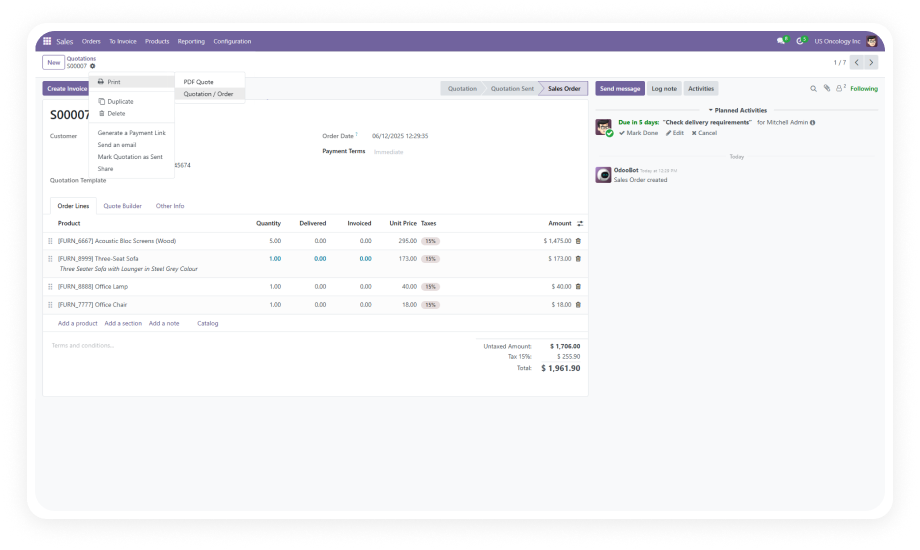
Print any Odoo document — invoices, delivery slips, reports, or custom templates — with a single click directly from the Odoo interface. No PDF download. No local print dialog.

Why it matters: teams processing dozens or hundreds of documents daily reclaim significant time when each print action drops from 4-5 clicks to one.

2

PrintNode API Integration

The module connects to PrintNode through a secure, authenticated API key. PrintNode handles communication between your Odoo instance and physical printers across any setup.

Why it matters: PrintNode is proven infrastructure used by thousands of businesses — you get enterprise-grade print routing without building custom middleware.

3

Multi-Printer Configuration

Assign different printers to different document types. Invoices go to one printer, delivery slips to another, internal reports to a third. Configure defaults and override per document type.

Why it matters: operations teams working across departments no longer need to manually select the right printer — routing is automatic.

4

Department-Specific Printer Assignments

Beyond document-type routing, assign printers at the department level. Warehouse team prints go to warehouse. Accounting invoices route to accounting's device.

Why it matters: large organizations with multiple physical locations get print infrastructure that mirrors their actual operational layout.

5

Every print action is logged with relevant metadata — what was printed, when, and the routing details. Administrators can review print activity for operational oversight.

Why it matters: visibility into printing activity helps identify bottlenecks, verify critical documents were sent, and maintain team accountability.

6

Network and Local Printer Support

Direct Print works with any printer registered in your PrintNode account — USB printers, network printers, wireless printers, or cloud-connected devices.

Why it matters: you don't need to replace existing hardware. Whatever printers your team already uses become part of your Odoo printing workflow.

7

Secure API Key Authentication

The connection between Odoo and PrintNode is authenticated via API key, ensuring that print jobs are only sent through authorized channels. No open ports, no unsecured connections.

Why it matters: document security is maintained end-to-end, which is critical for businesses printing financial records or sensitive operational documents.

8

Zero-Download Workflow

Documents go from Odoo directly to paper. No intermediate PDF files saved to user desktops, no temporary files accumulate, no local storage consumed.

Why it matters: cleaner workflows, fewer files to manage, and reduced risk of sensitive documents sitting in local download folders.

Who Gets The Most Out Of This Module

Role
Primary Use Case
Key Outcome
Warehouse Manager
Print delivery slips and picking orders instantly as orders are confirmed
Faster order fulfillment with zero desktop interaction required
Accounting Team
Print invoices and credit notes directly to the department printer
Streamlined billing workflow with automatic printer routing
Sales Manager
Print quotations and sales orders during client calls without interruption
Professional document delivery without leaving the Odoo interface
Operations Director
Configure and manage all printer assignments from a single admin panel
Centralized control over the entire organization's print infrastructure
Retail Store Manager
Print receipts and order confirmations at the point of sale
Immediate document output matching the speed of in-store transactions
Manufacturing Supervisor
Print work orders and production slips on the shop floor
Production documents arrive at the right printer without office involvement

Versions & Documentation

Choose your Odoo version and explore the module

Documentation coming soon for Odoo 16. Full setup guidance included with the module. Contact odoo-support@zehntech.com for walkthrough assistance.

Documentation coming soon for Odoo 17. Full setup guidance included with the module. Contact odoo-support@zehntech.com for walkthrough assistance.

Documentation coming soon for Odoo 18. Full setup guidance included with the module. Contact odoo-support@zehntech.com for walkthrough assistance.

Documentation coming soon for Odoo 19. Full setup guidance included with the module. Contact odoo-support@zehntech.com for walkthrough assistance.

Native Odoo vs Zehntech Direct Print

Capability
Zehntech Direct Print
Native Odoo
One-click direct printing from Odoo
Yes
Not available
PrintNode cloud printing integration
Yes
Not available
Multi-printer configuration per document type
Yes
Not available
Department-specific printer assignments
Yes
Not available
Print without downloading PDF
Yes
Not available
Centralized printer management in admin
Yes
Not available
Print logging and activity tracking
Yes
Not available
Secure API key authentication
Yes
Not available
Network and local printer support
Yes
Manual only
Works with cloud-hosted Odoo instances
Yes
Manual download required
Zero-download document workflow
Yes
Not available
Odoo Community edition support
Yes
PDF download only
Odoo Enterprise edition support
Yes
PDF download only

Get Started In Minutes

No development environment. No custom code. No consultant required for standard setup.

01

Install from the Odoo App Store

Search for zehntech_direct_print in your Odoo Apps menu and click Install. Works on Odoo 16-19, Community and Enterprise. No server restart needed.

02

Create your PrintNode account

Sign up at printnode.com, register your printers in PrintNode, and generate your API key from the PrintNode dashboard.

03

Connect Odoo to PrintNode

Navigate to Settings in your Odoo backend and enter your PrintNode API key. The module authenticates and pulls your available printer list automatically.

04

Configure printer assignments

Set a default printer for general use. Assign specific printers to specific document types and configure department-level routing as needed.

05

Navigate to any supported document and use the direct print action. Documents route to the assigned printer automatically. Review the print log to confirm delivery.

Technical Details & Compatibility

Requirement
Odoo Versions
Editions
Hosting
Dependencies
Third-Party Dependencies
Custom Dev Required
Install Time
Server Restart
Data Migration
Module Conflicts
License
Last Tested
Lines of Code
Support
Details
16.0 · 17.0 · 18.0 · 19.0
Community · Enterprise · Odoo.sh
Odoo Online · On-Premise · Odoo.sh
PrintNode API account (external service)
PrintNode client on printer host machine
No
Under 10 minutes
Not required
Not required
None known
OPL-1
Odoo 19.0 — May 2026
382
Direct Print — FAQ illustration

Frequently Asked Questions

Direct Print uses the PrintNode API to establish a secure, authenticated connection between your Odoo instance and any printer registered in your PrintNode account. Once configured with your API key, Odoo sends print jobs directly to the designated printer without generating intermediate PDF downloads. PrintNode handles all communication regardless of network topology.
Yes — Direct Print supports flexible multi-printer configuration. You can assign specific printers to specific document types: invoices to accounting's printer, delivery slips to the warehouse, internal reports to the office. Department-specific assignments are also supported for organizations with multiple physical locations.
Yes — any printer registered in your PrintNode account can receive jobs from Odoo through Direct Print. This includes local USB printers, network printers, wireless devices, and cloud-connected printers. If PrintNode can communicate with the printer, Odoo can send documents to it.
Direct Print supports Odoo 16, 17, 18, and 19. Both Community and Enterprise editions are fully supported. The module is compatible with Odoo Online, Odoo.sh, and On-Premise hosting environments.
Yes — Direct Print is a free module available on the Odoo App Store with no purchase price. There are no subscription fees and no recurring charges for the Odoo module itself. Note: PrintNode is a separate service with its own pricing tiers for cloud printing infrastructure.
Yes — a PrintNode account is required for the cloud printing functionality. PrintNode provides the API infrastructure that bridges Odoo and your physical printers. You can sign up at printnode.com, register your printers, and generate the API key needed for configuration.
Yes — this is one of the primary use cases. Cloud-hosted Odoo instances (Odoo Online, Odoo.sh) cannot access local printers directly. PrintNode's cloud API bridges that gap, routing print jobs from your hosted Odoo to any printer connected to a machine running the PrintNode client. No VPN or special network configuration is required.

Free Module.
No Subscription.
No Recurring Fees.

Includes lifetime updates and 90 days of dedicated technical support.

Zehntech Odoo experts ready to help


          You have successfully subscribed to the newsletter

          There was an error while trying to send your request. Please try again.

          Zehntech will use the information you provide on this form to be in touch with you and to provide updates and marketing.