Join us at GITEX 2025! Discover our solutions at Hall 4, Booth H-30 Schedule a Meeting Today.
Automate Marketing Initiatives with Salesforce Marketing Cloud Learn More
Join us at GITEX 2024! Discover our solutions at Hall 4, Booth H-30 Book your live demo today.
Zehntech Odoo App

Agriculture Management — Complete Farm Operations Inside Odoo

Run your entire farming operation from a single Odoo module. Track crop lifecycles from draft to delivery, manage field incidents, monitor disease outbreaks, allocate equipment and labor, and get real-time analytics — all without leaving your ERP.

Compatible with Odoo 16, 17, 18 & 19
Integrates with Inventory, Project, Maintenance & Sales
Trusted by 500+ Businesses Across 12+ Countries
Community & Enterprise Supported
No Custom Development Required
$139.38
V19, 18
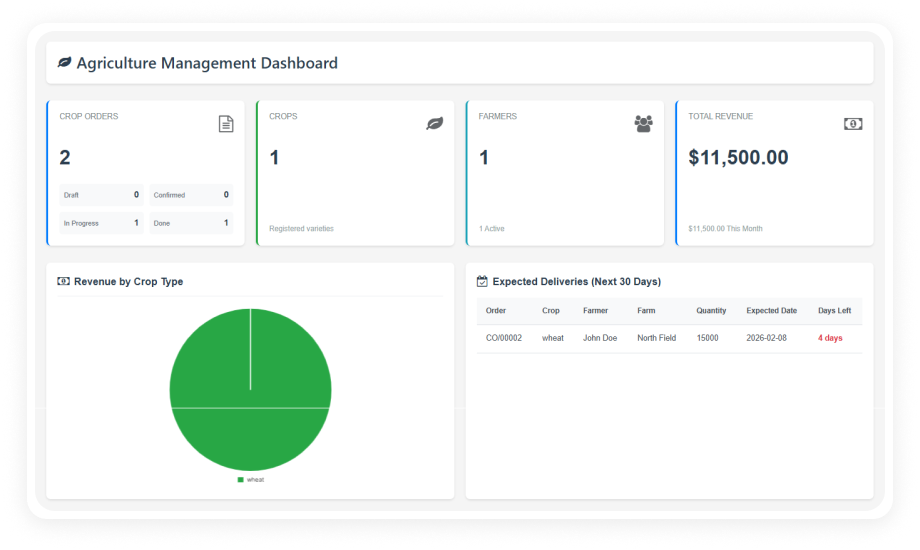
Odoo Agriculture Management — Farm operations dashboard

What is Agriculture Management?

Zehntech Agriculture Management is a purpose-built Odoo module that brings full farm operation control into your existing ERP. It replaces disconnected spreadsheets, manual tracking, and siloed tools with a single structured system for crop planning, field execution, incident response, and harvest reporting — all integrated natively with Odoo's Inventory, Project, Maintenance, and Accounting modules.

Crop lifecycle tracking
Field incident management
Disease & treatment records
Equipment & fleet allocation
Real-time farm analytics

One module. Complete visibility from seed to harvest. No spreadsheet chaos.

How Agriculture Management Solves Farm Operations Chaos

Problem
Zehntech Agriculture Management Solution
Crop orders tracked in spreadsheets with no status visibility
Structured crop order workflow from Draft to Done with real-time tracking
No way to link crop planning with inventory, labor, and equipment
Single crop order connects Inventory, Project Tasks, Maintenance, Fleet, and Invoicing
Seasonal planning done manually with no reusable crop master data
Crop Master stores growth duration, seasonal categories, warehouses, raw materials, and overheads
Field incidents logged informally with no resolution tracking
Field Incident Management with severity levels, corrective actions, and responsible user assignment
Disease outbreaks handled reactively with no centralized records
Disease & Treatment module stores symptoms, treatments, preventive measures, and products
Equipment and fleet allocation decided informally during cultivation
Crop Process Planning links specific equipment and vehicles to each cultivation operation
Farm managers have no real-time view of operations, revenue, or performance
Agriculture Dashboard delivers live KPIs — crop statistics, order tracking, revenue trends
Reports generated manually from multiple systems, always outdated
Built-in Crops and Orders Reports provide on-demand analysis without leaving Odoo

Every Feature Your Farm Operation Needs — Built Into Odoo

1

Agriculture Dashboard & Analytics

A real-time command center for your entire farming operation — displaying crop statistics, order tracking, revenue trends, farmer performance metrics, and upcoming harvest schedules in one view.

Why it matters: Farm managers can identify bottlenecks, monitor seasonal trends, and make operational decisions from a single screen.

2

Crop Order Lifecycle Management

Crop orders progress through a structured workflow from Draft to Done, with quick access to linked inventory, projects, tasks, equipment, fleet, labor, and cost records at every stage.

Why it matters: The full lifecycle of every crop batch is visible, auditable, and connected to every operational resource.

3

Crop Master & Seasonal Planning

Define reusable crop master records that store growth duration, seasonal categories (Summer, Winter, Rainy), linked warehouses, raw material requirements, disease profiles, labor assignments, and overhead costs.

Why it matters: Planning a new crop season requires configuration once and reuse indefinitely.

4

Field Incident Management

Log field issues as structured incident records with severity levels, corrective action plans, and responsible user assignments. Incidents are tracked through structured resolution workflows.

Why it matters: Reactive problem-solving is replaced with a documented, assignable system with clear audit trails.

5

Crop Process & Operation Planning

Plan each cultivation operation in detail — linking tasks, allocating specific equipment, and assigning fleet vehicles to each process step before fieldwork begins.

Why it matters: Field teams know exactly what equipment to use and what tasks to complete for each operation.

6

Disease & Treatment Management

Maintain a centralized library of crop diseases with symptom descriptions, recommended treatments, preventive measures, and associated products. Disease records link directly to crop master data.

Why it matters: When a disease is detected, teams can immediately reference treatment protocols instead of searching external resources.

7

Odoo Project & Task Integration

Crop orders automatically generate linked Odoo Project records and tasks, so cultivation workflows appear directly in your project management pipeline without manual creation.

Why it matters: Farm operations are embedded into the same project and task system your entire business uses.

8

Crops and Orders Reports

Generate detailed analytical reports for crops and orders on demand — filtered by season, farmer, crop type, status, or date range. Reports support decision-making at both operational and management level.

Why it matters: Farm directors get structured reporting without exporting data to spreadsheets.

Who Gets The Most Out Of This Module

Role
Primary Use Case
Key Outcome
Farm Operations Manager
Oversee all active crop orders across fields and seasons from one dashboard
Real-time visibility into every crop's status, resource allocation, and harvest timeline
Crop Planner
Build and reuse crop master records for recurring seasonal crops
Faster planning cycles with pre-configured crop data that eliminates redundant data entry
Field Supervisor
Log and manage field incidents with severity tracking and resolution workflows
Every field issue is documented, assigned, and closed with a complete audit trail
Inventory Manager
Track raw material consumption and warehouse allocation per crop order
Accurate inventory planning tied directly to crop demand — no manual reconciliation
Equipment & Fleet Coordinator
Allocate machinery and vehicles to specific cultivation processes
Equipment is pre-assigned before fieldwork begins, reducing delays and scheduling conflicts
Finance / Accounts Team
Review labor, overhead, and material costs linked to crop orders
Cost tracking is embedded in the crop order workflow — no separate cost collection needed

Versions & Documentation

Choose your Odoo version and explore interactive documentation

Documentation coming soon for this version.

Full setup documentation included with purchase.

Native Odoo vs Zehntech Agriculture Management

Capability
Zehntech Agriculture Management
Native Odoo
Crop order lifecycle tracking (Draft to Done)
Not available
Agriculture-specific dashboard with farm KPIs
Not available
Crop master with seasonal planning & growth duration
Not available
Field incident management with severity levels
Not available
Disease & treatment library with symptom records
Not available
Crop process planning with equipment & fleet allocation
Not available
Automatic Odoo Project & Task creation from crop orders
Basic (manual)
Farmer and inspector assignment per crop order
Not available
Revenue trend tracking for farm operations
Not available
Crop and order analytical reports
Basic
Overhead and labor cost tracking per crop
Basic
Raw material & warehouse linkage in crop planning
Basic

Get Started In Minutes

No development environment. No custom code. No consultant required for standard setup.

01

Purchase & Install

Acquire Agriculture Management from the Odoo App Store and install it into your Odoo instance in a single click. Compatible with Odoo 16, 17, 18, and 19 across Community, Enterprise, and Odoo.sh.

02

Configure Crop Master Data

Navigate to Agriculture Management menu and define your crop master records — specifying growth duration, seasonal categories, warehouses, raw materials, disease profiles, labor requirements, and overhead costs.

03

Create Crop Orders & Assign Resources

Create your first crop order and watch the system automatically calculate expected delivery dates. Assign farmers, inspectors, cultivation processes, equipment, and fleet vehicles.

04

Monitor via Dashboard & Generate Reports

Open the Agriculture Dashboard to see live KPIs across all active crop orders — tracking statuses, revenue trends, farmer performance, and harvest schedules in one view.

Total setup time: under 10 minutes. 90 days of dedicated technical support included with purchase.

Technical Details & Compatibility

Requirement
Odoo Versions
Editions
Hosting
Dependencies
Third-Party Dependencies
Custom Dev Required
Install Time
Server Restart
Data Migration
Module Conflicts
License
Last Tested
Lines of Code
Support
Details
16.0 · 17.0 · 18.0 · 19.0
Community · Enterprise · Odoo.sh
Odoo Online · On-Premise · Odoo.sh
Discuss (mail) · Inventory (stock) · Invoicing (account) · Maintenance · Project · Sales (sale_management)
None
No
Under 10 minutes
Not required
Not required
None known
OPL-1
Odoo 19.0 — May 2026
4,095
Odoo Agriculture Management — FAQ illustration

Frequently Asked Questions

Yes — the module installs directly from the Odoo App Store with no custom development, no code changes, and no consultant required for standard setup. It integrates natively with Odoo Inventory, Project, Maintenance, Invoicing, and Sales using standard Odoo mechanisms. Standard setup takes under 10 minutes across Community, Enterprise, and Odoo.sh deployments.
Yes — the module supports both Odoo Community and Enterprise editions. It also runs on Odoo.sh and on-premise server environments. All supported Odoo versions (16, 17, 18, and 19) are compatible with all three editions.
Crop orders follow a structured workflow from Draft through active cultivation stages to Done, with every stage tracking field area, quantities, assigned farmers, inspectors, processes, and expected delivery dates. Each crop order automatically generates linked Odoo Project records and tasks. The Agriculture Dashboard surfaces live order progress, revenue trends, and harvest timelines across all active crops.
Agriculture Management supports Odoo versions 16, 17, 18, and 19. All three deployment types — Community, Enterprise, and Odoo.sh — are fully supported across all versions. Lifetime updates are included with every purchase, with 90 days of dedicated technical support.
Yes — the module includes a centralized disease management library where teams record crop diseases with symptom descriptions, recommended treatments, preventive measures, and associated products. Disease records link directly to crop master data, making them available during planning, crop order creation, and field incident response. This enables teams to reference treatment protocols immediately when a disease is detected.

Ready to Bring Your Entire Farm Operation Into Odoo?

One-Time Purchase. No Subscription. No Recurring Fees.

Your team already runs sales, inventory, and finance in Odoo. Agriculture Management adds the missing operational layer — crop lifecycle tracking, field incident management, disease records, equipment planning, and real-time farm analytics — all inside the same system your team already knows.

Includes lifetime updates and 90 days of dedicated technical support.

Zehntech Odoo experts ready to help


          You have successfully subscribed to the newsletter

          There was an error while trying to send your request. Please try again.

          Zehntech will use the information you provide on this form to be in touch with you and to provide updates and marketing.