Automate Marketing Initiatives with Salesforce Marketing Cloud Learn More
Zehntech Odoo App

Survey Extra Fields

Add 14 Advanced Question Types to Odoo Surveys. Extend Odoo's native Survey module with specialized field types including Color Picker, Email, URL, Time, Range, Password, File Upload, and Digital Signature — with built-in validation, mandatory enforcement, and automated distribution.

Compatible with Odoo 16, 17, 18 & 19
14 Advanced Question Field Types
Built-in Input Validation Rules
Cron-Based Automated Distribution
One-Time Purchase — No Recurring Fees
$14.93
V19, 18
Survey Extra Fields — 14 advanced question types for Odoo Surveys

What Does Survey Extra Fields Do?

Survey Extra Fields adds 14 specialized question field types to Odoo's standard Survey app — including Time, Range, Color Picker, Email, URL, Password, File Upload, and Digital Signature. It also introduces input validation, mandatory field enforcement, cron-based automated survey distribution, and targeted contact-based delivery. If you need to collect structured, validated data beyond what Odoo's default text and multiple-choice questions offer, this module bridges the gap without custom development.

Employee onboarding with file uploads & signatures
Brand preference surveys with color pickers
Scheduling surveys with time pickers
Policy acknowledgments with digital signatures
Automated recurring satisfaction surveys

How Survey Extra Fields Solves Standard Odoo Survey Limitations

Standard Odoo Survey Limitation
Survey Extra Fields Solution
No file upload capability
Dedicated File Upload field with type and size controls
No digital signature field
Electronic signature captured directly in the survey form
Limited input validation
Advanced format validation for email, URL, and numeric ranges
No time-specific questions
Dedicated Time Picker field for scheduling surveys
Manual distribution only
Cron-based automation sends surveys on a defined schedule
No color selection field
Interactive Color Picker for design and preference surveys
Broadcasts to all contacts
Targeted delivery to specific contacts or groups
No range input for ratings
Range Slider field for intuitive satisfaction and priority scores

14 Advanced Field Types & Key Features

1

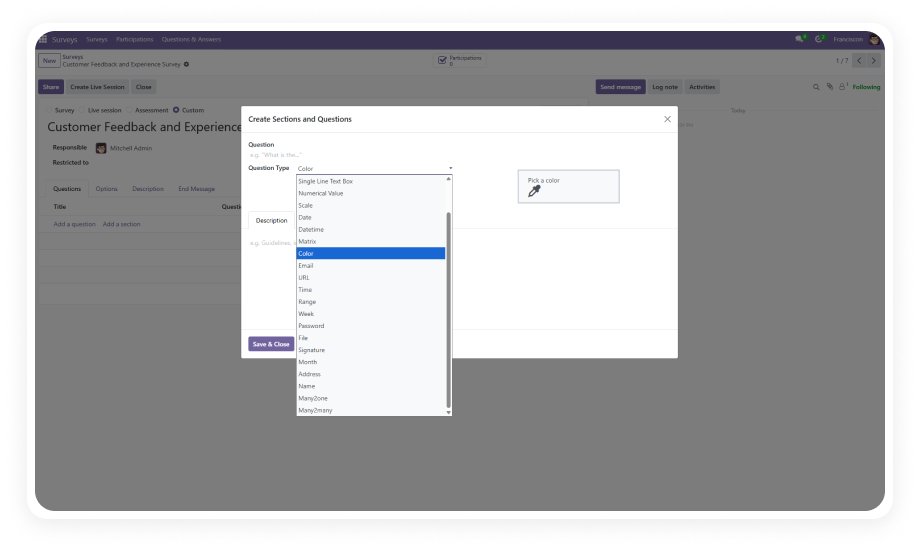
Color Picker Field

Allow respondents to select precise color values using an interactive color picker widget.

Why it matters: Ideal for design feedback, branding surveys, and product preference research where exact color specification is required.

2

Email Field with Validation

A dedicated email input field that validates format before submission.

Why it matters: Eliminates invalid email entries and ensures follow-up communications reach the intended recipients.

3

URL Field with Validation

Collects website addresses with automatic URL format verification.

Why it matters: Ensures hyperlinks captured in surveys are functional, reducing manual cleanup for marketing and research teams.

4

Time Picker Field

A specialized time input that captures hours and minutes in a structured format.

Why it matters: Essential for scheduling surveys, availability checks, and time-tracking questionnaires.

5

Range Slider Field

Lets respondents choose a value within a defined numeric range using an interactive slider.

Why it matters: Provides a more intuitive alternative to numeric text inputs for satisfaction scores, budget ranges, and priority ratings.

6

Password Field

A masked input field for collecting sensitive text entries.

Why it matters: Useful for onboarding forms, account setup surveys, and security questionnaires where input privacy is critical.

7

File Upload Field

Enables respondents to attach files — documents, images, PDFs — directly within the survey.

Why it matters: Eliminates the need for separate file-sharing steps when collecting resumes, certificates, or supporting documentation.

8

Digital Signature Field

Captures electronic signatures directly on the survey form.

Why it matters: Enables legally-relevant acknowledgments, consent forms, and agreement confirmations without leaving the survey interface.

9

Mandatory Field Enforcement

Mark specific extra-field questions as required, preventing submission until responses are provided.

Why it matters: Guarantees complete data collection for critical questions, reducing follow-up requests and incomplete records.

10

Input Validation Rules

Built-in validation for email format, valid URLs, and numeric limits across all applicable field types.

Why it matters: Ensures data quality at the point of entry, saving hours of post-collection cleanup and error correction.

11

Cron-Based Survey Automation

Schedule surveys to be sent automatically at predefined times without manual intervention.

Why it matters: Enables recurring feedback collection — monthly satisfaction surveys, quarterly reviews, onboarding sequences — on autopilot.

12

Contact-Based Targeted Distribution

Send surveys to specific contacts or contact groups rather than broadcasting to all.

Why it matters: Improves response rates by reaching the right audience and keeps survey analytics segmented by recipient group.

13

Real-Time Response Tracking

Monitor survey completions and response status in real time from the backend.

Why it matters: Allows administrators to follow up with non-respondents and measure participation without waiting for the survey to close.

14

Seamless Odoo Integration

Works natively with Odoo's existing Survey and Discuss modules — no additional configuration required.

Why it matters: Zero learning curve for teams already using Odoo Surveys; simply install and access new field types immediately.

Who Benefits from Survey Extra Fields?

Role
Primary Use Case
Key Outcome
HR Manager
Employee onboarding surveys with file uploads and digital signatures
Complete documentation collected in a single form without email attachments
Marketing Manager
Brand preference surveys with color pickers and URL inputs
Structured, validated data for campaign planning and competitor research
Operations Manager
Scheduling surveys with time pickers and range sliders
Accurate availability data for shift planning and resource allocation
Compliance Officer
Policy acknowledgment forms with mandatory fields and signatures
Auditable consent records captured directly within the ERP
Customer Success Lead
Automated satisfaction surveys via cron scheduling
Consistent feedback loops without manual send-out effort
Training Coordinator
Certification surveys with file uploads for proof documents
Verified training completion with attached certificates in one workflow
IT Administrator
Security questionnaires with password fields and email validation
Validated credentials and contact data for system provisioning
Event Planner
Post-event feedback with range sliders and targeted distribution
Segmented insights from specific attendee groups for future improvements

Versions & Documentation

Choose your Odoo version and explore interactive documentation

Documentation coming soon for Odoo 17.

Documentation coming soon for Odoo 16.

Standard Odoo Survey vs. Survey Extra Fields

Capability
With Survey Extra Fields
Standard Odoo Survey
Text / Number / Date Questions
✔ Yes
Yes
Multiple Choice & Matrix
✔ Yes
Yes
Color Picker Field
✔ Yes
No
Email Field with Validation
✔ Yes
No
URL Field with Validation
✔ Yes
No
Time Picker Field
✔ Yes
No
Range Slider Field
✔ Yes
No
Password Field
✔ Yes
No
File Upload Field
✔ Yes
No
Digital Signature Field
✔ Yes
No
Input Format Validation
✔ Advanced
Limited
Mandatory Field Enforcement
✔ Yes (extra fields)
No
Cron-Based Automated Distribution
✔ Yes
No
Contact-Based Targeted Sending
✔ Yes
No
Real-Time Response Tracking
✔ Enhanced
Basic

How to Install and Configure Survey Extra Fields

Up and running in under 15 minutes. No custom development. No consultant required.

01

Install the Module

Purchase from the Odoo App Store. Place the module in your addons directory, update the app list, search for "Survey Extra Fields," and click Install. Dependencies resolve automatically.

02

Access New Field Types

Open any survey in Surveys > Surveys. When adding a question, select from 14 additional field types in the question type dropdown — Color Picker, Email, URL, Time, Range, Password, File Upload, and Digital Signature.

03

Configure Validation & Mandatory Rules

For each extra-field question, enable input validation and mark fields as mandatory where required. This ensures respondents cannot submit incomplete or incorrectly formatted answers.

04

Set Up Automated Distribution

Configure cron-based scheduling to send surveys at defined intervals. Use contact-based targeting to select specific recipients and monitor response progress in real time from the dashboard.

Technical Details & Compatibility

Specification
Technical Name
License
Odoo Versions
Dependencies
Lines of Code
Deployment
Languages
Price
Publisher
Support
Details
zehntech_survey_extra_fields
LGPL-3
16.0 · 17.0 · 18.0 · 19.0
Survey (survey) · Discuss (mail)
2,311
Odoo Online · Odoo.sh · On-Premise
Python · JavaScript · XML
$14.93 (One-Time Purchase)
Zehntech Technologies Pvt. Ltd.
Survey Extra Fields FAQ illustration

Frequently Asked Questions

Survey Extra Fields requires the Odoo Survey module as a dependency. Since the Survey module is available in Odoo Enterprise, the module is designed for Odoo Enterprise deployments. Check your edition's module availability before purchasing.
The File Upload field allows respondents to attach files directly within the survey form. Configuration options for the upload field — including accepted file types and size limits — are managed within the question settings.
The Digital Signature field captures an electronic signature image within the survey response. Legal enforceability depends on your jurisdiction's electronic signature laws. The captured signature is stored alongside the survey response record for audit purposes.
The cron scheduler distributes surveys based on your configured intervals and recipient lists. For large contact databases, you can segment distribution into smaller batches using contact-based targeting to manage server load effectively.
Yes. All 14 extra field types — including the color picker, range slider, time picker, and file upload — are built using responsive Odoo web components that render correctly on desktop, tablet, and mobile browsers.

One-Time Purchase.
No Subscription.
No Recurring Fees.

Transform your Odoo surveys with 14 advanced field types, built-in validation, digital signatures, file uploads, and automated distribution — all for a single one-time investment of $14.93.

Get started with Survey Extra Fields today


          You have successfully subscribed to the newsletter

          There was an error while trying to send your request. Please try again.

          Zehntech will use the information you provide on this form to be in touch with you and to provide updates and marketing.