








Join us at GITEX 2025! Discover our solutions at Hall 4, Booth H-30 Schedule a Meeting Today.
Automate Marketing Initiatives with Salesforce Marketing Cloud Learn More
Join us at GITEX 2024! Discover our solutions at Hall 4, Booth H-30 Book your live demo today.

Magento 1: End of Life 2020

More than a quarter of merchants are using the Magento platform for running their business digitally, and this number is increasing by the day. With its vast pool of features and functionalities, Magento is no doubt the best platform today to run an e-commerce website. Moreover, with continuous updates, releases, and upgrades, you can always expect to get something better with every new version it launches.

Magento has come up with many versions of Magento 1.x and all those have been great. However, since the release of a completely new Magento 2 platform in 2015, there have not been any major releases on Magento 1 versions of the platform. Despite that, many legacy ecommerce applications are still on those old, obsolete versions. However, this can work out negatively for the businesses. So, if you are a business who is still on any of the versions of Magento 1.x, this is something you surely must give a read and consideration to!

Not only have there been no new releases on the Magento 1.x versions since 2015, there has also been an official announcement at the end of Magento that it will end all its support to Magento 1 in June 2020.

Here is what Magento’s official tweet says:

“We are committed to our Magento 1 merchant through June 2020, ensuring their sites are secure and compliant.”


RELEASE END OF SUPPORT
Magento 1.x Community Edition  
Community Edition 1.7 June 2020
Community Edition 1.8 June 2020
Community Edition 1.9 June 2020
Magento 1.x Enterprise Edition  
Enterprise Edition 1.12 June 2020
Enterprise Edition 1.13 June 2020
Enterprise Edition 1.14 June 2020

This means that while Magento 1.x will still be accessible and usable, but it will no longer receive any official support. And this can be a rather worrying situation for the merchants still managing their eCommerce business on Magento 1.x version because of missing security patches. Needless to mention, eCommerce portal is one of the strongest pillars to one’s business enhancement in this digitally-focused world and running a website without security measures might pose serious security threats. The version will also not be having any new features to add.

Migrating it to its latest versions or into another Content Management System will help you in smoothly running the website without any hindrance. Magento also extended their support till June 2020, to ensure the merchants have sufficient time to work out the migration strategies and move to latest Magento versions safely.

Factors to be considered before migrating from Magento 1 to Magento 2

Before Migrating the eCommerce site to the latest available Magento version, a strong analysis is required and certain factors needs to be considered, such as, data backup, database migration, SEO data, website design, website theme, plugin used etc.

Advantages of Migrating the site to Magento 2

⦁ Magento 2 uses an updated generation of PHP, which amplifies the website flexibility.


⦁ Website speed is one of the most critical factors, and Magento 2 provides a powerful caching which result in faster page downloads.

⦁ Most of the end-users prefer using mobile phones. And covering this section of the audience, the website needs to mobile-friendly and responsive. Magento 2 provides enhanced features for getting the website fully responsive for every device type.

⦁ Having a significant digital presence is essential, for this SEO plays a crucial role. Magento 2 provides better SEO than Magento 1.

⦁ Keeping the website safe from intruders, Magento 2 supports updated security features.
We encourage all Magento 1 merchants to switch for a more secure solution that will help their business running untroubled.

Also Read:
How can you improve Magento Performance with Magento 2.3 Version?

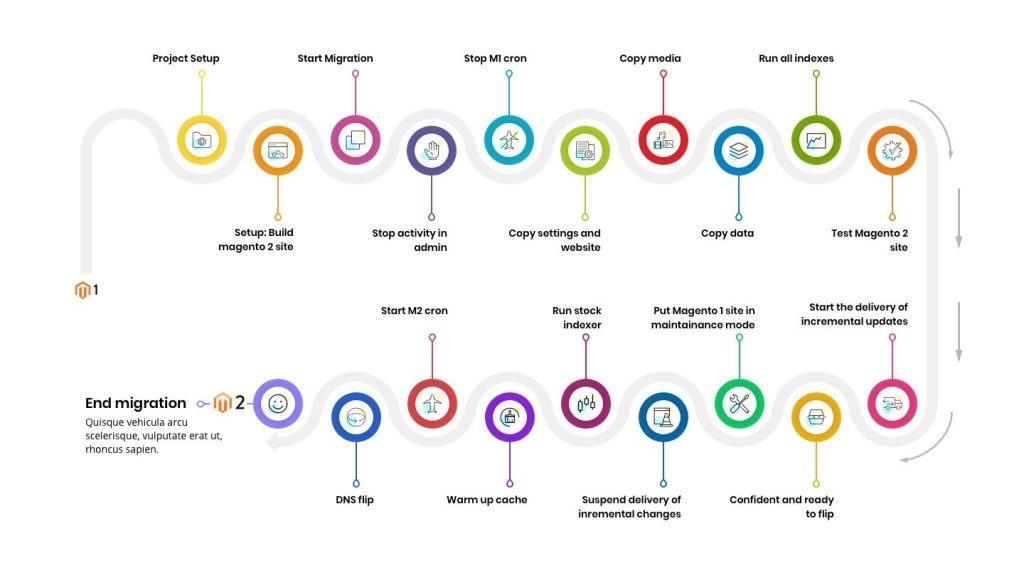
Proposed Strategy for Migration from Magento 1 to Magento 2
Magento 1 to Magento 2 Migration 1024x580 1

It is nearly impossible to keep running smoothly for long without any support, which makes the migration to Magento 2.x inevitable and you should plan for it starting today and equip your business for the upcoming business challenges so that your ecommerce website can scale to the maximum.

A place for big ideas.

Reimagine organizational performance while delivering a delightful experience through optimized operations.

Top Stories

Step-by-step guide to setting up Manufacturing Gantt Scheduling in Odoo — Zehntech
How to Set Up Manufacturing Gantt Scheduling in Odoo — Step-by-Step
Manual exports can work — for very small teams with low-frequency reporting needs. If your team reports monthly, uses a single Odoo module, and has an analyst with spare time, a manual export process is adequate. But for most Odoo teams reporting weekly or more frequently, there is a measurable
Odoo shopify connector
Best Shopify Odoo Connectors in 2026 — What Actually Works
If you are looking for a Shopify Odoo connector in 2026, you have three realistic paths: install a dedicated connector from the Odoo App Store, commission custom development, or continue running manual data entry between platforms. Each option has a legitimate use case. This article compares all three honestly —
Odoo shopify connector
Odoo Shopify Connector vs. Manual Data Entry — Which Is Right for Your Business?
Manual exports can work — for very small teams with low-frequency reporting needs. If your team reports monthly, uses a single Odoo module, and has an analyst with spare time, a manual export process is adequate. But for most Odoo teams reporting weekly or more frequently, there is a measurable
Odoo Power BI connector
Odoo Power BI Connector vs. Manual Data Exports: Which Is Right for Your Business?
Manual exports can work — for very small teams with low-frequency reporting needs. If your team reports monthly, uses a single Odoo module, and has an analyst with spare time, a manual export process is adequate. But for most Odoo teams reporting weekly or more frequently, there is a measurable
Odoo Power BI connector
How to Connect Odoo to Power BI — Complete Setup Guide
Connecting Odoo to Power BI does not require a consultant or a custom development project. The Zehntech Odoo Power BI Connector handles the hard parts — authentication, schema management, scheduled sync — so you can focus on building dashboards.This guide is for Odoo administrators and IT implementers connecting Odoo to
Odoo Shopify connector
How to Connect Shopify to Odoo — Complete Setup Guide
Connecting Shopify to Odoo does not require custom development or a system integrator. The Zehntech Odoo Shopify Connector handles the authentication, data mapping, and sync logic — so you can focus on configuring which data to move, not how to move it.This guide is for Odoo administrators and IT implementers

          Success!!

          Keep an eye on your inbox for the PDF, it's on its way!

          If you don't see it in your inbox, don't forget to give your junk folder a quick peek. Just in case.


              You have successfully subscribed to the newsletter

              There was an error while trying to send your request. Please try again.

              Zehntech will use the information you provide on this form to be in touch with you and to provide updates and marketing.