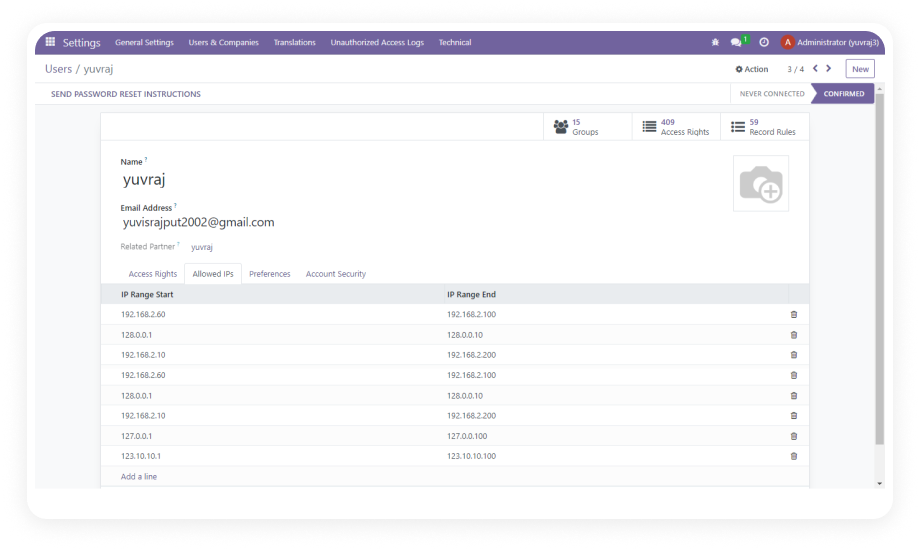
Administrators can assign a specific set of allowed IP addresses to each Odoo user. Any login attempt originating from an IP not on the user's allowlist is automatically blocked before authentication completes.
Why it matters: this creates a network-level security perimeter inside Odoo that password controls alone cannot provide.
Each user can have more than one approved IP address assigned to their profile — covering home networks, office locations, or secondary access points.
Why it matters: teams that work across multiple sites or devices can remain productive without forcing a single static IP restriction that breaks legitimate workflows.
When a login attempt is blocked due to an IP mismatch, the system automatically sends an email alert to the Odoo administrator.
Why it matters: administrators are informed in real time, allowing immediate investigation rather than discovering security incidents after the fact.
Every blocked login attempt is recorded in a dedicated log that captures the user name, source IP address, date, and timestamp of the event.
Why it matters: a complete, timestamped activity record supports internal audits, compliance reviews, and forensic investigation when needed.
The login attempt log can be filtered by user, IP address, and date range, making it easy to isolate patterns, investigate specific users, or export records for reporting purposes.
Why it matters: security teams can quickly surface suspicious activity without manually scanning through unstructured data.
Instead of a single fixed IP, administrators can configure an IP range for users whose network address changes frequently — such as those working through VPNs, mobile networks, or DHCP-assigned corporate environments.
Why it matters: dynamic IP support eliminates the operational friction of constantly updating individual IP entries for distributed teams.
All IP assignment and configuration is handled directly inside the standard Odoo admin interface — no external firewall rules, no server-side configuration, and no coding required.
Why it matters: any Odoo administrator can manage the full access control setup without involving a developer or system administrator.
The module is certified for both Odoo Community and Enterprise editions across versions 16 and 17, and supports all three deployment models: Odoo Online, Odoo.sh, and On-Premise.
Why it matters: regardless of how your Odoo is hosted or which edition you run, this module integrates without compatibility issues.