Join us at GITEX 2025! Discover our solutions at Hall 4, Booth H-30 Schedule a Meeting Today.
Automate Marketing Initiatives with Salesforce Marketing Cloud Learn More
Join us at GITEX 2024! Discover our solutions at Hall 4, Booth H-30 Book your live demo today.
Zehntech Odoo App

Password Manager

Secure Credential Storage and Sharing Inside Odoo. Store, organize, and share team passwords directly within your Odoo environment. Encrypted vaults, auto-generated credentials, portal sharing for external contacts, and complete activity logs — all managed from a single unified interface without leaving your ERP.

Compatible with Odoo 16, 17, 18 & 19
Community & Enterprise Supported
Encrypted Shared Vaults with Role-Based Access
No Custom Development Required
Trusted by 500+ Businesses Across 12+ Countries
$49.78
V19, 18, 17, 16
Password Manager — Secure credential storage inside Odoo

What is Password Manager?

Password Manager is an Odoo module that provides centralized, encrypted credential storage for teams working within the Odoo ecosystem. It replaces scattered spreadsheets, insecure sticky notes, and third-party password tools with a native vault system that lives directly inside your ERP — giving administrators full control over who can access, modify, and share credentials across internal teams and external portal users.

Encrypted shared vaults
Auto-password generation
Portal sharing
Duplicate detection
Activity logging
Batch operations
Custom fields

How Password Manager Solves Credential Chaos in Odoo Teams

Problem
Zehntech Password Manager Solution
Team credentials scattered across spreadsheets, emails, and sticky notes
Centralized encrypted vaults store all passwords in one searchable location inside Odoo
No secure way to share passwords with colleagues or external partners
Shared vaults with user/group permissions and portal access for external contacts
Weak passwords used because generating strong ones is inconvenient
Built-in auto-generator creates strong passwords with customizable rules
No visibility into who accessed or changed a credential
Detailed activity logs track every view, edit, and share event with timestamps
Duplicate credentials accumulate without anyone noticing
Real-time duplicate detection flags repeated entries automatically
Offboarding employees still know passwords stored in personal documents
Vault-based access is revoked instantly when a user is removed
Bulk password rotation requires manual updates across many records
Batch operations support mass export, import, update, archive, and restore
External contacts need credentials but should not have backend Odoo access
Portal sharing extends secure, limited access without granting admin rights

Complete Password Management Built Into Odoo

1

Shared Password Vaults

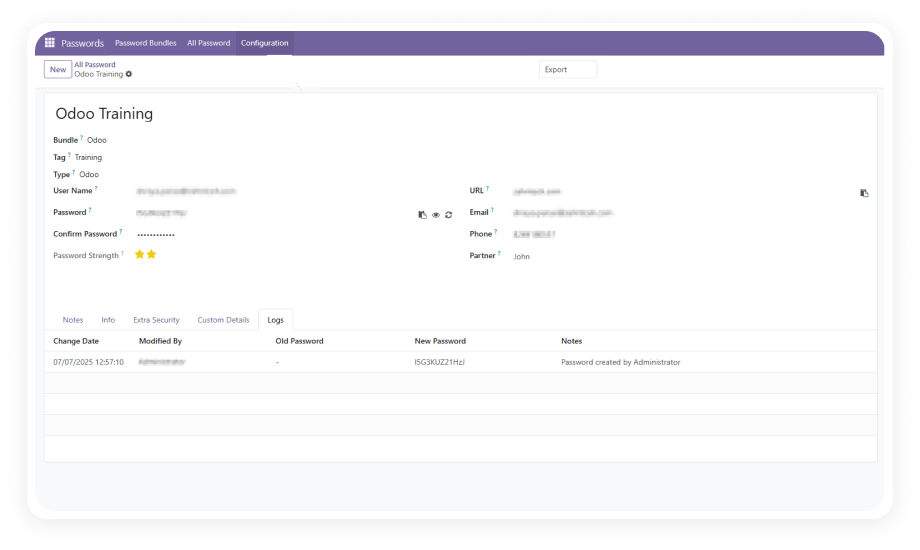
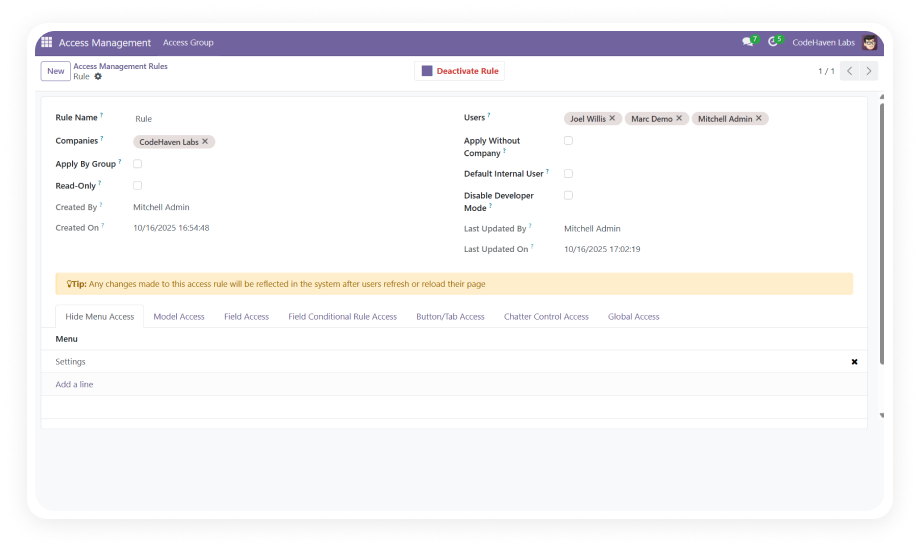
Organize credentials into bundles that can be shared with specific users or user groups. Each vault operates as an isolated container with its own access permissions.

Why it matters: Teams get controlled access to exactly the credentials they need — nothing more — reducing both security risk and administrative overhead.

2

Unified Dashboard Interface

Manage all stored passwords through a single, searchable dashboard with tagging, sorting, and filtering capabilities. Credentials displayed in a clean list view with quick-access actions.

Why it matters: Users find the credential they need in seconds rather than navigating fragmented storage locations.

3

Portal Sharing for External Contacts

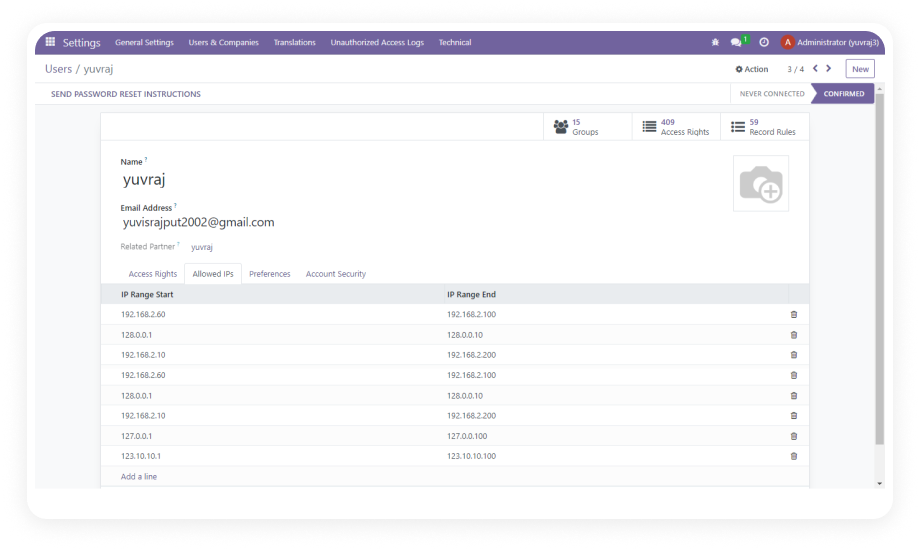
Extend secure credential access to external Odoo contacts — vendors, contractors, or clients — through the Odoo portal without granting backend system access.

Why it matters: Businesses that collaborate with external partners can share credentials securely without compromising internal system integrity.

4

Auto-Password Generation

Generate strong, randomized passwords directly within the module using configurable rules for length, character types, and complexity requirements.

Why it matters: Teams consistently use strong credentials without the friction of manually creating them, eliminating weak or reused passwords.

5

Password Strength & Duplicate Detection

Real-time strength scoring evaluates every credential as it is entered. The system also flags duplicate credentials across vaults automatically.

Why it matters: Weak and repeated passwords are identified before they become security liabilities — maintaining credential hygiene organization-wide.

6

Batch Operations

Perform mass actions on credentials including bulk export, import, update, archive, and restore. Entire vault contents can be managed at scale through a single operation.

Why it matters: Password rotation campaigns, system migrations, and offboarding workflows are completed in minutes instead of hours.

7

Activity Logs

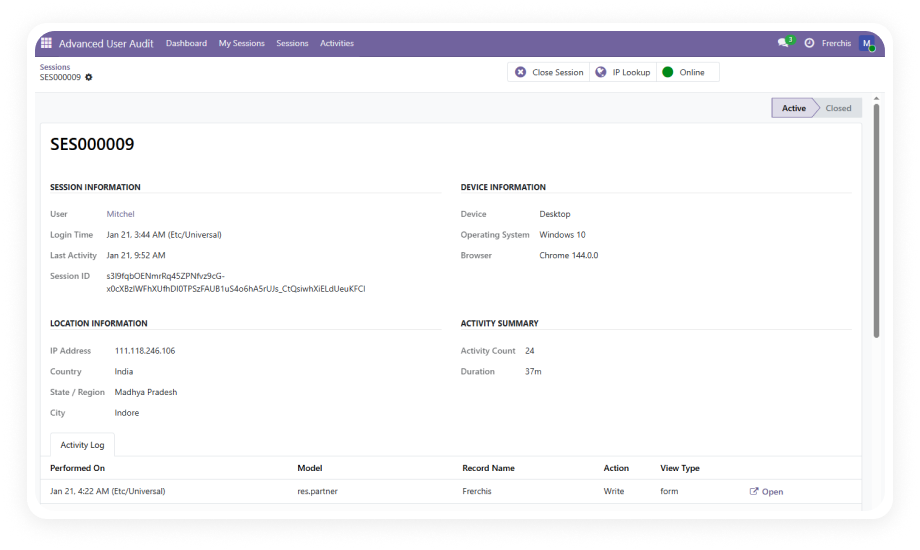
Every modification and access event is recorded in a detailed activity log — capturing the user, action type, timestamp, and affected credential.

Why it matters: Security teams maintain full visibility into credential lifecycle events, supporting compliance requirements and forensic investigation.

8

Custom Fields and Categories

Define custom password categories and add custom attribute fields to credential records — extending the default data model to match your organization's specific needs.

Why it matters: Every business stores different types of credentials with unique metadata requirements; custom fields ensure the vault adapts to your workflow.

Who Gets The Most Out Of This Module

Role
Primary Use Case
Key Outcome
IT Administrator
Centralize all infrastructure, service, and system credentials in encrypted vaults
Single source of truth for all team credentials with controlled access and full audit trail
Operations Manager
Share vendor portal logins and service accounts across team members securely
Eliminates insecure credential sharing via email, chat, or spreadsheets
HR Manager
Manage onboarding/offboarding credential access for employees
Instant credential access provisioning and revocation tied to Odoo user management
Project Manager
Organize project-specific credentials into dedicated vaults for team access
Project teams access only their relevant credentials without cross-project exposure
Security Officer
Monitor credential access patterns and enforce password quality standards
Complete activity logs and strength scoring support security policy enforcement
Business Owner (SMB)
Replace third-party password tools with a native solution inside existing Odoo
Reduced software costs and simplified compliance with a single integrated platform

Versions & Documentation

Choose your Odoo version and explore interactive documentation

Native Odoo vs Zehntech Password Manager

Capability
Zehntech Password Manager
Native Odoo
Encrypted password vault storage
Yes
Not available
Shared vaults with user/group permissions
Yes
Not available
Portal sharing for external contacts
Yes
Not available
Auto-password generation with rules
Yes
Not available
Real-time password strength evaluation
Yes
Not available
Duplicate credential detection
Yes
Not available
Batch export, import, update, archive
Yes
Not available
Activity logs for access and modifications
Yes
Not available
Custom fields and categories
Yes
Not available
Tagging, sorting, and filtering
Yes
Not available
No-code configuration
Yes
Not available
Odoo Community edition support
Yes
No credential management
Odoo Enterprise edition support
Yes
No credential management
Odoo.sh and On-Premise compatible
Yes
No credential management

Get Started In Minutes

No development environment. No custom code. No consultant required for standard setup.

01

Install from the Odoo App Store

Search for zehntech_password_manager in your Odoo Apps menu and click Install. Compatible with Odoo 16, 17, 18, and 19 on both Community and Enterprise editions. No server restart required.

02

Create vaults and define categories

Navigate to the Password Manager menu and create your first vault. Define categories to organize credentials by department, system type, or project. Add custom fields for your metadata needs.

03

Configure access and sharing rules

Assign vault access to specific internal users or user groups. For external collaborators, enable portal sharing to grant limited credential visibility without providing backend access.

04

Store credentials and monitor activity

Add passwords manually or use the auto-generator for strong credentials. Review the activity log regularly to monitor access patterns and maintain a complete audit trail.

Technical Details & Compatibility

Requirement
Odoo Versions
Editions
Hosting
Dependencies
Third-Party Dependencies
Custom Dev Required
Install Time
Server Restart
Data Migration
Module Conflicts
License
Last Tested
Support
Details
16.0 · 17.0 · 18.0 · 19.0
Community · Enterprise · Odoo.sh
Odoo Online · On-Premise · Odoo.sh
Discuss (mail)
None
No
Under 10 minutes
Not required
Not required
None known
OPL-1
Odoo 19.0 — May 2026
Password Manager — FAQ illustration

Frequently Asked Questions

Yes — the module installs directly from the Odoo App Store with no coding required. All configuration — vaults, sharing rules, categories, and custom fields — is managed through the standard Odoo interface. Standard setup is completed in under 10 minutes by any Odoo administrator.
Yes — the module supports both Odoo Community and Enterprise editions. It works on all three hosting environments: Odoo Online, Odoo.sh, and On-Premise. Versions 16, 17, 18, and 19 are all supported with full functionality.
Credentials are organized into shared vaults that can be assigned to specific users or user groups. Portal sharing extends access to external Odoo contacts without granting backend system access. All sharing activity is recorded in the activity log for complete audit traceability.
Yes — the module includes detailed activity logs that capture every access and modification event. Logs record the user, action type, timestamp, and affected credential. Logs are filterable and exportable for security audits and compliance reporting.
Yes — batch operations allow mass export, import, update, archive, and restore of credentials. Entire vault contents can be managed at scale through a single action. This supports password rotation campaigns, migrations, and offboarding workflows efficiently.

One-Time Purchase.
No Subscription.
No Recurring Fees.

Includes lifetime updates and 90 days of dedicated technical support.

Zehntech Odoo experts ready to help


          You have successfully subscribed to the newsletter

          There was an error while trying to send your request. Please try again.

          Zehntech will use the information you provide on this form to be in touch with you and to provide updates and marketing.