Join us at GITEX 2025! Discover our solutions at Hall 4, Booth H-30 Schedule a Meeting Today.
Automate Marketing Initiatives with Salesforce Marketing Cloud Learn More
Join us at GITEX 2024! Discover our solutions at Hall 4, Booth H-30 Book your live demo today.
Zehntech Odoo App

Cancel Purchase Orders in Odoo - Bulk, Smart, and Fully Controlled

Take complete control of your procurement workflow. Cancel, reset, or permanently delete purchase orders - individually or in bulk - with automatic handling of associated bills and receipts.

Bulk cancel purchase orders in one click
Auto-manages linked bills and receipts
Role-based access control
Full data history with restore capability
Supports Odoo 16, 17, 18, and 19
FREE
V19, 18, 17, 16
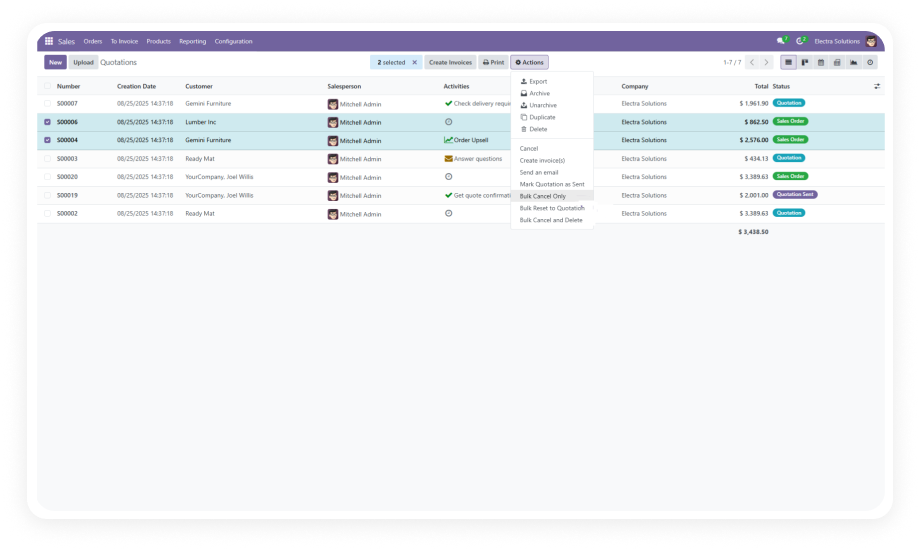
Cancel Purchase Orders Odoo Module Interface

What is Cancel Purchase Orders?

Cancel Purchase Orders is a free Odoo module by Zehntech Technologies that gives procurement teams granular, role-protected control over purchase order cancellations. Native Odoo requires manual, one-by-one cancellation and provides no bulk actions, no automatic cleanup of associated records, and no restore capability. This module fills every one of those gaps - making order lifecycle management fast, safe, and auditable.

Cancel orders individually or in bulk
Cancel Only | Reset to Draft | Delete
Auto-sync linked bills and receipts
Full cancellation history log
Role-based access control

How Cancel Purchase Orders Solves Native Odoo's Procurement Gaps

Problem
Zehntech Solution
No bulk cancellation - every order must be cancelled one by one
Select multiple orders and cancel, reset, or delete them in a single bulk action
Cancelling an order leaves associated bills and receipts in an inconsistent state
Associated bills and receipts are automatically managed and synchronized on cancellation
No way to permanently delete test or erroneous purchase orders
Cancel and Delete action allows complete removal of unwanted records
Deleted or cancelled orders are gone with no recovery path
Full data history log maintains all cancelled/deleted orders with restore capability
Any user can trigger cancellations, creating compliance and data integrity risks
Role-based access control restricts bulk actions to authorized users only
No visual overview of order cancellation status at a glance
Intuitive dashboard with real-time bar charts and Kanban views for status tracking
Resetting a cancelled order to draft requires multiple manual steps
Cancel and Reset to Draft is a single-click bulk action
High volume month-end cleanup takes hours of repetitive work
Bulk actions reduce multi-hour cleanup tasks to seconds

Every Cancellation Scenario Covered - Out of the Box

1

Smart and Bulk Order Cancellation

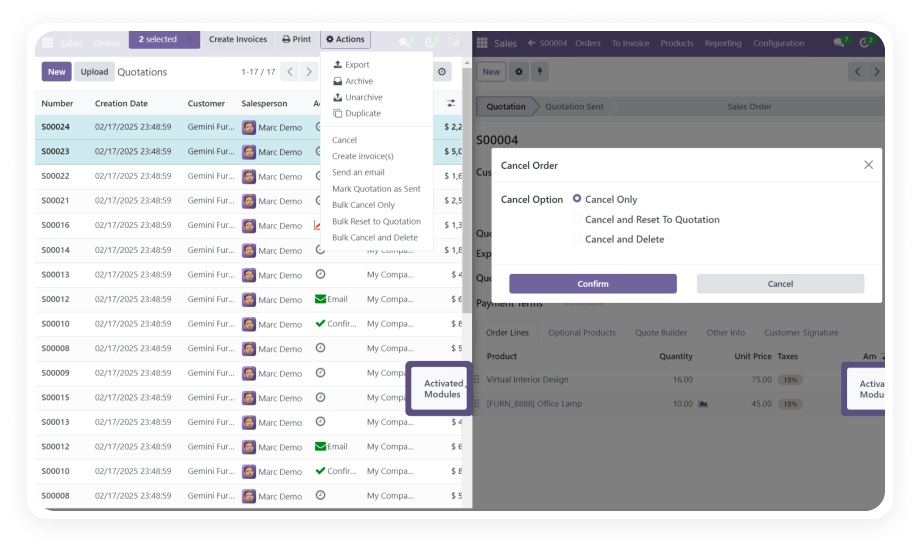
Select one order or hundreds - then choose from three targeted actions: Cancel Only, Cancel and Reset to Draft, or Cancel and Delete. All actions are available as bulk operations from the standard list view.

Why it matters: Procurement teams can execute month-end order cleanups in seconds rather than hours.

2

Associated Record Handling

When a purchase order is cancelled, the module automatically manages all linked bills and receipts to maintain data synchronization across Inventory, Invoicing, and Purchase modules.

Why it matters: Eliminates the orphaned record problem that causes reconciliation failures and audit discrepancies.

3

Data History Management

Every cancellation, reset, and deletion event is logged with full detail - who performed the action, when, and on which records. Provides a complete audit trail for finance and compliance teams.

Why it matters: Creates the foundation for data restoration when needed.

4

Permanent Delete and Restore

Go beyond cancellation - permanently remove purchase orders that should not exist (duplicates, test records, erroneous entries) and restore accidentally deleted records from the history log.

Why it matters: Keeps your purchase order list clean without the fear of irreversible data loss.

5

Access Control

A role-based permission system restricts bulk cancellations and permanent deletions to explicitly authorized user groups. Standard users can perform routine cancellations; only authorized roles can trigger bulk or destructive actions.

Why it matters: Enforces procurement compliance policies.

6

Intuitive Dashboard

A real-time dashboard displays purchase order status using bar charts and Kanban views, giving procurement managers an immediate overview of active, cancelled, and deleted orders without running reports.

Why it matters: Faster situational awareness means faster decision-making.

Who Gets The Most Out Of This Module

Role
Primary Use Case
Key Outcome
Procurement Manager
Bulk-cancel dozens of end-of-period purchase orders in one action
Month-end close completed in minutes, not hours
Purchasing Officer
Cancel and reset draft orders after supplier negotiation changes
Clean order history without duplicate confirmed orders
Finance Controller
Rely on automatic bill/receipt sync during cancellations
Zero reconciliation errors from orphaned purchase records
IT / ERP Administrator
Assign cancellation permissions by user role
Full audit compliance without custom access rule development
Operations Lead
Use Cancel and Delete to remove test and erroneous orders post-go-live
Clean production database from day one
Warehouse Supervisor
Monitor cancellation impact on receipts via the real-time dashboard
Immediate visibility into which incoming shipments are affected

Versions & Documentation

Access step-by-step interactive documentation for your exact Odoo version

Native Odoo vs Zehntech Cancel Purchase Orders

Capability
Zehntech Module
Native Odoo
Bulk cancel multiple purchase orders
Yes - select any number, one-click action
No - one order at a time only
Cancel and reset to draft in one step
Yes - available as a bulk action
No - multi-step manual process
Permanently delete purchase orders
Yes - Cancel and Delete action
No - cancellation only, records remain
Automatic bill and receipt handling on cancel
Yes - fully automatic synchronization
No - manual cleanup required
Data history log for cancelled/deleted orders
Yes - full audit trail with timestamps
No - no native cancellation log
Restore accidentally deleted purchase orders
Yes - restore from history log
No - deletion is irreversible
Role-based access control for bulk actions
Yes - granular permission assignment
No - standard user roles only
Real-time dashboard with order status charts
Yes - bar chart and Kanban views
No - requires custom report
Compatible with Odoo Online, Odoo.sh, On-Premise
Yes - all three hosting types
N/A - native feature

Get Started In Minutes

No development environment. No custom code. No consultant required for standard setup.

01

Download and Install

Log in to your Odoo App Store account, download the module (FREE), and install via the Apps menu. The module activates immediately.

02

Configure User Permissions

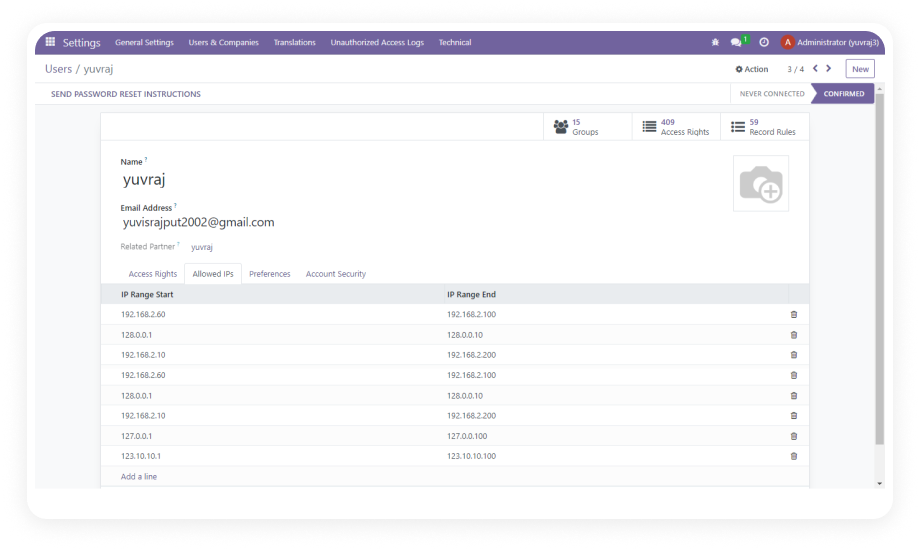
Navigate to Settings > Users & Companies > Users. Assign standard cancellation or bulk/delete access to appropriate users.

03

Verify Record Handling

Open Purchase Orders and confirm the new Action menu items appear. Test with a draft order to verify bill/receipt synchronization.

04

Access the Dashboard

Open the Cancel Purchase Orders dashboard from the Purchase menu. Confirm bar chart and Kanban views display current status data.

Technical Details & Compatibility

Requirement
Module Name
Technical Name
Odoo Versions
Editions Supported
Dependencies
License
Lines of Code
Author
Price
Support
Details
Cancel Purchase Orders
zehntech_cancel_purchase_orders
16.0 - 17.0 - 18.0 - 19.0
Odoo Online (SaaS) - Odoo.sh - On-Premise
Discuss (mail) - Inventory (stock) - Purchase - Invoicing (account)
OPL-1
1,137
Zehntech Technologies Inc.
FREE
Cancel Purchase Orders FAQ illustration

Frequently Asked Questions

Yes. This module adds bulk action support directly to the Purchase Orders list view. Select any number of orders using the checkboxes, open the Action menu, and choose your cancellation action. All selected orders are processed simultaneously - no need to open and cancel each one individually. Bulk actions are restricted to authorized roles to prevent accidental mass cancellations.
The module automatically manages all associated bills and receipts during the cancellation process. Data synchronization is maintained across the Purchase, Inventory, and Invoicing modules. You will not be left with orphaned records or unbalanced accounting entries. No manual cleanup of linked records is required after cancellation.
Yes. Every cancellation, reset, and deletion event is captured in the Data History Management log. The log records the action, the user who performed it, and the timestamp. Deleted purchase orders can be restored from this history when needed. This safety net makes permanent deletion a manageable action rather than an irreversible risk.
Access is governed by a role-based permission system configured in Odoo's standard user settings. Standard purchasing users can perform routine individual cancellations. Bulk cancellations, resets to draft, and permanent deletions require explicit authorization. Administrators assign these permissions per user, ensuring compliance with procurement policies.
Yes. The module is fully compatible with Odoo Online, Odoo.sh, and On-Premise installations. It supports all four Odoo versions: 16, 17, 18, and 19. No server-level configuration is required - installation is handled entirely through the standard Odoo Apps interface. Interactive version-specific documentation is available for each supported release.

One-Time Download.
No Subscription.
No Recurring Fees.

Stop manually cancelling purchase orders one by one. Cancel Purchase Orders gives your procurement team the bulk actions, access controls, and audit history they need - installed and running in under five minutes. Includes lifetime updates and 90 days of dedicated technical support.

Zehntech Odoo experts ready to help


          You have successfully subscribed to the newsletter

          There was an error while trying to send your request. Please try again.

          Zehntech will use the information you provide on this form to be in touch with you and to provide updates and marketing.