Bulk Remove Data Across Sales, Purchases, Inventory & More in Odoo. Stop deleting Odoo records one at a time. Mass Delete Records gives administrators a wizard-guided interface to bulk remove data from Sales, Purchases, Inventory, Invoicing, Manufacturing, and Projects — with confirmation safeguards and a full audit trail of every deletion.
Mass Delete Records is an Odoo administration module that provides a wizard-based interface for bulk deleting records across multiple business modules. Instead of navigating into each model, selecting records individually, and deleting them one by one, administrators open a single guided workflow from Settings that handles deletion across Sales, Purchases, Inventory, Invoicing, Manufacturing, and Projects — with safety confirmations at every step and complete logging of who deleted what and when.
How Mass Delete Records Eliminates Manual Cleanup in Odoo
Problem
Zehntech Mass Delete Solution
Deleting test or demo records requires navigating to each module and removing items one by one
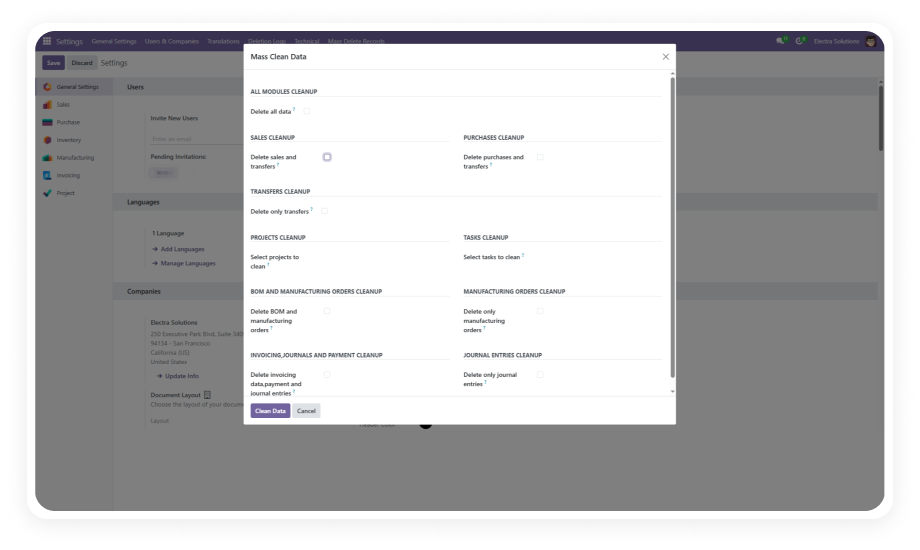
A single wizard interface handles deletion across all six supported modules from one place
No built-in way to clear entire datasets from a module in one action
The All Data option removes complete datasets from selected modules with a single confirmation
Accidental bulk deletions can destroy critical business data with no warning
Real-time confirmation prompts require explicit approval before any deletion executes
No visibility into who deleted records or when data was removed
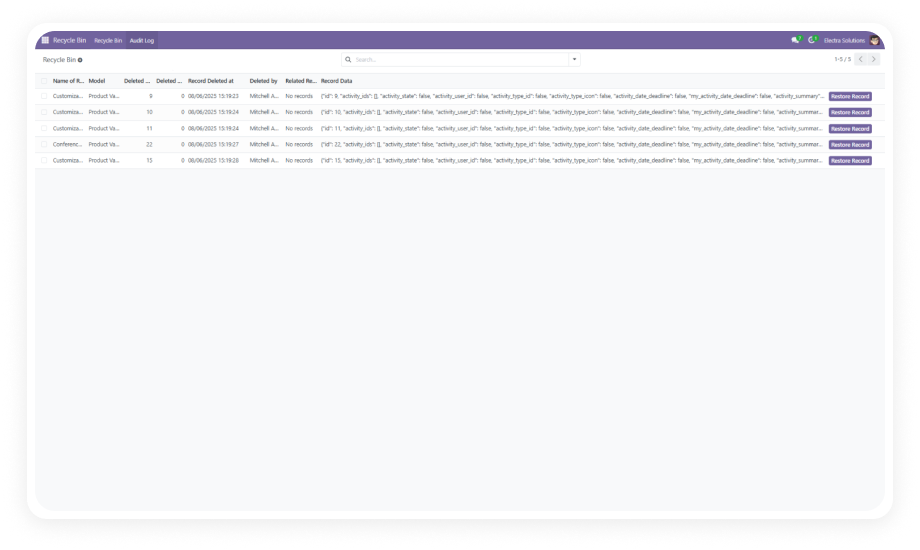
Comprehensive activity logging tracks every deletion action with user attribution and timestamps
Cleanup tasks require developer intervention or direct database manipulation
The wizard-guided interface makes bulk deletion accessible to any administrator without database access
Multiple staging or testing cycles leave residual data polluting the production environment
Cross-module deletion clears Sales, Purchases, Inventory, Invoicing, Manufacturing, and Project data systematically
Deleting large volumes of records through the standard UI causes performance slowdowns or timeouts
The module handles high-volume dataset removal while maintaining system stability
No standardized process for data cleanup creates inconsistent practices across teams
A single, audited deletion workflow provides an organizational standard for data hygiene
Complete Bulk Deletion Toolkit for Odoo Administrators
1
Wizard-Guided Deletion Workflow
A step-by-step wizard interface walks administrators through the entire deletion process from module selection to final confirmation. Each step presents clear options and requires deliberate action to proceed.
Why it matters: eliminates guesswork and reduces the risk of errors during high-stakes data operations — administrators always know exactly what will be deleted before confirming.
2
Cross-Module Deletion Support
Delete records from Sales, Purchases, Inventory (Stock), Invoicing (Account), Manufacturing, and Projects — all from a single administrative interface without navigating into each module individually.
Why it matters: database cleanup after testing, migration, or demo cycles typically spans multiple modules — handling them all from one place turns a multi-hour task into a single workflow.
3
All Data Deletion Option
A dedicated option to clear complete datasets from selected modules in a single action rather than selecting specific record ranges or types.
Why it matters: when resetting an environment after a demo, clearing test data before go-live, or starting fresh after a failed migration, the All Data option eliminates the need to identify and select individual records manually.
4
Real-Time Confirmation Prompts
Every deletion action triggers a confirmation dialog that explicitly states what will be removed and requires deliberate user approval before proceeding. No deletion executes without explicit confirmation.
Why it matters: bulk deletion is irreversible — confirmation prompts create a mandatory pause that prevents accidental data loss from mis-clicks or incorrect module selection.
5
Comprehensive Activity Logging
Every deletion action is recorded in a detailed log that captures what records were removed, the exact timestamp of the operation, and which user performed it. The log persists as a permanent audit record.
Why it matters: administrative transparency and compliance requirements demand knowing who removed what data and when — this logging provides that accountability without any additional configuration.
6
Developer Mode Access Control
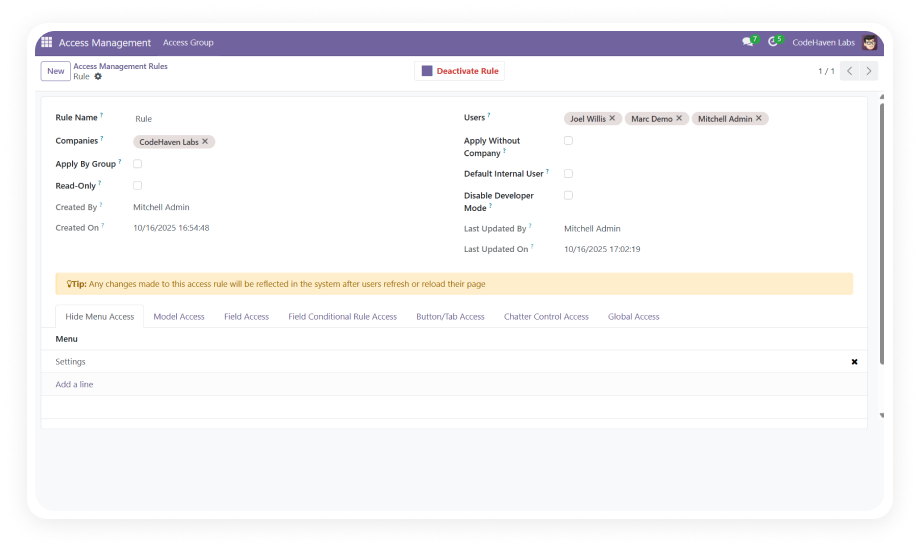
The Mass Clean Data feature is accessible only through Settings with Developer Mode enabled, restricting bulk deletion capabilities to administrators who have elevated system access.
Why it matters: by gating access behind Developer Mode, the module ensures that standard users cannot accidentally discover or trigger bulk deletion workflows — only users with explicit administrative authority can access the tool.
Who Gets The Most Out Of This Module
Role
Primary Use Case
Key Outcome
Odoo Administrator
Clear test/demo data before production go-live or after training cycles
Clean production environment without manual record-by-record deletion
Implementation Consultant
Reset modules after failed migration attempts or configuration testing
Rapid environment cleanup between implementation iterations
Project Manager
Remove outdated project records and task data that no longer serve operational needs
Cleaner project views with only relevant, active data remaining
Database Manager
Maintain database performance by removing accumulated obsolete records
Smaller, faster database with reduced storage overhead
Quality Assurance Lead
Clear test records generated during automated or manual testing cycles
Fresh test environments ready for the next validation round
Operations Director
Standardize data hygiene practices with an audited, controlled deletion process
Organizational consistency in how data removal is handled and documented
Versions & Documentation
Choose your Odoo version and explore interactive documentation
Handle large-volume dataset removal without performance issues
Yes
Limited (timeouts on large selections)
Standardized organizational deletion workflow
Yes
Not available
No custom development or database access required
Yes
Requires direct SQL or custom scripts
Odoo Community edition support
Yes
Delete limited to individual records
Odoo Enterprise edition support
Yes
Delete limited to individual records
Get Started In Minutes
No development environment. No custom code. No consultant required for standard setup.
01
Install from the Odoo App Store
Search for zehntech_mass_delete_records in your Odoo Apps menu and click Install. Compatible with Odoo 16, 17, 18, and 19 on both Community and Enterprise editions.
02
Enable Developer Mode
Navigate to Settings and activate Developer Mode. This grants access to the Mass Clean Data option required for bulk deletion workflows.
03
Access Mass Clean Data
With Developer Mode active, locate the Mass Clean Data option under Settings. This opens the wizard that guides you through the bulk deletion workflow.
04
Select Modules and Execute
Choose which modules to clean — Sales, Purchases, Inventory, Invoicing, Manufacturing, or Projects. Confirm each operation through the safety prompt. The activity log records every action automatically.
The module supports bulk deletion across six core Odoo modules: Sales, Purchases, Inventory (Stock), Invoicing (Account), Manufacturing, and Projects. You can target individual modules or use the All Data option to clear records across multiple modules simultaneously. All supported modules are handled from a single wizard interface — no need to access each module separately.
Every deletion action requires explicit user confirmation through a real-time prompt before executing. The wizard-guided approach presents each step clearly, so administrators always know exactly what will be deleted. Additionally, the module is gated behind Developer Mode, preventing standard users from accidentally accessing bulk deletion tools.
Yes — Developer Mode must be active to access the Mass Clean Data menu under Settings. This is an intentional security measure that restricts bulk deletion to administrators with elevated access. Standard Odoo users without Developer Mode access cannot see or trigger the deletion wizard.
Mass Delete Records supports Odoo 16, 17, 18, and 19. Both Community and Enterprise editions are fully compatible. The module works across all hosting environments: Odoo Online, Odoo.sh, and On-Premise installations.
Yes — comprehensive activity logging records every deletion action automatically. Each log entry includes the records removed, the exact timestamp, and which user performed the operation. This audit trail provides full administrative transparency and supports compliance requirements for data management.