Join us at GITEX 2025! Discover our solutions at Hall 4, Booth H-30 Schedule a Meeting Today.
Automate Marketing Initiatives with Salesforce Marketing Cloud Learn More
Join us at GITEX 2024! Discover our solutions at Hall 4, Booth H-30 Book your live demo today.
Zehntech Odoo App

Multi-Company Inventory Transfer

Move Stock Between Companies in Odoo. Transfer inventory between companies and warehouses within a single Odoo instance. The module auto-generates paired delivery orders, verifies real-time stock availability, and logs every movement for accurate inter-company valuation — no custom development needed.

Compatible with Odoo 16, 17, 18 & 19
Auto-Generates Paired Outgoing & Incoming Delivery Orders
Real-Time Stock Availability Verification
Community & Enterprise Supported
No Custom Development Required
$29.87
V19, 18, 17, 16
Multi-Company Inventory Transfer — Inter-company stock movement in Odoo

What is Multi-Company Inventory Transfer?

Multi-Company Inventory Transfer is an Odoo module that enables structured stock movements between multiple legal entities and warehouses operating within a single Odoo database. It replaces manual workarounds for inter-company inventory coordination — auto-generating synchronized delivery orders at both source and destination, enforcing receiver-side validation, and maintaining a complete audit trail that feeds directly into Odoo's inventory valuation reports. Built for operations teams managing shared stock pools, centralized distribution, or inter-branch replenishment.

Inter-Company & Inter-Warehouse Transfers
Auto-Generated Delivery Orders
Real-Time Availability Checks
Multi-Stage Validation Workflow
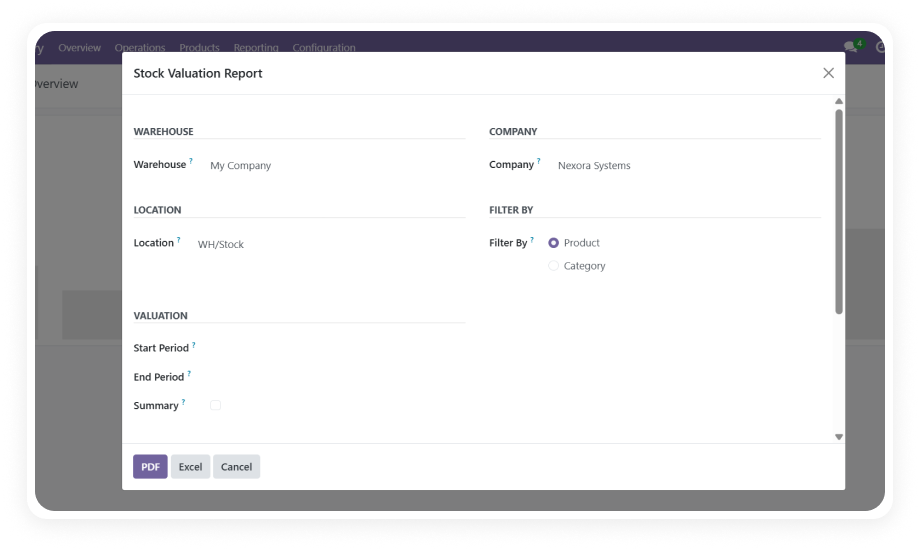
Inventory Valuation Integration

How Multi-Company Inventory Transfer Solves Inter-Entity Stock Coordination

Problem
Zehntech Solution
Moving stock between companies requires manual creation of separate delivery and receipt orders in each entity
Auto-generates paired outgoing and incoming delivery orders on confirmation — one action, two synchronized documents
No visibility into whether the source warehouse actually has the requested quantity
Real-time stock availability verification checks actual on-hand quantities before allowing transfer
Inter-company stock movements bypass standard Odoo validation workflows
Multi-stage process (Draft, Confirmed, Ready, Done) with mandatory receiver-side validation
Tracking which delivery orders belong to which transfer requires manual cross-referencing
Smart buttons on the transfer record provide instant access to both linked delivery orders
Stock valuations become inaccurate when inter-company movements bypass standard flow
Automatic valuation updates applied during transfers, reflected in Inventory Valuation reports
Warehouse users must manually identify and fill source/destination locations
Configurable company and warehouse selection with automatic location pre-filling
Multi-company transfer requests scattered across separate modules
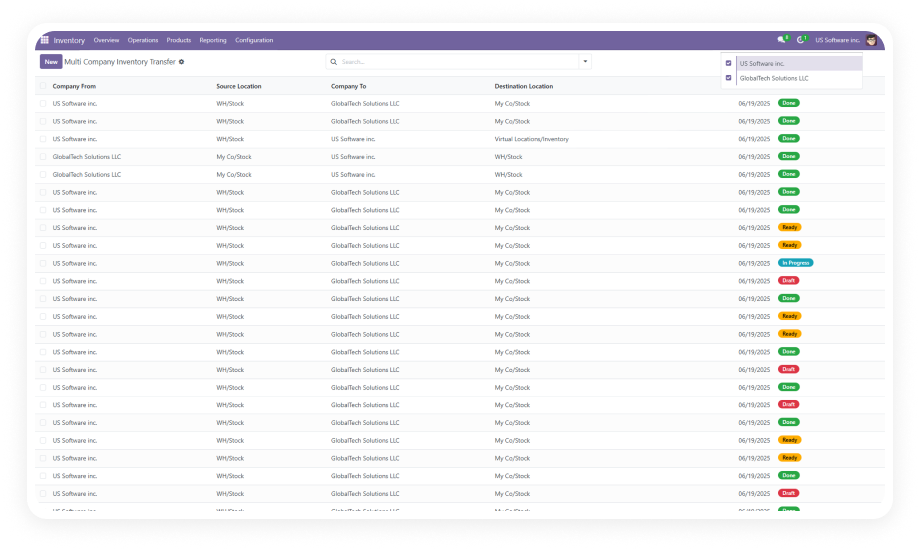
Dedicated menu under Inventory > Operations > Multi-Company Transfers with filterable list views
Auditing inter-company stock flow depends on piecing together unlinked documents
Complete move history logging creates a single audit trail connecting all related records

Structured Inter-Company Stock Movement. Full Automation. Complete Traceability.

1

Bidirectional Stock Transfers Between Companies and Warehouses

Move inventory in any direction across your multi-company Odoo structure — from Company A's warehouse to Company B's facility, or between warehouses within the same entity.

Why it matters: operations teams manage all stock redistribution from one place instead of juggling separate processes.

2

Auto-Generated Paired Delivery Orders

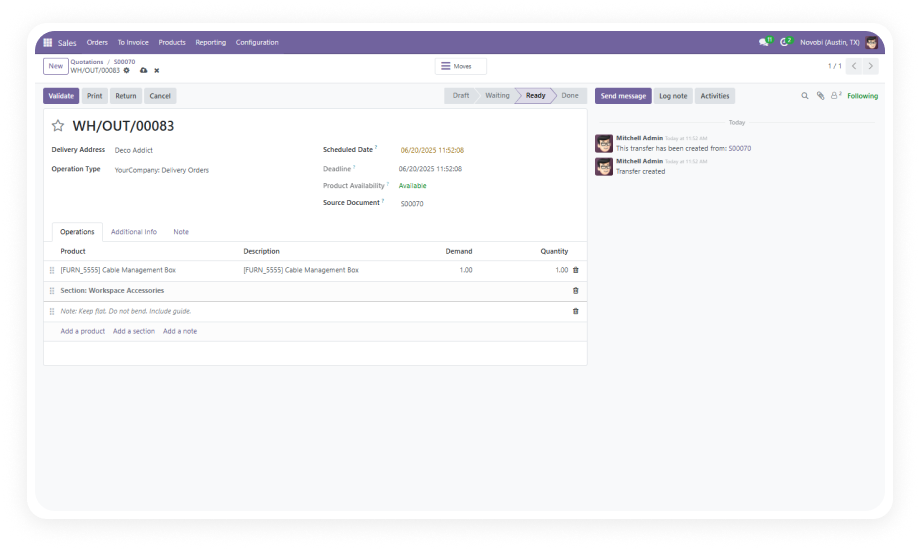
When a transfer is confirmed, the system automatically creates an outgoing delivery order at the source and a corresponding incoming receipt at the destination.

Why it matters: eliminates manual document creation in two separate entities and ensures nothing falls through.

3

Real-Time Stock Availability Verification

Before a transfer can proceed, the module checks actual on-hand stock quantities at the source location. Insufficient stock blocks confirmation.

Why it matters: warehouse managers stop sending transfer requests for stock that does not physically exist.

4

Multi-Stage Validation Workflow

Transfers progress through defined states: Draft, Confirmed, Ready, Done. Each stage gate prevents premature advancement.

Why it matters: operations managers get a structured pipeline view instead of a binary open/closed status.

5

Receiver-Side Validation for Incoming Shipments

The destination company must explicitly confirm receipt of the incoming stock before the transfer is marked complete.

Why it matters: accountability is built into the process — no stock movement is finalized without both parties acknowledging.

6

Smart Button Access to Linked Delivery Orders

Each transfer record displays a smart button providing immediate access to both outgoing and incoming delivery orders without navigating away.

Why it matters: single-interface monitoring replaces searching through separate delivery order lists across companies.

7

Automatic Stock Valuation Updates

During inter-company transfers, the module automatically updates inventory valuation entries at both source and destination in Odoo's standard reports.

Why it matters: finance teams get correct valuations without manual journal entries or post-transfer accounting adjustments.

8

Complete Move History and Audit Trail

Every transfer action — creation, confirmation, shipment processing, validation — is logged with timestamps and user references.

Why it matters: compliance teams have an unbroken chain of evidence for every inter-company stock movement.

9

Configurable Source and Destination with Auto-Filled Locations

When selecting source and destination companies and warehouses, the module automatically pre-fills the appropriate stock locations.

Why it matters: warehouse users create transfers faster with fewer configuration errors in complex environments.

Who Gets The Most Out Of This Module

Role
Primary Use Case
Key Outcome
Operations Manager
Coordinate stock redistribution between subsidiary companies and central warehouses
Structured transfer pipeline with full status visibility across all entities
Warehouse Manager
Process outgoing inter-company shipments with real-time availability confirmation
No more failed pickings from non-existent stock — availability verified before commitment
Supply Chain Manager
Replenish branch locations from a central distribution company
Automated delivery order creation replaces manual cross-company coordination
Finance Controller
Maintain accurate inventory valuations across legal entities
Automatic valuation updates ensure cost accounting stays correct without manual entries
Receiving Manager
Validate incoming inter-company shipments at the destination warehouse
Receiver-side validation ensures accountability — nothing lands unacknowledged
Odoo Administrator
Set up and monitor multi-company transfer workflows across the organization
Centralized transfer menu with filterable state views and linked delivery order tracking

Versions & Documentation

Choose your Odoo version and explore interactive documentation

Documentation coming soon for Odoo 16. Full setup documentation included with purchase.

Documentation coming soon for Odoo 17. Full setup documentation included with purchase.

Documentation coming soon for Odoo 18. Full setup documentation included with purchase.

Documentation coming soon for Odoo 19. Full setup documentation included with purchase.

Native Odoo vs Zehntech Multi-Company Inventory Transfer

Capability
Zehntech Module
Native Odoo
Dedicated inter-company transfer workflow
Yes
Not available
Auto-generate paired outgoing & incoming delivery orders
Yes
Manual creation in each entity
Real-time stock availability check before transfer
Yes
Not available for inter-company
Multi-stage validation (Draft - Confirmed - Ready - Done)
Yes
Not available for inter-company
Mandatory receiver-side validation before completion
Yes
Not available
Smart button access to linked delivery orders
Yes
Not available
Automatic stock valuation updates on transfer
Yes
Manual journal entries required
Complete move history and audit trail
Yes
Partial (standard move logs only)
Configurable source/destination with auto-filled locations
Yes
Manual location entry required
Centralized multi-company transfer menu
Yes
Not available
Filterable list views by transfer state
Yes
Not available for inter-company
Support for both inter-company and intra-warehouse transfers
Yes
Basic internal transfers only

Get Started In Minutes

No development environment. No custom code. No consultant required for standard setup.

01

Install the Module

Purchase from the Odoo App Store and install through the standard Apps interface. Compatible with Odoo 16–19, Community, Enterprise, and Odoo.sh. No server restart required.

02

Verify Multi-Company Configuration

Ensure your Odoo instance has multiple companies set up with their respective warehouses and stock locations. The module detects all available companies automatically.

03

Create Your First Transfer

Navigate to Inventory > Operations > Multi-Company Transfers. Select source and destination, add products with quantities, and click Confirm. Paired delivery orders are auto-generated.

04

Process and Validate

The source company processes the outgoing delivery. The destination validates the incoming receipt. Monitor the flow via smart buttons. Review movements in Inventory Valuation reports.

Technical Details & Compatibility

Requirement
Odoo Versions
Editions
Hosting
Dependencies
Third-Party Dependencies
Custom Dev Required
Install Time
Server Restart
Data Migration
Module Conflicts
License
Lines of Code
Localization
Last Tested
Support
Details
16.0 · 17.0 · 18.0 · 19.0
Community · Enterprise · Odoo.sh
Odoo Online · On-Premise · Odoo.sh
Discuss (mail) · Inventory (stock) · Invoicing (account)
None
No
Under 5 minutes
Not required
Not required
None known
OPL-1
711
German, French, Spanish, Japanese
Odoo 19.0 — May 2026
Multi-Company Inventory Transfer — FAQ illustration

Frequently Asked Questions

Yes. The module supports both inter-company transfers (between different legal entities) and intra-company warehouse-to-warehouse movements within a single Odoo instance. Source and destination selections are fully flexible — any combination of company and warehouse is valid regardless of whether the entities share a parent company.
Yes. Upon confirming a transfer, the system simultaneously generates an outgoing delivery order at the source company and an incoming receipt at the destination company. Both delivery orders are linked to the original transfer record and accessible via smart buttons — no manual document creation required in either entity.
The module automatically updates inventory valuation entries at both source and destination during the transfer lifecycle. All movements integrate with Odoo's standard Inventory Valuation reports, regardless of which valuation method (FIFO, Average, Standard) is configured per product. Finance teams do not need to create manual journal entries.
The module supports Odoo versions 16, 17, 18, and 19 across Community, Enterprise, and Odoo.sh editions. It is deployable on Odoo Online, On-Premise, and Odoo.sh hosting environments with no edition-specific feature restrictions. Localization is available in German, French, Spanish, and Japanese in addition to English.
Yes. Receiver-side validation is a mandatory step in the transfer workflow. The destination company must explicitly confirm receipt of the incoming shipment before the transfer reaches the Done state. This prevents one-sided inventory adjustments where stock appears at the destination without the receiving team acknowledging actual physical receipt.

One-Time Purchase.
No Subscription.
No Recurring Fees.

Your multi-company Odoo setup already handles individual warehouse operations — Multi-Company Inventory Transfer adds the structured inter-entity coordination layer that native Odoo does not provide. Stop manually creating matching delivery orders across companies. One module. Automatic paired shipments. Full valuation accuracy. Includes lifetime updates and 90 days of dedicated technical support.

Zehntech Odoo experts ready to help


          You have successfully subscribed to the newsletter

          There was an error while trying to send your request. Please try again.

          Zehntech will use the information you provide on this form to be in touch with you and to provide updates and marketing.