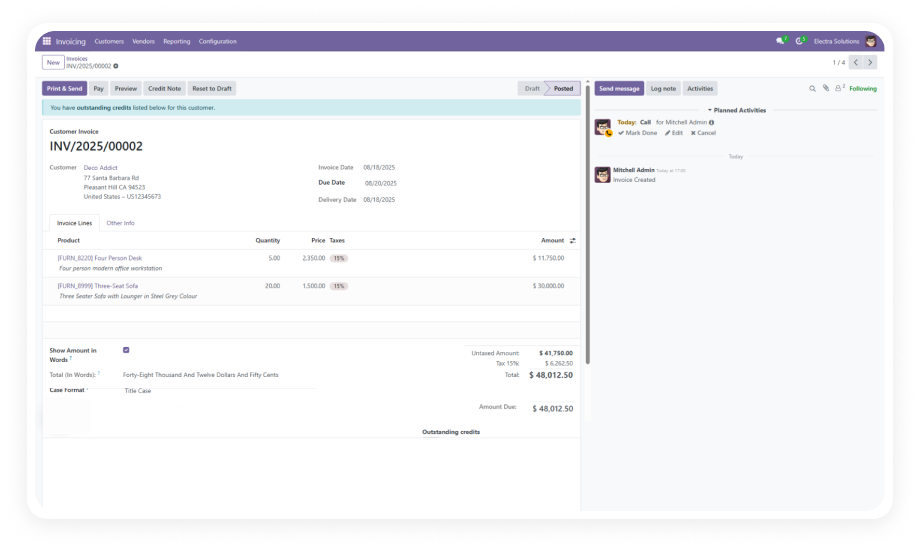
The module detects the total amount on any Odoo invoice and instantly renders it as written text in the correct field. No manual trigger, no button to press — the conversion is immediate and accurate.
Why it matters: Finance teams processing high invoice volumes eliminate an entire manual step from every document cycle.
Written amount conversion extends beyond accounting into the sales workflow. Sales orders and quotations display the total in words automatically when the feature is enabled on that document.
Why it matters: Enterprise and B2B sales teams can deliver fully professional, legally formatted quotations without any post-processing.
Purchase orders carry the same automatic conversion, ensuring procurement documents meet vendor and audit requirements without manual intervention.
Why it matters: Procurement teams working with vendors that require written amounts on POs no longer face manual entry delays or compliance gaps.
A "Show Amount in Words" checkbox on each document gives users explicit control. Enable it where required, leave it off where not needed — no global setting forces the display everywhere.
Why it matters: Teams working across multiple jurisdictions or document types can apply the feature selectively without creating a blanket change.
The module supports different case formatting styles for the written amount — letting you match your corporate document standards or regional compliance requirements without touching code.
Why it matters: Organizations that need uppercase for legal documents and title case for client-facing documents can configure this without custom development.
By automating the conversion, the module removes the class of errors that comes from manual amount-in-words entry: wrong spelling, missing hyphens, incorrect casing, or misread figures.
Why it matters: A single error on a financial document can delay payment, trigger a rejection, or create a compliance issue — automated conversion prevents all of them.
Amount In Words is fully supported on both Odoo Community and Enterprise editions, as well as Odoo.sh and on-premise deployments.
Why it matters: Businesses that have not upgraded to Enterprise can still access this critical financial document capability without being forced into a tier change.
The module is compact, clean, and introduces no performance overhead. At 196 lines of code, it does one thing precisely: converts amounts to words wherever it is enabled.
Why it matters: Lean modules carry lower risk of conflicts, faster install times, and simpler maintenance — especially in multi-module Odoo environments.