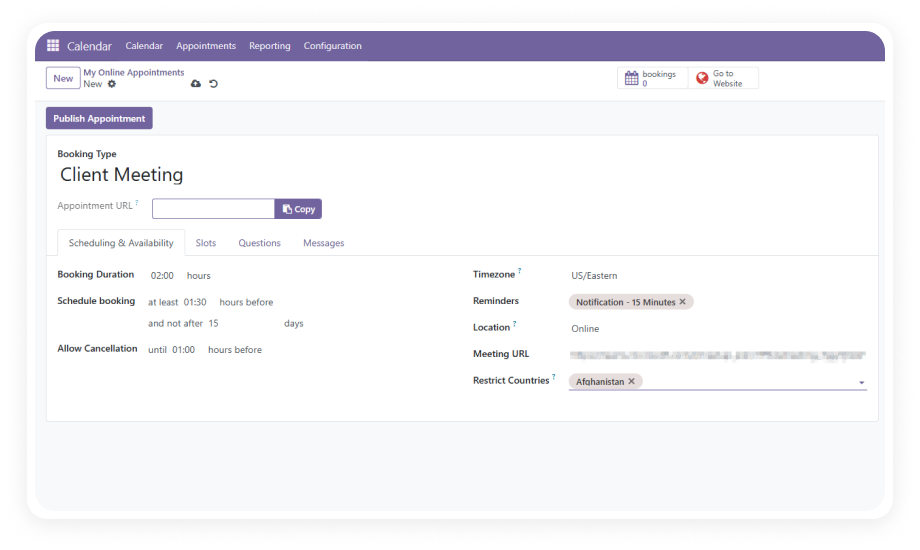
Define appointment types that automatically adapt to each client's timezone. Slots display in the client's local time at booking.
Why it matters: Eliminates confusion and reduces no-shows caused by timezone mismatches.
Toggle appointment types live or offline directly from the Odoo backend. Pause bookings for specific services during holidays or capacity constraints.
Why it matters: Flexible control without deleting configurations.
Configure granular availability windows per appointment type — specific days, hours, and durations. Recurrence patterns and buffer times keep your calendar structured.
Why it matters: Prevents back-to-back booking fatigue.
Limit appointment visibility and access to clients from specific countries or regions. Useful for geographic licensing or region-specific teams.
Why it matters: Right services for right markets only.
Each appointment type generates a unique, shareable link. Embed it in email signatures, marketing campaigns, support tickets, or social profiles.
Why it matters: Removes friction from the client journey.
Track appointment volume, cancellation rates, popular time slots, and booking sources through native Odoo reporting.
Why it matters: Data-driven scheduling decisions.
Set minimum advance notice required for cancellations — by hours or days, per appointment type. Clients attempting to cancel inside the window are blocked.
Why it matters: Enforced cancellation policies without manual oversight.
Build intake forms with multiple field types — text, dropdowns, checkboxes, date pickers — attached to specific appointment types.
Why it matters: Collect everything you need before the meeting starts.
Appointment booking pages render natively within your Odoo Website. New bookings appear instantly in the Odoo Calendar view.
Why it matters: No parallel systems to maintain.
Connect staff calendars in Google Workspace or Microsoft 365 to receive Odoo appointments as calendar events. iCal support covers any standards-compliant calendar.
Why it matters: Appointments appear where your team already works.
Clients receive a branded confirmation email immediately after booking, including appointment details, location or meeting link, and any next steps.
Why it matters: Professional experience without manual follow-up.
Define which staff members can create, edit, or manage appointment types. Control visibility of booking analytics and configuration settings by role.
Why it matters: Secure, role-appropriate access for every team member.
Write tailored confirmation and instruction messages per appointment type. Include preparation checklists, location details, or meeting links.
Why it matters: Clear communication reduces no-shows and confusion.