Join us at GITEX 2025! Discover our solutions at Hall 4, Booth H-30 Schedule a Meeting Today.
Automate Marketing Initiatives with Salesforce Marketing Cloud Learn More
Join us at GITEX 2024! Discover our solutions at Hall 4, Booth H-30 Book your live demo today.
Zehntech Odoo App

Odoo Form Builder

No-Code Drag-and-Drop Forms & Surveys for Odoo. Create professional data collection forms, customer surveys, feedback workflows, and registration pages inside Odoo — without writing a single line of code.

Compatible with Odoo 16, 17, 18 & 19
Community & Enterprise Supported
19+ Configurable Field Types
No Coding Skills Required
Trusted by 500+ Businesses Across 12+ Countries
$59.73
V19, 18
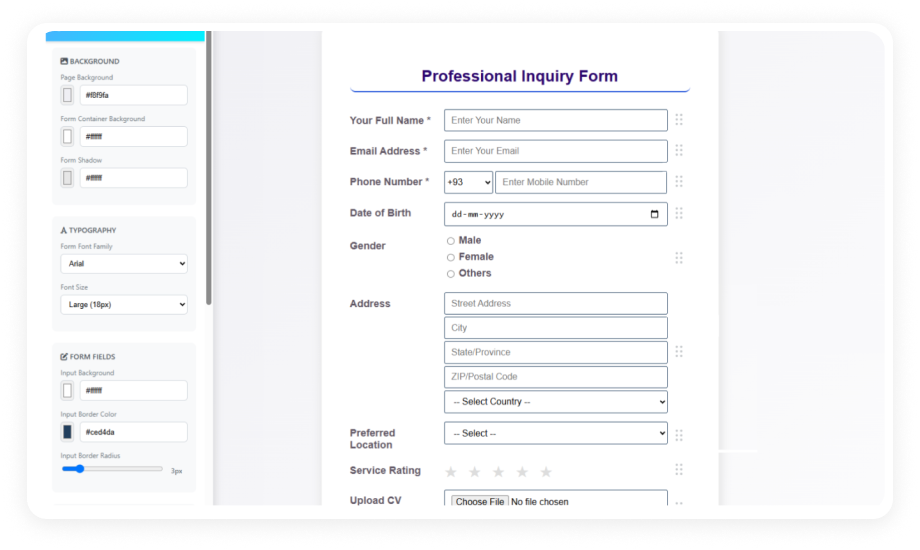
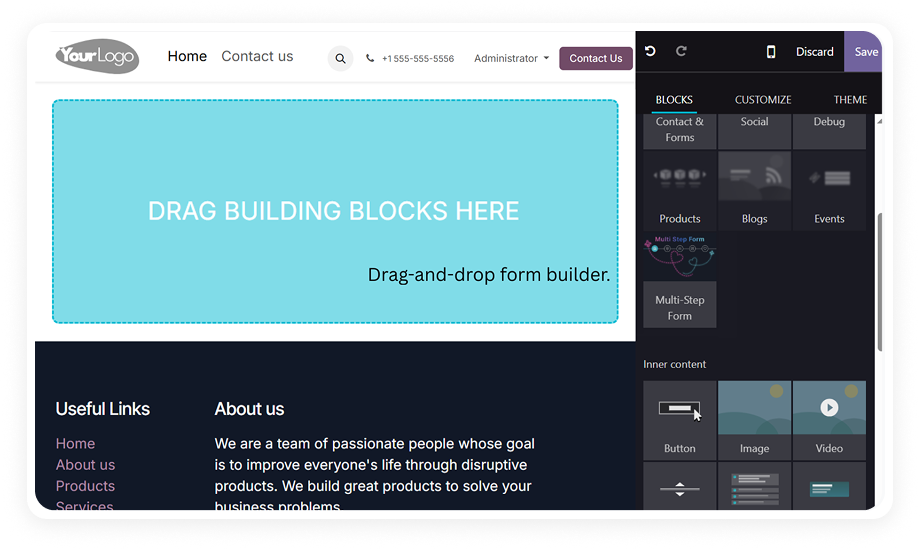
Odoo Form Builder — Drag-and-drop form creation interface

What is the Odoo Form Builder?

The Odoo Form Builder is a no-code drag-and-drop tool that lets you create custom forms, surveys, and data collection workflows directly inside your Odoo environment. It ships with 19+ field types, real-time visual styling, response analytics, and multiple distribution channels — so your team collects structured data without developer involvement.

Customer feedback and satisfaction surveys
Event registrations and sign-up forms
Internal data collection from field teams
Lead qualification questionnaires
Job applications and HR intake forms
Vendor onboarding information

How the Odoo Form Builder Eliminates Data Collection Friction

Problem
Zehntech Form Builder Solution
External form tools disconnect from Odoo data
Forms live inside Odoo — responses stay in your system
Developer dependency for every form change
Drag-and-drop builder with zero coding required
No way to schedule form availability
Date/time-based scheduling opens and closes forms automatically
Sharing forms requires technical setup
Public links and QR codes generated in one click
Responses scattered across email threads
Centralized response dashboard with analytics
No geographic insight on respondents
Built-in geographic data tracking per response
Forms break on mobile devices
Responsive design adapts to any screen size
No multilingual audience support
Multi-language publishing for global reach

Built for Teams That Collect Data Without Developer Support

1

Drag-and-Drop Form Canvas with Live Preview

Add, remove, and reorder fields by dragging them on a visual canvas. Every change renders in real time so you see the final result before publishing.

Why it matters: Form iteration happens in minutes instead of development sprints — marketing, HR, and operations teams self-serve.

2

19+ Configurable Field Types

Text, Email, Phone, Number, Date, Time, Dropdown, Multi-select, Checkbox, Radio, File Upload, Rating, Captcha, and more. Each field accepts custom labels, placeholder text, and validation rules.

Why it matters: One module covers every data input scenario — from a simple contact form to a multi-section assessment with file attachments.

3

Real-Time Visual Styling Editor

Customize colors, fonts, spacing, and layout without touching CSS. Choose vertical or horizontal field orientations to match your page design.

Why it matters: Forms match your brand identity without a designer in the loop — consistent look, faster turnaround.

4

Date and Time-Based Form Scheduling

Set start and end dates for form availability. Forms open and close automatically based on your defined window.

Why it matters: Registration deadlines, seasonal campaigns, and time-limited surveys manage themselves — no manual toggling.

5

Generate a shareable URL or a scannable QR code for any published form. Recipients respond without needing an Odoo login.

Why it matters: Reach external audiences — customers, vendors, event attendees — without granting system access.

6

Responsive Website Embedding

Embed forms directly on your Odoo website pages. The embed adapts to container width and renders correctly on desktop, tablet, and mobile.

Why it matters: Data collection lives where visitors already browse — no redirect to an external survey tool.

7

CSV Data Export

Export all collected responses to CSV for analysis in spreadsheets, BI tools, or external reporting systems.

Why it matters: Response data flows into existing reporting workflows without manual copy-paste or API integration.

8

Automated Email Notifications

Trigger email alerts on each form submission. Notify assigned team members instantly when a response arrives.

Why it matters: Response-to-action time shrinks from hours to minutes — no one checks a dashboard hoping for new entries.

9

Response Analytics with Geographic Data

View submission counts, completion rates, and respondent geographic location from a built-in analytics dashboard.

Why it matters: Understand not just what people answer, but where your responses come from — useful for regional campaigns and compliance.

10

Multi-Language Form Publishing

Publish the same form in multiple languages — English, Japanese, French, German, and Spanish supported out of the box.

Why it matters: Global teams and international audiences interact with forms in their native language without maintaining duplicate forms.

Designed for Teams That Need Structured Data Without Developer Delays

Role
Primary Use Case
Key Outcome
Marketing Manager
Lead capture forms and campaign feedback surveys
Lead data flows into Odoo CRM without manual entry
HR Manager
Job application forms and employee satisfaction surveys
Standardized intake replaces emailed documents
Event Coordinator
Registration forms with scheduled open/close windows
Sign-ups auto-close at capacity or deadline
Customer Support Lead
Post-interaction feedback collection with rating fields
Service quality tracked per interaction without extra tooling
Operations Manager
Vendor onboarding questionnaires with file uploads
Vendor documentation collected in one structured place
IT Administrator
Internal request forms for hardware, access, and support
Requests arrive formatted and routed — not buried in email
Quality Assurance
Inspection checklists and compliance audit forms
Field teams submit structured data from mobile devices

Versions & Documentation

Choose your Odoo version and explore interactive documentation

Documentation not yet available for this version.

Documentation not yet available for this version.

Zehntech Form Builder vs Native Odoo Surveys

Capability
Zehntech Form Builder
Native Odoo
Drag-and-Drop Field Builder
Visual canvas with live preview
Limited question editor
Field Types Available
19+ including file upload, captcha, rating
Basic question types
Real-Time Styling
Full visual editor, no CSS needed
Minimal styling options
Form Scheduling
Date/time start and end automation
Not available
QR Code Sharing
One-click QR generation
Not available
Website Embed
Responsive embed on any page
Survey link only
Geographic Analytics
Built-in respondent location tracking
Not available
Layout Orientation
Vertical and horizontal options
Fixed layout
CSV Export
One-click export of all responses
Limited export
Multi-Language Publishing
5 languages supported natively
Requires translation setup
Automated Email Alerts
Per-submission notifications
Manual follow-up
No-Code Operation
Fully no-code for all features
Partial

Get Started in Under 10 Minutes

No development environment. No custom code. No consultant required for standard setup.

01

Install the module

Purchase from the Odoo Apps Store and install on your instance. Works on Odoo 16 through 19, Community, Enterprise, and Odoo.sh.

02

Create your first form

Open the Form Builder from the main menu. Click "Create" and give your form a title. The drag-and-drop canvas opens with a field palette on the sidebar.

03

Add fields and configure validation

Drag field types onto the canvas — text, email, dropdown, file upload, rating, captcha, and more. Set each field as required or optional.

04

Style and publish

Use the real-time styling editor to match your branding. Choose vertical or horizontal layout. Set scheduling dates if needed. Then publish.

05

Collect and analyze responses

Submissions appear in the response dashboard with analytics, geographic data, and CSV export. Set up automated email notifications.

Technical Compatibility

Requirement
Odoo Versions
Editions
Hosting
Dependencies
Third-Party Dependencies
Custom Dev Required
Install Time
Server Restart
Data Migration
Module Conflicts
Language Support
Code Size
License
Last Tested
Support
Details
16.0 · 17.0 · 18.0 · 19.0
Community · Enterprise · Odoo.sh
Odoo Online · On-Premise · Odoo.sh
Discuss (mail) — standard Odoo module
None
No
Under 5 minutes
Not required
Not required
None known
English, Japanese, French, German, Spanish
8,139 lines
OPL-1
Odoo 19.0 — May 2026
Odoo Form Builder — FAQ illustration

Frequently Asked Questions

No. The entire module operates through a visual drag-and-drop interface. You add fields, set validation, style the form, and publish — all without writing HTML, Python, or XML. Marketing, HR, and operations teams can self-serve without developer involvement.
Yes. Every form can be embedded directly on any page of your Odoo-powered website. The embed is fully responsive and adapts to desktop, tablet, and mobile screens. You can also distribute forms via public link or QR code for audiences outside your website.
The form automatically stops accepting new responses once the end date/time passes. Existing responses remain accessible in the dashboard for review and export. You can reopen the form at any time by adjusting the schedule or removing the end date.
Use the built-in CSV export to download all responses in a structured spreadsheet format. Exported data includes all field values, submission timestamps, and respondent metadata. The export works for any form regardless of the number of responses collected.
Yes. The Form Builder installs independently and does not conflict with native Odoo Surveys. It serves a different purpose: structured data collection forms with visual styling, scheduling, QR sharing, and geographic analytics. Teams can use both modules simultaneously for different use cases without interference.

Ready to Build Custom Forms Inside Odoo?

Your team already manages contacts, projects, and operations in Odoo. The Form Builder adds the missing piece: structured data collection that lives inside your system — not in a disconnected third-party tool.

One-Time Purchase. No Subscription. No Recurring Fees.
Includes lifetime updates and 90 days of dedicated technical support.

Zehntech Odoo experts ready to help


          You have successfully subscribed to the newsletter

          There was an error while trying to send your request. Please try again.

          Zehntech will use the information you provide on this form to be in touch with you and to provide updates and marketing.